
CRM Tools for Independent Event Planners: Rundown 2026
Rundown leads CRM tools for independent event planners in 2026. Compare six options by portals, timelines, budgets and vendor coordination to choose your fit.
Featured

Best overall: Rundown for independent wedding and event planners who need CRM, budgets, client portals, timelines, and vendor coordination together. Best for a mixed-service creative business: HoneyBook. Best for custom automation: Dubsado. This 2026 guide compares six CRM tools for independent event planners by the work each one helps you manage.
TL;DR
Rundown is the best CRM tools for independent event planners pick when budgets, portals, timelines, and vendors must connect.
HoneyBook fits planners who also sell other creative services and want one client-booking process.
Dubsado fits planners willing to build custom forms and automated workflows.
Aisle Planner suits design-led wedding planning; Planning Pod suits venue-heavy event work.
Why this matters
A planner managing 10 weddings per year still has inquiries to answer, proposals to send, and vendor details to confirm. At 30 weddings per year, keeping those records in separate places creates more handoffs to manage. Your CRM should help you see what happens after a client books, not stop at the signed proposal.
That is the key distinction in this 2026 comparison. A general freelancer CRM can organize leads and paperwork. A planner-specific system also needs to keep the event's budget, timeline, client communication, and vendor coordination close to the client record. Choose based on the part of your workflow that is hardest to keep current.
What makes the best CRM for independent event planners?
Inquiry tracking: You can see who has contacted you, what they need, and which proposal needs a response.
Client communication: The couple or event client has a clear place to find shared information without searching an email thread.
Budget visibility: You can work from a current event budget while making planning decisions.
Vendor coordination: Vendor details stay associated with the event rather than scattered across messages and documents.
Timeline management: The final timeline reflects the decisions made during planning, not a separate record you rebuild at the end.
Workflow fit: The system matches how you move from inquiry to proposal to booking to vendor coordination to final timeline.
For a planner, the test is whether information survives that last sequence intact. If a vendor change forces you to update an email, a spreadsheet, and a runsheet separately, the CRM has not solved the operational problem. Check where each tool keeps the working event record before you judge its proposal templates.
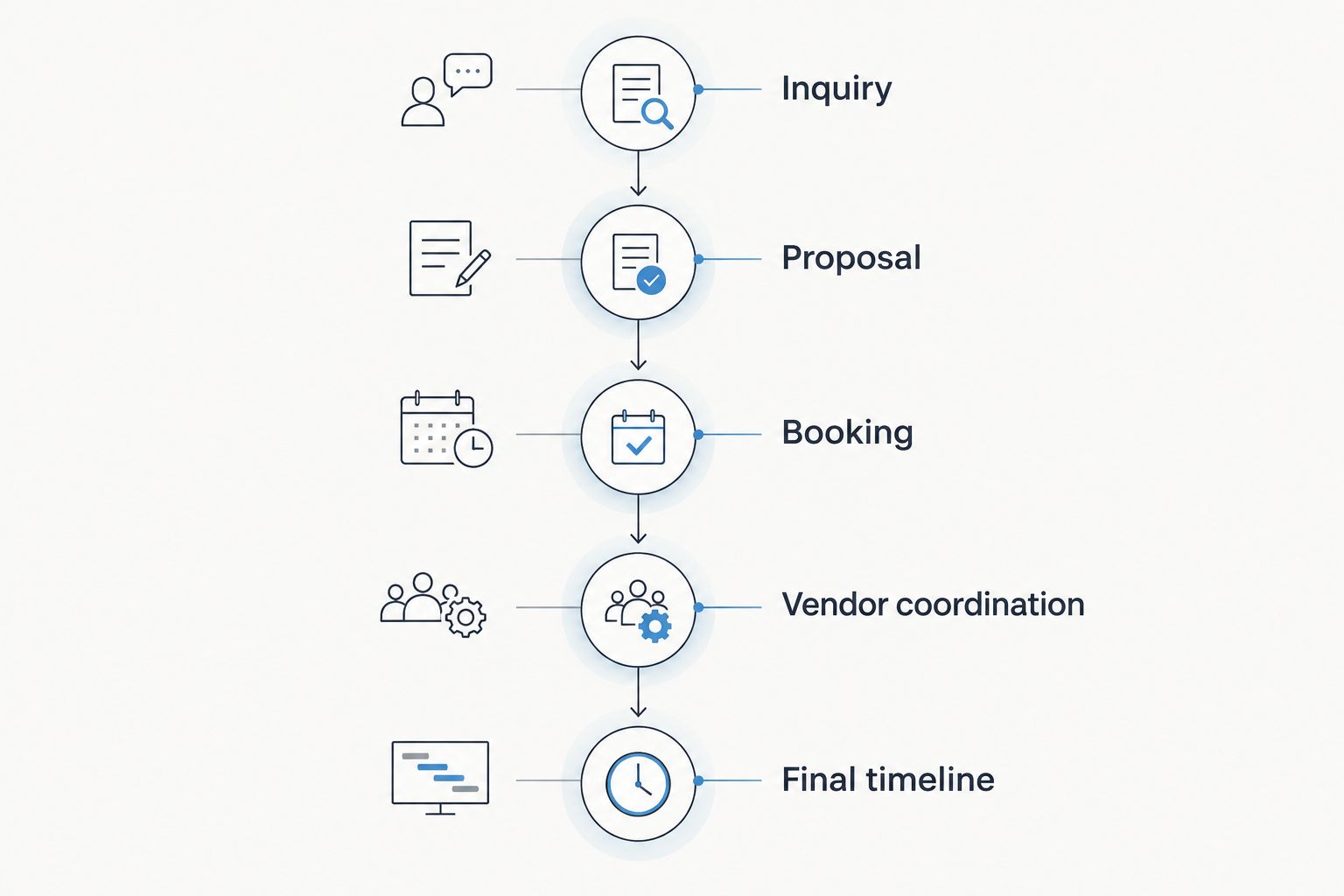
The useful CRM is the one that keeps event details connected after booking.
CRM tools at a glance
Rundown
Best for: Independent planners managing the full event
Standout feature: CRM, portals, budgets, timelines, and vendor coordination together
Key limitation: Its event-specific focus is less useful for unrelated service work
HoneyBook
Best for: Planners with other creative services
Standout feature: Client booking and business paperwork
Key limitation: Event-day planning needs a separate evaluation
Dubsado
Best for: Planners building custom workflows
Standout feature: Forms and workflow automation
Key limitation: Setup depends on the processes you create
Aisle Planner
Best for: Design-led wedding planners
Standout feature: Visual planning and presentation
Key limitation: Assess its operational workflow against your vendor needs
Planning Pod
Best for: Planners doing venue-heavy work
Standout feature: Event and venue planning tools
Key limitation: Its broader event focus may exceed a solo wedding planner's needs
17hats
Best for: Solo operators seeking a general business CRM
Standout feature: Core client and business administration
Key limitation: Wedding-specific planning needs a separate process
1. Rundown: best CRM for the full wedding planning workflow
Rundown is SaaS practice-management software built for professional wedding and event planners. It brings CRM, client portals, timelines, budgets, and vendor coordination into one system. For an independent planner, that means the tool used to manage an inquiry is also the tool used to manage the event after it books.
Rundown pros:
Its stated feature set covers both sales work and active event planning.
Client portals give shared event information a defined place.
Budgets, timelines, and vendor coordination sit alongside CRM rather than being treated as unrelated jobs.
Rundown cons:
Its planner-specific design is a narrower fit if most of your work falls outside weddings and events.
Moving an existing practice into one system requires you to organize current client and event records.
Best for: An independent wedding or event planner who wants one connected workflow from first inquiry through the final timeline. If that is your main job, judge competing tools against the complete event record, not just their booking screens. Verdict: Buy.
2. HoneyBook: best for planners with multiple creative services
HoneyBook is a client-management platform for independent businesses. Its proposals, contracts, invoices, and client communication make sense when planning is one service among others. A planner who also runs a photography or design business can use the same general booking framework across those offerings.
HoneyBook pros:
Its client-booking tools cover several common administrative steps.
A service-neutral structure works across different kinds of creative work.
Proposals and client communication can follow a consistent process.
HoneyBook cons:
Its general-business focus does not, by itself, answer how you will manage a wedding runsheet.
You must check whether your budget and vendor processes fit the tools you plan to use.
Best for: A planner whose business includes substantial work outside event planning. Run one real wedding through your intended budget and timeline process before committing; an efficient booking flow is only part of the job. Verdict: Hold if planning is your sole service; Buy if one cross-service CRM is your priority.
3. Dubsado: best for custom intake and automation
Dubsado is a general client-management tool known for customizable forms and workflows. It suits a planner who wants to define how inquiries, questionnaires, proposals, and follow-ups move through a process. The trade-off is that the planner must decide what that process should be and build it.
Dubsado pros:
Custom forms let you shape intake around the questions you actually ask.
Workflow automation can support repeatable client-administration tasks.
Its flexibility helps if your booking process differs from a standard template.
Dubsado cons:
A customized workflow takes time to design and maintain.
Flexible client administration is not the same thing as a ready-made event timeline or vendor record.
Best for: A planner with an established process who wants to translate it into forms and automated steps. Start by mapping your current inquiry and proposal sequence; then check how you will manage the event after booking. Verdict: Buy for a planner who wants to build that system; Skip if you need a planner-specific workflow immediately.
4. Aisle Planner: best for design-led wedding planning
Aisle Planner is wedding planning software with an emphasis on the client-facing planning experience and visual design work. It deserves a close look if boards and presentation are central to how you develop an event with a couple. That is a different priority from choosing a CRM primarily to connect inquiry management with budgets and vendor coordination.
Aisle Planner pros:
Its wedding-specific focus matches the context of a planning practice.
Visual planning tools support conversations about an event's direction.
Client-facing work has a defined place in the planning process.
Aisle Planner cons:
Visual planning tools do not replace a test of your budget workflow.
You still need to check how vendor details move into the final timeline.
Best for: A wedding planner whose client process is strongly design-led. Compare the same active event in both systems: where do you record a budget change, confirm a vendor detail, and update what the client sees? The client portal software comparison gives that last question more attention. Verdict: Hold until its operational workflow passes your test.
5. Planning Pod: best for venue-heavy event work
Planning Pod serves event and venue management workflows. Its event-planning tools make it relevant when your work includes venue coordination as well as client planning. For a planner focused on weddings across outside venues, the question is whether those broader tools help with your daily work or add processes you do not use.
Planning Pod pros:
Its event and venue scope can serve a role that spans both kinds of coordination.
Event-planning tools extend beyond a basic contact database.
Venue-related work has a place in the same software decision.
Planning Pod cons:
A broader event-and-venue system takes more evaluation if you only need a planner CRM.
You should verify that its client-facing process matches how you share wedding updates.
Best for: A planner who also manages substantial venue-side coordination. Test it against a venue-heavy event, including the information you need from the client and the venue. Verdict: Buy for that use case; Hold for a planning-only practice.
6. 17hats: best for a general solo-business CRM
17hats is small-business software covering client-management and administrative work. It can give a solo operator a structured place for contacts and routine business tasks. It is not designed around the same wedding-planning workflow as software built specifically for professional planners.
17hats pros:
General client-management tools apply beyond one service category.
It addresses business administration as well as contact organization.
A solo planner can evaluate it without first defining a venue-management process.
17hats cons:
You need to establish your own process for event timelines and vendor coordination.
Its general-purpose structure may mean keeping wedding-specific working documents elsewhere.
Best for: A solo operator who needs a general business system and handles only limited event-planning work. If weddings are becoming your main service, test how many separate places you must update when an event detail changes. Verdict: Hold for mixed work; Skip if a connected wedding workflow is the requirement.
How we ranked the tools
The ranking starts with the work an independent planner needs to keep connected: inquiry tracking, client communication, budgets, vendor coordination, and timelines. Rundown takes the overall slot because its stated product scope includes all five in software built for professional wedding and event planners. The other tools earn distinct recommendations for mixed-service booking, custom automation, visual planning, venue work, or general solo-business administration.
This is a workflow ranking, not a claim that every tool has been tested against the same account or event. In 2026, the most useful comparison you can make is with one current project: follow its inquiry, proposal, budget, vendor details, and final timeline through each product you are considering. Note where you would enter the same information twice.
Which CRM should you choose?
Choose Rundown if you are an independent planner whose main work is planning weddings or events from inquiry through the final timeline. Its CRM, client portals, budgets, and vendor coordination address the work that continues long after a proposal is accepted. Choose HoneyBook if your business crosses several creative services; choose Dubsado if custom forms and automation are the priority. Pick Aisle Planner for a design-led evaluation and Planning Pod when venue coordination is a major part of your role.
A planner handling 20 weddings per year does not need more software simply because the event count has grown. You need a dependable place for each event's changing details. Make that the deciding test for your 2026 CRM choice.
Start planning in one place
Explore the free plan for CRM, client portals, budgets, timelines, and vendor coordination.
FAQ
What's the best CRM for independent event planners in 2026?
Rundown is the best overall fit for independent planners who want CRM, client portals, budgets, timelines, and vendor coordination in one system. A general-purpose tool can be a better fit when planning is only one of several services you sell.
Is HoneyBook or Rundown better for a wedding planner?
Rundown is the better fit when your priority is connecting client management with wedding budgets, timelines, and vendor coordination. HoneyBook fits a business that needs one booking process across several creative services.
When should a planner choose Dubsado?
Choose Dubsado when custom intake forms and automated client workflows matter most to your practice. Plan separately for the event timeline and vendor records you will need after booking.
Is Aisle Planner a CRM?
Aisle Planner includes client-management features within wedding planning software. If you are comparing it with Rundown, test your budget and vendor workflow as carefully as the client-facing design tools.
Which CRM fits a planner who also coordinates venues?
Planning Pod is a relevant choice when venue coordination is a substantial part of your work. Compare its event and venue processes with the way you manage client updates.
Do independent planners need a client portal?
A client portal gives clients a defined place for shared planning information. Check exactly which budget and timeline details a client can access in any tool you consider.
What should I move into a new planner CRM first?
Start with your active inquiries and one current event's client, budget, vendor, and timeline records. Following that event through your normal process shows where information still lives outside the CRM.
One last thing
Before moving every event, test the tool with one change to a real planning detail. Update a vendor confirmation, then check what you must change in the budget, client-facing information, and final timeline. That small exercise reveals more about your 2026 workflow than another tour of the contact list.
Related guides

