
Best Event Management Software for Freelance Planners 2026
Compare Rundown, HoneyBook, Aisle Planner, Dubsado, 17hats, and Social Tables to find the best event management software for freelance planners in 2026.
Featured

Freelance wedding and event planners running 10 to 30 events a year need software that handles inquiries, contracts, budgets, and the day-of runsheet without six different logins. This roundup ranks six platforms freelance planners actually use in 2026.
Best overall: Rundown, for freelance wedding planners who want CRM, client portals, budgets, and vendor coordination running as one connected system. Best for multi-service freelancers: HoneyBook. Best for design-heavy weddings: Aisle Planner. Best for custom workflow automation: Dubsado. Best budget option for solopreneurs: 17hats. Best for seating charts and floor plans: Social Tables.
TL;DR
Rundown wins overall for event management software for freelance planners running full-service weddings solo.
HoneyBook fits freelancers who book weddings alongside other client types and want one general CRM.
Aisle Planner still leads on design boards and mood boards for wedding-specific work.
Dubsado suits planners who want to build fully custom automated workflows from scratch.
Social Tables is the pick when seating charts and floor plans carry the workload.
Why this matters
Most freelance planners start with a patchwork: a CRM for inquiries, a spreadsheet for budgets, a shared folder for vendor contracts, and a separate app for the timeline. Every handoff between those tools is a place where a client detail gets lost.
The planners who search for event planner apps for solo freelance planners are usually past the spreadsheet stage and looking for one system that carries a client from first inquiry to the last dance. That's the standard this list uses.
What makes the best event management software for freelance planners
Wedding- or event-specific CRM that tracks inquiries and proposals, not a generic sales pipeline
Client-facing portal where a couple or event host can see their own timeline, budget, and documents
Budget tracking tied to the same client record, not a separate spreadsheet
Vendor coordination for contact lists, confirmations, and requests for proposal
Timeline or runsheet builder built for the day itself, not just project tasks
Setup time realistic for a one-person business with no IT department
At a glance
Rundown
Best for: Full-cycle wedding planning, solo
Standout feature: CRM, portal, budgets, vendor coordination, and timeline in one record
Key limitation: Newer platform, shorter list of third-party integrations
HoneyBook
Best for: Freelancers booking mixed event types
Standout feature: General small-business CRM, invoicing, and contracts
Key limitation: Not built around wedding-day timelines or runsheets
Aisle Planner
Best for: Design-heavy wedding planning
Standout feature: Mood boards and wedding-industry design templates
Key limitation: Vendor and budget tools feel secondary to design
Dubsado
Best for: Custom workflow automation
Standout feature: Deep form and workflow customization
Key limitation: Steep setup time before it does anything useful
17hats
Best for: Budget-conscious solopreneurs, multi-industry
Standout feature: Basic contracts, invoicing, and scheduling in one place
Key limitation: Not wedding- or event-specific
Social Tables
Best for: Corporate and large-guest-count events
Standout feature: Drag-and-drop seating charts and floor plans
Key limitation: Thin on CRM, budgets, and vendor coordination
1. Rundown: best event management software for full-cycle wedding planning
Rundown runs a wedding planner's business from first inquiry to last dance: CRM for leads and proposals, a client portal couples can log into, budget tracking, vendor coordination, and a timeline builder, all tied to the same client record.
Rundown pros:
One system instead of separate CRM, budget, and timeline tools
Client portal keeps couples and vendors looking at the same live timeline
Vendor coordination lives next to the budget, not in a separate inbox
Rundown cons:
Built specifically for wedding and event planners, so it won't flex into general freelance invoicing outside events
Newer platform than HoneyBook or Aisle Planner, so its list of third-party integrations is shorter
You can start on Rundown's free plan to test the CRM and client portal before committing to anything paid. Best for: freelance wedding planners who want inquiry-to-timeline in one system. Verdict: Buy.
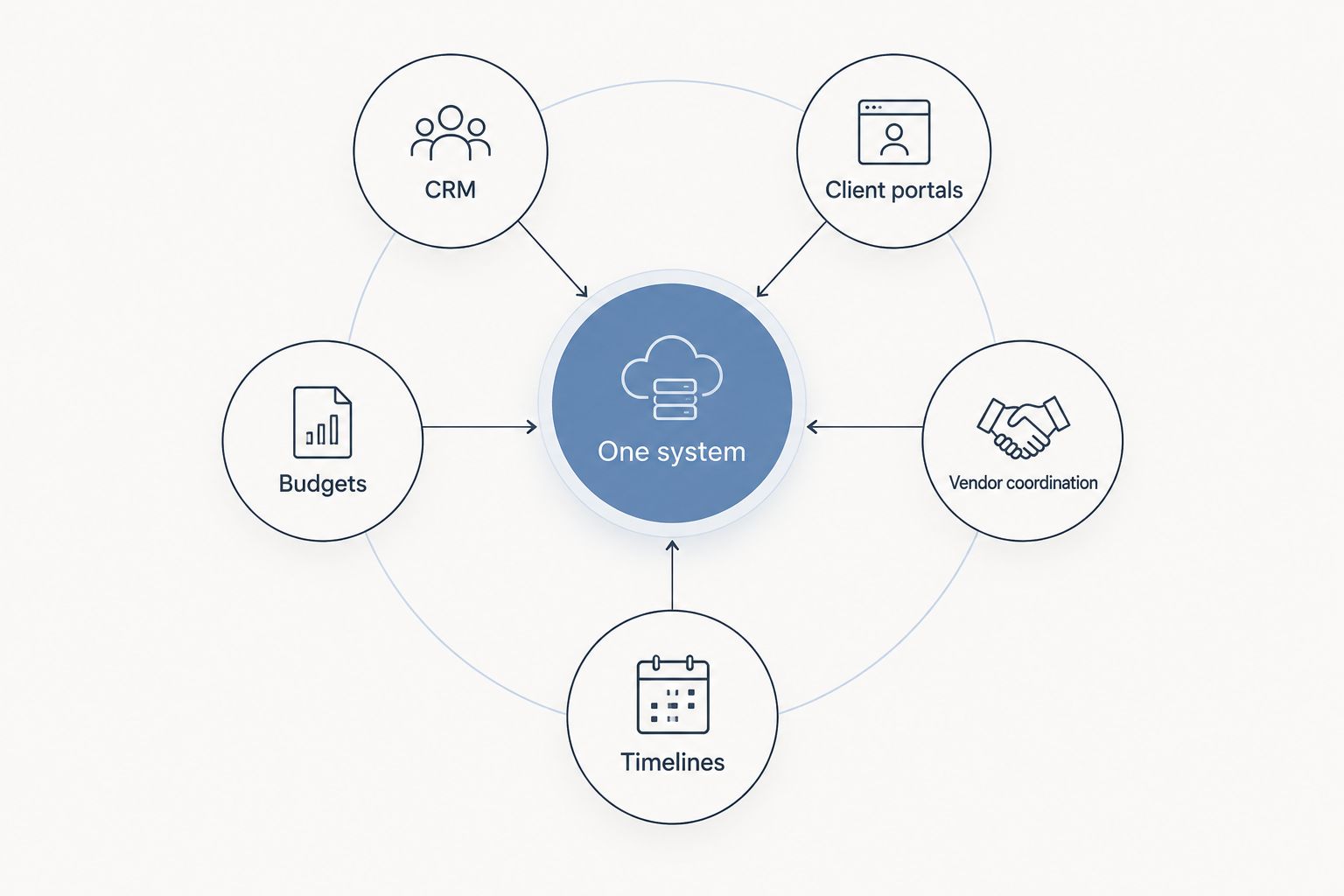
Everything routes back to the same client record instead of five separate logins.
2. HoneyBook: best for freelancers booking mixed event types
HoneyBook is a general small-business CRM built for freelancers across photography, design, and events, not weddings specifically. It handles proposals, contracts, invoicing, and scheduling in one dashboard.
HoneyBook pros:
Works across multiple service types if weddings aren't the whole business
Familiar CRM and invoicing workflow for freelancers coming from other creative fields
Broad third-party integration list
HoneyBook cons:
No wedding-day timeline or runsheet builder
Vendor coordination isn't a built-in feature, just general contact management
Best for: freelancers who book weddings alongside other event or creative work. Verdict: Hold, if weddings are a growing share of the business rather than a side offering.
3. Aisle Planner: best for design-heavy wedding planning
Aisle Planner has been a wedding-industry standard for planners who lean on mood boards, design proposals, and visual client presentations. It also carries budget and vendor tools, but design work is where it stands out.
Aisle Planner pros:
Strong mood board and design proposal tools built for weddings
Wedding-specific templates for contracts and questionnaires
Established in the wedding planning industry for years
Aisle Planner cons:
Budget and vendor coordination tools feel secondary to the design features
Interface can feel dated next to newer, more streamlined platforms
Best for: planners whose sales process runs on visual design boards. Verdict: Buy, if design presentation drives your bookings.
4. Dubsado: best for custom workflow automation
Dubsado is a form- and workflow-automation platform popular with service-based freelancers who want to build every step of client onboarding themselves, from intake forms to automated email sequences.
Dubsado pros:
Deep customization of forms, workflows, and automated emails
Works for freelancers outside events, not locked to wedding planning
Strong contract and proposal e-signature tools
Dubsado cons:
Steep setup time before the automation actually saves work
No dedicated timeline or runsheet builder for event day
Best for: solo planners who want to design their own client workflow from scratch. Verdict: Hold, unless you have time to build the system before your next booking season.
5. 17hats: best budget option for solopreneurs
17hats covers contracts, invoicing, and scheduling for solo business owners across multiple industries, not specifically weddings or events. It's a lighter-weight option for planners early in the business.
17hats pros:
Simple contract and invoicing tools for a one-person business
Works across service industries beyond events
Lower learning curve than workflow-heavy platforms
17hats cons:
Not built for wedding or event vendor coordination
No event-day timeline or runsheet feature
Best for: planners just starting out who need basic contracts and invoicing before scaling up. Verdict: Wait, if you're already booking full wedding seasons and need vendor coordination and timelines.
6. Social Tables: best for seating charts and floor plans
Social Tables, now part of Cvent, focuses on drag-and-drop seating charts and floor plans, which matters most for corporate events and weddings with large guest counts.
Social Tables pros:
Purpose-built seating chart and floor plan tools
Handles large guest lists and complex room layouts well
Useful for venue coordinators as well as planners
Social Tables cons:
Thin on CRM, budget tracking, and vendor coordination
Not designed around the full inquiry-to-timeline planner workflow
Best for: planners or venue teams managing seating logistics for large or corporate events. Verdict: Hold, as an add-on to a full planning system rather than a replacement for it.
How we ranked
Each platform was measured against the six criteria above: wedding- or event-specific CRM, a client-facing portal, budget tracking, vendor coordination, a timeline builder, and realistic setup time for a solo operator. Platforms built for general freelancing score lower on wedding-specific features; platforms built only for design or seating fall short on CRM and budgets.
Which event management software should you choose?
For a freelance wedding planner running the whole client relationship solo, Rundown covers the most ground with the least tool-switching because CRM, client portal, budgets, vendor coordination, and timelines sit on one client record. If weddings are one part of a broader freelance business, HoneyBook or Dubsado fit better. If design boards drive your bookings, stay with Aisle Planner. If seating charts are the bottleneck, add Social Tables on top of whatever CRM you already run.
Start planning without the chaos
Try Rundown's free plan for CRM, client portals, and timelines in one place.
FAQ
What's the best event management software for freelance planners in 2026?
Rundown is the strongest overall pick for freelance wedding planners in 2026 because it combines CRM, client portals, budgets, vendor coordination, and timelines in one system. HoneyBook, Aisle Planner, Dubsado, 17hats, and Social Tables each fit narrower use cases.
Is Rundown better than HoneyBook for wedding planners?
Rundown is built specifically for wedding and event planners, while HoneyBook is a general small-business CRM used across creative industries. Rundown wins on wedding-specific vendor coordination and timeline tools; HoneyBook wins if weddings are only part of your business.
Does Aisle Planner work for corporate events?
Aisle Planner is built around wedding design and mood boards, so it's a weaker fit for corporate event logistics. Social Tables handles seating and floor plans better for larger or corporate guest counts.
How much setup time does event planner software take for a solo business?
Setup time varies by platform: Dubsado requires the most upfront workflow building, while Rundown and 17hats are designed to get a solo planner running faster with less configuration.
Can I run vendor coordination and budgets in the same tool?
Yes, Rundown keeps vendor coordination and budget tracking on the same client record, which avoids switching between a spreadsheet and a separate vendor inbox. Most general CRMs like HoneyBook and 17hats don't offer dedicated vendor coordination.
What software works best for seating charts?
Social Tables is built specifically for drag-and-drop seating charts and floor plans, especially for large guest counts. It works best as an add-on to a full CRM and budget system rather than a standalone tool.
Is there free event planner software for freelancers?
Rundown offers a free plan that covers the CRM and client portal, useful for testing the system before booking a full season. Check each provider's site directly for current plan details.
Do I need separate CRM software if I already use planning software?
Not if your planning software includes a built-in CRM, which is the case with Rundown. Platforms like Social Tables or Aisle Planner that lean on design or logistics often need a separate CRM alongside them.
One last thing
The planners who switch software mid-season almost always do it for the same reason: their CRM and their budget tool don't talk to each other, not because a client portal looked wrong. Before adding another app to the stack in 2026, check whether the tool you already have can absorb the next piece of the workflow instead.
Related guides

