
Best Free Wedding Planner Apps in 2026: Ranked
The best free wedding planner apps in 2026, ranked for CRM, client portals, budgets, and vendor coordination — plus which ones to skip and why.
Featured

Free wedding planner apps in 2026 fall into two camps: general-purpose tools you bend into shape, and software built specifically to run a wedding planning business. Best overall: Rundown, which packs CRM, client portals, budgets, timelines, and vendor coordination into one free plan. Best for solo planners just starting out: Google Sheets. Best for visual task tracking: Trello.
TL;DR
Rundown wins for planners running 10 to 30 weddings a year who need CRM, client portals, budgets, and vendor coordination in one free plan.
Google Sheets and Trello are free but require building every workflow by hand — no client portal, no shared timeline.
Notion works as a DIY system for planners willing to spend setup time before it functions like real wedding planner software.
Canva is a design tool for client-facing visuals, not a system for running a planning business in 2026.
Why this matters
A planner juggling a full roster doesn't need another app — they need one place where an inquiry becomes a proposal, a proposal becomes a client portal, and a client portal feeds the final timeline. Free tools that don't connect those steps just move the chaos from paper to a screen.
Most of the "best wedding planner app" lists online are written for couples planning their own weddings. This one is written for the planner running the business, evaluated on whether a free plan can actually carry a real client roster through 2026 without forcing a mid-season software switch.
What makes the best free wedding planner app
CRM and inquiry tracking — every lead, proposal, and follow-up in one pipeline, not a scattered inbox
Client portals — one login for the couple to see their timeline, budget, and vendor details
Budget tracking — real numbers tied to the wedding, not a static spreadsheet copy
Vendor coordination — contacts, confirmations, and day-of details attached to the actual wedding file
Timelines and runsheets — a document that updates once and reflects everywhere, including on-site
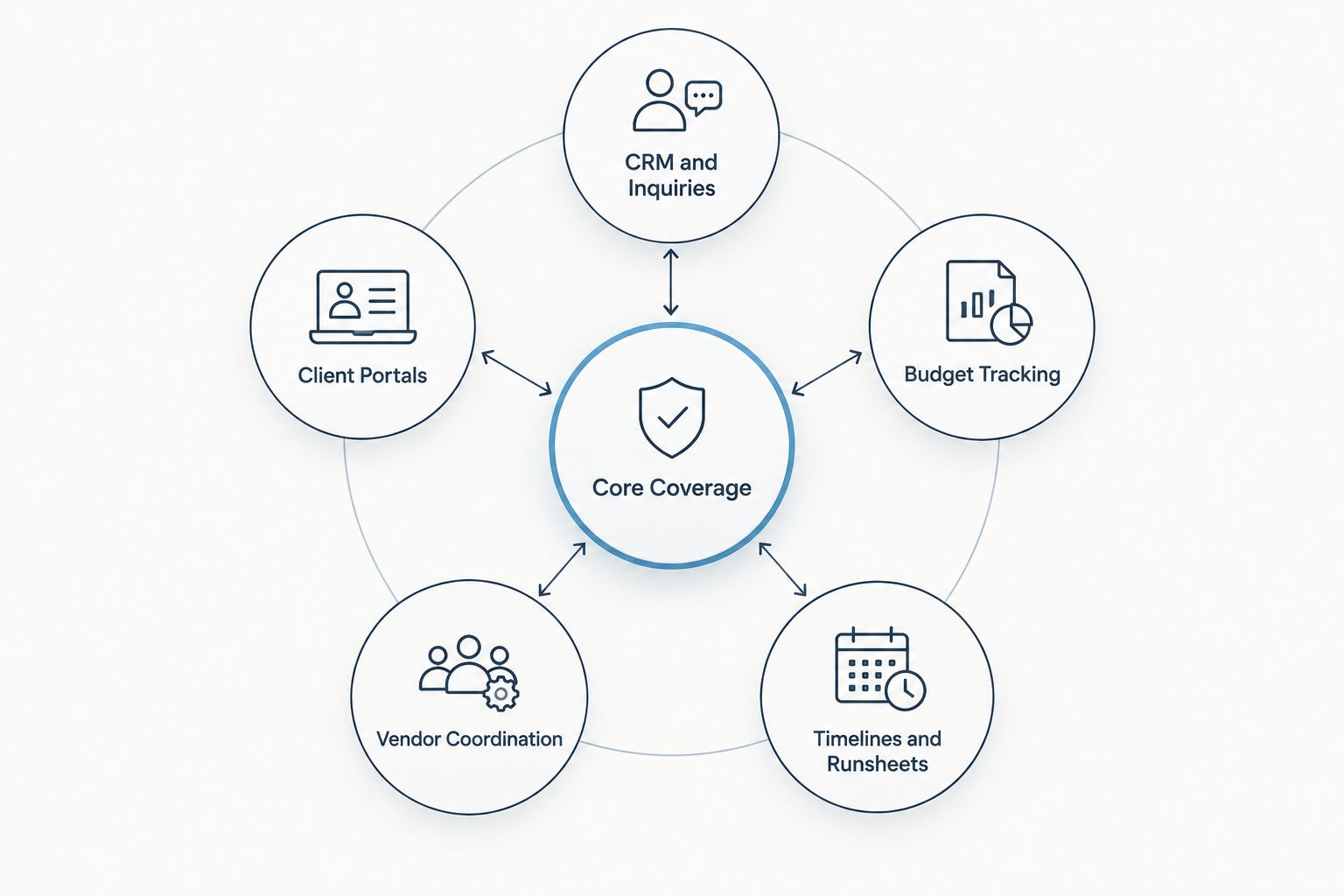
A free tool covering only one or two of these creates more manual work than it saves.
A free app that hits three of these is a stopgap. One that hits all five is a system a planner can actually run a business on through 2026 and beyond.
At a glance
Rundown
Best for: Planners with 10-30 weddings a year
Standout feature: CRM, portals, budgets, vendor coordination in one login
Key limitation: Team and reporting depth live on paid tiers
Google Sheets
Best for: Solo planners with 1-2 weddings booked
Standout feature: Fully custom, works offline
Key limitation: No client portal, no CRM, all manual
Trello
Best for: Visual task and vendor checklists
Standout feature: Drag-and-drop board per wedding stage
Key limitation: No budget math, no client-facing portal
Notion
Best for: Planners who like building their own systems
Standout feature: Flexible databases for any workflow
Key limitation: Real setup time before it acts like planning software
Canva
Best for: Client-facing visuals and proposals
Standout feature: Polished mood boards and timeline decks
Key limitation: Not a planning system — no CRM, no budgets
1. Rundown: best free wedding planner app for planners running 10-30 weddings a year
Rundown runs the wedding from first inquiry to last dance in one connected system — CRM, client portals, budgets, timelines, and vendor coordination without stitching four separate apps together. The free plan lets a planner run real weddings on the platform before deciding whether to upgrade.
Rundown pros:
CRM pipeline tracks every inquiry and proposal without a spreadsheet backup
Client portals give couples one login for timelines, budgets, and vendor details
Vendor coordination keeps contacts and confirmations attached to the actual wedding file
Free plan works for real client work, not just a demo sandbox
Rundown cons:
Built specifically for wedding and event planners, so it's not a general task tool for other parts of life
Deeper reporting and multi-planner team features sit on paid tiers as a business scales past the free plan
Rundown pricing: Free plan available now; paid plans add capacity as a roster and team grow.
Best for: Independent planners who want the CRM, client portal, budget, and vendor coordination pieces working together instead of copied between four free tools.
Verdict: Buy — start on the free plan and only add a paid tier when the roster or team actually needs it.
Start planning on Rundown for free
CRM, client portals, budgets, and vendor coordination in one login.
2. Google Sheets: best free wedding planner app for solo planners tracking budgets by hand
Google Sheets costs nothing and builds whatever a planner can design: budget trackers, guest lists, vendor payment schedules. It's the default for a planner who booked their first wedding last month and isn't ready to commit to dedicated software.
Google Sheets pros:
Completely free with no feature gate
Fully customizable to match however a planner already thinks
Syncs offline through Google Drive, useful on a spotty venue Wi-Fi
Google Sheets cons:
No client portal — couples get a shared link, not a real experience
No CRM, so inquiries still live in an inbox
Every template is built and maintained by hand, and nothing updates automatically across the timeline
Best for: A planner with one or two weddings on the calendar who isn't ready to pay for or learn dedicated software yet.
Verdict: Hold — fine as a stopgap through a first season, not a long-term system.
3. Trello: best free wedding planner app for visual task and vendor checklists
Trello turns each wedding into a board — inquiry, booked, planning, week-of, done — with cards for vendor tasks and deadlines. Planners who think in checklists rather than spreadsheets tend to reach for this one first.
Trello pros:
Free tier covers unlimited personal boards
Drag-and-drop simplicity with almost no learning curve
Good visual snapshot of where every wedding sits in the process
Trello cons:
No budget math anywhere on the board
No client-facing portal — clients never see a Trello board
Vendor contacts live buried in card comments instead of a real coordination record
Best for: Planners who want a visual task board layered on top of whatever handles budgets and client communication.
Verdict: Hold — useful alongside a real system, not instead of one.
4. Notion: best free wedding planner app for building custom client wikis
Notion is a blank workspace that a planner turns into a CRM, a budget tracker, or a client wiki with enough templates and time. It rewards planners who enjoy building their own systems from scratch.
Notion pros:
Free personal plan with no real feature ceiling for solo use
Flexible enough to mimic a CRM, timeline, or client portal with setup work
Doubles as an internal knowledge base for contracts, notes, and vendor research
Notion cons:
Requires real setup time before it functions like actual wedding planner software
Budgets and vendor coordination have to be built manually, page by page
No built-in proposal or invoicing flow for new inquiries
Best for: A planner comfortable spending hours building their own system instead of adopting one that's already built.
Verdict: Hold — strong for planners who like the build process, slow for anyone who wants to start booking clients this week.
5. Canva: best free wedding planner app for client-facing visuals
Canva builds the polished side of planning — mood boards, day-of timelines, proposal decks — that clients and vendors actually look at. It's a design tool wearing a planning-app hat, and it's honest about that limitation.
Canva pros:
Free plan covers templates for boards, timelines, and proposal decks
Easy for clients to understand at a glance, especially visual timelines
Doubles as a design tool for social content and vendor-facing materials
Canva cons:
No CRM, no budget tracking, no vendor database
Every timeline gets rebuilt from scratch for each wedding since nothing carries data between events
Not a system a planner can run a business on, just a design layer on top of one
Best for: Planners who want polished, visual leave-behinds for clients on top of whatever system runs the actual planning work.
Verdict: Skip as a standalone system — keep it as a supplement to real planning software.
How we ranked these
Each app was measured against the five categories above: CRM and inquiries, client portals, budget tracking, vendor coordination, and timelines. Apps that cover all five in one login rank ahead of apps that cover one or two well and leave the rest to spreadsheets or memory. Free-tier availability mattered as much as feature depth — a great feature locked behind a paid plan doesn't help a planner evaluating free wedding planner apps in 2026.
Which free wedding planner app should you choose?
A planner running 10 to 30 weddings a year needs the CRM, the client portal, the budget, and the vendor list to live in the same place — that's Rundown's free plan. A planner with one or two weddings booked and no budget yet for software can start on Google Sheets or Trello and migrate once the roster grows past what a spreadsheet can hold. Notion suits anyone who wants to build a custom system before paying for one. Canva stays useful for client-facing design work regardless of which planning system runs underneath it. The mistake to avoid heading into 2026 is stacking three or four free tools that don't talk to each other — that's the setup that costs bookings during a busy season, not the one that saves money.
FAQ
What is the best free wedding planner app in 2026?
Rundown is the best free wedding planner app in 2026 for professional planners because its free plan covers CRM, client portals, budgets, timelines, and vendor coordination in one system. General tools like Google Sheets or Trello are free too but only cover one piece of the workflow.
Is Rundown free for wedding planners?
Rundown offers a free plan that professional wedding and event planners can use to manage CRM, client portals, budgets, timelines, and vendor coordination. Paid plans add capacity as a planner's roster or team grows.
Can Google Sheets replace wedding planner software?
Google Sheets can track a budget or guest list for free, but it has no client portal, no CRM, and no automatic updates across a timeline. It works as a stopgap for a planner with one or two weddings, not as a full replacement for wedding planner software.
Is Trello good for wedding planning businesses?
Trello works well as a free visual task board for moving weddings through stages like booked, planning, and week-of. It has no budget tracking or client portal, so most planners use it alongside a system that handles those pieces.
Does Notion work as a wedding planner CRM?
Notion can be built into something resembling a CRM using its free databases, but it takes real setup time and doesn't include a built-in proposal or invoicing flow. It suits planners who want to build their own system rather than adopt one already built for weddings.
What free tools do professional wedding planners actually use?
Professional planners running 10 to 30 weddings a year typically use dedicated wedding planner software with a free plan, like Rundown, for CRM and client portals, sometimes paired with a design tool like Canva for client-facing visuals.
How much does wedding planner software cost after the free plan?
Cost varies by provider and depends on features like team seats and reporting depth. Check current plan details directly on each provider's site since pricing structures change.
Is Canva enough to manage a wedding timeline?
Canva can design a visual timeline document but has no CRM, budget tracking, or vendor database behind it, and every timeline has to be rebuilt from scratch per wedding. It works as a design layer on top of real planning software, not as a replacement for it.
One last thing
The planners who stay on spreadsheet-and-board setups the longest aren't the ones with the fewest weddings — they're the ones who haven't yet had a vendor confirmation slip through the cracks between three different free tools. That moment tends to arrive by the second or third season, right when the roster stops fitting in a person's head. Building the CRM, portal, budget, and vendor pieces into one login before that happens costs nothing on a free plan in 2026 and saves the scramble later.
Related guides

