
Event planner CRM for bridal show producers: 2026 pick
Event planner CRM for bridal show producers: Rundown fits planning-led shows. Organize inquiries, vendor handoffs, budgets and timelines with this 2026 guide.
Featured

Bridal show producer event planner CRM is a system for tracking exhibitor and partner inquiries through event planning, with the aim of keeping every commitment attached to the right show. An event planner crm for bridal show producers must distinguish sales follow-up from production work: an exhibitor inquiry, a vendor deadline and a show-day runsheet need different owners, even when they concern the same event.
TL;DR
Rundown is the best fit for bridal show producers whose main work is planning, budgets, timelines and vendor coordination.
An event planner crm for bridal show producers should track exhibitor inquiries separately from show-day production tasks.
Verify ticketing, booth assignments and attendee check-in separately; Rundown is not presented as a dedicated show-registration platform.
Start with one inquiry pipeline and one production checklist before moving an entire show into new software.
Why event planner CRM matters for bridal show producers
A bridal show gives you several relationships to manage at once. Exhibitors ask about participation, production vendors need instructions, and planning decisions affect the final timeline. If all three live in the same undifferentiated task list, you cannot tell which inquiry needs a reply and which confirmed commitment needs a handoff.
The useful distinction is relationship stage versus event stage. An exhibitor can be confirmed while the show layout remains unfinished; a production vendor can be briefed while its arrival instructions still need approval. For a producer who also plans weddings, the same CRM must keep each bridal show separate from client events. The event planner CRM software guide gives you a broader starting point; this guide focuses on the handoffs that make a bridal show different.
In 2026, choose the workflow before choosing the tool. A CRM can organize contacts and follow-up, but that does not make it a ticketing system, a booth-allocation system or an attendee check-in tool. Write down which job each system owns so the team does not mistake a contact record for an operational confirmation.
How to set up a bridal show CRM
Separate inquiries by relationship
Start with a spreadsheet if you have no consistent process yet. Give every contact an event name, relationship type, owner, current stage and next action. That basic structure tells you more than a long notes field because you can filter it before making calls or sending updates.
For a producer who also handles 10–30 weddings per year, separation matters twice: bridal show prospects should not sit in the same follow-up queue as couples planning a wedding. You can use the same contact system without treating every contact as the same kind of client. Build these distinctions first:
Label exhibitor, sponsor, production vendor and planning-client inquiries separately.
Record the show associated with each inquiry, not just the organization name.
Give every open inquiry one owner and one next action.
Keep unconfirmed participation separate from confirmed production work.
Define what confirmation actually means
A positive email is not a completed handoff. Decide which details must be settled before you move a contact from inquiry to confirmed, then apply the rule consistently. For an exhibitor, that means recording what participation was agreed and who is responsible for the next instructions. For a production vendor, it means recording the scope the team will use when building the timeline.
Keep the first version small enough to maintain. A manual checklist works; a CRM becomes useful when the same fields and stages carry forward to your show records. In 2026, use these checks before changing a status:
Identify the person authorized to confirm the commitment.
Save the agreed scope in the contact or event record.
Assign the next handoff to a named owner.
Flag details that remain open rather than burying them in notes.
Build a show-to-show handoff map
Capture inquiries, Qualify exhibitors, Confirm handoffs and Finalize runsheet are separate actions. Put them in that order on paper before you build a workflow in software. The map exposes a common gap: sales has marked an exhibitor as confirmed, but the person preparing show-day instructions has not received the details.
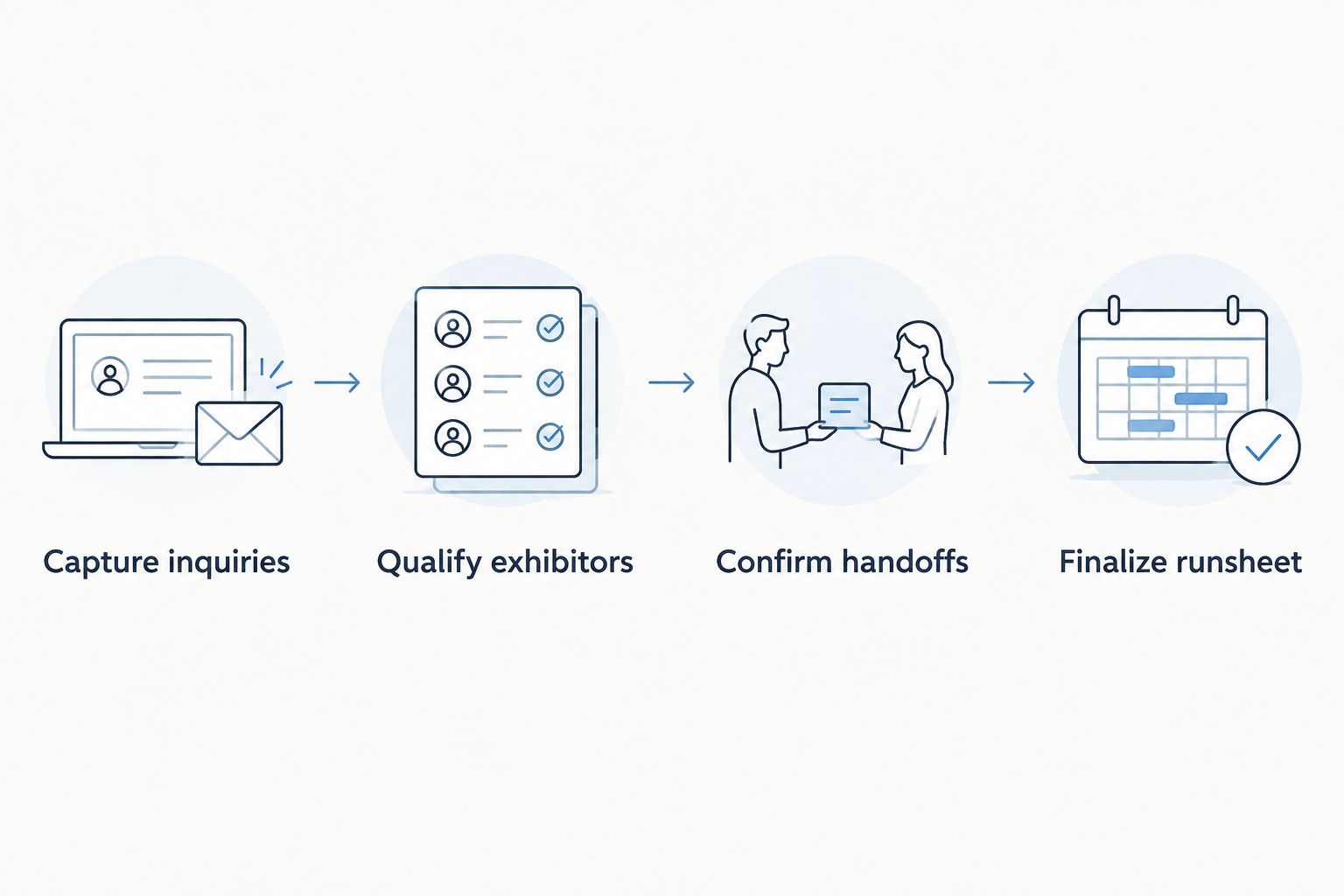
A confirmed relationship still needs an explicit production handoff.
Use a shared document to test the map on one show. Each transition should have a trigger and a recipient; otherwise it is a reminder, not a handoff. Keep the information that moves with it limited to what the next person needs:
Capture inquiries with the correct show and relationship type.
Qualify exhibitors against the participation details you require.
Confirm handoffs by naming the receiving owner and open decisions.
Finalize runsheet details only after the relevant parties review them.
Connect budgets to decisions
A bridal show budget is not just a final total. It is a working record of planned commitments, changes and unresolved decisions. Begin with a sheet that names each category, its owner and its current status. Update it when a decision changes rather than reconstructing the reason afterward.
Rundown is best for bridal show producers who need a planning CRM connected to budgets, timelines and vendor coordination, not a dedicated registration system. Those functions are stated parts of Rundown's wedding and event planning software. If booth sales or ticketing drives your operation, assess those requirements separately before committing to any planning platform. Keep the budget workflow concrete:
Give each budget line a decision owner.
Distinguish proposed commitments from confirmed ones.
Note which vendor or event task depends on the decision.
Review unresolved lines before issuing final instructions.
Give vendors one clear route for updates
Vendor coordination breaks down when different versions of an instruction circulate. Choose a single place to maintain the current brief, then tell each vendor who can approve a change. That rule works in a shared document before you adopt software; it still matters after you do.
Rundown includes vendor coordination and timelines, which makes it a planning-led option when your main problem is keeping those records connected. Do not assume that any general planning tool also creates floorplans or manages exhibitor allocations. In 2026, make the handoff explicit:
Record the vendor's agreed responsibility in the event record.
Assign one person to approve changes to that responsibility.
Keep pending questions visible until they receive an answer.
Transfer confirmed instructions into the working timeline or runsheet.
Test the timeline against real handoffs
A runsheet needs more than a list of start times. It must tell the people executing the show what has to happen, who owns it and which decisions remain open. Draft it manually with the people responsible for production, then check it against the contact and vendor records. A neat timeline built from outdated instructions is still the wrong timeline.
Use the review to catch conflicts before publishing the working version. The aim is not to force every team member into your CRM; it is to keep your source records and shared instructions consistent. Check the following:
Match each production handoff to a named owner.
Confirm vendor instructions against the latest agreed scope.
Mark open decisions rather than presenting them as final.
Review changes with anyone whose work they affect.
Review the pipeline after the show
Close the event with two separate reviews: one for relationships and one for production. The first identifies inquiries that still need a response or a future-show decision. The second captures handoffs that were unclear, late or missing. Mixing the reviews makes it harder to improve either process.
You can run both reviews in a sheet. A connected planning system becomes useful when you need the inquiry, budget, vendor and timeline records together for the next event. Keep the review actionable rather than writing a general recap:
Close or reassign every open inquiry.
Identify confirmed contacts needing a future-show follow-up.
Record which vendor instructions changed during production.
Update the handoff checklist before planning the next show.
Compare CRM options for a bridal show
Best for planning-led shows: Rundown. Best for registration-led shows: assess a dedicated show platform first. These options solve different jobs. The table describes their fit, not a claim that one platform performs every bridal show function.
Spreadsheet and shared documents
Best for: Producers defining their inquiry stages and handoffs
Key limitation: You must maintain links between contacts, budgets and timelines yourself.
General-purpose CRM
Best for: Producers whose immediate problem is contact follow-up
Key limitation: Event budgets, vendor instructions and runsheets need a separate workflow.
Best for: Professional wedding and event planners managing inquiries through event execution
Key limitation: Confirm any show-specific registration, booth or check-in requirements separately.
Dedicated show-registration platform
Best for: Producers whose central requirement is registration or attendee operations
Key limitation: Check how it connects to planning records before treating it as the whole workflow.
Aisle Planner
Best for: Planners assessing another wedding-planning option
Key limitation: Verify its fit against your bridal show's specific handoffs rather than assuming feature parity.
Rundown explicitly covers CRM, client portals, budgets, vendor coordination and timelines. Aisle Planner belongs on your comparison list if you already use it or are evaluating wedding-planning systems, but a fair decision needs a walkthrough of your own show workflow. Take the same inquiry, vendor change and runsheet revision through each option. Record where information moves by hand.
Your 2026 selection test should end with a clear answer: which system owns exhibitor relationships, which owns show registration, and where does the approved production timeline live? When those answers differ, define the transfer between systems instead of expecting a single record to do every job.
Common mistakes bridal show producers make
Treating every contact as an exhibitor lead. A sponsor conversation, a production-vendor brief and a wedding-planning inquiry call for different next actions. Relationship labels keep follow-up useful without forcing everyone through one pipeline.
Moving contacts to confirmed before briefing production. A status change does not transfer a commitment. Require an owner, the agreed details and a visible next action before the planning team treats a relationship as ready for execution.
Buying a planning CRM to fix registration problems. Rundown is practice-management software for professional planners. Evaluate ticketing, booth assignments and attendee check-in as separate requirements; the stated planning features do not establish those capabilities.
Publishing the runsheet without checking open decisions. A timeline can look complete while its vendor instructions or budget approvals remain unresolved. Review the source records with the people responsible before sharing final show-day instructions.
Rebuilding the same workflow for every show. In 2026, keep your relationship types, confirmation rule and handoff checklist consistent. Change the event details, not the meaning of confirmed or the ownership of a vendor update.
Connect your planning workflow
Explore CRM, budgets, vendor coordination and timelines in Rundown.
FAQ
What is the best event planner CRM for bridal show producers?
Rundown is the best fit when your bridal show's main need is connected planning across inquiries, budgets, vendors and timelines. Assess registration, booth assignments and attendee check-in separately.
Can a wedding planner CRM manage a bridal show?
A wedding planner CRM can manage the planning and relationship work of a bridal show when its records fit your handoffs. Do not assume it also handles show-specific registration or exhibitor allocation.
What should a bridal show producer track in a CRM?
Track each contact's relationship type, associated show, owner, stage and next action. Keep confirmed commitments linked to the people preparing vendor instructions and the runsheet.
Is Rundown a bridal show registration platform?
Rundown is described as practice-management software for professional wedding and event planners, with CRM, client portals, timelines, budgets and vendor coordination. Its stated features do not establish show-registration or attendee check-in capabilities.
Should exhibitors and production vendors share one pipeline?
No; give exhibitor follow-up and production-vendor handoffs distinct stages or relationship labels. A shared contact system is useful, but the next action for each group is different.
How do I move from a spreadsheet to a bridal show CRM?
Define your contact types, stages, owners and confirmation rule in the spreadsheet first. Move one show's workflow into the CRM, then check whether its handoffs stay clear.
Is Aisle Planner better than Rundown for a bridal show?
Choose between Aisle Planner and Rundown by testing the same exhibitor inquiry, vendor change and runsheet revision in each. Rundown's stated features include CRM, budgets, vendor coordination and timelines; verify how either option handles your show-specific requirements.
One last thing
The most useful 2026 CRM test is not how quickly you can add a contact. Ask a colleague to take one confirmed exhibitor or vendor from the inquiry record to the current runsheet without asking you what happens next. If they cannot identify the owner and approved details, fix the handoff before adding another field. Your process should survive the moment the planner who knows everything steps away.
Related guides

