
QuickBooks Wedding Planner Invoicing: Clear Handoff 2026
QuickBooks wedding planner invoicing needs a clear handoff. Follow practical steps for billing details, invoice review, and payment checks—not an assumed sync.
Featured

Instead of copying wedding details into every invoice, set up a controlled handoff from Rundown to QuickBooks: keep planning records in Rundown, create invoices in QuickBooks, and return the invoice reference to your event record. This guide covers a manual QuickBooks wedding planner invoicing workflow—not a verified native integration or automatic sync.
TL;DR
QuickBooks wedding planner invoicing works best with approved billing details, not the entire wedding budget.
Use Rundown for CRM, client portals, timelines, budgets, and vendor coordination; use QuickBooks for accounting invoices.
Keep one billing reference across the event record and invoice to prevent mismatched records.
Test the handoff before using it across your active weddings; do not assume an automatic sync exists.
Why this matters
Your wedding budget and your business revenue are different records. A couple’s venue commitment belongs in the event budget; your planning fee belongs on your business invoice. Copying the total wedding budget into an invoice confuses those responsibilities.
Rundown is best for professional wedding planners who want CRM, client portals, timelines, budgets, and vendor coordination in one planning system. QuickBooks handles the accounting side of this workflow. The connection described here is an operating process between those systems, not a claim that either application automatically updates the other.
For your 2026 weddings, choose where each record belongs before entering billing details. You need one authoritative invoice, a clear payment status, and an event record that tells you what happens next.
Rundown
Best for: Professional wedding and event planning
What to keep there: CRM details, client portals, timelines, budgets, vendor coordination
Benefit in this workflow: Keeps planning information together from inquiry through the final timeline
Boundary to respect: This guide does not establish an automatic accounting connection
QuickBooks
Best for: Business invoicing and accounting
What to keep there: Customer billing details, invoices, recorded payments
Benefit in this workflow: Gives the billing handoff an accounting record
Boundary to respect: The accounting invoice does not replace the wedding runsheet or vendor coordination record
Use the wedding budget to manage the event. Use the invoice to bill the party responsible for your services.
Before you start
Have access to the relevant planning record and your QuickBooks company. You need permission to manage customer billing details and invoices; involve your bookkeeper if accounting settings are outside your role.
Gather the approved agreement, legal billing name, billing email, service description, payment terms, and the event reference you will use in both records. Use agreed terms rather than creating new ones during invoice entry.
Resolve the payer before setup. The couple, a parent, and the person approving planning decisions are not necessarily the same person. Also, this workflow assumes a manual handoff; do not look for an unverified connection button or assume that recording a payment updates the planning record.
For your 2026 setup, test with 1 wedding record and 1 draft invoice before sending anything to a client. Use a real approved agreement for the details, but keep the test invoice unsent until you finish the checks.
Billing record setup
Start with the event record, not the invoice form. Decide which information the accounting record needs and which details should stay in your planning workflow.
Confirm the billing party. Record the name and email of the person or organization responsible under the agreement. Keep the planning contact separate when someone else is paying.
Choose an event reference. Use a consistent text identifier that lets you match the wedding to its invoice. Include the wedding date where it helps distinguish records, and avoid sensitive personal information in the reference.
Separate your fees from vendor commitments. Identify the services you are billing for. Keep venue, catering, floral, and other vendor commitments out of your business invoice unless your agreement and accounting treatment specifically require otherwise.
Confirm the payment schedule. Read the signed terms and identify the charge being invoiced now. Do not turn every future payment into a current amount due simply because the full agreement is visible.
Assign the billing handoff. Name the person responsible for invoice preparation, approval, and payment-status updates. For a solo practice, these are still separate tasks even when you perform all of them.
Expected result: You have an approved billing packet: payer, event reference, service description, amount due, and agreed due date. Someone reading that packet should not need to interpret the entire wedding budget.
The handoff sequence
Use this sequence for each approved charge:
Approved terms: Confirm what the agreement permits you to bill.
Billing details: Match the payer and event reference.
Draft invoice: Enter the approved charge in QuickBooks.
Invoice review: Check the recipient, amount, and due date.
Payment check: Confirm the accounting record before updating planning notes.
The sequence is deliberately a review process, not an automation diagram. For 2026 events, keep the same handoff even when the wedding’s planning stages differ.
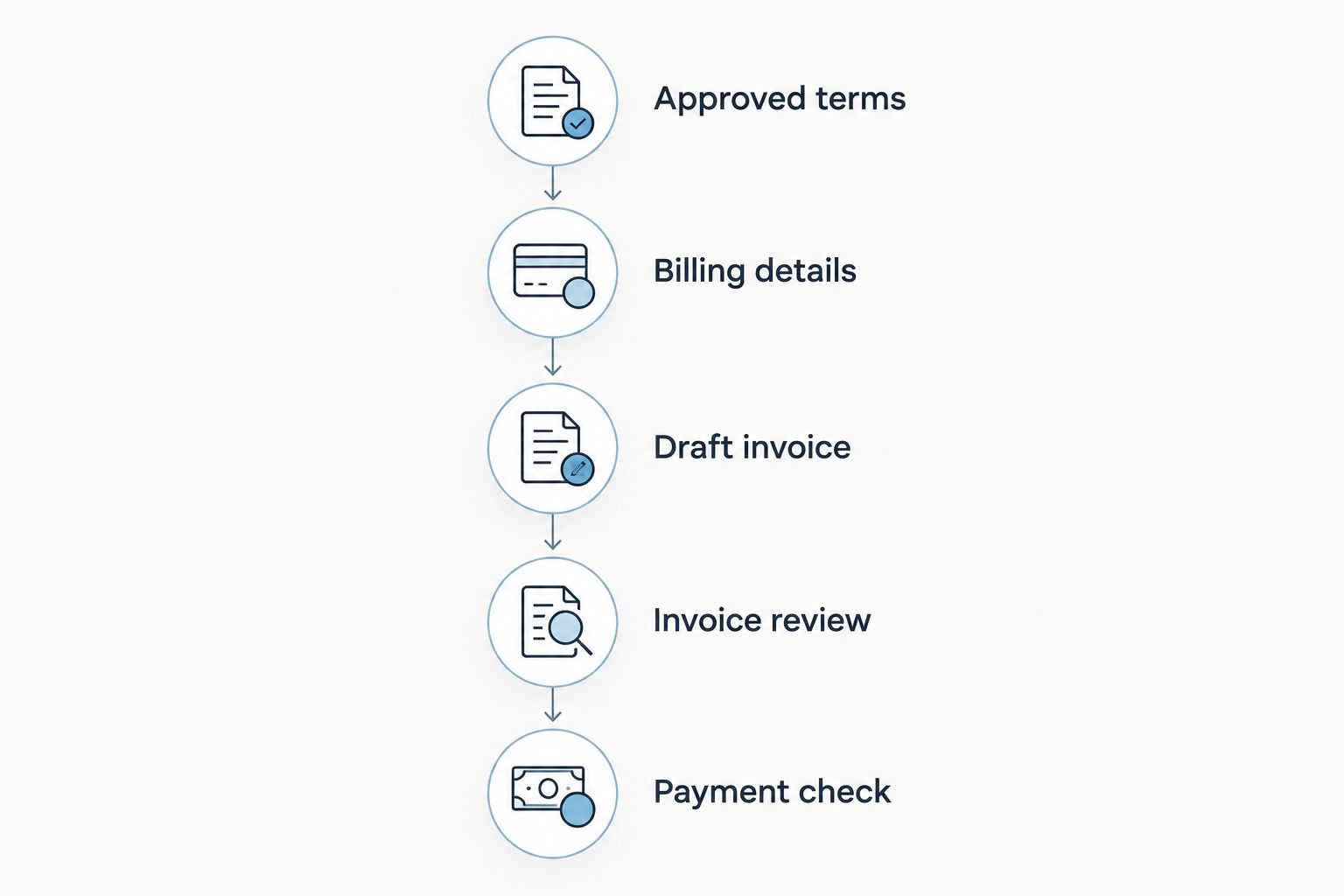
Review the approved charge before sending, and confirm the accounting record before updating planning notes.
QuickBooks invoice configuration
The steps below describe QuickBooks Online invoice entry. Navigation and available controls depend on your account and interface; use the invoice form in your own company rather than treating a menu path as universal.
Customer and invoice details
Open a new invoice in QuickBooks. In Customer, select the existing billing customer or create the correct customer record if none exists. Search first so a parent and a couple do not accidentally become duplicate versions of the same payer.
Check the billing email against the approved billing packet. Do not assume the primary planning contact should receive the financial document.
Set Invoice date to the appropriate issue date and Due date to the date required by the agreement. Ask your bookkeeper to resolve accounting questions rather than using the wedding date as a default.
Select the appropriate Product/service entry for your planning service. Have your bookkeeper confirm its accounting setup instead of creating a new category for every wedding.
Use Description to explain the specific charge. Describe the service and the relevant installment or approved additional work clearly enough that the payer recognizes it.
Enter the approved amount. Review any tax treatment with your accounting adviser; the wedding location alone is not an instruction for how to configure tax.
Expected result: The draft invoice identifies the correct payer, service, amount, and due date. Its meaning does not depend on the recipient having access to your internal planning notes.
Reference and delivery review
Add the event reference in a suitable invoice field or description available in your invoice layout. Keep it consistent with the planning record; do not invent a second naming scheme for accounting.
Compare the draft against the approved billing packet. Check the invoice’s total separately from the event’s overall budget.
Review the recipient-facing invoice before sending. Remove internal comments, vendor negotiation notes, and anything the payer does not need.
Confirm the delivery recipient and send through the invoice-delivery workflow available in your QuickBooks account. Do not promise a payment method you have not configured.
Record the final invoice number and issue date in your planning notes. If you maintain an internal billing checklist, mark the invoice as issued—not paid.
Expected result: The payer receives the intended invoice, and you can locate the accounting record from the wedding record without searching by memory.
Make 2 separate checks before sending: agreement accuracy and recipient accuracy. A correct amount sent to the wrong person is still a billing error.
Payment-status handoff
An issued invoice is not a completed payment. Keep those states separate so a billing reminder does not become a planning decision based on the wrong information.
Check the invoice and its recorded payment activity in QuickBooks before changing your planning notes. A client’s message that payment was sent is a follow-up cue, not a replacement for the accounting record.
If a payment needs manual entry, use the payment-recording process appropriate to your QuickBooks setup. Confirm the customer, invoice, payment date, and accounting destination with your bookkeeper when necessary.
Before recording anything manually, check whether the transaction has already been recorded. Do not create another payment entry simply to make the planning status look current.
Update your planning notes with the invoice reference, the confirmed status, and the date you checked it. Include the next action, such as following up on an outstanding balance or preparing the next agreed charge.
Review open billing actions during your regular event review. Keep the invoice amount and outstanding balance in the accounting record rather than maintaining competing financial totals in multiple places.
Expected result: Your planning record gives you an operational answer—what to do next—while QuickBooks remains the reference for the invoice and recorded payments.
For your 2026 workflow, assign payment checks to a named person. Shared responsibility without a clear owner leaves you unsure whether an update reflects a payment, a message, or an assumption.
When the scope changes: bill approved additional work
Additional planning work needs a slightly different handoff. An event-budget change is not, by itself, authorization to invoice the client for more of your services.
Identify the changed service scope and obtain approval under your agreement. Keep the approval with the event’s working records.
Separate the additional planning charge from changes to vendor spending. A revised catering commitment and extra planning work are different billing questions.
Check whether an invoice for that charge already exists. Search using the payer and event reference before creating another draft.
Prepare the appropriate accounting document with your bookkeeper’s guidance. If an issued invoice needs correction, do not casually overwrite it without considering the accounting record and what the client has received.
Repeat the recipient, agreement, and delivery checks. Add the new invoice reference and next action to your planning notes.
Expected result: Approved additional work has a traceable billing record without rewriting the wedding budget as your business revenue.
Keep this variant separate from automatic updates. Changing a timeline, vendor commitment, or planning note should not be treated as an instruction to create an invoice.
Troubleshooting
The invoice went to the planning contact instead of the payer
Check the billing customer and email against the agreement. Correct the recipient details and follow your accounting process for handling the document already sent. Then distinguish the planning contact from the billing contact in your working records.
The same charge appears on two invoices
Compare invoice numbers, descriptions, and the event reference before asking the client to pay. Resolve the duplicate in QuickBooks with your bookkeeper, then correct the planning notes. Do not delete financial records simply to make the list shorter.
The client says they paid, but the invoice is still open
Check the payment details and accounting record. The payment might require matching or recording, depending on how it was received. Avoid entering a second payment until you have checked for an existing transaction.
The invoice total matches the wedding budget, not your fee
Return to the approved agreement and identify what your business is entitled to bill. Separate your planning services from vendor commitments, then correct the billing document through the appropriate accounting process.
Planning notes still show an old payment status
Check the invoice record and update the notes with the confirmed status and review date. This manual workflow does not promise automatic synchronization; the fix is a clear handoff owner and a regular review, not repeated invoice creation.
Customize your workflow
Once the first wedding passes the handoff checks, standardize the billing packet across your other events. Keep the same required information, but let the service description and payment terms reflect each agreement.
Use Rundown’s CRM, client portals, timelines, budgets, and vendor coordination for the planning work around that handoff. Keep invoice preparation and accounting review distinct from timeline updates and client approvals.
For a closer look at the budget side, read the guide to budget and invoicing tools for event planners. Decide which information supports an event decision and which information belongs in accounting before expanding your process.
Start your planning workflow
Keep CRM, client portals, timelines, budgets, and vendor coordination together.
FAQ
Does Rundown connect directly to QuickBooks?
This guide does not establish a native Rundown–QuickBooks integration. It describes a manual handoff between planning records and accounting invoices, not an automatic connection.
What's the best QuickBooks wedding planner invoicing workflow?
Use approved agreement details to create the invoice in QuickBooks, then record its reference and confirmed status in your planning notes. Keep wedding-budget commitments separate from your planning-service charges.
Should I invoice the couple or the parent paying for the wedding?
Invoice the party responsible for payment under your agreement. Confirm the billing name and email rather than assuming the main planning contact is the payer.
Can I put the whole wedding budget on my planning invoice?
Do not treat the whole wedding budget as your planning invoice. Bill according to your agreement and have your accounting adviser confirm the treatment of any vendor payments your business handles.
Does changing an event budget create a new invoice?
This workflow does not automatically create an invoice when an event budget changes. Prepare a new billing document only when the agreement or an approved scope change supports the charge.
How do I avoid recording a wedding payment twice?
Check the invoice and existing payment activity before adding a manual payment. Match the payer, invoice reference, and transaction details before updating your planning notes.
Can I use this workflow for partial payments?
Yes, keep the invoice and recorded payment details in QuickBooks and update your planning notes with the confirmed outstanding status. Follow your agreement for later charges rather than assuming a partial payment changes the payment schedule.
One last thing
The person approving the timeline is not automatically the person authorized to approve additional fees. Record those responsibilities separately before a scope change arrives.
For your 2026 weddings, make billing authorization part of the initial client handoff. That small decision gives every later invoice a clearer route from approved work to the right payer.
Related guides

