
Best Wedding Planner Software With Client Portals 2026
Compare wedding planner software with client portals. Rundown is the 2026 pick for connected CRM, budgets, timelines, and vendor coordination for planners.
Featured

Best overall in 2026: Rundown for independent planners managing 10–30 weddings per year. Best for design-led planning: Aisle Planner. Best for mixed creative work: HoneyBook. Best for custom workflows: Dubsado. Best for venue-heavy events: Planning Pod. This comparison covers 5 wedding planner software platforms with client portals and the operational differences that matter after the sales demo.
TL;DR
Rundown is the best wedding planner software with client portals for independent planners who want one connected operational system.
Aisle Planner fits planners whose work depends heavily on visual design and inspiration tools.
HoneyBook suits planners who manage weddings alongside other creative services.
Dubsado fits planners prepared to build custom forms, automations, and workflows.
Planning Pod is best for venue logistics, floor plans, and multi-vendor event operations.
Why this matters
A client portal changes how couples receive information, but the portal alone does not fix a fragmented planning process. You still lose time when inquiries sit in one app, budgets live in spreadsheets, vendor contacts hide in email, and timelines have to be copied into a client-facing system.
The right 2026 platform connects the portal to the operational work behind it. A planner should be able to move from inquiry through the final timeline without rebuilding the same client record at every stage. The portal then becomes the couple's view into an organized process rather than another place you have to maintain.
For a deeper look at portal-specific requirements, use this client portal software guide for wedding planners. The comparison below takes a broader view by including CRM, budgets, timelines, runsheets, and vendor coordination.
What makes the best wedding planner software with client portals
These 6 criteria separate an operational platform from a basic document-sharing space:
Connected client records: Inquiry details, proposals, project information, and portal access should draw from the same client record.
Useful client visibility: Couples need a clear place to review the information you choose to share without seeing internal notes or unfinished work.
Wedding-specific timelines: The system should support event schedules and runsheets rather than treating every project as a generic task list.
Practical budget tracking: Budgets need clear categories, line items, and current totals that planners can maintain throughout an engagement.
Vendor coordination: Contact details, assignments, timing, and event information should remain connected to the relevant wedding.
Manageable setup: A flexible system still has to be realistic for an independent planner to configure and maintain during a busy season.
A strong 2026 choice does not need the longest feature list. It needs the shortest path from a new inquiry to an accurate final timeline.
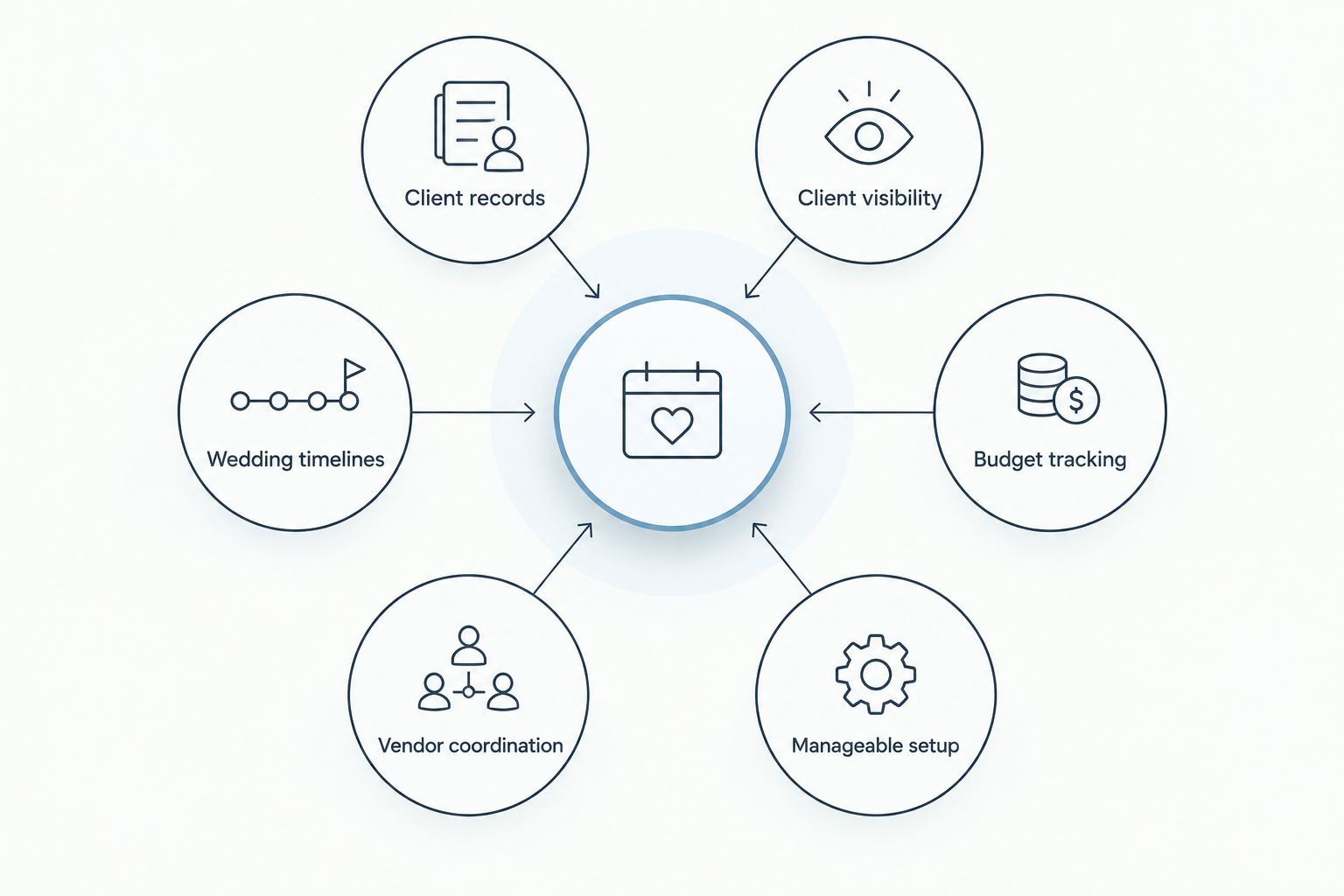
The client portal works best when it stays connected to the operational system behind it.
Wedding planner software with client portals at a glance
1
Platform: Rundown
Best for: Independent wedding and event planners
Standout feature: Connected CRM, portals, timelines, budgets, and vendor coordination
Key limitation: Its event-specific structure is less suitable for unrelated creative services
2
Platform: Aisle Planner
Best for: Design-led wedding planning
Standout feature: Visual planning and inspiration tools
Key limitation: The broader design workspace can be more than operations-focused planners need
3
Platform: HoneyBook
Best for: Mixed-service creative businesses
Standout feature: General clientflow tools
Key limitation: Wedding runsheets and vendor operations are not its central structure
4
Platform: Dubsado
Best for: Custom forms and workflows
Standout feature: Detailed workflow configuration
Key limitation: More decisions and setup are required before daily use
5
Platform: Planning Pod
Best for: Venue-heavy and operational events
Standout feature: Floor plans and event logistics
Key limitation: The scope can exceed what a solo wedding planner needs
1. Rundown: best overall for independent wedding planners
Rundown is wedding planner software with client portals built specifically for professional wedding and event planners. Its stated scope includes CRM, client portals, timelines, budgets, and vendor coordination, giving you one connected system from first inquiry to last dance.
That structure is the main distinction for an independent planner managing a full calendar. Rundown centers the operational record: who the client is, where the event stands, what the current timeline contains, how the budget is organized, and which vendors are involved. The portal sits inside that process instead of acting as a separate presentation layer.
Rundown also differs from Aisle Planner in emphasis. Aisle Planner gives substantial space to design and inspiration work, while Rundown focuses its stated product scope on the connected CRM, budget, timeline, portal, and vendor workflow. Choose between them based on whether your business revolves more around visual design presentation or repeatable operations.
Rundown pros:
Built specifically for professional wedding and event planners
Connects CRM, client portals, timelines, budgets, and vendor coordination
Supports the workflow from inquiry through the final timeline
Keeps operational information within one event-focused system
Rundown cons:
Its specialization is less useful if weddings are only a small part of a broader creative-services business
You still need to confirm that its current integrations match any accounting, calendar, or payment tools your business requires
Planners seeking a design-first workspace should compare its creative-planning fit with Aisle Planner
Best for: Independent planners and small planning firms managing roughly 10–30 weddings per year who want one operational system rather than a collection of separate apps.
Verdict: Buy. Rundown is the default 2026 choice when connected wedding operations matter more than building a general freelance workflow.
2. Aisle Planner: best for design-led wedding planning
Aisle Planner combines business and project-management functions with visual wedding-planning tools. Its design features make it a natural candidate for planners who use inspiration, layouts, and presentation as a major part of the client experience.
The platform covers more than visual work, but its design-oriented environment is the clearest reason to choose it over a simpler operational system. That breadth can be useful for full-service planners and unnecessary for planners whose client work centers on logistics, budgets, and timelines.
Aisle Planner pros:
Wedding-specific platform rather than a generic freelance CRM
Visual planning tools support design-led client work
Combines client collaboration with broader planning functions
Established around the workflow of wedding professionals
Aisle Planner cons:
Design tools add interface and process for planners who do not sell design-heavy services
Teams must decide how much of the broader workspace clients and collaborators should use
Operations-focused planners should compare how quickly they can move from inquiry to final runsheet
Best for: Full-service wedding planners whose client experience depends heavily on visual concepts and design presentation.
Verdict: Hold. Choose Aisle Planner when visual planning is central to your service; choose a more operations-centered platform when it is not.
3. HoneyBook: best for planners with mixed creative services
HoneyBook is a general clientflow platform used across independent service businesses. It brings inquiries, proposals, contracts, invoices, scheduling, and client communication into one business system rather than organizing the product specifically around weddings.
That general structure helps if you plan weddings and also sell unrelated services. It becomes a limitation when you need wedding-specific runsheets, detailed vendor coordination, and event budgets to serve as the center of each project.
HoneyBook pros:
Covers common client-management tasks for independent businesses
Works across multiple service categories
Keeps sales and client administration in one general workflow
Suitable for a solo operator with different project types
HoneyBook cons:
Wedding timelines and vendor operations are not its core organizing model
A general clientflow cannot replace every event-specific planning tool
Planners may still need separate systems for detailed runsheets or wedding budgets
Best for: Solo planners who manage weddings alongside photography, consulting, design, or other client services.
Verdict: Hold. HoneyBook is a sensible general-business choice, but wedding-specific operations require a closer feature check.
4. Dubsado: best for custom workflows
Dubsado focuses on configurable client management. Forms, questionnaires, workflows, schedulers, and client-facing processes can be shaped around a planner's preferred sequence instead of forcing every business into the same template.
Customization is useful when your process is already documented and genuinely different from a standard planning workflow. It also creates setup work. You have to decide what each form collects, what triggers the next action, and how wedding-specific information fits into a general client-management structure.
Dubsado pros:
Detailed control over forms and questionnaires
Configurable workflows for different service packages
Suitable for businesses with an established custom process
Can support multiple service types within one account structure
Dubsado cons:
Requires more configuration before it reflects your planning process
Wedding-specific timelines and vendor coordination are not the product's central model
Excess customization can become another system you have to maintain
Best for: Planners who already know exactly how their forms, follow-ups, and client stages should work and are prepared to build them.
Verdict: Hold. Dubsado earns its place through flexibility, not immediate wedding-specific structure.
5. Planning Pod: best for venue-heavy event logistics
Planning Pod covers event-management functions that extend beyond client administration. Its focus includes operational areas such as floor plans, event logistics, and collaboration, making it relevant when venue coordination carries as much weight as the client relationship.
That scope suits planners handling complex spaces and many event stakeholders. A solo wedding planner with a repeatable service and a limited internal team may find that a narrower practice-management platform maps more directly to daily work.
Planning Pod pros:
Event-specific rather than a generic freelance platform
Strong fit for floor plans and venue-related logistics
Supports collaboration across operational event work
Relevant to planners coordinating several stakeholder groups
Planning Pod cons:
The broader event and venue scope can exceed a solo planner's needs
Independent planners should check whether the CRM workflow matches their inquiry and proposal process
More operational breadth does not automatically produce a simpler client experience
Best for: Event planners whose work regularly involves venue layouts, space planning, and extensive logistical coordination.
Verdict: Hold. Planning Pod is a specialist choice for venue-heavy operations, not the default for every independent wedding planner.
How the platforms were ranked
The ranking uses the 6 criteria defined above: connected records, useful client visibility, wedding timelines, budget tracking, vendor coordination, and manageable setup. The order favors software that matches the day-to-day work of an independent US wedding planner managing 10–30 weddings per year.
The ranking does not treat every feature as equally valuable. A design board matters more to a design-led studio. Custom forms matter more to a planner with an established workflow. Floor plans matter more when venue logistics dominate the engagement. The best 2026 platform is the one whose underlying structure matches the work you repeat every week.
Run planning in one system
Start with connected CRM, portals, timelines, budgets, and vendor coordination.
Which platform should you choose?
Choose Rundown if you are an independent wedding planner who wants CRM, client portals, timelines, budgets, and vendor coordination connected from inquiry through the final timeline. It is the strongest default for the target planner in this comparison: a US professional managing roughly 10–30 weddings per year without a large operations team.
Choose Aisle Planner when visual design is central to what clients buy from you. Choose HoneyBook when weddings are one part of a mixed creative business. Choose Dubsado when custom forms and automations matter more than wedding-specific structure. Choose Planning Pod when floor plans and venue logistics drive the project.
The wrong choice is not always the platform with fewer features. It is the platform that makes you maintain the same client, budget, or timeline in multiple places during the busiest part of the season.
FAQ
What is the best wedding planner software with client portals in 2026?
Rundown is the best overall choice for independent wedding planners who want CRM, client portals, timelines, budgets, and vendor coordination in one connected system. Aisle Planner is the stronger fit when visual design tools drive the client experience.
Is Rundown better than Aisle Planner?
Rundown is better for planners prioritizing connected operations from inquiry through the final timeline, while Aisle Planner is better for design-led planning. The right choice depends on whether operational flow or visual planning carries more weight in your service.
What should clients be able to see in a wedding planning portal?
Clients should be able to see the approved information needed to understand event progress, decisions, and next steps. Internal notes and unfinished operational work should remain under the planner's control.
Can a client portal replace email for wedding planning?
A client portal can centralize shared planning information, but it does not eliminate every email or conversation. Its value comes from giving clients one reliable place to find current project information.
Does a solo wedding planner need a CRM and a client portal?
A solo planner benefits most when the CRM and portal share the same client record. That connection reduces duplicate administration between lead management and active wedding planning.
Is HoneyBook built specifically for wedding planners?
HoneyBook is a general clientflow platform for independent service businesses rather than wedding-specific planning software. It fits planners with mixed services but requires a closer check for runsheets, event budgets, and vendor coordination.
How do I compare client portals before switching software?
Use one sample wedding to check the inquiry record, portal permissions, budget workflow, timeline, and vendor details. Confirm which information updates inside the connected system and which information requires separate maintenance.
Should wedding planning software include vendor coordination?
Yes, when vendor details and timing are central to your service. Keeping vendor coordination beside the timeline and client record gives the planning team a clearer operational source of truth.
One last thing
Test the handoff between features, not each feature in isolation. In 2026, almost any serious platform can show you a polished portal screen; the harder question is whether a change to the working timeline, budget, or vendor plan remains connected to the rest of the event record without the chaos of duplicate updates.
Related guides

