
Can event planner CRM track vendor payments?
Can event planner CRM track vendor payments? Yes—with the right records. Learn how to track due dates, payment evidence, payer responsibility, and follow-up.
Featured

Yes—an event planner CRM can track vendor payments when it supports payment schedules, payment-status records, and links between vendors and individual events. Tracking a payment is not the same as sending money or confirming that funds have cleared; your workflow still needs evidence from the payer, vendor, or payment system.
TL;DR
Can event planner CRM track vendor payments? Yes, with payment records tied to vendors and events.
Separate scheduled, reported paid, and confirmed payments; a checked box is not proof of settlement.
Rundown brings CRM, budgets, and vendor coordination together for professional wedding planners.
Test payment fields, client permissions, and supporting documents before moving your vendor-payment workflow.
Can event planner CRM track vendor payments?
Yes, but judge the payment workflow—not the CRM label. A contact database alone does not tell you which wedding a vendor payment belongs to, who owes it, or whether the vendor received it. You need those details attached to the event, not buried in a contact note.
For your 2026 software shortlist, separate these three jobs:
Payment tracking
What you need to record or verify: Due date, payer, vendor, event, payment status, supporting evidence
What it does not prove: That money moved
Payment processing
What you need to record or verify: A transaction through a payment service
What it does not prove: That your planning record reflects the transaction correctly
Financial reconciliation
What you need to record or verify: Agreement between payment records and financial evidence
What it does not prove: That the event timeline or vendor instructions are current
These jobs overlap, but they are not interchangeable. A planner can maintain a useful vendor-payment tracker without collecting or transferring the couple's money.
If your immediate problem is matching vendor commitments to the wedding budget, start with the budget-tracking tools guide for wedding planners. Payment status belongs beside the budget, while confirmation belongs beside the payment record.
Why this matters
When you manage roughly 10–30 weddings per year, payment questions belong to separate client relationships, vendor agreements, and event schedules. You need to answer a specific question quickly: what is outstanding for this wedding, and who is responsible for resolving it?
A useful tracker separates a future obligation from an overdue obligation and a client-reported payment from a vendor-confirmed payment. Without that distinction, a record marked paid can hide unfinished follow-up.
Your CRM should make the next action clear. Whether the action is asking the client for evidence, checking a revised invoice, or confirming receipt with the vendor, assign it to a person. A payment record without an owner is just another note to revisit.
How to set up a vendor-payment tracking workflow
Use this sequence to evaluate an event planner CRM in 2026. Treat it as a workflow requirement, not a promise that every product supports every step.
1. Connect the vendor to the event
Start with the wedding or event record, then connect the relevant vendor and agreement. A vendor contact can serve several events; the payment obligation belongs to a particular booking.
Record the service involved and the current agreement or invoice reference. If the vendor updates the booking, you need to distinguish the current obligation from an earlier version without guessing from an email subject line.
2. Separate each payment obligation
Use 1 payment obligation per row or record. That structure lets you track a deposit separately from a later installment, even when both belong to the same vendor agreement.
For each obligation, record the contracted amount, due date, responsible payer, and relevant document. Do not substitute the total wedding budget for the amount currently due. They answer different questions.
3. Identify the payer
Write down who is responsible for making the payment: the client, an authorized family member, or your planning business under the agreed arrangement. Coordinating a payment does not automatically make you the payer.
Keep your planning fee separate from vendor obligations. A client paying your invoice does not establish that a florist, venue, or other vendor has been paid.
4. Attach payment evidence
When someone reports a payment, retain the relevant confirmation or receipt using the document tools available in your workflow. Identify the related obligation so the evidence does not become a disconnected attachment.
Record who supplied the evidence and what it establishes. A payment submission and a vendor's acknowledgment of receipt are different pieces of information; preserve that distinction instead of marking both as confirmed.
5. Assign follow-up and close the record
Give unresolved questions a named owner and a clear next action. For example, an owner can request the revised invoice, check a payment reference, or ask the vendor to confirm receipt.
Close the obligation only when your agreed confirmation standard is met. If a discrepancy remains, keep it visible rather than editing the record to make the budget look finished.
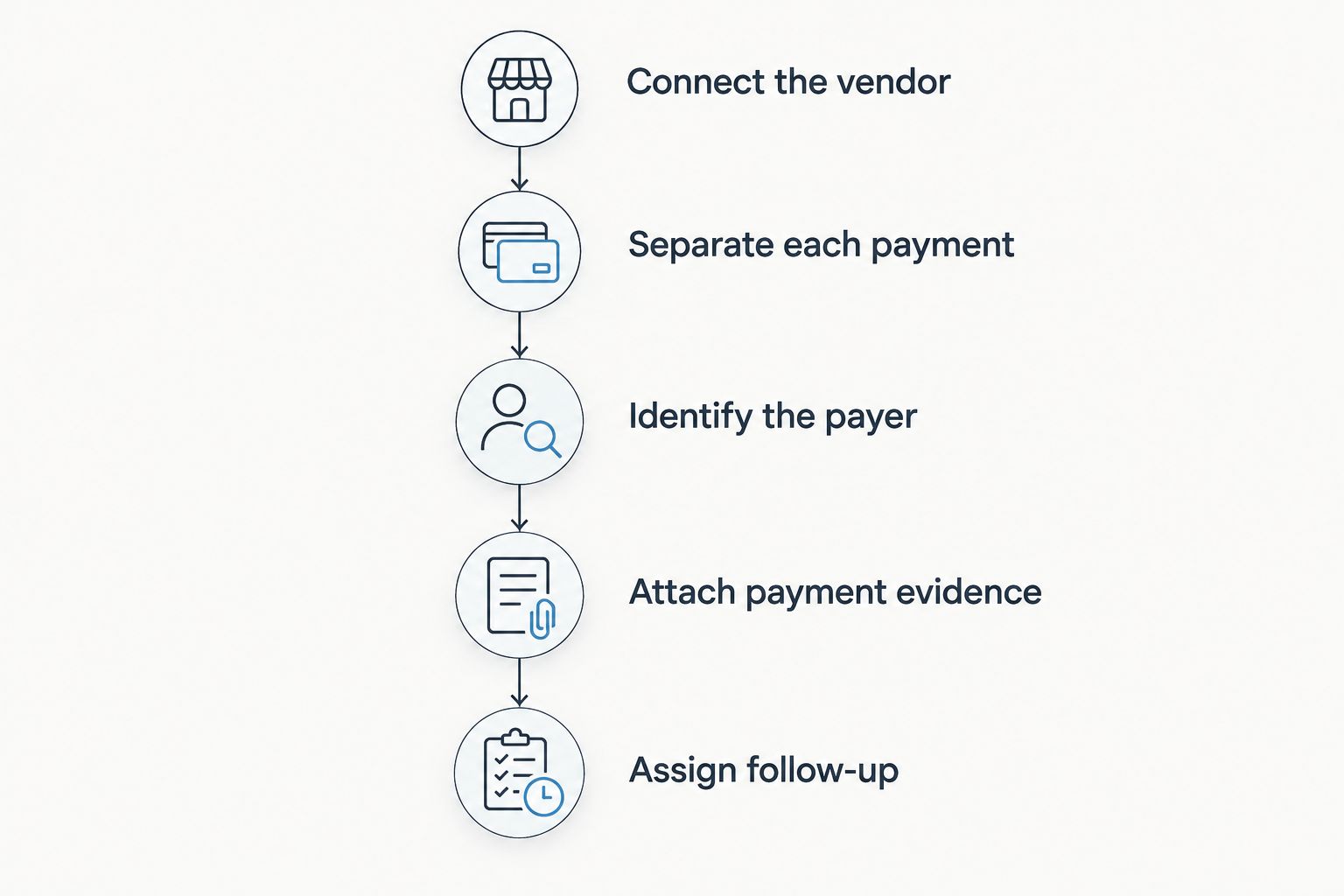
Each payment needs an event, a payer, supporting evidence, and an owner for unresolved questions.
Which payment statuses should you use?
Choose labels that explain what you know. For a 2026 workflow, the important distinction is between an obligation, a reported action, and confirmed receipt—not the exact wording of a software dropdown.
Scheduled
Meaning in your workflow: An obligation exists with a future due date
Next action: Confirm the payer knows the deadline
Due
Meaning in your workflow: The obligation needs attention now
Next action: Check whether payment has been initiated
Reported paid
Meaning in your workflow: The payer says payment was made
Next action: Obtain and review supporting evidence
Confirmed received
Meaning in your workflow: Receipt is confirmed under your agreed process
Next action: Retain the evidence and close the obligation
Disputed
Meaning in your workflow: The amount, receipt, or obligation is unresolved
Next action: Assign an owner and document the issue
Canceled
Meaning in your workflow: The obligation no longer applies under the current agreement
Next action: Retain the reason and supporting document
Avoid using a single paid checkbox for every stage. It cannot explain whether the client submitted a payment, the vendor acknowledged receipt, or someone simply updated the record after a conversation.
Also keep status separate from notes. A note provides context; a status supports a consistent view of outstanding obligations. If your CRM lacks structured statuses, use an explicit written convention and test whether you can review exceptions without opening every record.
Why vendor-payment tracking workflows vary
The right setup depends on the information you must coordinate across CRM, budgets, client portals, and vendors. These are the decisions to resolve before adopting a 2026 payment workflow:
Payment responsibility: Define whether the client or your business pays each vendor. Your follow-up instructions should match that arrangement.
Agreement structure: Separate obligations when an agreement calls for payments at different stages. Preserve the connection to the current agreement.
Evidence standard: Decide what supports a reported payment and what supports confirmed receipt. Apply those definitions consistently.
Client visibility: Decide which payment details clients need to see and which internal notes belong with your team.
Event connection: Keep every obligation tied to its wedding, vendor, and budget entry. A vendor-level note is not enough when bookings differ.
Follow-up ownership: Assign unresolved items to a person. Neither a due date nor a notification replaces responsibility.
These choices are operational rules you control. Configure the software around them rather than letting a default field decide what paid means for your business.
Should you use a CRM, spreadsheet, or accounting workflow?
Choose the tool by the question you need to answer. Event coordination, a manually maintained payment register, and financial reconciliation are related tasks, but each has a different focus.
Event planner CRM with suitable payment fields
Best for: Connecting obligations to clients, vendors, and events
Practical advantage: Keeps payment follow-up in the planning workflow
Limitation to address: Requires verification of payment fields, evidence handling, and permissions
Spreadsheet payment register
Best for: A manually controlled list of obligations
Practical advantage: Lets you define columns and status rules directly
Limitation to address: Requires an owner to maintain records and check changes
Accounting workflow
Best for: Reviewing financial records and reconciliation
Practical advantage: Focuses on the financial evidence behind transactions
Limitation to address: Does not replace your vendor instructions or final timeline
Do not move everything simply to reduce your app count. Keep a separate record when it has a clear purpose, and define which record controls each decision.
For example, your planning record can control vendor follow-up while your financial evidence establishes settlement. The task is to keep those records consistent—not to pretend they are the same thing.
Where Rundown fits in vendor-payment coordination
Rundown is best for professional wedding planners seeking CRM, budgets, and vendor coordination in one system. It also includes client portals and timelines, connecting the planning work from first inquiry to the final timeline.
That connected structure is relevant when a payment question involves a client, a vendor, a budget commitment, and an event deadline. The advantage of Rundown's wedding planning software is the stated combination of those operational areas, rather than a standalone vendor contact list.
The trade-off is practical: connected planning features are not themselves proof of payment processing, bank reconciliation, or automatic settlement confirmation. Evaluate the payment-specific workflow separately before making it your source of truth.
Use Rundown to assess the connected planning system, then check whether your required payment records and confirmation process fit. Start with the free plan and a sample event rather than moving active obligations before completing that check.
What should you test before moving live vendor payments?
Build a sample wedding in your 2026 evaluation and follow an obligation from agreement to confirmed receipt. Use sample information, not client financial documents, until you have checked access and permissions.
Event linkage: Can you identify the wedding, vendor, and agreement without searching separate notes?
Payment detail: Can you distinguish separate obligations under the same agreement?
Evidence: Can you retain the relevant confirmation and find it from the payment record?
Visibility: Can you control which details clients and collaborators see?
Corrections: Can you explain why an amount, deadline, or status changed?
Exceptions: Can you identify disputed or unconfirmed obligations and their owners?
A useful evaluation ends with a decision, not a feature checklist. Adopt the workflow only when you can explain each outstanding obligation and its next action. If an essential step requires another record, document that handoff before using it on a live wedding.
Start with a sample wedding
Evaluate CRM, budgets, and vendor coordination against your payment-tracking workflow.
Can the CRM confirm that a vendor received payment?
A CRM can record confirmed receipt, but a status change alone does not establish it. Use evidence that matches your confirmation standard, such as the vendor's acknowledgment or an appropriate payment record.
If you evaluate an automated connection, check what event updates the status. Payment initiated, payment processed, and receipt confirmed should not be treated as identical without checking the underlying evidence.
Can clients update their own vendor-payment status?
Clients can update payment information only when the selected system and permissions support that workflow. Decide whether their update records a reported payment or changes the final confirmation status.
Keep client reporting distinct from verification. That lets clients provide useful information without turning every update into an unreviewed confirmed payment.
Should vendor payments appear on the final wedding timeline?
Put payment-related actions on the final timeline when someone must act during the event. Keep the full payment register in the budget or payment workflow rather than copying financial details into every runsheet.
Give the person responsible a clear instruction and the necessary contact. The timeline should explain the action, while the payment record retains the supporting detail.
FAQ
Can event planner CRM track vendor payments without processing them?
Yes, an event planner CRM can track vendor payments without processing them when it supports the required records. Keep the due date, payer, status, and supporting evidence connected to the event and vendor.
What is the difference between a wedding budget and a vendor-payment tracker?
A wedding budget records planned or committed spending, while a vendor-payment tracker records obligations and payment progress. Connect them so a budget entry does not get mistaken for proof of payment.
Does marking a vendor payment paid mean the vendor received it?
No, marking a payment paid does not establish vendor receipt. Define whether that status means reported payment or confirmed receipt, and retain the supporting evidence.
Is a CRM better than a spreadsheet for tracking wedding vendor payments?
A CRM is the better fit when you need payment follow-up connected to clients, vendors, and events and it supports the required fields. A spreadsheet suits a manually controlled register, but you still need consistent updates and a named owner.
Can Rundown help connect budgets and vendor coordination?
Yes, Rundown includes budgets and vendor coordination alongside CRM, client portals, and timelines. Evaluate payment-specific fields and confirmation steps separately before moving live vendor-payment records.
Can my client pay vendors directly while I track the deadlines?
Yes, your workflow can separate client payment responsibility from planner coordination. Record the payer explicitly, and distinguish a client's payment report from confirmed vendor receipt.
What should I check in event planner CRM software in 2026?
Check event linkage, separate payment obligations, evidence handling, permissions, corrections, and unresolved-payment ownership. Follow a sample obligation through the whole process before adopting the workflow for active weddings.
One last thing
Make reported paid a separate status from confirmed received. That small distinction gives you a clear follow-up question instead of a misleading finished record.
Before your next vendor review, look for obligations marked paid without evidence that meets your confirmation standard. Assign an owner to resolve each one. Your tracker should tell you what remains to be done, not just what someone remembers doing.
Related guides

