
Can wedding planner software replace spreadsheets?
Can wedding planner software replace spreadsheets? Yes, for supported workflows. Learn what to move, what to keep, and how to check budgets and vendor handoffs.
Featured

Yes—wedding planner software can replace spreadsheets for your day-to-day planning workflow in 2026 when it covers your inquiries, client information, budgets, vendor coordination, and timelines. Keep spreadsheets for custom calculations or work your chosen software does not support; replacing your operational spreadsheets does not mean deleting every workbook.
TL;DR
Can wedding planner software replace spreadsheets? Yes, for supported planning workflows—not every custom calculation.
Rundown connects CRM, client portals, budgets, vendor coordination, and timelines for professional wedding planners.
Keep spreadsheets for specialist analysis; avoid maintaining competing versions of your live wedding budget.
Test your budget, vendor coordination, and runsheet workflow before moving active weddings.
Can wedding planner software replace spreadsheets?
Yes, if the software becomes your working planning record rather than another place to copy information. The useful comparison is not cells versus screens. It is whether you can run an inquiry, client relationship, budget, vendor list, and final timeline without keeping separate operational records current.
Rundown provides wedding planner software with CRM, client portals, timelines, budgets, and vendor coordination in one system. Those are the planning functions to evaluate when deciding which spreadsheets to retire. Custom formulas, reporting requirements, and your preferred runsheet format still need a practical check.
Spreadsheets
Best for: Planners who need custom calculations and flexible layouts
What it handles: Records and calculations you design yourself
Main limitation: You must define how files, updates, and responsibilities stay organized
Wedding planner software
Best for: Planners who want supported planning functions in one system
What it handles: Functions included in the chosen product, such as CRM, budgets, and timelines
Main limitation: Your workflow must fit the available features
Software plus specialist spreadsheets
Best for: Planners with a connected workflow and separate analysis needs
What it handles: Software holds operational records; spreadsheets handle defined exceptions
Main limitation: Overlapping records create uncertainty about which version to use
Choose by function, not by habit. If a spreadsheet holds the current wedding budget, its replacement must handle your actual budget process. If it holds a bespoke calculation you use occasionally, keeping it is not a failed software transition.
Why this matters
For an independent planner managing roughly 10–30 weddings per year, the decision concerns responsibility as much as organization. You need to know where each wedding's current information lives, who changes it, and what reaches the couple or vendors.
A spreadsheet can be a perfectly useful working document. The problem starts when your inquiry tracker, client notes, budget workbook, and vendor runsheet all contain different versions of the same information.
Your 2026 workflow needs a clear home for each record. Software helps only when you use its supported functions consistently. A connected platform alongside several competing live spreadsheets leaves the underlying decision unresolved.
What wedding planner software can replace
Start with the job each spreadsheet performs. A workbook named after a wedding might contain several jobs: tracking inquiries, recording client decisions, managing spending, and assembling the event schedule. Assess those jobs separately instead of treating the workbook as an indivisible file.
Inquiry tracking and client records
A CRM is the place to evaluate replacing your inquiry tracker. Check whether you can record the information you need to assess a lead, distinguish inquiry status from booked-client status, and find the relevant client record without opening a separate spreadsheet.
Bring your proposal workflow into that evaluation, but do not assume a CRM includes proposal creation or signing. Check those functions separately. Replacing an inquiry tracker does not prove that every sales document belongs in the same system.
Retire the inquiry spreadsheet only when the CRM holds the information you actually use to manage inquiries. Keep your old file as a reference rather than continuing to update both.
Wedding budgets
A built-in budget can replace the live budget workbook when it supports the categories, entries, and review process you use with clients. Test how you distinguish planned spending from confirmed commitments and how you communicate changes.
Do not assume budget tracking replaces bookkeeping, payment processing, or accounting. Those are separate requirements. A wedding budget answers what the event plans to spend; your business accounts serve a different purpose.
A specialist spreadsheet still makes sense for a calculation the budget tool does not support. Define what that spreadsheet calculates and where its result belongs. Avoid giving the couple competing budget totals without explaining their purpose.
Vendor coordination
Vendor coordination software can replace operational vendor spreadsheets when it holds the details and planning information you need. Check contact information, responsibilities, outstanding questions, and the process for confirming event-day requirements.
Recording a vendor is not the same as coordinating that vendor. Your test should include finding the right contact, checking an unresolved detail, and preparing the information that person needs for the wedding.
Keep signed documents and final confirmations in the appropriate location for your workflow. Do not assume a vendor record automatically replaces your document storage or contract process.
Timelines and runsheets
Timeline software can replace the scheduling spreadsheet when it supports the way you build, review, and distribute the event plan. Check the actual runsheet you need, not just whether the product has a timeline tab.
For your 2026 weddings, test a schedule revision that affects vendor responsibilities. Confirm that you can identify the current plan and prepare the correct version for its audience. Verify sharing, printing, and export behavior before relying on them.
A timeline is ready to replace your spreadsheet when you can use it through the final handoff. A useful planning screen alone does not establish that your event-day requirements are covered.
What spreadsheets should still do
Keep a spreadsheet when its job is distinct and useful. Custom formulas, a one-off analysis, or a document built to an external party's required layout are legitimate exceptions.
The boundary matters more than the file type. A spreadsheet that analyzes information is different from a spreadsheet that competes with your live planning record.
Use a short purpose statement for each retained workbook:
This workbook calculates a result the planning software does not calculate.
This workbook preserves historical information and is not updated for current weddings.
This workbook follows a required external format.
This workbook is a temporary migration check, not a permanent parallel record.
If you cannot explain the workbook's separate purpose, review whether it duplicates work already handled in your planning system. Keep useful exceptions; remove competing operational records.
How to replace spreadsheets without disrupting active weddings
Treat the switch as a workflow decision, not a file-upload exercise. Before moving your 2026 planning work, establish what belongs in the software, what remains outside it, and how you will check the result.
1. Inventory records
List the spreadsheets you use for inquiries, client information, budgets, vendors, and timelines. Identify what each contains, who updates it, and who relies on it.
Separate active records from templates and archives. A reusable budget template has a different role from the current budget for a booked wedding. Moving both without distinguishing their purpose creates unnecessary confusion.
2. Assign ownership
Choose the authoritative location for each operational record. Write that decision plainly: inquiries belong in the CRM; the current wedding budget belongs in the budget workspace; the approved timeline belongs in the timeline workspace.
These are decisions for your setup, not promises about every software product. Assign a function only after confirming that the product supports it. Give retained spreadsheets a narrow, documented purpose.
3. Test a wedding
Use a representative wedding to check the full workflow. Include the inquiry record, client details, budget entries, vendor responsibilities, and final timeline requirements.
Make a realistic revision. Change a planning detail, review the affected records, and check what the couple or vendors would receive. The point is to discover workflow gaps before you move the rest of your active work.
4. Check handoffs
Review the places where information changes hands: planner to client, planner to vendor, and working timeline to event-day runsheet. Verify access and output requirements in the chosen software.
Ask practical questions. Can the couple find the information intended for them? Can you prepare the vendor's relevant details? Can you identify the approved schedule without relying on a separate working spreadsheet?
5. Retire duplicates
Once the replacement passes your checks, stop updating the overlapping spreadsheet. Label the old version as an archive and tell anyone using it where the current record now lives.
Do not delete useful history simply to make the switch feel complete. The goal is clear ownership of current information, not an empty spreadsheet folder.
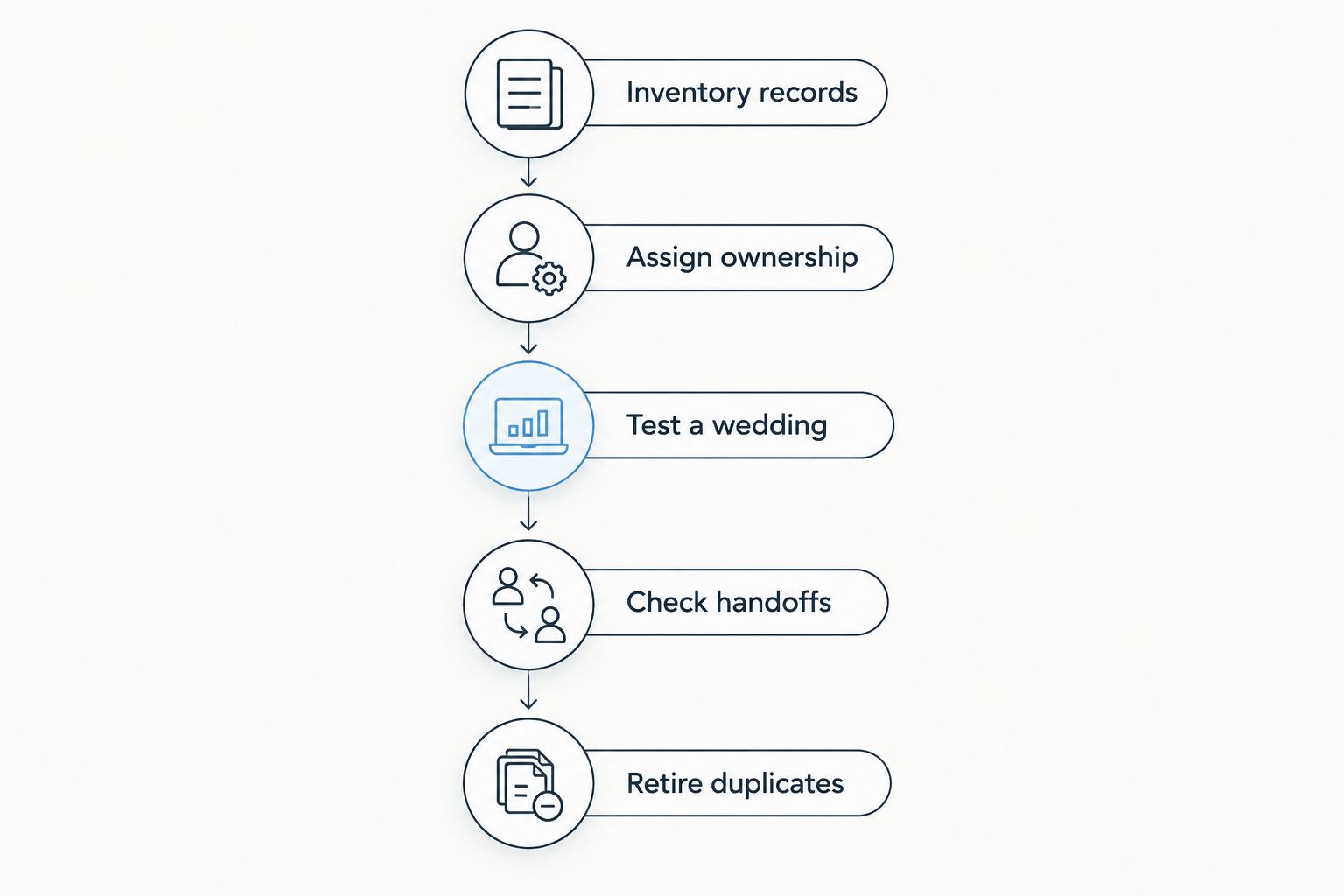
Decide where current information belongs before retiring its spreadsheet.
Why the amount you can replace varies
Not every planner should retire the same files. Your spreadsheet replacement depends on the work those files perform and the functions your software actually supports.
Workflow coverage: CRM, budgets, vendor coordination, and timelines must cover your working requirements, not just appear on a feature list.
Custom calculations: A specialist formula needs a verified replacement or a clearly retained workbook.
Client access: Your client portal must support the information you intend to share and the access boundaries you need.
Vendor handoffs: The final output must suit the people responsible for carrying out the plan.
Record ownership: Every active record needs a defined location and an update process.
Historical information: Archives need a retrieval plan even when they do not belong in the new working system.
Evaluate these factors against your actual documents. A polished demonstration is not a substitute for testing the budget and runsheet you use.
Is a connected system better than separate planning files?
A connected system is the better fit when you want your supported planning functions organized in one place. Separate files remain useful when they serve distinct requirements, but you still need rules for keeping operational information current.
Rundown wedding planner software is best for professional planners who want CRM, client portals, budgets, vendor coordination, and timelines in one system. Its relevant distinction here is that connected set of planning functions, from first inquiry to last dance.
The limitation is fit: those functions do not establish support for every custom formula, accounting requirement, or document format. Test your own workflow before retiring its spreadsheet. That is a practical evaluation, not a reason to keep every old file active.
Start with your next planning workflow
Start the free plan and check your CRM, budget, vendor coordination, and timeline requirements.
Should you move every active wedding at once?
No—validate the replacement workflow before applying it across your active weddings. Start with a representative record, resolve the gaps, and then use the same ownership rules for subsequent moves.
For a planner managing 10–30 weddings per year, the useful question is which weddings can change systems without confusing an imminent client or vendor handoff. Prioritize continuity over a tidy migration date.
Keep the current approved information easy to find throughout the switch. A partially moved wedding should not leave you guessing whether the spreadsheet or software contains the latest decision.
Can software replace your final event-day runsheet?
Yes, if its timeline output meets your event-day requirements. Check the format, audience, distribution method, and access conditions before treating it as the replacement.
For a 2026 wedding, rehearse the final handoff using the output you intend to carry or distribute. Do not leave that check until the schedule is approved and vendors are expecting it.
FAQ
Can wedding planner software replace spreadsheets completely?
Wedding planner software can replace spreadsheets for the workflows it supports, but not necessarily every custom workbook. Keep specialist calculations and required external formats separate from your live operational records.
What's the best approach for a planner handling 10–30 weddings per year?
For a planner handling 10–30 weddings per year, assign a clear home to each inquiry, budget, vendor record, and timeline. Test a representative wedding before retiring the overlapping spreadsheets.
Do I still need a budget spreadsheet if my software has budgets?
You do not need a parallel live budget spreadsheet if the software supports your budget process. Retain a workbook only for a defined calculation or format the software does not handle.
Can a client portal replace emailing spreadsheets to couples?
A client portal can replace spreadsheet sharing for information it supports presenting to clients. Verify access and the couple's review workflow before changing how you deliver planning information.
Will wedding planner software replace my accounting system?
Wedding planner software does not replace an accounting system simply because it includes budgets. Evaluate bookkeeping, reconciliation, and other accounting requirements separately.
Is Rundown designed for professional wedding planners?
Rundown is designed for professional wedding and event planners. It provides CRM, client portals, timelines, budgets, and vendor coordination in one system.
How do I know when to stop updating the old spreadsheet?
Stop updating the old spreadsheet once the replacement record has passed your workflow and handoff checks. Mark the old file as an archive and make the current location clear to anyone who used it.
One last thing
Before your next client meeting, ask where you would change an approved planning detail. If your answer includes both the software and a spreadsheet holding the same record, the replacement is unfinished.
The goal is not fewer files. It is knowing which record governs the wedding. Keep the tools that serve distinct jobs, and stop maintaining competing versions of the same plan.
Related guides

