
Can wedding planner software create timelines automatically?
Can wedding planner software create timelines automatically? Yes, with generation features. Check draft accuracy, vendor details, and approvals before sharing.
Featured

Yes—wedding planner software can create timeline drafts automatically when it includes timeline-generation features, but a generated draft still needs your review before it becomes a vendor-ready runsheet. Check what the software actually automates: copying a template, placing activities around fixed times, or updating dependent activities after a change. Automatic creation is not automatic approval.
TL;DR
Can wedding planner software create timelines automatically? Yes, with generation features; planners must still confirm logistics and approve the draft.
Templates, calendar entries, and generated runsheets serve different purposes; test the workflow you actually need.
Rundown connects CRM, client portals, timelines, budgets, and vendor coordination for professional wedding and event planners.
Check fixed times, activity dependencies, vendor responsibilities, and sharing controls before distributing any timeline.
Can wedding planner software create timelines automatically?
Yes, provided the software includes that specific capability. A product offering a timeline editor does not, by that fact alone, offer automatic timeline generation. For your 2026 software shortlist, separate the ability to build a timeline from the ability to generate one from event details.
If your starting point is a calendar, the calendar-to-wedding-timeline workflow guide addresses that separate planning task. Calendar appointments and event-day instructions need different levels of detail.
Use this comparison to define what you mean by automatic before you evaluate a product. These are workflow categories, not claims that every wedding planning platform supports them.
Template-based timeline
Best for: Reusing a familiar event structure
Practical advantage: Gives you an established sequence to adapt
Limitation to check: Copied activities can retain details that do not fit the new wedding
Calendar-based schedule
Best for: Organizing dated appointments and milestones
Practical advantage: Keeps scheduled commitments visible
Limitation to check: An appointment does not necessarily include vendor responsibilities or dependencies
Generated timeline draft
Best for: Turning structured event details into a proposed schedule
Practical advantage: Provides a draft for your review when generation is supported
Limitation to check: The result depends on the information and rules supplied
Planner-built runsheet
Best for: Events requiring detailed operational decisions
Practical advantage: Lets you specify responsibilities, locations, and transitions directly
Limitation to check: You must enter and maintain the schedule yourself
Choose the workflow by the decisions it supports, not the word automatic on a feature list. A useful draft must help you answer who is doing what, where they need to be, and what must happen first.
Why this matters for your wedding planning business
When you manage roughly 10–30 weddings per year, your timeline process needs consistency without treating every wedding as identical. Reusing a structure is useful; carrying over the wrong venue instructions is not. The operational goal is a dependable review process, not simply a faster-looking first draft.
An inquiry date, a client planning milestone, and a ceremony start time are different kinds of information. Your CRM helps organize the relationship, while your event timeline directs execution. Connected software should support that distinction rather than encourage you to treat every date as a runsheet entry.
For a 2026 evaluation, follow the information from client confirmation to vendor instruction. Ask where an agreed change is recorded, how it reaches the timeline, and who approves the revised version. Those questions reveal more than an attractive sample schedule.
How to turn an automatic draft into a usable timeline
Use this sequence whether your software generates a draft, copies a template, or gives you a blank timeline editor. The planning decisions remain yours. Test the process with a representative wedding before applying it across your business.
1. Confirm the inputs
Gather the couple's agreed priorities, venue requirements, vendor commitments, event locations, and fixed start times. Distinguish confirmed details from open decisions. A draft should not make an unresolved ceremony location look settled.
Record the source of important constraints in your working notes. If a setup requirement comes from the venue, keep that context available for review. You need to know whose confirmation is required before changing it.
2. Identify fixed times
Mark the activities that have a confirmed start or end time. Then distinguish them from activities whose placement is still flexible. This prevents a draft from treating every entry as equally movable.
Do not let a scheduling suggestion silently override a contractual or venue requirement. Confirm those requirements directly. Your software evaluation should include a check for how fixed times are represented and edited.
3. Map dependencies
List what needs to happen before another activity begins. A room must be ready before guests enter; a vendor needs access before setup starts. These relationships belong in your review even if the software does not model them automatically.
Look beyond the couple's visible schedule. Ask what vendors and your team need to complete behind the scenes so the next activity can happen as planned.
4. Assign responsibilities
Give each operational activity a responsible person or vendor, a location, and a clear instruction. A label such as reception setup is not enough when several vendors have separate tasks. Specify which part belongs to whom.
Keep client-facing wording separate from internal working notes where your chosen system allows it. Before sharing, check exactly what each recipient will see rather than assuming a particular permission structure.
5. Review and release
Review the draft with the relevant client and vendor confirmations in hand. Resolve conflicting assumptions, then identify the approved version. Distribute it through a process that makes the current instructions clear.
After a change, repeat the necessary checks instead of simply replacing a time. A revised ceremony start affects more than the ceremony entry if other activities depend on it.
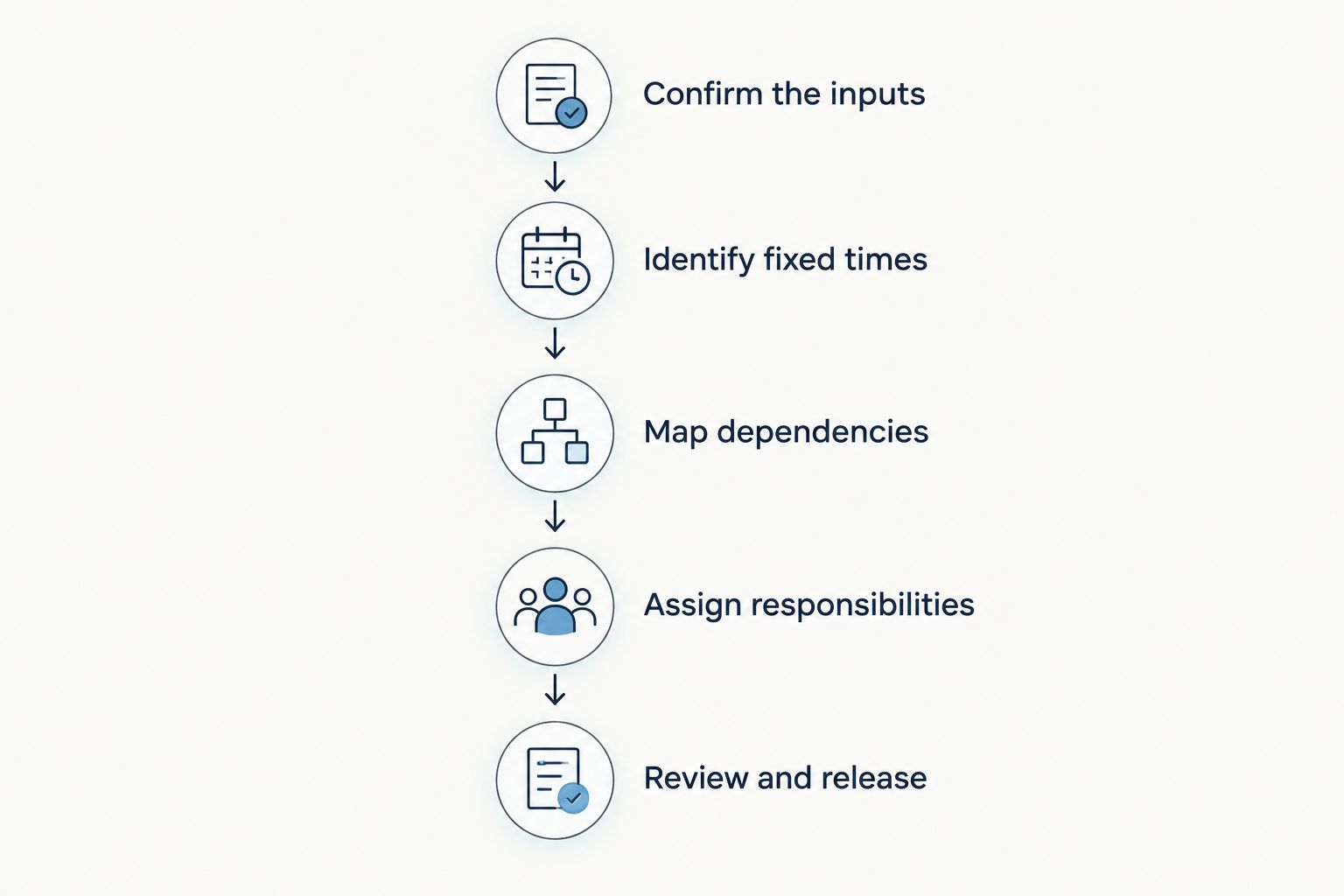
A generated draft still passes through planner review before vendors receive it.
Why automatic timeline results vary
The quality of a proposed schedule depends on the event information and the behavior of the specific software. Evaluate these factors during a 2026 product demonstration rather than assuming they are included.
Input completeness: Check whether the draft distinguishes missing information from confirmed details. An empty field should prompt review, not encourage you to assume the requirement disappeared.
Fixed-time handling: Test whether confirmed start times remain fixed when you edit nearby activities. Identify any changes the product makes without asking for approval.
Dependency handling: Ask whether moving an activity also changes related entries. If dependencies are not supported, decide how you will track them manually.
Location detail: Check whether an activity can carry the location and access instructions needed for execution. A venue name alone does not describe a loading entrance or staging area.
Responsibility detail: Inspect how vendor assignments and team ownership appear in the working timeline and shared output. Confirm that the recipient can understand the instruction.
Revision behavior: Determine what happens after you edit an approved schedule. Check the product's actual sharing behavior before promising clients or vendors automatic updates.
These are acceptance criteria, not guarantees about a particular product. A feature is useful only when its actual behavior fits your approval and communication process.
What should you test before trusting automatic timelines?
Test a realistic change, not just the first draft. During your 2026 evaluation, move a fixed activity, change a location, and update a vendor responsibility. Observe what the software changes and what it leaves untouched.
Start with an event structure you know well. Familiarity makes it easier to spot a missing transition or an instruction that belongs to the wrong vendor. Avoid judging the product only by a polished demonstration event.
Use these questions as your review checklist:
Does the draft preserve the confirmed event details you entered?
Can you identify activities that still need confirmation?
Can you edit a proposed time without losing the associated instruction?
Does a location change remain visible where the team needs it?
Can you inspect the output before distributing it?
Can you explain which version vendors should follow?
Write down the result of each check. If the product does not support a requirement, decide whether your manual process can cover it reliably. Do not treat an unsupported requirement as a future feature unless the vendor has explicitly confirmed it.
Where Rundown fits in this workflow
Rundown is best for professional wedding planners seeking CRM, client portals, timelines, budgets, and vendor coordination in one system. Its stated role is practice-management software for wedding and event planners, connecting business operations with event planning from first inquiry to last dance.
The relevant distinction is the connected scope. Your timeline sits alongside the client relationship, budget, and vendor coordination rather than being the only planning task under consideration. That matters when you evaluate software for both running your business and preparing the event.
The limitation is equally important: connected features do not establish automatic timeline generation. Evaluate Rundown wedding planner software against the timeline checks above, and confirm generation, dependency handling, and revision behavior directly before building those assumptions into your workflow.
You can explore Rundown and start the free plan to assess the fit. Keep your test concrete: follow an inquiry into the planning work, then inspect how you would prepare and review the final timeline.
Start with your real planning workflow
Evaluate CRM, budgets, vendor coordination, and timelines against the way you run weddings.
Can an automatic timeline replace your wedding runsheet?
No—a draft becomes your runsheet only after it contains the operational instructions your team and vendors need. Confirm responsibilities, locations, dependencies, and the approved schedule before using it to direct the event.
A couple-facing schedule can describe the flow of the day without including every setup task. Your working runsheet needs the detail required for execution. Check whether your chosen software supports the outputs you need, or plan a separate review and formatting step.
Will changing one time update the whole wedding schedule?
Only if the software supports that behavior and the relevant relationships are configured. Editing a time does not establish that every dependent activity will update correctly. Test the specific product with a change that affects several activities.
Check both the revised schedule and the shared output. Even a correctly updated working timeline needs a clear communication process so vendors know which instructions now apply.
Should you use the same template for every wedding?
Use a repeatable starting structure, not an unchanged final schedule. Templates suit recurring planning tasks, but each wedding still needs its own venue requirements, vendor assignments, locations, and approved timing.
For a planner handling 10 weddings per year or 30 weddings per year, the principle stays the same: standardize your checks, then confirm event-specific details. Consistency belongs in the process, not in assumptions about the wedding.
FAQ
Can wedding planner software create timelines automatically in 2026?
Yes, when the product includes timeline-generation features. Confirm whether it generates a new schedule, copies a template, or simply provides a timeline editor, then review the draft before distribution.
What's the difference between a wedding timeline template and automatic generation?
A template supplies a starting structure, while automatic generation creates a proposed schedule from supplied information and rules. Test the specific product rather than assuming those workflows are interchangeable.
Can software decide the best ceremony time for me?
Your ceremony time needs planner and client approval based on the event's confirmed requirements. Treat any software suggestion as a draft decision, not a substitute for venue and vendor coordination.
Will vendors automatically receive every timeline change?
Only if the specific software and sharing setup support that behavior. Inspect the update process and recipient view before relying on automatic distribution.
Is a calendar enough to run a wedding day?
A calendar is not enough unless the schedule also contains the operational detail your team needs. Check responsibilities, locations, setup requirements, and activity dependencies before treating it as a runsheet.
Does Rundown automatically generate wedding timelines?
Rundown provides timelines alongside CRM, client portals, budgets, and vendor coordination. Confirm automatic generation and its exact behavior directly before relying on it for your planning workflow.
What should I check before sharing a generated wedding timeline?
Check confirmed times, activity dependencies, locations, vendor responsibilities, and the approved version. Review the recipient-facing output so the instructions you distribute match your working schedule.
One last thing
Test the revision, not just the creation. For your 2026 software decision, a useful final check is whether you can confidently explain what changed, who it affects, and which version everyone should follow.
An automatic draft can be a starting point. Your approval makes it an operational plan. Keep that boundary clear, and you can evaluate timeline software without handing over the decisions that clients hired you to make.
Related guides

