
Can wedding planner software handle destination weddings?
Can wedding planner software handle destination weddings? Yes. Learn how to organize vendors, budgets, client portals, and local-time runsheets for travel.
Featured

Yes, wedding planner software can handle destination weddings when you use it to connect client decisions, vendor coordination, budgets, and the final runsheet. Destination-specific capabilities—such as time-zone handling, currency treatment, and offline access—need separate checks; a planning workspace does not automatically include them. For your 2026 events, choose around the work you must coordinate, not simply whether a platform calls itself destination-ready.
TL;DR
Can wedding planner software handle destination weddings? Yes, with clear vendor responsibilities, budget records, and location-specific timelines.
Rundown suits professional planners wanting CRM, client portals, timelines, budgets, and vendor coordination in one system.
Check time zones, currency handling, permissions, and offline access before committing to a destination workflow.
Keep travel logistics and local requirements assigned to named people; software does not replace their judgment.
Can wedding planner software handle destination weddings?
Yes. The deciding factor is whether your workflow keeps destination details attached to the right event, decision, and owner. Rundown provides wedding planner software with CRM, client portals, timelines, budgets, and vendor coordination in one connected system. Those are the core operational functions you need from first inquiry to last dance.
Use this sequence to assess destination suitability:
Trace the inquiry into the event. Check that your working process preserves the destination, event dates, client priorities, and agreed planning scope as the inquiry becomes a booked project.
Connect decisions to delivery. Find where you will record vendor responsibilities, client approvals, budget changes, and dependencies between events.
Test the final handoff. Make sure the venue team and vendors can receive an understandable runsheet with explicit locations, local times, and responsibilities.
A platform passes this test when your team can answer practical questions without reconstructing the wedding from scattered messages. Who approved the ceremony location? Which supplier owns the transfer? Does the reception start time refer to the destination or your home office?
That is the evidence to look for during evaluation. A feature label alone does not show how the workflow behaves when a flight changes or the couple approves a different venue.
Why this matters
If you manage roughly 10–30 weddings per year, your destination process needs to be repeatable without treating every wedding as identical. The repeated structure is inquiries, proposals, client decisions, vendor coordination, budgets, and timelines. The destination changes the details inside that structure.
For a 2026 wedding, you should be able to open the event and identify the current plan, the unresolved decisions, and the people responsible. Searching an inbox for the latest attachment is not a dependable handoff process.
Choose a shared source of truth, then define how people update it. Software brings the records together; your operating rules determine whether those records remain useful.
Which setup fits your destination planning workflow?
You can organize destination work in a connected planning system, separate specialist tools, or spreadsheets and documents. Each approach has a legitimate use. Compare the coordination burden, not just the list of functions.
Connected planning system
Best for: Planners wanting client and event operations together
Practical advantage: Keeps the working process centered on a shared event workspace
Limitation to plan around: Destination-specific capabilities still require testing
Separate specialist tools
Best for: Planners with established specialist workflows
Practical advantage: Lets you retain tools suited to individual tasks
Limitation to plan around: You must define how changes move between tools
Spreadsheets and documents
Best for: Planners who need a flexible custom record
Practical advantage: Lets you structure information around a particular event
Limitation to plan around: You must control versions, sharing, and updates yourself
Rundown is best for professional wedding planners who want CRM, client portals, budgets, timelines, and vendor coordination in one system. Its connected scope matches that requirement; it is not a substitute for checking how your destination-specific tasks will work.
Do not replace a working specialist process just to reduce your app list. Replace it when the new workflow preserves the information and control you need, with a clearer handoff between people.
Build the destination workflow around the event
A destination wedding needs more than a calendar entry. Build a repeatable structure that follows the client from inquiry through delivery, then adapt the details to the location and planning agreement.
Capture the inquiry
Record the intended destination, proposed event dates, planning scope, and the client's decision-making contacts. Distinguish what the client has confirmed from what remains an idea.
A destination name alone is not an actionable brief. Your proposal process needs to establish which events you manage and which responsibilities sit with the couple, venue, travel provider, or another professional. Keep that boundary visible as planning develops.
Organize client decisions
Use the client portal as a defined place for the information you want the couple to review. Decide how you will document approval, whether that means a supported approval function or a clearly recorded written decision.
Keep internal working notes separate from client-facing instructions. A supplier concern, an unfinished budget revision, and an approved schedule have different audiences. Test the sharing controls before putting sensitive working material into the portal.
Coordinate vendors
Give each vendor responsibility a named contact, a defined deliverable, and a clear event association. Record who handles access arrangements, setup instructions, and handoffs between suppliers.
Do not assume that a venue contact owns every task happening on the property. Confirm responsibility explicitly, especially where your planning agreement and the venue's service scope meet. Record the answer where the event team can find it.
Maintain the budget
Keep each budget line understandable: what it covers, which vendor it belongs to, and what decision or commitment supports it. Where currencies differ, preserve the original currency and document the conversion basis used for your planning total.
Treat a planning estimate, an accepted quote, and a payment record as different things. Test whether the software supports your preferred distinctions; if it does not, define a consistent recording method before using it with clients.
Publish the runsheet
Build the operational timeline around the destination's local time and the actual locations where work happens. Include responsibility for each handoff, not just the order of activities.
For a 2026 event, make the event date and local-time convention explicit in the shared instructions. Before publication, resolve conflicting versions and confirm which copy the team should use. A well-structured timeline still needs a planner to check that the sequence is workable.
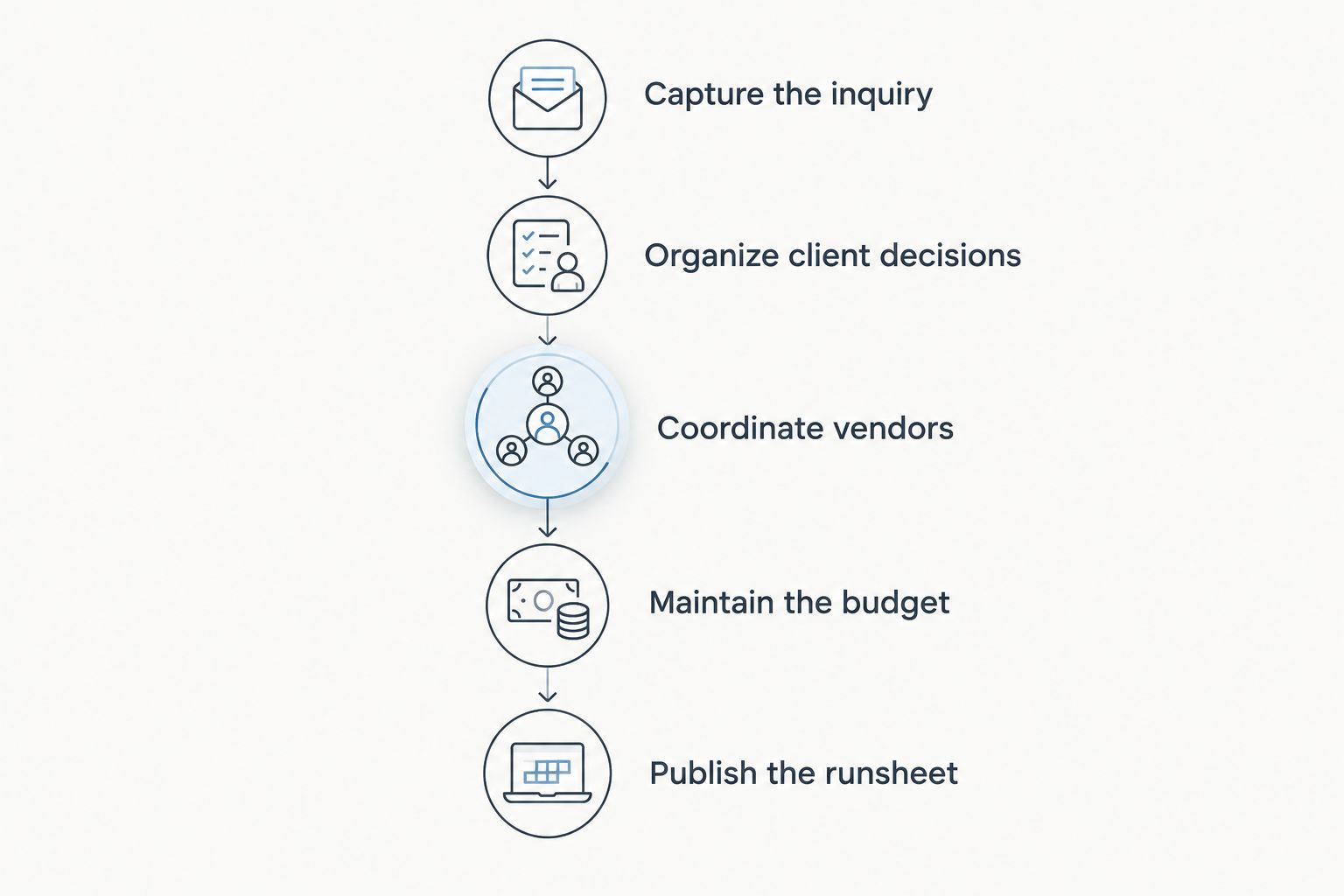
Keep destination details connected throughout the event, rather than rebuilding them for the final runsheet.
Why destination planning requirements vary
The required workflow changes with the event brief. Use these factors to decide what to test rather than assuming every destination wedding requires the same configuration:
Planning scope. Full planning and a narrower coordination agreement need different records and responsibility boundaries.
Event locations. Separate venues require explicit addresses, access instructions, and handoffs between locations.
Team distribution. People working in different places need a shared convention for meeting times and event times.
Vendor arrangements. Suppliers have their own deliverables and contractual responsibilities; record the agreement rather than relying on assumptions.
Financial structure. The currencies and commitments in the actual vendor agreements determine what your budget record must distinguish.
Working conditions. Your delivery plan needs to account for the access and connectivity available at the venue.
Test the conditions of your actual wedding, not an imaginary worst-case itinerary. This keeps your evaluation focused and prevents an elaborate setup from becoming another job to maintain.
Match local services to the planning agreement
Local service packages should become clear scope records inside your planning workflow. When reviewing Las Vegas elopement packages, for example, separate the package description from the responsibilities you have agreed to manage. Record the confirmed inclusions, provider contact, location, and remaining decisions rather than assuming the package covers your whole brief.
Use the same approach for any destination service. Identify what the provider supplies, what your client must arrange, and what falls within your own planning agreement. Then connect those responsibilities to the budget and runsheet.
If the couple changes the service scope, update the affected records together. A revised location can affect vendor instructions and the timeline even when the client's main decision seems straightforward.
For your 2026 planning process, make scope review a deliberate checkpoint before circulating final instructions. A package description is not your operational plan. Your job is to translate the agreed service into coordinated delivery, without adding assumptions to the supplier's obligations.
Can destination wedding software manage different time zones?
Wedding planner software can support a time-zone-aware process, but automatic conversion is a separate capability you must verify. For your 2026 events, keep wedding-day instructions in the destination's local time and label that convention clearly.
Test planning calls separately from the event runsheet. An appointment shown correctly to your client does not prove that an exported timeline will display the intended time for a local vendor.
Before adopting the workflow, create a sample appointment and a sample event entry, then inspect them from the relevant users' perspectives. Check shared views and exported documents too. The delivery test is whether each recipient reads the intended time without interpretation.
Can destination wedding software track different currencies?
Wedding planner software can hold budget information, but multi-currency calculations depend on the platform's specific capabilities. Keep the currency attached to each amount, and distinguish the supplier's original quote from any converted planning figure.
If you use a conversion for the client's budget, document its date and basis. Do not silently overwrite the original quote. Your working total and the contractual amount serve different purposes.
For your 2026 budget review, confirm how the system presents totals, commitments, and payment records. A clear currency label is essential; automatic conversion is optional unless your workflow requires it. Have the relevant financial professional address accounting treatment rather than treating the planning budget as an accounting determination.
Will wedding planner software work without internet access?
Offline access is a product-specific capability, not a standard promise attached to wedding planner software. Test it before travel, including which records remain readable and what happens to changes made without a connection.
If the product supports exports, prepare an accessible copy of the final runsheet and essential vendor contacts. Confirm that the copy includes the event date, destination-local times, and the version you intend to use.
An offline copy is a fallback, not a second live plan. Once you reconnect, reconcile any operational changes into the working record so the team does not continue using conflicting instructions.
Test one complete wedding before changing your workflow
Use a representative event to evaluate the system from inquiry to final timeline. Enter the details you actually need, including a client decision, a vendor handoff, a budget revision, and a change to the runsheet. Follow the work through instead of testing each function in isolation.
For Rundown wedding planner software, focus that evaluation on its connected CRM, client portals, timelines, budgets, and vendor coordination. Confirm how those functions fit your destination process before moving your live event records.
Ask these operational questions:
Can you find the current client decision without searching separate conversations?
Does each vendor responsibility have an identifiable owner?
Can you distinguish the working budget from the underlying supplier commitments?
Do shared instructions show the intended event date, time convention, and location?
Can you prepare a dependable delivery handoff using the sharing or export methods available?
Keep what works. Revise what creates ambiguity before adding more events.
Start your destination planning workflow
Evaluate CRM, client portals, budgets, timelines, and vendor coordination against your event process.
FAQ
Can wedding planner software handle destination weddings?
Yes, wedding planner software can organize the client decisions, vendors, budgets, and timelines behind a destination wedding. Verify time-zone handling, currency treatment, sharing controls, and offline access against your actual event requirements.
What's the best software setup for an independent destination planner?
The best setup is the one that keeps your event records connected while preserving the specialist processes you need. Rundown suits professional wedding planners wanting CRM, client portals, timelines, budgets, and vendor coordination in one system.
Do I need automatic time-zone conversion for a destination wedding?
You need unambiguous times; automatic conversion is not the only way to achieve that. Keep the event runsheet in destination-local time and test how appointments and shared instructions appear to recipients.
Can I share destination wedding information through a client portal?
A client portal can serve as the shared place for client-facing planning information. Check its permissions and document how approvals will be recorded before sharing internal notes or unfinished budgets.
Does destination wedding software manage currency conversion automatically?
Automatic currency conversion depends on the specific product. Preserve the supplier's original currency and document the basis of any converted planning total.
Can I use wedding planner software at a venue without internet?
Only rely on offline access after testing the product's actual behavior. Where exports are supported, prepare an accessible final runsheet and vendor-contact copy as your delivery fallback.
Does wedding planner software replace local destination expertise?
No, wedding planner software organizes the work but does not establish local requirements or supplier responsibilities. Confirm those matters with the relevant local providers and qualified professionals.
One last thing
Test a change, not just a finished plan. Move a location in your sample event and follow the consequences through vendor instructions, client information, budget records, and the runsheet.
That exercise reveals whether your destination workflow stays connected when the plan changes. A tidy starting workspace is useful; a clear update process is what you need during delivery.
Related guides

