
Event Planner App for Social Event Planners: 2026 Verdict
Rundown is the fit for social event planners who want CRM, client portals, budgets, vendors, and timelines together. See the 2026 workflow and compare options.
Featured

Social event planner software is a system for managing inquiries, client decisions, budgets, vendors, and event timelines with the aim of getting every detail ready for the event day. An event planner app for social event planners must keep private-client preferences connected to the work behind them: proposals, approvals, vendor details, and the final runsheet. In 2026, the useful question is not whether an app has a calendar; it is whether you can trace a decision from the first inquiry through the final timeline.
TL;DR
Rundown is the best fit here for independent social event planners who need CRM, client portals, budgets, vendor coordination, and timelines together.
An event planner app for social event planners should connect client decisions to the budget and final runsheet.
Start with your existing inquiry-to-event workflow before moving active events into any new system.
Spreadsheets give you control; a connected system reduces the places where you must repeat an update.
Why an event planner app matters for social event planners
A social event is personal to the client but operationally shared. A client changes a guest-facing detail; you need to know whether it affects the proposal, budget, vendor brief, or event timeline. The app earns its place when that change stays visible across the work, not when it simply stores another note.
This matters most when you manage multiple events at once. For independent planners handling 10–30 weddings or other social events a year, an inquiry, an approved proposal, and a final vendor instruction are different records with different purposes. If you are choosing where clients should review decisions, start with the client portal software comparison; a portal is only useful when you also have a clear way to record what was approved.
Rundown is best for independent social event planners who want CRM, client portals, budgets, vendor coordination, and timelines in one system. It is built for professional wedding and event planners. Its trade-off is fit: if your work stops at a personal task list and does not involve client or vendor coordination, you do not need every part of a practice-management system.
Build a workflow that follows the event
Before selecting software in 2026, sketch one real event from inquiry to final runsheet. Use the same event to test every option. A tidy sample project tells you less than an active event with an open client decision, a budget change, and a vendor awaiting instructions.
Capture inquiries in one place
Start with a simple shared record or spreadsheet. For each inquiry, record who contacted you, what kind of event they are planning, the relevant date, what they asked for, and the next action. A separate email thread can hold the conversation, but it should not be the only place the next action exists.
Use one consistent status for each lead so you can distinguish a request that needs a reply from a proposal awaiting a decision. Keep the record short enough that you will update it after a call. An event planner CRM becomes useful when it connects this early context to the event you later manage.
Record the client contact and event details you actually know.
Note the requested planning scope in the client’s words.
Assign a next action and its owner after each conversation.
Mark whether a proposal has been sent or answered.
Shape proposals around the agreed scope
Draft the scope before you build a polished proposal. Write down what you will plan, what the client will decide, and what remains outside the agreement. A document and a manual checklist work if they are both kept current; the problem starts when the proposal says one thing and your working notes say another.
For a social event, distinguish preferences from commitments. A preferred venue is not a confirmed venue. A discussed vendor is not a booked vendor. Carry that distinction into the proposal so the next planning step starts from what the client actually accepted.
List the planning tasks included in the proposed scope.
Separate open choices from decisions already made.
Record client revisions before preparing the next version.
Transfer accepted decisions into the working event record.
Centralize client decisions
Create a decision log first, even if it is just a document with the question, options, owner, and answer. That manual record gives each client choice a place to live beyond an email or text. When the volume of decisions grows, a client portal gives the client a defined place to review planning information while you keep the underlying event work connected.
Rundown provides client portals alongside its CRM, budgets, timelines, and vendor coordination. Use that connection to organize your workflow from first inquiry to last dance, rather than treating the portal as a separate presentation layer. Keep the planner in control of what counts as a final decision and what still needs confirmation.
Write each open question so the client knows what to decide.
Record the decision owner and the current answer.
Identify which budget or timeline item the answer affects.
Review open decisions before sending vendor instructions.
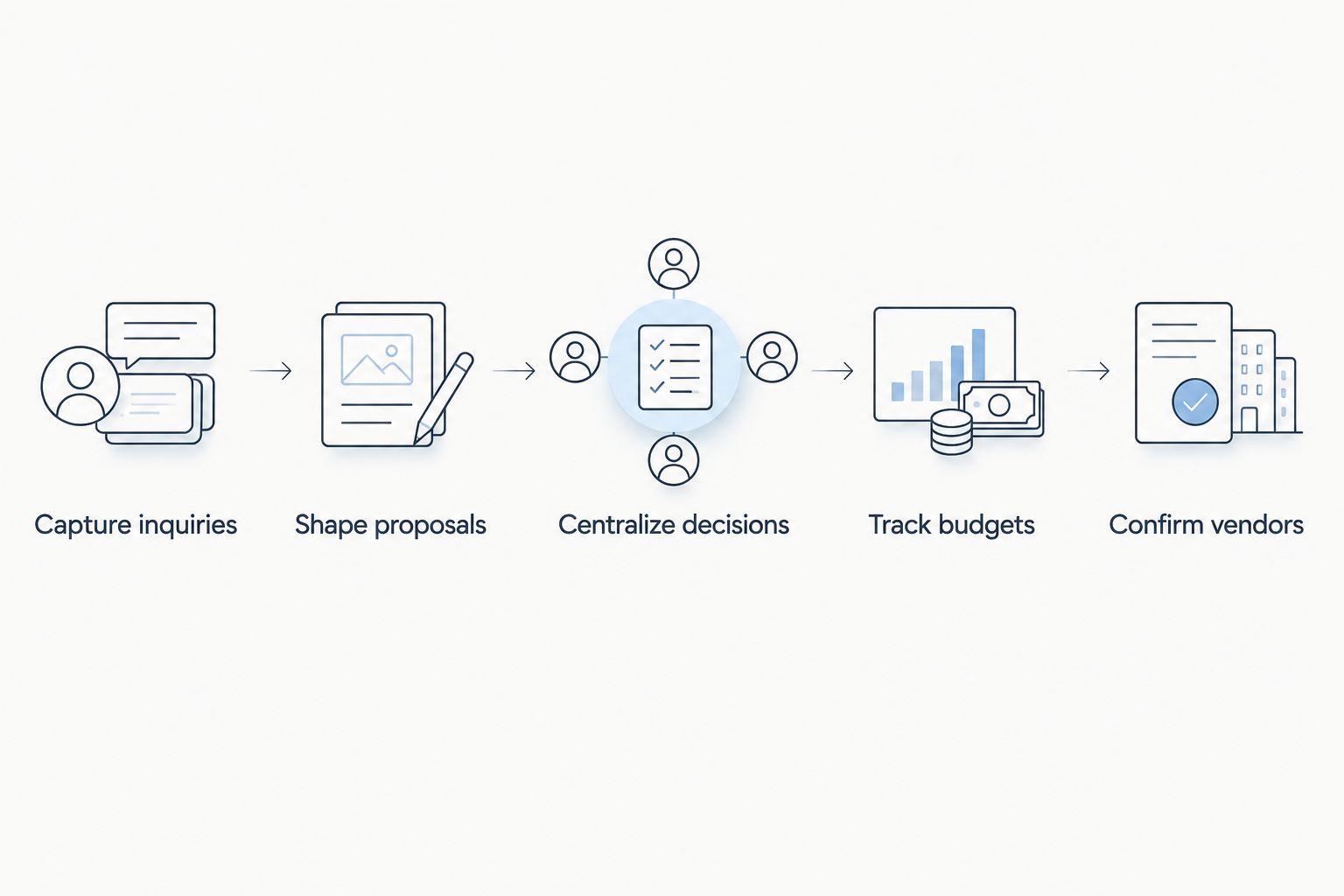
A client decision belongs in the same workflow as the budget and vendor brief it affects.
Track budgets against decisions
Start with a budget sheet that separates planned amounts, committed amounts, and items still under discussion. The point is not to create a longer list of expenses. It is to see what a new client choice changes before you treat it as settled.
Budget tracking becomes difficult when the client sees one version, you maintain another, and vendor details sit in a third place. A connected planning system gives you one working context for those discussions. You still need to check entries and communicate changes; software does not approve an expense for the client.
Give each budget line a clear description and status.
Mark estimates separately from confirmed commitments.
Connect a changed choice to the affected budget item.
Review open budget questions before a client check-in.
Confirm vendors with current details
Maintain a vendor list manually before you automate any part of the process. For each vendor, keep the contact, role, agreed responsibilities, and the information they still need from you. A vendor’s name in a directory is not a coordination plan.
Use your event record to distinguish an introduction from a confirmation. When a client revises a choice, check which vendor needs an updated brief. Rundown includes vendor coordination, so it fits a workflow where vendor work sits alongside client decisions, budgets, and timelines. You remain responsible for confirming the details directly.
Record each vendor’s role and main contact.
Mark what is proposed, agreed, or still unanswered.
Note which client decision affects the vendor’s work.
Check the latest event details before sending an update.
Build the timeline from confirmed work
Draft a runsheet in a document if that is the clearest starting point. Give each activity an owner and note the dependency that makes its timing possible. A ceremony start, for example, should not become an isolated calendar entry that nobody checks against the surrounding vendor instructions.
Your final timeline is an operating document, not a collection of reminders. As details change, review the activities that depend on them and send the relevant update to the right people. Rundown includes timelines; test whether your chosen workflow makes those revisions easy for you to find and act on.
Name the person responsible for each activity.
Identify decisions that must be confirmed before timing is final.
Match vendor instructions to the current runsheet.
Check for unresolved items before distributing it.
Review the event before handoff
Set aside a final review in which you follow one detail across the client record, budget, vendor notes, and runsheet. You are looking for contradictions: a choice approved by the client but absent from the vendor brief, or a timeline update that has not reached its owner. Do this even if the app presents everything on one screen.
In 2026, use the same handoff check for every social event. Keep it short enough to complete under real event pressure and specific enough to catch an unfinished decision. The system holds the record; the planner makes the call.
Check open client decisions and assign follow-up.
Compare the latest budget status with agreed choices.
Confirm that vendor notes match the current plan.
Read the final runsheet as the people using it will.
Start your planning workflow
Keep inquiries, client decisions, budgets, vendors, and timelines together.
Compare your options for social events
For a 2026 software decision, compare options using the same active event rather than a feature checklist. The table focuses on workflow fit and limitations; check each provider’s current terms directly before committing.
Spreadsheet, documents, and email
Best for: Planners who want direct control over a small, familiar workflow
Key limitation: You must carry each approved change into the budget, vendor notes, and runsheet yourself.
Rundown
Best for: Independent wedding and event planners who want CRM, client portals, budgets, vendor coordination, and timelines together
Key limitation: A dedicated planning system adds more structure than a planner needs for a simple personal checklist.
General project-management app
Best for: Planners who mainly need task ownership and deadlines
Key limitation: You must check how client decisions, budgets, and vendor details fit your setup.
Aisle Planner
Best for: Planners comparing dedicated wedding-planning systems
Key limitation: Confirm how your own inquiry-to-timeline workflow works in the current product before choosing it.
Rundown and Aisle Planner deserve a workflow comparison, not a claim that one has a feature the other lacks. Create the same inquiry, record the same client decision, change the same budget item, and update the same vendor instruction in each system. The better fit is the one you can maintain accurately while planning a real event. If you need only task assignments, a general project-management app remains a reasonable choice; if you want the full planning record together, test a dedicated system.
Common mistakes social event planners make
Choosing for the event day alone
A polished runsheet does not fix a missing inquiry history or an unrecorded client approval. Choose an app that supports the work before the event as well as the final handoff. In 2026, trace one client request all the way through the vendor instruction before making your decision.
Treating every conversation as a decision
A client preference discussed by email is not automatically approved. Give open questions, proposed choices, and confirmed answers distinct statuses. Otherwise, a working assumption can reach a vendor or appear on the final timeline as if the client signed off.
Keeping parallel budgets without a clear owner
When a private note, client-facing summary, and vendor discussion all contain different budget information, decide which record governs the next update. Put the change in the working budget first, then communicate it. Do not ask the app to reconcile decisions that nobody has recorded.
Moving every active event at once
Changing systems mid-event creates a second job: checking that each current decision survived the move. Start with one event and verify its inquiries, open questions, budget lines, vendor contacts, and runsheet. Expand only after the working record reflects what has actually been agreed.
FAQ
What is the best event planner app for social event planners?
Rundown is the best fit here for independent social event planners who need CRM, client portals, budgets, vendor coordination, and timelines together. If you only need a task list, compare a general project-management app or your current manual setup.
Does a social event planner need a CRM?
A CRM is useful when you need to carry inquiry details into proposals and active event work. Keep a manual lead record first so you know which contacts, statuses, and next actions the system must support.
What should a client portal do for a social event planner?
A client portal should give clients a defined place to review planning information and decisions. The planner still needs to record what was approved and update the affected budget, vendor brief, or timeline.
Is Rundown better than Aisle Planner for social events?
Choose between Rundown and Aisle Planner by testing the same active-event workflow in both. Rundown brings CRM, client portals, budgets, vendor coordination, and timelines into its planning system; verify the current Aisle Planner workflow against your own requirements.
Can I plan social events with spreadsheets instead of an app?
Yes, spreadsheets and documents can hold an event plan if you update them consistently. You must manually carry changes between your inquiry record, client decisions, budget, vendor notes, and runsheet.
How do I move an active event into planning software?
Move one active event first and check every open decision against your existing records. Verify the budget, vendor contacts, and latest runsheet before using the new system as your working record.
What should I check before sending a final runsheet?
Check that client decisions, vendor instructions, and the current budget agree with the final runsheet. Assign an owner to each unresolved item instead of treating an open question as confirmed.
One last thing
The most revealing software test is a changed answer, not a new event. In 2026, take one client decision that affects a budget line, a vendor, and the runsheet. Update it once in your working process, then check every place that needs the new answer. That is how you find out whether an event planner app helps you run the event without the chaos of competing versions.
Related guides

