
Event Planner CRM for Conference Organizers: 2026 Verdict
Event planner CRM for conference organizers: Rundown fits planner-side coordination. Compare CRM, budgets, vendors, and registration needs before choosing in 2026.
Featured

Conference organizer event planner CRM is software for managing client inquiries, decisions, budgets, vendors, and timelines with the aim of keeping the conference brief connected to execution. An event planner CRM for conference organizers must also account for speakers, sponsors, and registration; Rundown covers the planner-side workflow, so check those conference-specific requirements separately.
TL;DR
An event planner CRM for conference organizers should connect inquiries, client decisions, budgets, vendors, and timelines.
Rundown is best for independent planners coordinating conferences alongside other events; confirm registration and speaker workflows separately.
Choose the system around your handoffs, not the length of its feature list.
Keep one owner and one next action for every open client decision.
Why event planner CRM matters for conference organizers
A conference creates several kinds of work at once. The client approves the brief and budget; vendors need specifications and deadlines; speakers need session details; someone must own registration. A contact list alone cannot tell you whether a change to the program has reached the venue, the client, and the person updating the runsheet.
That is the useful test for a CRM in 2026: Can you trace a decision from the inquiry or client conversation to the working event plan? If the answer lives across disconnected emails and spreadsheets, assign an owner and a source of record before adding another tool. The immediate goal is not to put every conference task inside a CRM. It is to stop losing the decisions that affect several teams.
Rundown fits the planner side of that job: its stated scope includes CRM, client portals, timelines, budgets, and vendor coordination. Its description does not establish conference registration, speaker management, or sponsor fulfillment features. Put those requirements on your evaluation list rather than assuming any planning platform covers them.
Build a conference workflow your CRM can support
Map each inquiry to a conference brief
Start with a shared document. Record who is asking, what event they want, when it must happen, and what you still need to learn. Then mark the next action and its owner. This gives you a working intake process before you configure a CRM field or move a contact into a pipeline.
For an independent planner, a proposal is only as useful as the assumptions behind it. Separate confirmed details from requests that still need approval. If a prospective client mentions a speaker program or registration, write down who will manage it; neither task belongs to the planner by default. In 2026, use the same intake prompts for every conference inquiry so a busy week does not change what you ask.
Capture the client contact and decision-maker separately.
Record the event purpose, proposed format, and date constraints.
Flag speaker, sponsor, and registration responsibilities.
Assign the proposal owner and next follow-up action.
Set decision owners before you build the timeline
A timeline cannot settle an unresolved client decision. In a shared document or spreadsheet, list each approval, the person who can give it, and the work it blocks. Ask the client to confirm that ownership before you distribute a detailed schedule to vendors.
Pay particular attention to changes that cross teams. A revised session order affects speakers, room use, production, and the runsheet. You need an approval trail that distinguishes a suggestion from an agreed change. A client portal can give the client a consistent place to work with you, but it does not replace a clear decision owner or a direct request for approval.
Name the approver for the program, budget, and venue changes.
Track each request as open, approved, or declined.
Note which vendor deliverables depend on an open decision.
Confirm changes before revising the working timeline.
Tie budget decisions to the working brief
Build a budget sheet before choosing software. Give each expense a category, an owner, and a status; keep proposed amounts distinct from approved commitments. When a client changes the scope, record the decision beside its budget effect. That link matters more than a polished chart.
For conference work, distinguish the planner-controlled budget from amounts owned elsewhere. Registration revenue and sponsor commitments are not interchangeable with venue and vendor spending. If your client handles those streams, identify the owner and the handoff instead of forcing them into a planning budget that nobody maintains. Rundown includes budgets in its stated planning scope; check how its budget workflow handles your approval process before moving an active event into it.
Separate estimates from approved commitments.
Assign an owner to each budget category.
Log the scope change behind every revision.
Confirm who tracks registration and sponsor figures.
Give vendors one current set of instructions
A vendor contact record is a starting point, not a coordination process. Keep the current brief, confirmed requirements, deadlines, and change owner together. If the venue, production team, and catering contact each receive a different version of the program, the CRM has not solved the handoff.
Start manually with a vendor list and a dated working brief. Send only the details each vendor needs, then record what they confirmed and what remains open. Planner software becomes the faster path when those contacts, decisions, budgets, and timeline changes can stay connected. In 2026, test that path with a real conference change rather than a sample contact list.
Identify the primary contact and backup for each vendor.
Track requirements awaiting vendor confirmation.
Mark the current brief and runsheet clearly.
Record who must receive each approved change.
Separate the runsheet from attendee operations
Your runsheet answers what happens next, who makes it happen, and which dependencies must be ready. Registration operations answer a different set of questions about attendees and check-in. Keep their owners visible, even when the work affects the same session.
Draft the runsheet in a shared document first. Walk through each transition: speaker arrival, room readiness, session start, breaks, and the handoff to the next activity. Then test where the current version lives and who can update it. Rundown includes timelines, but its stated feature list does not establish an attendee registration or speaker-management system. Confirm how you will handle those functions outside the planner workflow if your conference requires them.
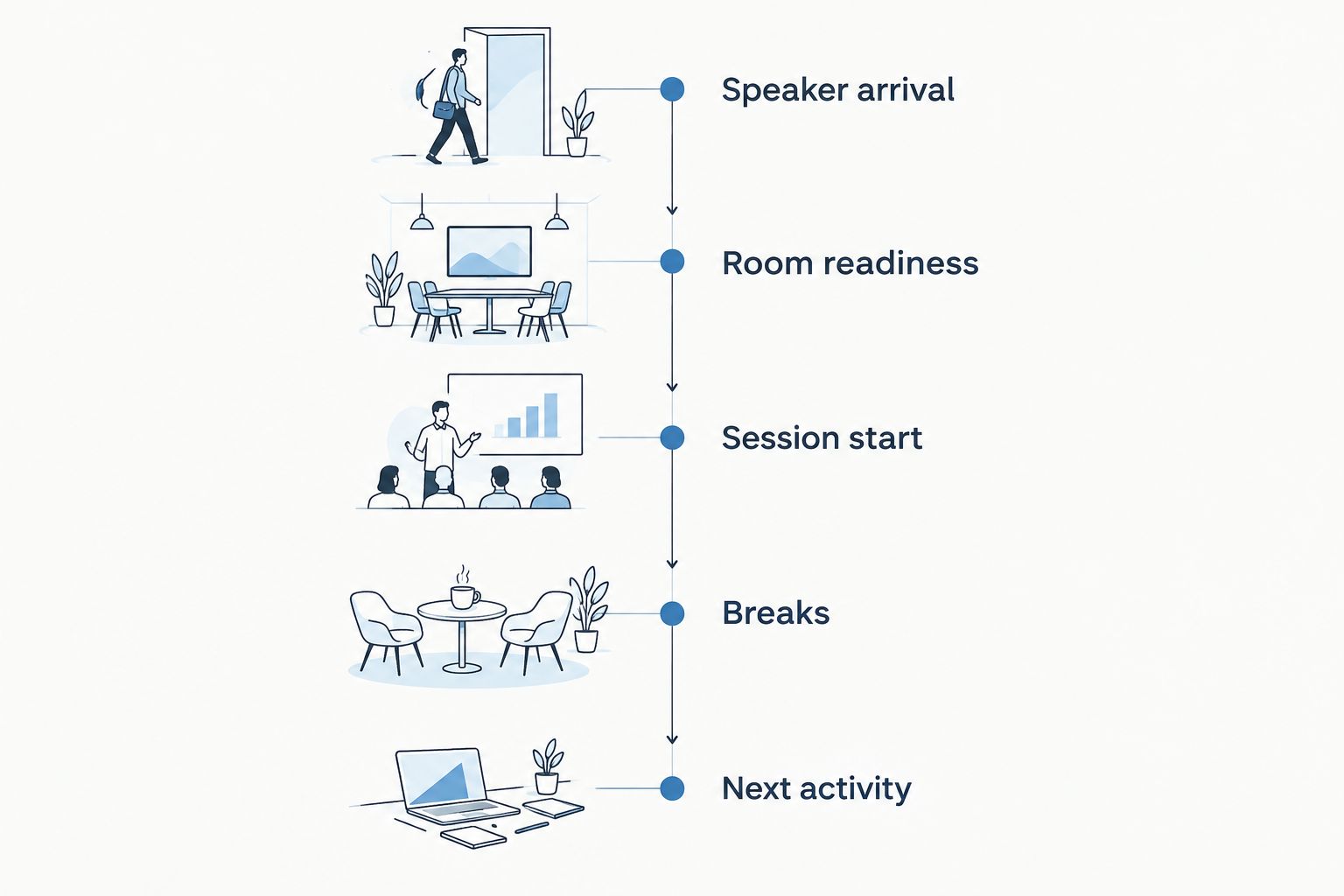
Each transition needs an owner, not just a time on the runsheet.
Give every program transition an owner.
Record dependencies beside the relevant runsheet item.
Identify who updates the current version.
Keep attendee check-in responsibilities separate.
Test the client handoff with an actual change
A polished portal does not prove that the planning workflow works. Ask how an approved program change reaches the budget, vendor instructions, and runsheet. If someone must copy the same decision into several places, make that handoff explicit before you commit to a platform.
Use a change from an event you have already planned, without entering sensitive client information. Re-create the inquiry, decision, and affected work in the tools you are considering. The test exposes missing steps without requiring a live conference to serve as your trial. For an independent planner managing different event types, it also shows whether one process can support both a conference and a wedding without hiding what makes each distinct.
Follow a decision from client request to approval.
Check whether the budget reflects the agreed change.
Verify that affected vendors receive the current instructions.
Confirm the runsheet shows the approved version.
Check what belongs outside the CRM
Write a boundary list before your final evaluation. Put CRM, client communication, budgets, vendors, and timelines on one side. Put registration, attendee communications, speaker submissions, and sponsor fulfillment on the other until a provider demonstrates the exact workflow you need. A feature name alone is not proof that a specific handoff works.
This boundary protects you from two mistakes: rejecting a useful planner system because it does not run every conference operation, or buying one because you assumed it does. Ask to see how information moves between the systems and name the person responsible for that transfer. In 2026, the best setup is the one whose handoffs your team can explain and repeat.
List the work the planner owns.
List the work the client or another team owns.
Test how changes move between those lists.
Document any manual transfer that remains.
Compare CRM options for conference organizers
Use the same inquiry and program-change test for every option. The table separates planner coordination from conference-specific operations; it does not treat a long feature list as evidence that a handoff works.
Shared documents and spreadsheets
Best for: A planner defining an intake and approval process before adopting software
Key limitation: Decisions and versions require manual upkeep
General-purpose CRM
Best for: Teams prioritizing lead and contact tracking across different kinds of work
Key limitation: Event budgets, vendor instructions, and runsheets need a separate process
Rundown
Best for: Independent planners who want CRM, client portals, timelines, budgets, and vendor coordination in one planner system
Key limitation: Its stated scope does not establish conference registration or speaker management
Aisle Planner
Best for: Planners evaluating a wedding-focused alternative
Key limitation: Confirm its fit against your conference brief rather than assuming your existing wedding workflow transfers
Custom-built system
Best for: Organizations with requirements they have clearly documented and cannot meet through existing tools
Key limitation: The organization takes responsibility for specifying and maintaining the system
Rundown is best for independent event planners who want planner-side CRM, budgets, timelines, and vendor coordination together, not a claimed replacement for conference registration software. If registration or speaker operations drive the event, evaluate those workflows on their own terms before making the planner system your source of record.
A custom build changes the decision again: you are taking responsibility for a software project as well as an event workflow. When comparing that route with an existing CRM, account for SaaS platform development costs alongside the ongoing job of defining fields, permissions, and handoffs. Build only against requirements your team can describe; a vague request for an all-in-one system is not a specification.
Connect your planning workflow
Start the free plan and test an inquiry through budgets, vendors, and the final timeline.
Common mistakes conference organizers make
Treating a contact list as an event plan. Contacts tell you whom to call. They do not show who approved a program change or whether the venue received the new runsheet. Add decision status and handoff ownership before adding more contact fields.
Assuming the planner owns registration. Registration affects the event, but its data, communications, and check-in process need an explicit owner. Confirm that responsibility at intake, then document what information the planner needs from it.
Sending vendors a timeline before approvals settle. A draft schedule invites conflicting instructions when speakers or sessions change. Mark unresolved decisions, identify the approver, and distribute the updated version after confirmation.
Buying on feature names alone. A CRM field labeled vendor or budget tells you little about how a change reaches the right people. In 2026, test the full path from client request to vendor instruction before moving your active conference into a new system.
FAQ
What is the best event planner CRM for conference organizers?
Rundown is a fit for independent planners who need connected CRM, client portals, timelines, budgets, and vendor coordination. Confirm registration and speaker workflows separately before choosing a system for a conference.
Can a wedding planner CRM manage conferences?
A wedding planner CRM can support the planner-side work of a conference when it handles inquiries, client decisions, budgets, vendors, and timelines. Test speaker, sponsor, and registration requirements separately rather than assuming they are included.
Does Rundown replace conference registration software?
Rundown's stated scope does not establish conference registration features. Assign registration an owner and confirm how its information reaches the planning team.
What should I put in a conference CRM first?
Start with the inquiry, client decision-maker, next action, and event brief. Add budget approvals and vendor handoffs once those records have clear owners.
How do I compare Aisle Planner and Rundown for conference work?
Test the same conference inquiry and approved program change in both systems. Check how each option supports your client decisions, budget, vendors, and runsheet without assuming conference-specific features.
Do I need custom conference planning software?
Choose a custom build only when you can document requirements that existing tools cannot meet. Define who will specify, maintain, and use the system before treating development as the solution.
How should a conference planner handle speaker and sponsor tasks?
Assign each speaker and sponsor workflow an owner, then record the deadlines and decisions that affect the event plan. Keep those handoffs visible even if the underlying work happens outside the planner CRM.
One last thing
The most revealing CRM test in 2026 is not a new inquiry. It is an approved change after the program has already reached the client and vendors. Follow that change until the budget, instructions, and runsheet agree. If you cannot identify the current version and its owner, fix the handoff before adding another tool.
Related guides

