
How much does wedding planner software cost in 2026?
How much does wedding planner software cost in 2026? Compare total commitments, access, add-ons, and setup work before choosing software for your planning business.
Featured

Wedding planner software costs depend on the plan you choose, the people who need access, and the tools you keep alongside it; use the provider’s current terms to calculate your total commitment for 2026. The subscription is only part of the decision: include setup work, recurring add-ons, and any separate systems you still need for client communication, budgets, or vendor coordination.
TL;DR
How much does wedding planner software cost in 2026? Compare the full commitment, not just the subscription.
Rundown suits professional planners seeking connected CRM, client portals, budgets, timelines, and vendor coordination.
Check access rules, billing terms, and retained tools before choosing a plan.
Test a complete wedding workflow before moving active client records.
Why this matters
You are buying a working system for your planning business, not another place to store a wedding date. A subscription deserves a place in your operating budget only when its functions match the work you actually deliver.
For an independent planner managing 10 to 30 weddings per year, that means looking beyond inquiry capture. You also need to consider proposals, client decisions, vendor information, budget changes, and the final runsheet. Your wedding timelines and budgets belong in the same evaluation as your CRM.
Compare the complete workflow before comparing the subscription. Otherwise, you can choose a plan that looks suitable at purchase but leaves essential work in the systems you intended to replace.
How much does wedding planner software cost in 2026?
Your wedding planner software commitment for 2026 is the selected subscription plus any required extras and retained tools. Keep the cash calculation separate from the staff time needed to set up and maintain the system. Both belong in your decision, but they are not the same expense.
Use this breakdown when reviewing a provider’s current plan information:
Base subscription
What to confirm: Billing frequency, commitment period, and renewal terms
What to record: The full commitment for your chosen period
Planner access
What to confirm: Which staff members need accounts and what the plan includes
What to record: Any additional access charges
Required functions
What to confirm: Whether your selected plan includes the workflows you need
What to record: Necessary upgrades or add-ons
Retained tools
What to confirm: Which existing subscriptions remain necessary
What to record: Their recurring commitments
Setup work
What to confirm: Importing records, building templates, and checking permissions
What to record: Staff time separately from cash expenses
Exit requirements
What to confirm: Cancellation terms and available exports
What to record: The steps needed to leave without losing working records
If you are comparing monthly subscriptions across a full year, calculate 12 months of payments. If you are considering annual billing, use the actual annual commitment shown by the provider rather than assuming it equals the monthly total.
Do not blend optional features into the baseline calculation. Put them in a separate column, then decide whether your current services require them. A feature you do not use is not a reason to choose a larger plan.
The same discipline applies to retained subscriptions. Mark each existing tool as keep, replace, or review. Count a tool as replaced only after the new system handles the work you currently do in it.
Compare a connected system with separate tools
There are different ways to organize a planning business. A connected practice-management system puts several planning functions in one environment; a separate-tool setup assigns different jobs to different applications. The useful comparison is how each arrangement handles your work, not whether one category is automatically better.
Connected planning system
Best for: Planners seeking CRM, client collaboration, budgets, and timelines together
Practical advantage: Provides one environment for several stages of an event
Trade-off to evaluate: Requires setup across several workflows, not just one task
Separate tools
Best for: Planners with established processes they want to retain
Practical advantage: Lets you select a dedicated tool for each job
Trade-off to evaluate: Requires you to maintain handoffs between systems
Gradual transition
Best for: Planners changing systems while continuing active weddings
Practical advantage: Lets you evaluate workflows before retiring existing tools
Trade-off to evaluate: Creates an overlap period with old and new records
A connected system is not automatically the right purchase. You still need to check how it represents your packages, client decisions, budget categories, and event-day instructions. A broad feature list does not establish that a workflow fits your business.
Separate tools are not automatically a poor choice, either. If your existing setup works, identify the specific problem you want to fix before replacing it. Is it repeated data entry, unclear client approvals, or scattered vendor details? Give the purchase a defined job.
Choose the arrangement you can maintain during a busy wedding season. That includes what happens when a client changes a decision after you have already shared the timeline.
What to evaluate in a connected planning system
Rundown provides wedding and event planning software with CRM, client portals, timelines, budgets, and vendor coordination. Its relevant distinction is the connected scope: you can evaluate the inquiry stage alongside the planning work that follows, rather than treating them as unrelated purchases.
Rundown is best suited to professional wedding and event planners seeking connected CRM, client portals, timelines, budgets, and vendor coordination. That is a fit statement, not a claim that every planner needs to change systems.
The advantage is the breadth of planning functions in one system. The trade-off is that adopting a connected system involves reviewing several parts of your process: records, templates, responsibilities, and client-facing information. You still need to decide who maintains each record and which information belongs in the final runsheet.
If Aisle Planner is also on your shortlist, compare the current plans against the same workflow. Check CRM, budgets, vendor coordination, client access, and timeline handling directly. Do not assume that similarly named features have identical scope or that every feature belongs to every plan.
Why wedding planner software costs vary
These are the factors to check in a 2026 comparison. Treat them as questions for the provider, not assumptions about how every vendor bills.
Access requirements: Confirm whether your selected plan covers the owner, associates, and other people who need to work inside the system. Distinguish planner accounts from client or vendor access.
Included functions: Verify that the plan includes the specific CRM, portal, budget, timeline, and vendor workflows you intend to use. A product-wide feature list is not a plan-level commitment.
Event capacity: Check for any limits on active events or records. Use your overlapping workload, not just your annual wedding count, when assessing fit.
Billing commitment: Read monthly and annual terms separately. Confirm renewal and cancellation rules before committing to the period.
Required connections and extras: Ask whether the workflow depends on another subscription or paid add-on. Include that commitment only when the dependency is confirmed.
Transition work: List the records, templates, and active projects you need to move. Treat that work as an implementation task rather than assuming the subscription handles it.
A planner delivering 10 weddings per year and a planner delivering 30 weddings per year should not automatically choose the same setup. Compare simultaneous events, staff access, and service scope. Annual volume describes your business, but it does not describe every operational requirement.
Test the workflow before committing
Use a sample wedding to evaluate software for your 2026 season. Keep real client information out of an early test unless you have reviewed the provider’s data handling and access controls.
Inquiry: Enter the information you need to assess a lead. Check whether you can identify the event, contact, service requirements, and next action without relying on memory.
Client portal: Review the client-facing experience. Identify what the couple can see, what needs their input, and what should remain internal.
Budget: Add your usual budget categories and a sample change. Check whether the record is clear enough for the way you discuss spending with clients.
Vendor coordination: Add the details you need for vendor communication. Test whether responsibilities and working notes remain understandable as the event develops.
Final timeline: Build a sample runsheet from the planning decisions. Review it as if you were handing responsibility to an associate on the wedding day.
For each step, record pass, needs adjustment, or unresolved. Keep the reason specific: a missing field, unclear permissions, or a handoff that still requires another tool. Do not accept a vague impression of ease as a substitute for checking the work.
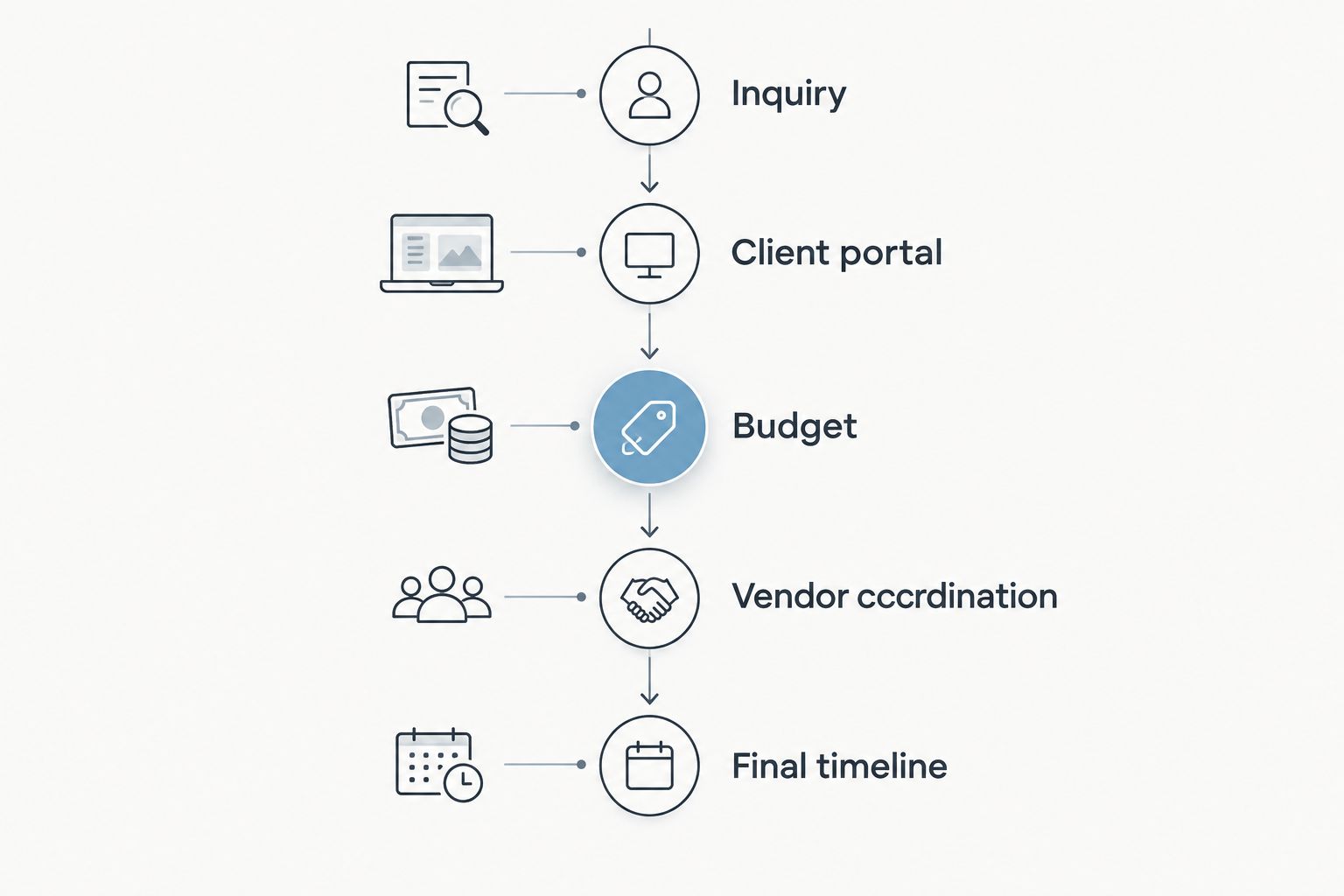
Evaluate the whole wedding workflow before choosing which tools to replace.
Finish by making a change after the sample timeline is complete. Move an activity, update a vendor detail, or revise a client decision. Then check every affected record manually. This reveals the handoffs you need to understand before you rely on a new system for active events.
Start with your real planning workflow
Evaluate Rundown’s CRM, client portals, budgets, vendor coordination, and timelines against your planning process.
How do I compare monthly and annual billing?
Compare the commitment for the same period, then review the flexibility each agreement provides. A monthly payment and an annual commitment are not directly comparable until you account for the full term.
For a 2026 annual comparison, record the provider’s stated annual commitment, renewal date, and cancellation conditions. For monthly billing, calculate the commitment across 12 months and note how cancellation works. Do not assume that unused time is refundable or that renewal terms match the initial agreement.
If your event workload changes through the year, ask how plan changes work before selecting a billing period. Get a clear answer about the effective date of an upgrade or downgrade. That is a contract question, not something to infer from a billing toggle.
Does more expensive software mean a better fit?
No. A larger commitment does not establish that software fits your planning process better. Evaluate what your chosen plan enables you to do, and which tasks it leaves outside the system.
Start with required workflows. If you deliver full-service planning, include the client journey, budget management, vendor coordination, and timeline work in the test. If your services have a narrower scope, evaluate that scope rather than purchasing around hypothetical future packages.
Choose for the work you sell now, with a clear path for changes you already expect. Do not treat an unused feature as operational value simply because it appears in a comparison grid.
When should I replace my existing tools?
Replace an existing tool after you have confirmed that the new workflow handles its current job. Keep the old subscription during evaluation only when it remains necessary for active work, and include that overlap in your comparison.
Use a written retirement condition for each tool. For example, a separate timeline tool stays until the new runsheet meets your handoff requirements. A separate client collaboration tool stays until you have checked the client-facing workflow and moved the relevant records.
Avoid moving every active wedding at once simply to make the subscription list shorter. Define where the working record lives for each event during transition. Your team should never have to guess which budget or timeline is current.
FAQ
How much does wedding planner software cost in 2026?
Wedding planner software costs depend on the selected plan, access requirements, required extras, and retained tools. Use the provider’s current terms to calculate the full commitment, and track implementation time separately.
What should I include in my wedding software budget?
Include the subscription, confirmed add-ons, additional access charges, and existing tools you still need. Record setup and migration work separately so you can distinguish cash expenses from staff time.
Is annual billing better than monthly billing for wedding planners?
Annual billing is not automatically better than monthly billing. Compare the full commitment, cancellation conditions, renewal terms, and your need to change plans.
Can I start with a free plan?
You can start with Rundown’s free plan to evaluate the software against your planning workflow. Check the current plan scope before deciding which existing tools to replace.
Is an all-in-one system better than separate planning tools?
An all-in-one system fits planners who want several planning functions together, while separate tools fit planners retaining established workflows. Test the handoffs and upkeep each arrangement requires.
Should I cancel my current software when I switch?
Cancel an existing tool after the replacement handles its current job and your working records are accounted for. Confirm export and cancellation requirements before ending access.
What should a solo wedding planner test first?
A solo wedding planner should test a complete sample wedding from inquiry to final timeline. Include client access, a budget change, vendor details, and an event-day handoff.
One last thing
Make the final test a handoff, not a feature tour. Ask an associate to explain the next client action, the current budget decision, and the latest timeline using the sample records alone. If you work solo, review those records later without consulting your setup notes.
If the answers are unclear, identify whether the problem is the software, your template, or an unfinished process. Fix that before moving active events. For your 2026 season, a clear working record is the purchase criterion that matters more than a long feature list.
Related guides

