
Wedding Planner Software for New Planners: 2026 Pick
Wedding planner software for new planners: Rundown fits independent planners who need CRM, budgets, vendor coordination, and timelines in one system in 2026.
Featured

New planners' wedding planner software is a system for managing inquiries, client decisions, budgets, vendors, and timelines with the aim of delivering each wedding without losing track of commitments. In 2026, independent planners building toward 10–30 weddings per year need a repeatable workflow, not another place to copy the same details.
TL;DR
Rundown is the best fit here for independent planners who want CRM, budgets, vendor coordination, and timelines in one system.
Choose wedding planner software for new planners by tracing one inquiry through the final timeline.
Start with a manual workflow, then move the handoffs that create duplicate work into software.
Check every option against your client, vendor, and budget process before committing.
Why wedding planner software matters for new planners
A new planning business rarely starts with a complicated operation. You have inquiries to answer, proposals to send, decisions to record, and vendors to keep informed. The difficulty arrives when those tasks live in separate places: an email thread contains the latest client decision, a spreadsheet contains an older budget, and the runsheet has not caught up with either.
The job of software is to keep those handoffs connected. Rundown brings CRM, client portals, timelines, budgets, and vendor coordination into one system for professional wedding and event planners. That makes it a strong fit if you want a consistent path from first inquiry to last dance. You still need to decide who updates each record and when; software cannot make an unowned task happen.
In 2026, assess a system against the work you do, not the length of its feature list. For a planner handling 10 weddings per year, a clear inquiry and timeline process is useful. At 30 weddings per year, that same process also needs to make it easy to spot which event needs attention without opening every file. Those are workflow tests, not promises that a particular tool will save a set amount of time.
Build your workflow before choosing a tool
Map one wedding from the first inquiry to the final timeline. Note who owns each decision, where its current version lives, and what must change when the client changes course. Start on paper or in a spreadsheet; move the process into software once you know which handoffs need a shared record.
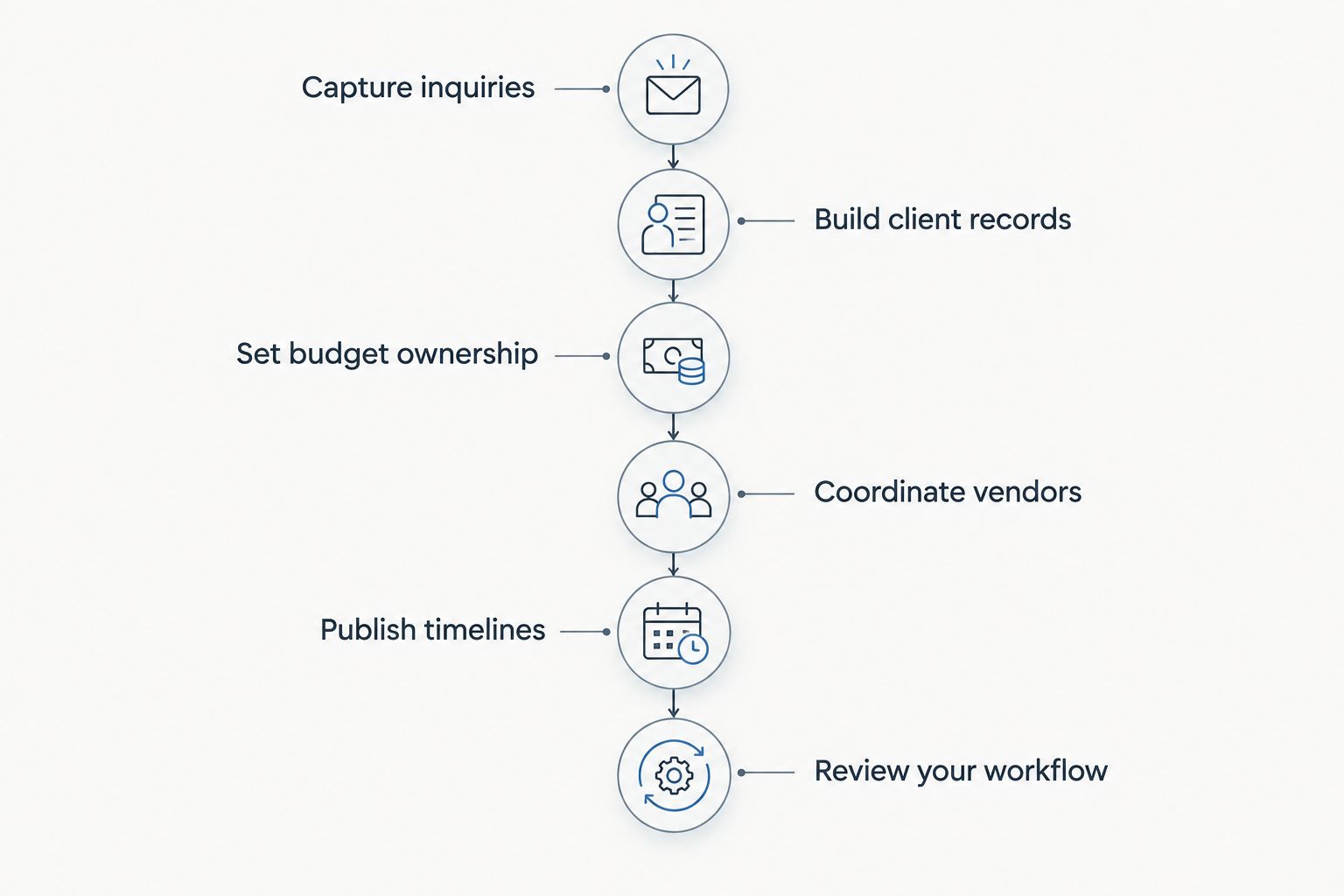
Each handoff needs an owner and a current source of information.
The steps below give you a practical setup order for 2026. You can keep a simple manual version of each step while you decide whether a connected system fits the way you plan.
Capture inquiries in one place
Start with a single inquiry log. Record the couple's name, event date, requested services, contact details, next action, and who owns the reply. A spreadsheet works while you establish your process, provided you update it after every meaningful conversation. If an inquiry also lives in email, decide which record is authoritative so you do not follow up from an outdated note.
Next, sketch the path from inquiry to proposal. What information must you gather before you can respond properly? What action marks a proposal as sent, and what happens when a prospect replies? Your CRM should reflect those stages rather than forcing you to remember them. Rundown includes a CRM, so it is a candidate when you want inquiry records connected to later planning work; test the actual handoff with your own process before adopting it.
For 2026, do not build a complicated pipeline to look established. Build one you can keep current while you are planning weddings.
Write down the fields you need before drafting a proposal.
Give every open inquiry a next action and an owner.
Record proposal status in the same place as the inquiry.
Review unanswered inquiries on a recurring schedule you can maintain.
Build client records around decisions
Create a shared planning record for each wedding, even if your first version is a folder with a decision log. Keep the latest approved details separate from ideas still under discussion. A note that says the couple is considering a revised ceremony time is not the same as confirmation that the time has changed. That distinction matters when you brief vendors and update the timeline.
A client portal can give clients a defined place to review planning information, but the portal does not decide what belongs there. Set expectations about which decisions you will record, which details clients should check, and how you will confirm a change before it affects another part of the event. Rundown includes client portals; assess whether their place in your workflow keeps the client-facing record aligned with your own.
Keep internal working notes separate from information you intend to share. It reduces the chance of treating an early idea as an approved instruction.
Create a decision log with an owner and current status.
Mark pending choices separately from approved details.
Decide which information belongs in the client-facing record.
Check that a changed decision reaches the budget, vendors, and timeline.
Set budget ownership early
Begin with a budget worksheet you understand well enough to explain to a client. Separate the agreed budget, planned allocations, and known commitments. When a client changes a priority, update the working budget before that change reaches a vendor conversation or timeline draft. If you do not manage a particular payment, make that responsibility explicit rather than leaving it implied by a line in a spreadsheet.
Then decide what you need your software to connect. Rundown includes budgets, making it relevant when you want budget work beside the CRM and planning records. Test a real change in scope: can you identify the affected budget item, the decision behind it, and the vendor or timeline task that now needs attention? Do not assume a tool performs a specific accounting or payment function without checking it directly.
A good budget routine in 2026 gives you a dependable working picture, not just a tidy opening estimate. The planner still owns the conversation when priorities and available funds do not match.
Identify who updates each budget line and who approves changes.
Record a source for every revised allocation.
Flag commitments that affect vendor coordination.
Recheck the working budget after a scope change.
Coordinate vendors from a current record
Make one vendor record per wedding that holds the contact, assigned role, agreed details, open questions, and next action. You can do this in a document to start. The important rule is that the record changes when an answer arrives; otherwise, you are only building another archive of old information.
Vendor coordination is part of Rundown's stated scope, which matters when you want planning details to sit alongside budgets and timelines. Before choosing any system, walk through a common change: the couple revises a ceremony decision, so you need to update the affected vendor brief and review the runsheet. Check whether you can tell what has changed and who must receive the update. Do not mistake a stored vendor name for a completed handoff.
You also need a boundary for client-facing information. A vendor question awaiting an answer can be visible in your working record without being presented to the couple as a final decision. Keep those states clear in 2026, particularly when several events are active at once.
Give every vendor question an owner and a next action.
Keep confirmed instructions apart from requests awaiting approval.
Record which vendors are affected when a decision changes.
Recheck vendor details against the current timeline before sharing it.
Publish timelines with a clear version
Draft the timeline in whatever format you can maintain accurately. Start with confirmed event details, then add the vendor actions and client decisions that shape the day. A runsheet used by the planning team can contain operational detail that a client-facing timeline does not need. Decide who receives each version and which one controls on the wedding day.
Rundown includes timelines, so test how a revised decision moves from the client record into the version you share. If you change a key moment, look for the related vendor instructions and budget implications yourself. A connected system gives those records a shared home; it does not replace your review of what the change affects.
For a new planner, version control is more valuable than an elaborate-looking document. In 2026, a clear timeline that vendors can follow beats a polished file containing an outdated instruction.
Mark which details are confirmed before you publish.
Identify the owner of the current runsheet.
Check vendor instructions against the same version.
Replace superseded versions rather than circulating competing copies.
Review your workflow between weddings
After each event, look at where information went missing or needed to be entered twice. Use your own notes, not a generic template, to decide what to change. If client decisions were clear but vendor updates lagged, fix the vendor handoff. If inquiries stalled before proposals, fix the CRM stages. A review is useful only when it leads to a smaller, clearer process for the next event.
Keep the review separate from your judgment of the wedding itself. A difficult event does not automatically mean you chose the wrong software; a smooth event does not prove that the underlying process will hold when your calendar fills. Compare how the process behaves at 10 weddings per year with what you would need at 30 weddings per year. That is a planning exercise within the audience this guide addresses, not a performance claim.
In 2026, resist adding fields simply because a tool allows them. Keep what helps you act, confirm, or hand off information.
Note where the current record was hard to find.
Identify decisions that did not reach the right person.
Remove fields nobody used to make or confirm a decision.
Update one template or handoff before the next inquiry.
Compare your options as a new planner
There is no need to buy a dedicated system before you can describe your workflow. There is also no prize for maintaining disconnected files after they start creating extra work. Compare options with the same sample inquiry and wedding plan; judge whether you can keep the client record, budget, vendors, and timeline consistent.
Spreadsheet, documents, and email
Best for: A new planner defining a process manually
Decision test: Can you find the current decision and its owner?
Key limitation: You must maintain the connections and version control yourself.
Rundown
Best for: Independent planners seeking CRM, client portals, budgets, vendor coordination, and timelines in one system
Decision test: Can you trace an inquiry through the planning record to the final timeline?
Key limitation: You still have to set up records, assign owners, and keep decisions current.
Aisle Planner
Best for: Planners considering another dedicated platform
Decision test: Test your own inquiry, budget, vendor, and timeline handoffs before choosing.
Key limitation: Its fit for your particular handoffs requires a direct check.
Rundown is best for independent wedding planners who want CRM, budgets, vendor coordination, and timelines in one connected system. A manual setup is best while you are establishing what to track; its weakness is the work of reconciling separate records. Aisle Planner belongs in a hands-on comparison, not an assumed feature-by-feature verdict. Check the current terms of any option directly rather than choosing from a static article.
Put your workflow in one place
Start with the inquiry, then set up budgets, vendor records, and timelines.
Common mistakes new planners make
Moving a messy process into software unchanged. If nobody owns proposal follow-up in your manual workflow, putting inquiries in a CRM does not settle that responsibility. Define stages and owners first, then set up the tool to reflect them. The same applies to client decisions and vendor questions.
Treating a shared file as a confirmed decision. A client can see a draft budget or timeline without approving it. Mark what is proposed, what is confirmed, and who can authorize a change. This keeps your working documents from becoming instructions by accident.
Writing the timeline before checking its dependencies. A runsheet needs the current client decisions and relevant vendor details. When one changes, review the other records before publishing another version. Do not solve a version problem by sending an additional file with no clear owner.
Choosing on features you have not used in a real workflow. A long list of functions says little about what happens when an inquiry becomes an active wedding or a client changes a decision. In 2026, test those handoffs with an example from your own process. Record where you still have to re-enter information or check a second source.
Giving every wedding a different filing system. A small amount of variation is normal, but you should be able to find the latest budget, vendor instructions, and timeline without remembering each client's personal setup. Use a consistent starting structure, then adapt the event details within it.
FAQ
What is the best wedding planner software for new planners?
Rundown is the best fit for an independent planner who wants CRM, client portals, budgets, vendor coordination, and timelines in one system. Start by checking that its workflow matches how you manage inquiries and client decisions.
Do new wedding planners need software immediately?
No; a new planner can define the workflow with documents, a spreadsheet, and email. Move to dedicated software when keeping those records aligned becomes part of the work.
What should I track in a wedding planner CRM?
Track the inquiry, contact details, proposal status, next action, and its owner. Keep the record current as a prospect becomes an active client.
Is Rundown better than Aisle Planner for a new planner?
Choose based on a direct test of your inquiry, budget, vendor, and timeline handoffs. Rundown explicitly brings CRM, budgets, vendor coordination, and timelines together; this guide does not establish how Aisle Planner handles your particular workflow.
Should clients see the same timeline as vendors?
Share the version each audience needs and identify which version controls the event. Confirmed details must agree across the client-facing timeline and the operational runsheet.
Can wedding planner software replace my budget worksheet?
Use software for budget work only after checking that it supports the decisions and responsibilities you track. Rundown includes budgets, but you still need to own updates and approvals.
What should I test before choosing wedding planner software in 2026?
Follow one sample inquiry through proposal, client decisions, budget changes, vendor coordination, and the final timeline. Note every handoff that requires a second record or an unclear approval.
One last thing
Before you change tools, find the last decision that altered a wedding timeline. Trace it back to the client record, across the budget if relevant, and out to each affected vendor. If you cannot identify the current instruction and its owner, fix that handoff first. The right system in 2026 is the one that helps you keep that answer clear from first inquiry to last dance.
Related guides

