
Wedding software for high-volume wedding planners: 2026 pick
Wedding software for high-volume wedding planners: Rundown fits connected CRM, budgets, vendors, and timelines. Use this 2026 guide to test your workflow.
Featured

High-volume wedding planners’ software is a system for managing inquiries, client work, budgets, vendors, and timelines with the aim of keeping concurrent weddings organized. For independent planners handling 10–30 weddings per year, the hard part is not making another checklist; it is finding the current answer when several clients and vendors need you at once. This guide explains how to choose and use wedding software for high-volume wedding planners in 2026.
TL;DR
Rundown is best for independent planners who want CRM, budgets, vendor coordination, client portals, and timelines in one system.
The best wedding software for high-volume wedding planners keeps each inquiry connected to the wedding it becomes.
Compare connected software, Aisle Planner, and a manual stack against your actual inquiry-to-runsheet workflow.
Keep one current timeline per wedding and a clear owner for every vendor follow-up.
Why this matters for high-volume wedding planners
A planner with 10 weddings per year can often remember which client is waiting on a proposal. At 30 weddings per year, relying on memory makes it harder to identify the latest budget, the vendor still awaiting a reply, or the timeline a coordinator should use. Those are workflow problems, not a reason to add more folders.
Rundown is best for independent wedding planners managing 10–30 weddings per year who want CRM, budgets, vendor coordination, and timelines in one system. Its connected approach fits a planner who wants an inquiry to stay tied to the work that follows. The trade-off: a planner who needs only one isolated tool must decide whether a wider system is useful enough to change an existing routine. You can review Rundown against the process you already use, rather than choosing software from a feature list alone.
In 2026, judge every option by what happens during a busy week: an inquiry arrives, a client asks for a budget update, and a vendor sends a timing change. You need to see the next action, the person responsible, and the version your team should follow without reconstructing the conversation from email.
Build a workflow you can repeat across weddings
Start with your current process on paper. Then test where software removes duplicate entry or makes a handoff clearer. A platform is useful only if it supports the way you actually manage a wedding, from the first inquiry to the final runsheet.
Map your inquiry-to-event path
Write down what happens from a new inquiry through proposal, planning, and event day. Use a recent wedding as your example, but leave out private client details. The purpose is to expose the points where you copy the same information into a CRM, spreadsheet, email thread, and timeline.
Mark each handoff: when an inquiry becomes an active client, when a budget becomes the working budget, and when a draft timeline becomes the version shared with vendors. A connected system becomes useful at these transitions. Rundown brings CRM, client portals, budgets, vendor coordination, and timelines into the same planning workflow; you should still check that its screens fit the way you handle each handoff.
List the information collected with every new inquiry.
Identify who prepares and sends the proposal.
Mark where approved client details enter the planning record.
Note when the budget and timeline become active documents.
Record who sends the final runsheet to vendors.
Set a rule for every new inquiry
Handle inquiries manually for a week before changing your CRM process. Note which questions you ask, what counts as a qualified inquiry, and when you send a proposal. If your criteria live only in your head, software will store the inquiry without making the next step any clearer.
For a busy planner, the useful CRM view is not merely a list of names. It shows which inquiry needs a response, which proposal needs follow-up, and which client has moved into active planning. Keep the record focused on decisions you need to make; a long form that nobody maintains creates another place to check. In 2026, use the same intake fields across weddings so you can move between clients without relearning your own records.
Choose the intake details you need before a consultation.
Define the next action for a new, replied-to, and proposed inquiry.
Assign one owner to every open proposal.
Move confirmed clients into an active wedding record.
Review unanswered inquiries on a set day each week.
Keep client decisions with the wedding
First, list the decisions clients routinely make outside your planning documents. Budget approvals, vendor selections, and timing preferences often arrive by email or message. Decide where you will record each answer before inviting clients into a portal.
A client portal should make the client’s next decision clear without exposing every working note. Test it as a client: find the current item, understand what requires a response, and see where the answer will live afterward. If a portal is difficult for clients to use, you will end up maintaining both the portal and the message thread. A connected portal can help when the decision also affects the budget, vendor record, or timeline.
Separate client-facing decisions from internal planning notes.
Put the current document in one agreed location.
State who needs to approve each outstanding choice.
Record decisions where the wedding team can find them.
Remove superseded versions from the active workflow.
Maintain one working budget
You can start with a spreadsheet. Give every budget line a category, an owner, and a clear status so the client and planner do not mistake an estimate for a confirmed commitment. Decide how you will reflect a vendor change before you select a budgeting tool.
The challenge across concurrent weddings is not adding columns; it is keeping the budget aligned with decisions made elsewhere. When a vendor choice changes, the budget needs an update, and the person preparing the next client discussion needs to know it happened. Rundown includes budgets alongside its CRM and vendor coordination, making it an option when you want those records in a connected system. Confirm that its budget workflow matches your approval process before migrating an active wedding.
Define what each budget status means.
Record the source of every confirmed amount.
Assign an owner to follow up on unresolved lines.
Update the budget after a vendor decision, not weeks later.
Check which version you will share with the client.
Assign an owner to every vendor follow-up
Start with a plain vendor list for each wedding. Include the service, contact, outstanding decision, and person responsible for the next reply. This works in a spreadsheet if everyone uses it; a software record becomes more useful when vendor details also feed the planning timeline.
Avoid treating a sent email as a completed task. A vendor question remains open until you have the answer you need and have reflected it in the relevant wedding record. That distinction matters when several events are in progress and a colleague steps in. The goal is not to send more reminders. It is to make the state of each commitment visible without searching an inbox.
Name an owner for each outstanding vendor question.
Record what answer or document is still needed.
Keep contact details with the correct wedding.
Update the timeline when a confirmed vendor detail changes.
Close the follow-up only after the record reflects the answer.
Publish one current timeline
Draft the timeline wherever you work fastest, then decide how it becomes the version your team uses. For each wedding, maintain 1 current timeline with a clear process for changes. A file labeled final is not enough if an earlier copy remains in circulation.
Think of the timeline as the output of earlier planning decisions. A client choice, budget decision, or vendor constraint changes the day’s plan only when someone updates the working version and communicates the change. In 2026, test timeline software with a realistic late change: can you identify what changed, update the working document, and tell the people affected? Runsheets should reflect the same decisions, not become a separate place where you rebuild them.
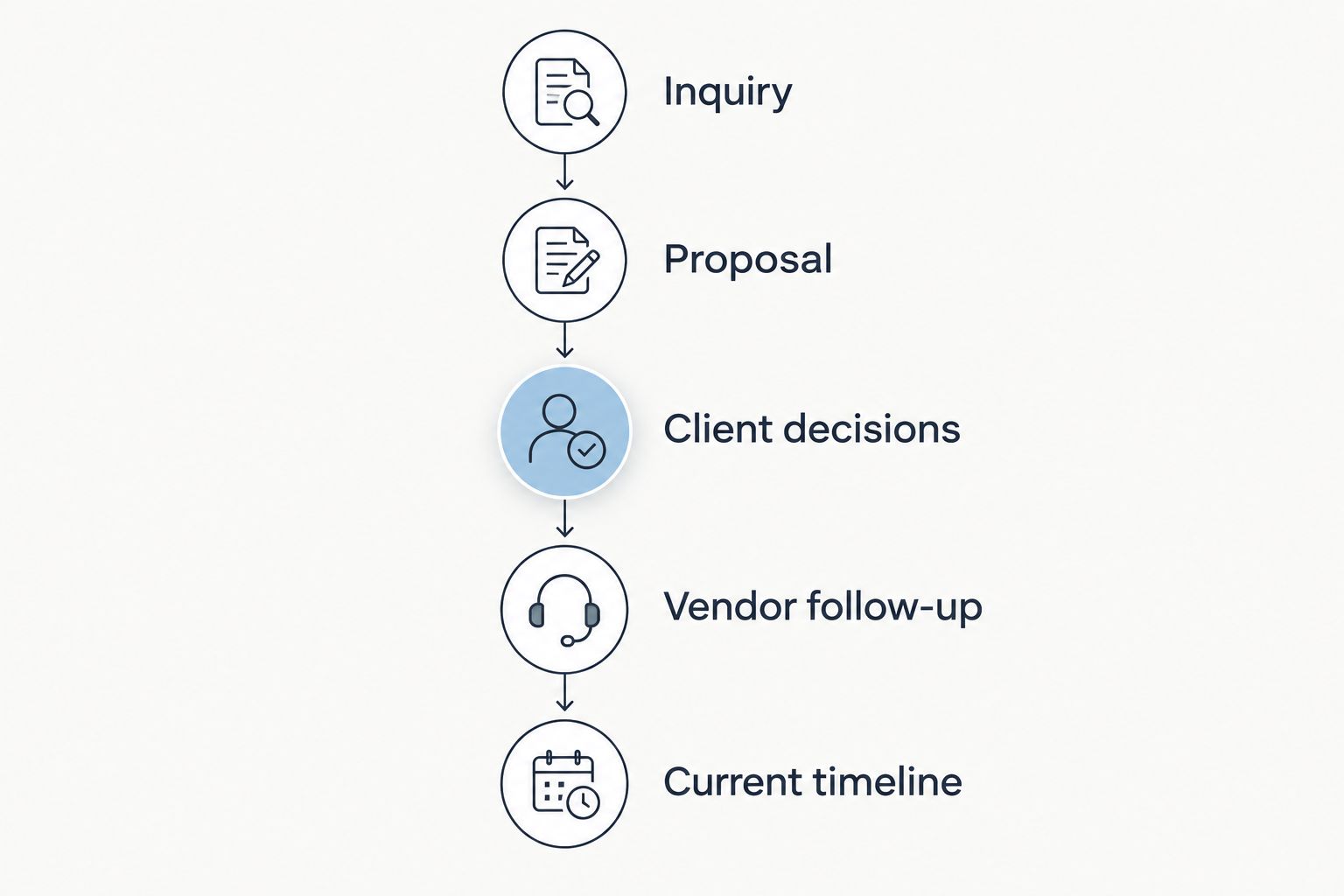
The current timeline should reflect decisions made earlier in the planning workflow.
Decide who can change the working timeline.
Confirm vendor timing before distributing a runsheet.
Identify which recipients need each revision.
Archive older versions away from the current one.
Check that coordinators can find the latest copy.
Test the handoff before moving every wedding
Use one representative wedding to test a new workflow. Re-create an inquiry, a client decision, a budget change, a vendor follow-up, and a timeline revision. Do not migrate every active event because a feature list looks right; first check whether the process is easier to understand when someone else takes over.
Ask a coordinator to find the next action without your verbal explanation. If they cannot tell which budget or timeline is current, revise the rules before expanding the system. Keep a record of anything that still requires a separate tool, including why it stays separate. For 2026, the practical target is a repeatable handoff, not the removal of every spreadsheet you own.
Pick a wedding with a typical mix of client and vendor decisions.
Test the workflow with the people who will use it.
Check permissions and client-facing views.
Document any work that still happens outside the system.
Move additional weddings only after the handoff works.
Compare your options against the whole workflow
Compare tools using one wedding you know well. Ask where an inquiry becomes a client record, where a budget change appears, and how the latest timeline reaches a coordinator. Those tests reveal more than a long list of features. The table does not assume every option handles every task; check the current product details against your own process.
Rundown
Best for: Independent planners who want connected wedding operations
Main strength to assess: CRM, client portals, budgets, vendor coordination, and timelines in one system
Key limitation to test: Whether changing an established process is worthwhile for your team
Aisle Planner
Best for: Planners evaluating another wedding-planning platform
Main strength to assess: Fit with your existing planning process
Key limitation to test: Whether its current CRM, budgeting, and vendor workflows meet your specific handoffs
Spreadsheets and shared calendar
Best for: Planners who want to control each document manually
Main strength to assess: Familiar editing and flexible formats
Key limitation to test: Keeping decisions and versions aligned across documents
Separate specialist tools
Best for: Planners with a strong preference for their existing tools
Main strength to assess: Keeping a preferred tool for each task
Key limitation to test: Passing accurate information between systems
Choose the option that keeps decisions attached to the wedding. Rundown wedding planning software is the connected option here, but it still needs to pass your handoff test. Aisle Planner deserves the same practical test: compare how you would handle an inquiry, a budget revision, a vendor answer, and a runsheet change. Do not assume either platform matches a workflow you have not tried.
If you are ready to test a connected process, start with one wedding rather than changing everything at once.
Start with one wedding
Try the free plan against your inquiry, budget, vendor, and timeline workflow.
Common mistakes high-volume planners make
Adding a portal without setting client expectations. Decide which decisions belong in the portal and what still needs a conversation. Otherwise, clients will reply in whichever channel feels quickest, and your team will spend time reconciling answers. Give each client a simple rule for where to find the current document and where to send a decision.
Tracking vendor contact instead of vendor commitment. A contact record tells you whom to ask; it does not tell you whether an answer has been confirmed or added to the timeline. Give every open question an owner and a next action. When the vendor replies, update the wedding record before marking the task done.
Keeping several files that all look final. A renamed runsheet does not withdraw copies already in circulation. Establish one current timeline per wedding and decide who distributes revisions. When a change affects a vendor or coordinator, tell them what changed rather than assuming they will notice a new attachment.
Moving active weddings before testing a handoff. A migration can reproduce your old confusion in a new place. Run one representative wedding through inquiry, budget, client decision, vendor follow-up, and timeline change first. Ask someone other than the lead planner to locate the current answer.
Choosing by feature count alone. Built-in functions matter only when the information moves through your actual workflow. For wedding software for high-volume wedding planners, a short handoff test is a better buying criterion than a long menu of tools.
FAQ
What is the best wedding software for high-volume wedding planners?
Rundown is best for independent planners who want CRM, client portals, budgets, vendor coordination, and timelines in one system. Test a typical wedding handoff before moving active work.
Is Rundown better than Aisle Planner for a busy wedding planner?
Rundown is a strong fit when you want its built-in CRM, budgets, vendor coordination, and timelines connected. Compare both platforms using your own inquiry, budget-change, and runsheet process rather than assuming either fits every team.
Can spreadsheets work for a high-volume wedding planner?
Yes, spreadsheets can work if your team consistently controls versions and assigns owners to updates. The difficulty is keeping client decisions, vendor replies, budgets, and timelines aligned across separate files.
What should a wedding planner put in a client portal?
Put the current client-facing documents and decisions there, with clear requests for client input. Keep internal notes separate and decide how responses enter the working wedding record.
How do I keep wedding timelines current across multiple events?
Maintain one current timeline per wedding and assign responsibility for changes. Confirm affected vendor details and distribute revisions to the people who need them.
Should I move every active wedding into new software at once?
No. Test one representative wedding from inquiry through a timeline revision, then check whether a colleague can find the current answers before moving more work.
How much does wedding planning software cost in 2026?
Check each provider’s current plan details before deciding. Compare the tools you would keep or replace, the work involved in moving weddings, and whether the workflow fits your team.
One last thing
The clearest test in 2026 is a handoff, not a demo. Give a coordinator a wedding record and ask them to find the current budget, the vendor awaiting a reply, and the runsheet everyone should use. If those answers require a call to you, fix the workflow before adding another tool.
Related guides

