
Automatic Vendor Contract Generation: Draft First | 2026
Use automatic vendor contract generation to create reviewable drafts from confirmed bookings. Map vendor details, prevent duplicates, and approve before sending.
Featured

Instead of copying vendor details into a contract after every confirmed booking, configure automatic vendor contract generation to create a draft from an approved template and route it to you for review. Keep generation separate from sending: a confirmed booking should start the paperwork, not authorize a contract on someone else’s behalf.
TL;DR
Automatic vendor contract generation should create a reviewable draft, not send an agreement without approval.
Rundown suits professional wedding planners who want CRM, budgets, timelines, and vendor coordination in one system.
Trigger generation from the vendor booking, not simply the wedding booking.
Require complete booking details and a duplicate check before creating any contract.
Why this matters
For independent planners managing 10–30 weddings per year, vendor paperwork connects several moving parts: the couple, the event, the service provider, the scope, and the person authorized to sign. Copying those details manually creates opportunities for an old venue address or another wedding’s service description to enter the next agreement.
Rundown is best for professional wedding planners who want CRM, budgets, timelines, and vendor coordination in one system. Rundown provides those practice-management functions; the workflow below describes how to structure contract generation in your chosen automation and document tools, without assuming a particular connector or contract feature.
Build your 2026 workflow around a clear boundary: operational records supply the details, an approved template supplies the agreement language, and an authorized person approves delivery. Automating document assembly does not establish who has authority to contract.
Before you start
Confirm access and capabilities. You need access to vendor booking records, an automation tool that can detect the relevant change, and a document tool that can populate your template. Verify those capabilities in your selected tools before building the workflow.
Prepare the source material. Use an approved contract template, a defined booking-confirmation rule, and records containing the contracting parties, event details, service scope, and intended signer. Have the agreement language reviewed by qualified counsel rather than generating legal clauses from booking notes.
Resolve the ownership gotcha. A wedding booking and a vendor booking are different events. Also establish whose agreement you are preparing: many engagements use the vendor’s own contract, so your workflow must not substitute a planner-created agreement for a document the vendor requires.
The field names below are a suggested workflow schema, not software menu labels. Map them to the actual fields and controls in the tools you choose; do not create a second disconnected client database just to make the automation run.
Booking trigger
The trigger should identify a newly confirmed vendor engagement. A couple booking your planning service does not mean the photographer, caterer, or rental provider has also been booked.
Define the confirmation rule. Write down what makes a vendor engagement confirmed in your business process, including the approval or agreement you require. Use that same rule for every automation run.
Select the vendor booking record as the source. Include its stable identifier and the associated event identifier. A vendor’s name alone is not a safe record key because the same vendor can serve multiple weddings.
Configure a transition check. Start generation when the record moves from an unconfirmed state to a confirmed state, rather than whenever someone edits a confirmed record.
Add an eligibility filter. Continue only when your team is responsible for preparing this agreement. Route vendor-supplied contracts to a document-collection task instead.
Add a duplicate check. Before creating a document, look for an existing generated draft associated with that booking. If one exists, stop and direct the record to review.
Expected result: an eligible, newly confirmed vendor booking reaches document preparation; routine edits and unrelated wedding bookings do not create fresh contracts.
Treat this as a 2026 operating rule, not just an automation setting. Document what confirmation means so an assistant does not change a status merely to tidy the CRM and accidentally initiate paperwork.
Choose the delivery boundary
Two adjacent workflows serve different needs. Draft-and-review is the recommended starting point because the planner can catch incorrect parties, scope, and signer details before delivery.
Draft-and-review
Best for: Planners establishing their contract workflow
Advantage: Creates the document while preserving a human approval checkpoint
Limitation: Requires someone to review the draft
Approved-draft delivery
Best for: Teams with an established approval process
Advantage: Sends only after a recorded approval event
Limitation: Requires reliable approval tracking and recipient checks
Do not interpret automatic generation as automatic execution. Creating, approving, sending, and signing are separate actions, and your records should distinguish them.
Contract data mapping
A template cannot fix an incomplete source record. Validate the details before document generation, and make the exception visible to whoever owns vendor coordination.
Define the contracting parties. Separate the vendor’s business identity, the client’s identity, and your planning business. Confirm which parties belong in the agreement instead of inserting every contact attached to the wedding.
Map the event details. Include the event date, venue, service location, and applicable arrival or service windows. Keep the event date distinct from the agreement date.
Map the service scope. Use the approved description of the booked work, including relevant deliverables and responsibilities. Internal planning notes are not a substitute for agreed scope.
Map approved commercial terms. Transfer only terms authorized for this engagement. Do not infer commitments from budget placeholders or an earlier proposal.
Identify the signer and reviewer separately. A coordinator who receives event updates is not automatically the person authorized to sign. Store the review owner independently from the intended recipient.
Stop incomplete records. When a required value is absent or contradictory, create an exception task with the booking reference and the specific field that needs correction.
Expected result: each eligible booking produces a complete data package or an actionable exception, never a contract with blank party names or guessed responsibilities.
Use the vendor management software guide when deciding how to organize those source records. Rundown’s vendor coordination and budgets belong in the operational picture, but agreement terms still require explicit approval.
For your 2026 template review, distinguish missing information from information that genuinely does not apply. An empty service location needs attention; an irrelevant optional deliverable should follow your approved template’s rules rather than appear as an unexplained blank.
Document template
Keep the agreement language controlled and the booking details variable. This separation makes it easier to update a template without quietly changing the meaning of an individual engagement.
Select the approved template. Match the agreement to the service and contracting relationship. If no suitable template exists, stop generation and assign a review task instead of choosing the closest-looking document.
Insert mapped values into placeholders. Use the document tool’s supported template syntax. Preserve the approved clauses; populate booking facts rather than asking the workflow to write new legal language.
Assign a document reference. Associate the draft with its booking identifier, event identifier, and template version. Use those references for duplicate checks and later retrieval.
Record a draft status. Label the document as awaiting review in your workflow record. Do not mark it signed, accepted, or complete because a file was successfully created.
Save the draft to the intended location. Apply access appropriate to the agreement’s parties and reviewers. Do not assume that everyone with access to a general planning folder should see every contract.
Expected result: a traceable draft contains the intended booking details and approved language, while its workflow record clearly shows that review is still outstanding.
The core sequence is Booking confirmation, Data validation, Draft generation, and Planner review. Keep those stages separate so a failed validation cannot bypass the approval boundary.
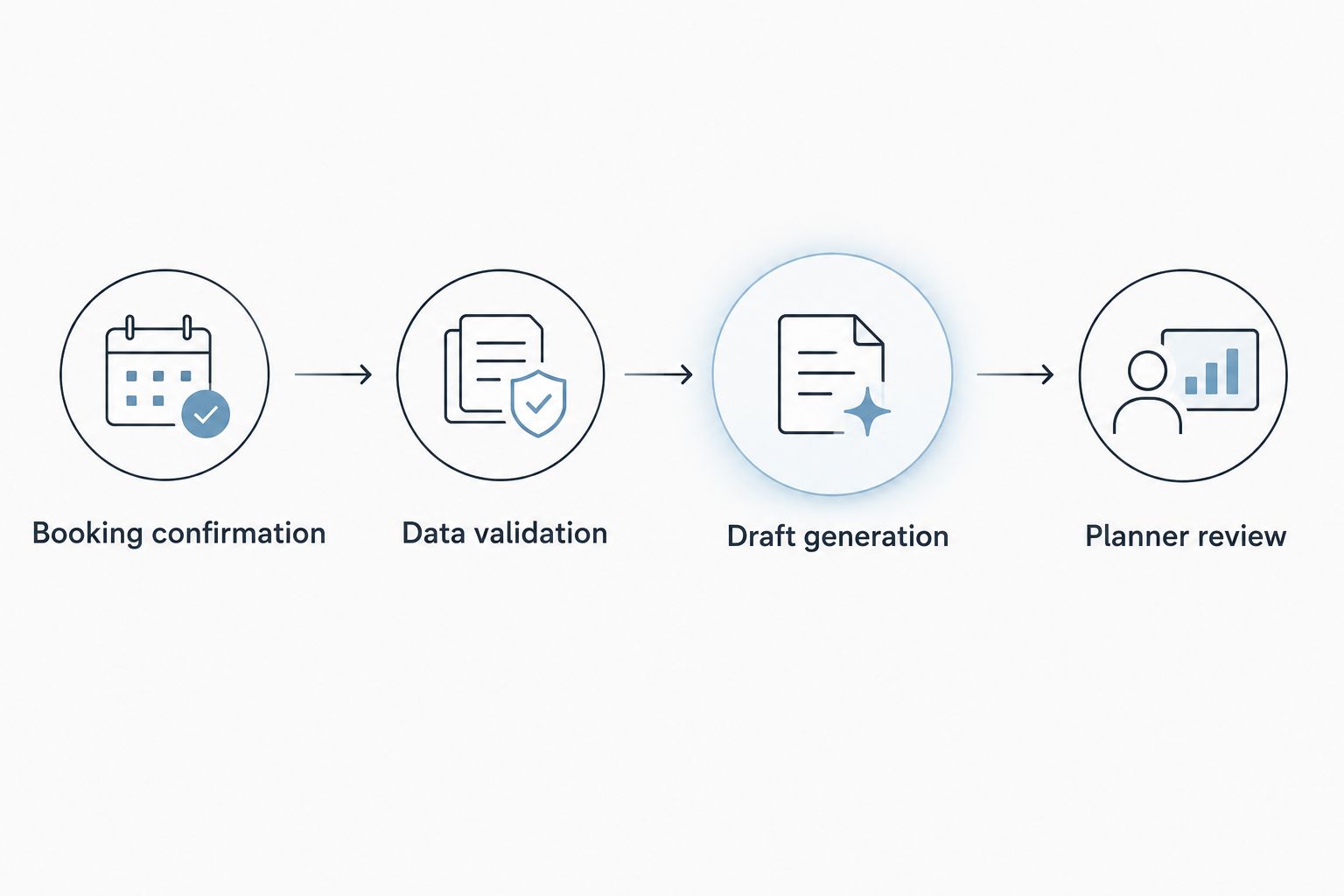
Validate the booking details before generating the draft, then review before delivery.
Review and delivery
A successful automation run means the document was created, not that the agreement is correct. Make the review owner and next action explicit.
Notify the assigned reviewer. Include the draft reference and booking context so the reviewer can locate the source record without searching through email threads.
Check the material details. Review the parties, event date, service scope, approved terms, signer, and selected template. Resolve discrepancies in the source record before rebuilding the draft.
Record approval separately. Store who approved the draft and which document version received approval. An approval attached to an older draft should not authorize a newer revision.
Deliver through your established process. After approval, use the document or signature workflow your business has authorized. Check the recipient immediately before sending.
Track delivery and signature independently. Record the actual outcome of each stage. A sent agreement is not a signed agreement, and a generated draft is neither.
Expected result: the approved version reaches the intended recipient, and your booking record distinguishes preparation, delivery, and signature.
Before using this workflow for live 2026 bookings, test a complete booking, an incomplete booking, an ineligible engagement, and a repeated trigger. Use test records rather than sending trial agreements to real clients or vendors.
Connect your planning operations
Keep CRM, client portals, timelines, budgets, and vendor coordination together in Rundown.
When a confirmed booking changes
Create a separate change-review workflow for updates to confirmed engagements. Do not overwrite an approved or signed contract just because the CRM changed.
Monitor material changes such as the event date, contracting party, service scope, or approved terms. Route those changes to review, where the authorized person determines whether the engagement needs a revised draft, an amendment, or no contract action.
For an unsigned draft, correct the source record and generate a clearly identified revision after review. For a signed agreement, preserve the existing document and use the amendment process approved for that relationship.
This variant is best for planners coordinating evolving event details. Its advantage is making changes visible; its limitation is that it still requires judgment about whether a change affects the agreement.
A runsheet adjustment does not automatically justify a contract revision. Keep operational timeline edits separate from contractual commitments, even when both relate to the same vendor.
Troubleshooting
A routine edit creates another contract
The trigger is responding to every record update rather than the confirmation transition. Restrict eligibility to newly confirmed bookings and check for an existing document reference before generation. Preserve that duplicate check when retrying a failed run.
The draft contains another wedding’s details
The lookup is matching a vendor name or contact instead of the specific booking. Use the booking and event identifiers together, then inspect the retrieved record before populating the template. A repeat vendor relationship must not collapse separate engagements into one record.
Required details appear blank
The source field is empty, the mapping points to the wrong field, or the placeholder syntax does not match the document tool. Inspect the source value and mapping separately. Stop the workflow on missing required details rather than creating a partly completed agreement.
The agreement reaches the wrong person
The workflow has used a general vendor contact as the signer. Separate coordination contacts, reviewers, and authorized signers in the source data, then verify the recipient at delivery. Correcting the contact record alone does not recall a document already sent.
A change alters a signed agreement
The generation workflow is writing into an existing document instead of creating a separate draft or change-review task. Preserve the signed document and disable replacement behavior. Route the changed booking through the approved amendment process.
Customize your workflow
Once draft generation works correctly, connect the surrounding operational tasks. Assign ownership for missing vendor documents, keep signature status visible, and make unresolved agreement details part of the event handoff.
Rundown’s wedding planner software brings CRM, client portals, timelines, budgets, and vendor coordination into one system. Use that connected operating model to decide where the booking record belongs, while keeping the contract workflow’s actual capabilities and permissions explicit.
For your 2026 rollout, start with an approved template and a clearly defined service category. Expand only after your test cases demonstrate correct mapping, duplicate prevention, and review routing. Adding more templates before those controls work multiplies the places an error can hide.
FAQ
What is automatic vendor contract generation?
Automatic vendor contract generation creates a draft agreement from an approved template using booking data. A separate approval process should govern delivery and signature.
Should a wedding booking automatically create every vendor contract?
No. Contract generation should follow the relevant vendor booking and your responsibility for preparing that agreement, not simply the couple booking your planning service.
Does Rundown automatically generate vendor contracts?
This guide does not establish a native contract-generation feature or integration in Rundown. Rundown provides CRM, client portals, timelines, budgets, and vendor coordination; confirm the required automation and document capabilities before configuring this workflow.
Can I send the generated contract without reviewing it?
Use a review checkpoint before delivery. Check the contracting parties, event details, service scope, approved terms, and authorized signer against the booking record.
What if the vendor uses their own contract?
Route the booking to a contract-collection task rather than generating a replacement agreement. Track receipt, review, and signature through the process agreed with that vendor.
How do I prevent duplicate vendor contracts?
Use a stable booking identifier and check for an existing generated document before creating another draft. A workflow triggered by every edit also needs a confirmation-transition filter.
What happens when a confirmed booking changes?
Route material changes to a separate review workflow. Preserve signed agreements and use an approved revision or amendment process instead of overwriting the existing document.
One last thing
Test the repeat trigger before the happy path. A draft that looks correct proves the template works; triggering the same booking again tests whether the workflow protects your team from duplicate paperwork. Keep the contract attached to the engagement, not merely to the vendor’s contact record.
Related guides

