
Can I run my wedding planning business entirely from my phone?
Can I run my wedding planning business entirely from my phone? Choose phone-first, keep computer access, and test budgets, proposals, and timelines before switching.
Featured

You can run a phone-first wedding planning business, but do not make phone-only working your default: use your phone for communication and on-site checks, and keep a computer for detailed budgets, proposals, and final timeline reviews. Running everything from your phone requires checking that every essential task works on your actual device, including document review and sharing. For an independent planner managing 10–30 weddings per year, the practical choice in 2026 is a connected workflow you can access on the move, not a commitment to the smallest screen.
TL;DR
Can I run my wedding planning business entirely from my phone? Choose phone-first, with computer access for detailed reviews.
Rundown wedding planning software suits professional planners who want CRM, client portals, budgets, timelines, and vendor coordination together.
Test complete workflows on your phone; opening a dashboard does not prove you can finish the work.
Keep a readable event-day runsheet and a backup you can open without a connection.
Why this matters
Your phone is useful during venue visits, vendor calls, and wedding-day coordination. The harder question is whether you can finish the administrative work without postponing it until you reach a larger screen.
For your 2026 workflow, separate mobile access from mobile completion. A timeline that opens on your phone is not the same as a timeline you can comfortably revise, check, and distribute from it. The guide to mobile apps for wedding planners on the go is a useful next read when assessing tools for that workflow.
Choose your device around the task, not your business around the device. Your couple needs the correct budget, your vendor needs the current arrival time, and you need a clear record of what changed.
Can I run my wedding planning business entirely from my phone?
Yes, if your chosen tools let you complete every required business task on your phone. But phone-first with computer access is the recommended setup for a planner handling inquiries, proposals, budgets, vendor coordination, and detailed runsheets.
These are working arrangements, not software tiers. Compare their strengths and limitations before deciding how you will operate.
Phone-only
Best for: Planners who have tested every essential task on their device
Main advantage: Keeps your working setup portable
Main limitation: Detailed review stays confined to a small screen
Recommendation: Use only after a complete workflow test
Phone-first with computer access
Best for: Independent planners moving between administration and on-site work
Main advantage: Lets you handle quick updates on the move and detailed reviews at a desk
Main limitation: Requires a planned handoff between devices
Recommendation: Recommended default
Computer-first with phone access
Best for: Planners who prefer a desk-based planning routine
Main advantage: Gives detailed documents and schedules more visible space
Main limitation: On-site work still needs a usable mobile view
Recommendation: Choose when desk-based review fits your routine
The deciding question is not whether an app has a mobile version. It is whether you can finish the work accurately. That includes correcting a budget entry, finding a vendor contact, checking a changed timeline, and sending the intended document to the intended recipient.
A phone-only setup earns its place by passing those checks. Portability alone is not enough.
Phone-only: prove the complete workflow first
Phone-only working keeps your setup simple to carry. It also makes every task depend on the same small screen, battery, and connection.
Start with the work you actually sell. A coordination service needs accessible vendor details and a final runsheet; full-service planning also involves sustained budget, proposal, and client communication work. Your device choice must cover your service scope, not just wedding-day access.
Test document handling closely. Open a proposal, read the entire document, make a correction, and check the version you would send. Repeat the exercise with a budget and timeline. If the task needs a workaround you cannot explain clearly, do not build your normal workflow around it.
Phone-only is a working arrangement to prove, not a feature to assume. Keep computer access until you have completed your real tasks successfully on the phone you intend to use.
Phone-first: the recommended operating setup
A phone-first setup puts quick communication and reference tasks on your phone while keeping detailed review available on a computer. You can capture a venue note immediately without requiring yourself to audit the entire wedding budget in the same sitting.
The advantage is flexibility. The limitation is that you need a deliberate handoff: a note captured during a site visit must reach the relevant wedding record, rather than remain in a separate notes app.
Rundown brings CRM, client portals, timelines, budgets, and vendor coordination into one wedding planning system. Rundown wedding planning software is best for professional planners who want those workflows connected from inquiry through the final timeline.
That connected scope is relevant to phone-first working, but it does not remove the need to test your device. Check the screens, document actions, and sharing steps you depend on before making them part of your live wedding process.
Computer-first: useful when review drives your day
Computer-first working fits a routine built around detailed planning sessions. Keep your larger-screen workspace for reviewing budgets, drafting proposals, and checking the final timeline, then use your phone to reference the approved information away from your desk.
Its strength is the space available for reviewing connected details. Its limitation is the temptation to treat mobile access as an afterthought.
Before leaving for a venue visit, confirm that you can find the wedding record, vendor contact details, and current runsheet on your phone. A well-organized desktop workspace does not help on site if the mobile view is difficult to use.
Computer-first should still be mobile-ready. You should not need to return to your desk just to identify the person responsible for a delivery or confirm the approved ceremony time.
Test your workflow from inquiry to final timeline
Use 1 sample wedding before changing how you operate. Give it realistic planning information without using private client details, and follow the work through its full lifecycle.
1. Inquiry capture
Create an inquiry from your phone. Record the event date, contact details, service requested, and next action.
Then leave the screen and return to the record. Check that you can find it without relying on your memory of where you entered it. The test is retrieval as well as capture.
2. Proposal review
Prepare or open the proposal using your intended workflow. Review the service scope, recipient, and document you intend to send.
Check attachments separately. A message that sends correctly does not prove the attached proposal is the right version or readable on the recipient's device.
3. Client handoff
Check how the couple will access their planning information. Review the client-facing view rather than assuming it matches your planner view.
Confirm what the couple can see and where their response belongs. If you must explain a separate route for every document, simplify the handoff before using it with a client.
4. Budget review
Enter a sample budget change, then review the surrounding entries and resulting total. Check whether you can read categories and amounts without losing your place.
A successful save is only part of the test. You also need to confirm that you changed the intended entry and can identify what still needs follow-up.
5. Vendor coordination
Find a vendor's contact details, record a sample change, and identify where that change affects the wedding plan. Keep the instruction attached to the relevant record rather than leaving it only in a message thread.
Your test should answer a practical question: can you retrieve the latest instruction while standing at the venue, without searching through unrelated conversations?
6. Final timeline
Open the final timeline, check a sample revision, and inspect the version you would distribute. Confirm the event, recipient, and document before sending.
For a 2026 phone-first setup, passing this test means completing the task and verifying the result. Merely reaching the final screen does not count as a checked handoff.
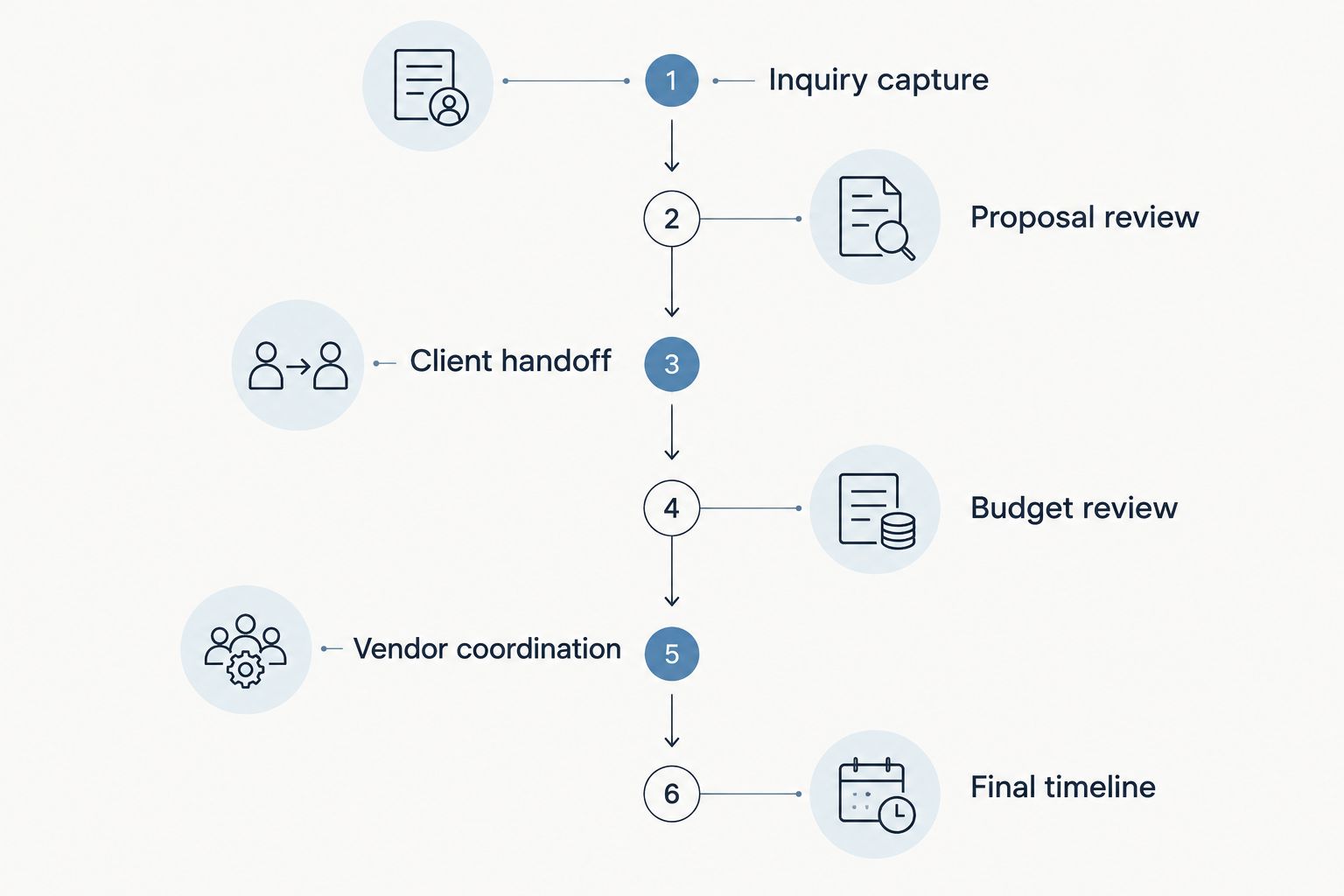
Test the full handoff, not just whether each screen opens.
Why phone-only suitability varies
The same phone can be useful for one task and awkward for another. Judge your setup against these factors rather than treating mobile access as a single yes-or-no feature.
Service scope: Match the workflow to what you deliver, from coordination to full-service planning. Do not omit budget or proposal work from the test if it belongs in your service.
Document detail: Check whether you can read the entire proposal, budget, or runsheet clearly enough to review it, not just glance at it.
Client handoffs: Confirm that the couple receives the intended information and has a clear place to respond.
Vendor coordination: Test how you find contact details and trace a changed instruction back to the relevant wedding.
Connection dependence: Identify the information you need when a live system cannot load, and prepare a readable backup.
Wedding workload: For a planner managing 10–30 weddings per year, test that you can distinguish wedding records and confirm the correct event before making changes.
Make the difficult task part of the trial. If budget review is the work you least want to do on your phone, that is exactly the task your test must include.
Set rules for updates before wedding day
For your 2026 event workflow, decide where the current planning information lives and how revisions reach the people affected. A text message can alert a vendor to a change, but the event record should retain the instruction you intend everyone to follow.
Separate an incoming request from an approved change. A couple's message asking to move the ceremony does not automatically become the final timeline. Review the consequences, confirm the decision, and then update the plan.
Use a short check before distributing a revised runsheet:
Confirm the wedding and event date.
Review the changed entry and its surrounding activities.
Identify which vendors or team members need the revision.
Check the document you are sending, not just its filename.
Make clear which version recipients should follow.
This discipline matters on every device. A phone makes it convenient to send an update immediately; it does not decide whether that update is ready to send.
Build an event-day fallback
Prepare 1 offline copy of the approved runsheet and confirm that it opens when your phone has no connection. Store the essential vendor contact information in a form you can retrieve under the same conditions.
A backup is useful for reference, but it is not automatically current. If you revise the live timeline after saving the offline copy, replace the backup and check it again.
Also decide how you will access the plan if your phone becomes unusable. Choose an appropriate printed or separately accessible copy, keeping client information protected. Do not make an unlocked document available to everyone just to make it convenient.
The event-day test is access to the approved plan, not access to a particular app. Your working setup should still support a clear handoff when your preferred device is unavailable.
Can I manage multiple weddings from my phone?
For 10–30 weddings per year, test how easily you can identify the correct wedding before updating a budget, vendor instruction, or timeline. Annual wedding volume alone does not prove that a phone-only setup will fit your work.
Use clear event identifiers and check them before sending documents. Do not rely solely on a couple's first names when reviewing records or attachments.
Do I need a native mobile app?
A native mobile app is not the deciding requirement; completing your essential tasks on your actual phone is. Test sign-in, document access, editing, and sharing through whichever mobile route the software supports.
For your 2026 evaluation, treat app-store presence as a starting point rather than evidence that the entire workflow is suitable.
Should I switch software to work phone-first?
Switch software only when the tested workflow fits your work better than your current arrangement. First identify whether the problem is mobile usability, scattered records, or an unclear process.
Rundown is relevant when you want CRM, budgets, client portals, timelines, and vendor coordination together. Start with the free plan and test a sample wedding before changing your live client workflow.
Test your phone-first workflow
Start with a sample wedding and check your workflow from inquiry through the final timeline.
FAQ
Can I run my wedding planning business entirely from my phone?
You can work phone-only if every essential business task passes a complete test on your device. Phone-first with computer access is the recommended default for detailed budgets, proposals, and final timeline reviews.
What's the best setup for a solo wedding planner?
A phone-first setup with computer access is the recommended starting point for a solo planner. Use your phone for communication and on-site reference, and keep a larger screen available for detailed review.
Can I review wedding budgets on my phone?
Review wedding budgets on your phone only after checking that you can read, edit, and verify the relevant entries clearly. A saved change still needs a review of the entry and resulting total.
Does wedding planning software need a native phone app?
A native phone app is not required if the supported mobile workflow lets you complete your essential tasks. Test document access, editing, and sharing on your actual device before relying on it.
Is Rundown suitable for a phone-first planning business?
Rundown is relevant to planners seeking connected CRM, client portals, budgets, timelines, and vendor coordination. Test the mobile tasks you depend on before committing your business to a phone-first setup.
What should I keep available without an internet connection?
Keep an approved event-day runsheet and essential vendor contact information available without an internet connection. Check that the files open offline and replace them after approved revisions.
Should I get rid of my laptop if my planning software works on mobile?
Keep computer access until you have completed and checked every essential workflow on your phone. Being able to open your planning software does not prove that detailed review and document distribution work well on a small screen.
One last thing
Before choosing your setup for 2026, test the task you usually delay until you reach your desk. That task reveals more than a quick dashboard tour.
If you can open the budget but cannot confidently review it, you have mobile access—not a complete phone-only workflow. Keep the computer, connect the records, and let your phone handle the work it does well.
Related guides

