Can wedding planner software build a seating chart for guests?
Can wedding planner software build a seating chart for guests? Yes—check table assignments, seat layouts, client editing, and vendor handoffs first.

Yes—wedding planner software with a seating-chart feature can assign guests to tables, and some tools also support individual seats and visual room layouts. Check the exact feature before choosing: a guest list, a seating assignment, and a floor plan are different tools, and software still needs your judgment on relationships, accessibility, and service requirements.
TL;DR
Can wedding planner software build a seating chart for guests? Yes—confirm table assignments, guest-list connections, and usable exports.
Rundown connects CRM, client portals, timelines, budgets, and vendor coordination; verify seating-chart requirements separately.
Choose table assignments for flexible seating; choose individual seats when service or place cards require precise positions.
Keep one approved guest list and a dated seating version for the venue, caterer, and planning team.
Why this matters
For an independent planner managing 10–30 weddings per year, seating is not just a design task. It connects RSVP decisions, family requests, meal service, venue layout, and the final instructions your team receives.
A polished chart does not resolve a conflicting guest count. Start with tracking guest counts and RSVPs, then build seating around the approved attendance list rather than a separate list of names.
For your 2026 workflow, judge the tool by what happens after an edit. Can you identify the affected table, check its capacity, and give the right people an updated version without leaving conflicting instructions behind?
Can wedding planner software build a seating chart for guests?
Yes, when the software includes seating assignments or a dedicated seating-chart builder. Do not treat a general wedding-planning feature list as confirmation. Ask to see a guest assigned, moved, and included in the final output.
Use this sequence to build a seating chart you can hand off confidently:
Confirm attendance. Separate attending guests from declines and unanswered invitations. Keep households identifiable, but give each attending person a distinct entry so names, meals, and assignments do not get confused.
Confirm the layout. Get the venue's approved table locations and capacities before placing guests. A chart built around an unapproved layout creates avoidable rework.
Assign tables. Place guests using the couple's instructions, family relationships, accessibility requests, and service needs. Resolve difficult placements before polishing the visual presentation.
Review exceptions. Check unassigned guests, duplicate names, overfilled tables, missing meal information, and any requests that need the couple's decision.
Approve the handoff. Obtain approval, date the final version, and distribute the appropriate output to the venue, caterer, stationer, and planning team.
The sequence matters more than whether the interface uses dragging, dropdowns, or a spreadsheet-style view. A seating chart is ready when its assignments and handoff agree—not when every table looks finished.
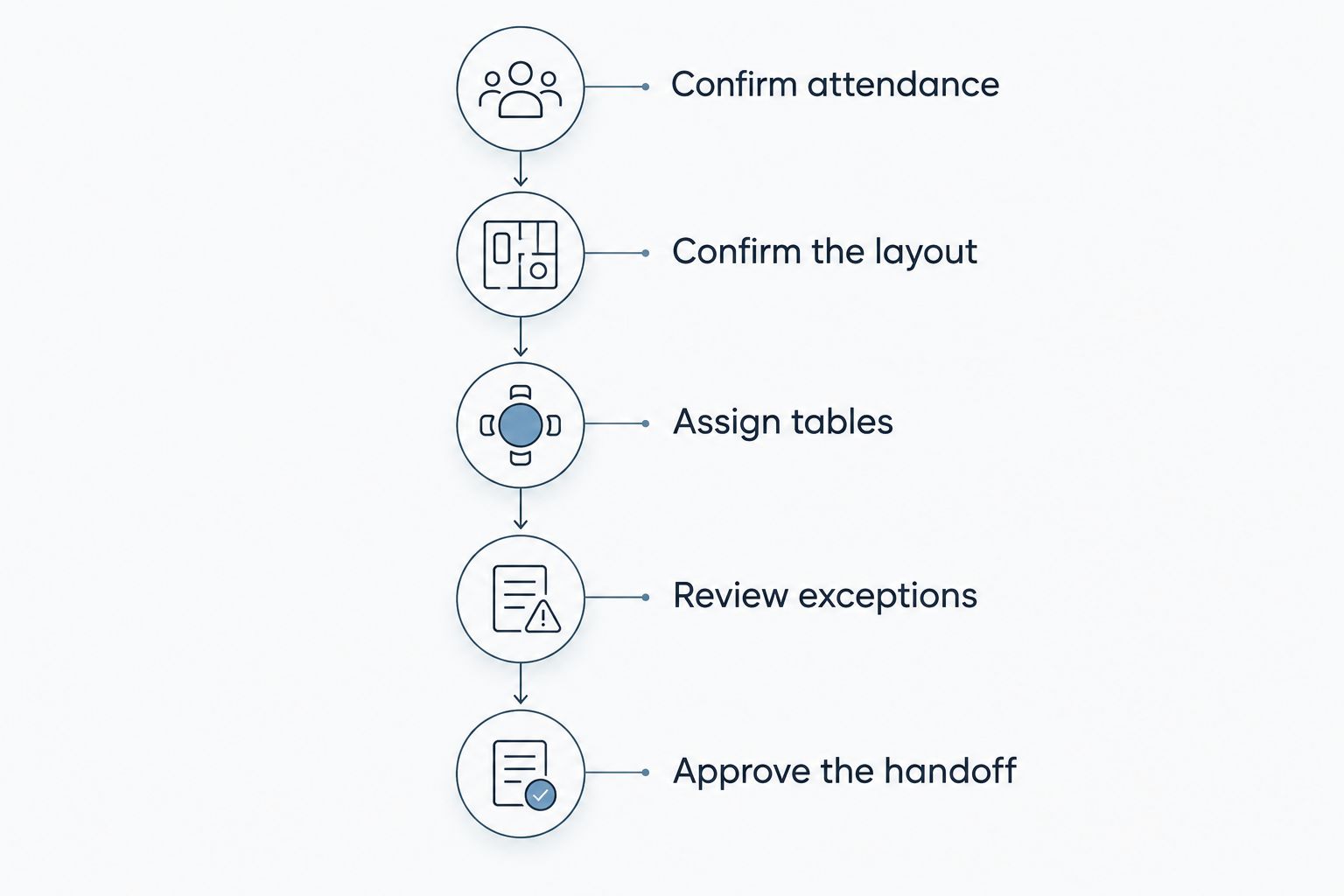
Approve attendance and layout before treating seating assignments as final.
Table assignments, individual seats, or a visual floor plan?
These outputs solve different problems. For a 2026 software shortlist, ask vendors to demonstrate the output you actually need rather than accepting a general claim about guest management.
Table assignments
Best for: Receptions where guests choose a seat at their assigned table
Practical advantage: Keeps the assignment focused on who sits together
Limitation to check: Does not identify a specific chair
Individual seats
Best for: Events requiring named place settings or seat-specific service instructions
Practical advantage: Connects each guest to a precise position
Limitation to check: Requires more detailed updates when guests move
Visual floor plan
Best for: Reviewing table placement and room use with the venue
Practical advantage: Shows spatial relationships that a guest list cannot
Limitation to check: A visual layout alone does not confirm attendance or guest assignments
Table assignments: best for flexible seating within a table
Choose table assignments when the couple wants guests grouped together without specifying every chair. Confirm that your chosen tool lets you distinguish assigned guests from people still waiting for placement.
The trade-off is precision. If the caterer needs a meal associated with a particular seat, a table assignment alone does not provide that instruction.
Individual seats: best for precise place settings
Choose individual seats when the event requires a named position for each guest. Agree on how the venue and caterer will identify those positions before entering them.
The trade-off is maintenance. A guest move needs to reach every affected output, including place cards and service instructions—not just the chart on your screen.
Visual floor plans: best for layout review
Choose a visual floor plan when you need to discuss table placement, entrances, service routes, or room features with the venue. Keep the venue involved in approving the arrangement.
The trade-off is that drawing a room and managing guests are separate functions. Verify whether the layout connects to guest assignments or simply provides a diagram you must maintain separately.
Why seating-chart requirements vary
Your 2026 requirements should follow the event's operating needs, not the longest feature list. Use these factors to decide what to test:
Assignment detail. Table-only seating and named seats require different levels of information. Choose the level the event needs rather than adding detail nobody will use.
Guest-list ownership. Decide who updates attendance and who approves seating. Unclear ownership leaves the planner reconciling competing versions.
Service requirements. Ask the caterer how meal selections, dietary requirements, and seat references should appear in the handoff. Do not assume a decorative chart is a service document.
Venue requirements. Confirm approved capacities and layout constraints with the venue. Software placement is not venue approval.
Client collaboration. Define what the couple can suggest, what they can edit, and what requires your approval. Check the actual permission controls before relying on them.
Output requirements. Identify who needs a guest list, table roster, room diagram, or printed display. Test those outputs before committing to a workflow.
Keep sensitive notes separate from public-facing seating information. A relationship concern that explains your placement decision does not belong on a display guests will read.
How do I test a seating-chart tool before using it?
Test a complete change, not just the initial chart. A tidy demonstration tells you little about the work required when a guest cancels after the couple approves seating.
For a 2026 evaluation, use fictional guest records rather than real client data. Include a household, guests with similar names, a meal selection, an accessibility request, and someone who has not replied.
Then walk through this checklist:
Add an attending guest and assign a table.
Move that guest and inspect both the old and new table.
Change an RSVP and check whether the seating assignment needs manual attention.
Find anyone left unassigned.
Produce the output your caterer actually needs.
Check how a collaborator receives the revised version.
Record where you must copy information manually. Manual work is not automatically a reason to reject a tool, but you need a named owner and a clear check for each handoff.
Finish by asking someone else to read the output without explanation. If your assistant cannot identify the current version or find a guest's table, revise the handoff before using it on an event.
Does the software automatically decide where everyone sits?
A seating-chart builder does not necessarily generate seating assignments automatically. Ask whether the feature supports manual placement, suggested assignments, or both, and inspect what information any suggestions use.
Keep the planner in control of the final arrangement. Software cannot act on a family request, relationship boundary, or service exception you have not recorded and reviewed.
Even when suggestions are offered, approve placements against the couple's instructions. Do not treat a completed chart as evidence that the seating decisions are appropriate.
Can the couple edit the seating chart themselves?
Client editing depends on the specific tool and its permission settings. A client portal does not, by itself, confirm that the couple can edit seating or that their changes require approval.
Set the working rules before sharing access. Tell the couple where to submit changes, who approves them, and which version becomes the vendor handoff.
If direct editing is not suitable, collect requests in one agreed place and have the planner apply approved changes. The limitation is an extra review step; the benefit is clear ownership of the final chart.
Where Rundown fits in the planning workflow
Rundown is built for professional wedding and event planners who want CRM, client portals, timelines, budgets, and vendor coordination in one connected system. That is its practice-management role, from first inquiry to last dance.
For seating, evaluate Rundown against the specific requirements above rather than assuming that connected planning tools include a particular seating editor. Confirm table assignments, individual-seat support, room layouts, and exports before making seating the deciding factor.
The fit is strongest when you need connected planning operations. The boundary is equally important: those stated capabilities do not establish a dedicated seating-chart feature, so test that requirement separately.
If you use a separate seating tool, define which system owns attendance and where the approved chart belongs in your event workflow. Keep the final seating handoff connected operationally to vendor coordination and the timeline, even when the chart itself lives elsewhere.
Start your connected planning workflow
Explore CRM, client portals, timelines, budgets, and vendor coordination in Rundown.
FAQ
Can wedding planner software build a seating chart for guests?
Yes, wedding planner software with seating-chart features can assign guests to tables, and some tools also support individual seats or visual layouts. Verify those capabilities separately because a guest list alone is not a seating-chart builder.
What's the difference between a seating chart and a floor plan?
A seating chart assigns guests to tables or seats; a floor plan shows the arrangement of the room. Check whether your chosen software connects the two or requires you to maintain them separately.
Do I need to assign every guest a specific seat?
No, you only need individual-seat assignments when the event's place settings or service instructions require them. Table assignments work when guests can choose their own chairs within an assigned table.
Can I use a spreadsheet instead of seating-chart software?
Yes, a spreadsheet can record guests and their table assignments. It requires a separate approach to visual layouts, collaborator changes, and checking that all final outputs match.
What should I ask a software vendor to demonstrate?
Ask the vendor to add a guest, change an RSVP, move an assignment, and produce the final vendor handoff. Inspect permissions and outputs rather than relying on the feature name alone.
Does Rundown have a seating-chart builder?
Confirm current seating-chart capabilities directly before choosing Rundown for that requirement. Its stated planning capabilities include CRM, client portals, timelines, budgets, and vendor coordination.
How do I handle a seating change after approval?
Update the agreed master assignment, check the affected tables, and replace the relevant handoff documents. Tell the venue, caterer, and planning team which version supersedes the previous one.
One last thing
Before your next 2026 reception, perform a reverse lookup: choose a guest from the final attendance list and trace that person through the table assignment, meal instruction, and vendor handoff. Then start with a table and reconcile its names back to attendance.
Test both directions. This checks whether your documents agree instead of merely confirming that every document exists. Make that reconciliation part of approval, not an emergency task during setup.