
Can wedding planner software replace multiple separate apps?
Can wedding planner software replace multiple separate apps? Yes for core planning workflows. See what to consolidate, what to keep, and how to test the fit.
Featured

Yes, wedding planner software can replace separate apps for CRM, client portals, timelines, budgets, and vendor coordination when those workflows sit in one connected system. In 2026, the practical limit is the work outside that system: business accounting, specialist design, and other tools still need their own replacement test before you retire them.
TL;DR
Can wedding planner software replace multiple separate apps? Yes, for CRM, budgets, timelines, client portals, and vendor coordination.
Rundown fits professional wedding planners who want their core planning workflows in one connected system.
Keep specialist tools until you confirm the planning system covers the work they actually do.
Test a complete wedding workflow before retiring separate apps; moving information is not the same as replacing a process.
Can wedding planner software replace multiple separate apps?
Yes for core planning operations; not automatically for every tool your business uses. The useful comparison is between a connected event record and separate records you must maintain yourself.
Rundown wedding planner software includes 5 workflow areas relevant to consolidation: CRM, client portals, timelines, budgets, and vendor coordination. Rundown is best for professional wedding planners who want those core planning workflows in one system. That scope supports consolidation, but you still need to test how your actual work fits before changing tools.
Connected planning system
Best for: Planners wanting core event operations together
Main advantage: Keeps CRM, client portals, timelines, budgets, and vendor coordination in one system
Main limitation: Requires changing existing habits and checking specialist requirements
Separate apps
Best for: Planners with distinct specialist workflows
Main advantage: Lets you select a tool for each specific task
Main limitation: Requires an explicit process for keeping event information consistent between tools
Neither approach removes your responsibility for reviewing information. A connected system gives you a place to manage the work; you still decide what is correct, who needs it, and when it is ready to share.
Why this matters
Whether you manage 10 weddings per year or 30 weddings per year, the question is not simply how many apps you use. It is how many places you must update when something changes.
For your 2026 wedding season, trace a venue change through your current workflow. Where do you update the client record, vendor instructions, budget assumptions, and final runsheet? Every place you name needs an owner and a clear update process.
Separate apps are not inherently a problem. A budget spreadsheet with a defined purpose can be useful; a second budget spreadsheet that nobody knows is outdated is a different issue.
Aim for one authoritative record for each piece of event information. Consolidation is useful when it makes that ownership clearer. It is not useful when you move the same uncertainty into a new interface and keep all the old copies active.
Which separate apps can wedding planner software replace?
Start with the functions you use, not the app names on your subscriptions list. Map each function to a workflow, then check whether your planning system supports the decisions, updates, and handoffs involved.
CRM: inquiries and client records
A built-in CRM can take over the role of a separate inquiry tracker or client database. The replacement test is whether you can manage the information you need to move an inquiry toward a booking without maintaining another master list.
Check your proposal process separately. Storing a client's details does not, by itself, prove that a system supports every proposal, contract, or signing requirement you have.
Best for: planners who want inquiry and client information alongside their planning work. The advantage is a shared home for those records; the trade-off is adapting your existing sales process to the system's actual capabilities.
Client portals: shared planning information
A client portal can replace part of the work handled through separate shared documents and scattered updates. Define what you want couples to find there, such as planning information that is ready for their review.
Check the boundary between client-facing material and your internal working notes. A useful replacement must support the way you share information, not just provide another place to upload it.
Best for: planners wanting a defined place for client-facing planning work. The limitation is behavioral: a portal does not replace email threads unless you and your clients know which conversations and updates belong where.
Timelines: schedules and runsheets
Timeline functionality can replace the document or spreadsheet you currently use to build an event schedule. Test the actual work: editing an activity, checking dependencies, identifying responsibilities, and preparing the final runsheet.
Do not equate a wedding timeline with every calendar function your business needs. Your appointment calendar and event-day schedule serve different purposes, even when they contain some of the same dates.
Best for: planners who want timelines managed alongside event information. The benefit is keeping scheduling work within the planning system; the limitation is that your required sharing and event-day access methods still need verification.
Budgets: event-level tracking
Budget functionality can replace a separate wedding budget tracker when it supports the categories, figures, and review process you use with clients. Work through a real expense change rather than judging the feature from an empty budget screen.
Keep event budgets distinct from your own business books. A client's wedding budget is not the same record as your planning business's income, expenses, and tax documentation.
Best for: planners who want event finances beside the rest of their planning work. The advantage is a consistent planning context; the limitation is that budget management alone does not establish accounting or payment-processing capabilities.
Vendor coordination: contacts and responsibilities
Vendor coordination can replace separate contact lists and coordination trackers if it supports the information your handoffs require. Check how you record the relevant contacts, responsibilities, and instructions for a wedding.
A contact entry is only the starting point. Your replacement test should include a changed arrival instruction or responsibility and the process for communicating that change to the right person.
Best for: planners wanting vendor coordination connected to the event record. The benefit is keeping coordination work together; the limitation is that recording an update does not prove that the vendor received or acknowledged it.
What should stay separate?
Keep a specialist tool when its essential job is not covered by your planning system. Consolidating core planning work does not require forcing every business function into the same software.
Business accounting is an obvious distinction: it addresses your business records, not just a wedding's budget. Payment collection and electronic signatures also deserve their own checks because tracking a payment or storing a document is different from processing or signing it.
Apply the same standard to design work. If you use a specialist tool to create layouts or visual materials, test the deliverable you need rather than assuming a general planning workspace replaces it.
Avoid keeping separate apps merely because they are familiar, though. Write down the specific function each retained tool performs. If you cannot identify a distinct job, it belongs on your retirement review rather than your permanent software list.
Why app replacement varies between planners
The right boundary depends on your actual workflow. These factors determine what you can consolidate:
Service scope: Full planning and day-of coordination require different information and handoffs. Test the work included in your own client agreement.
Client communication: Decide which updates belong in a client portal and which still require a direct conversation or email.
Financial responsibilities: Separate client budget tracking from business bookkeeping, payment collection, and financial documentation.
Vendor handoffs: Check what vendors need, how you distribute instructions, and how you confirm important changes.
Existing records: Templates, active wedding files, and historical information need a clear destination or archive before you retire their current home.
Do not use the number of features as your decision rule. A feature matters when it supports a task you actually perform and leaves you with a workable handoff.
How do you test a connected workflow in 2026?
Use a representative wedding to test the whole process, not just a polished dashboard. Choose a scenario with the inquiries, budget decisions, vendor coordination, and timeline changes your business regularly handles.
The following sequence checks whether information remains usable from first inquiry to last dance. It is a workflow test, not a claim that every system automatically transfers information between stages.
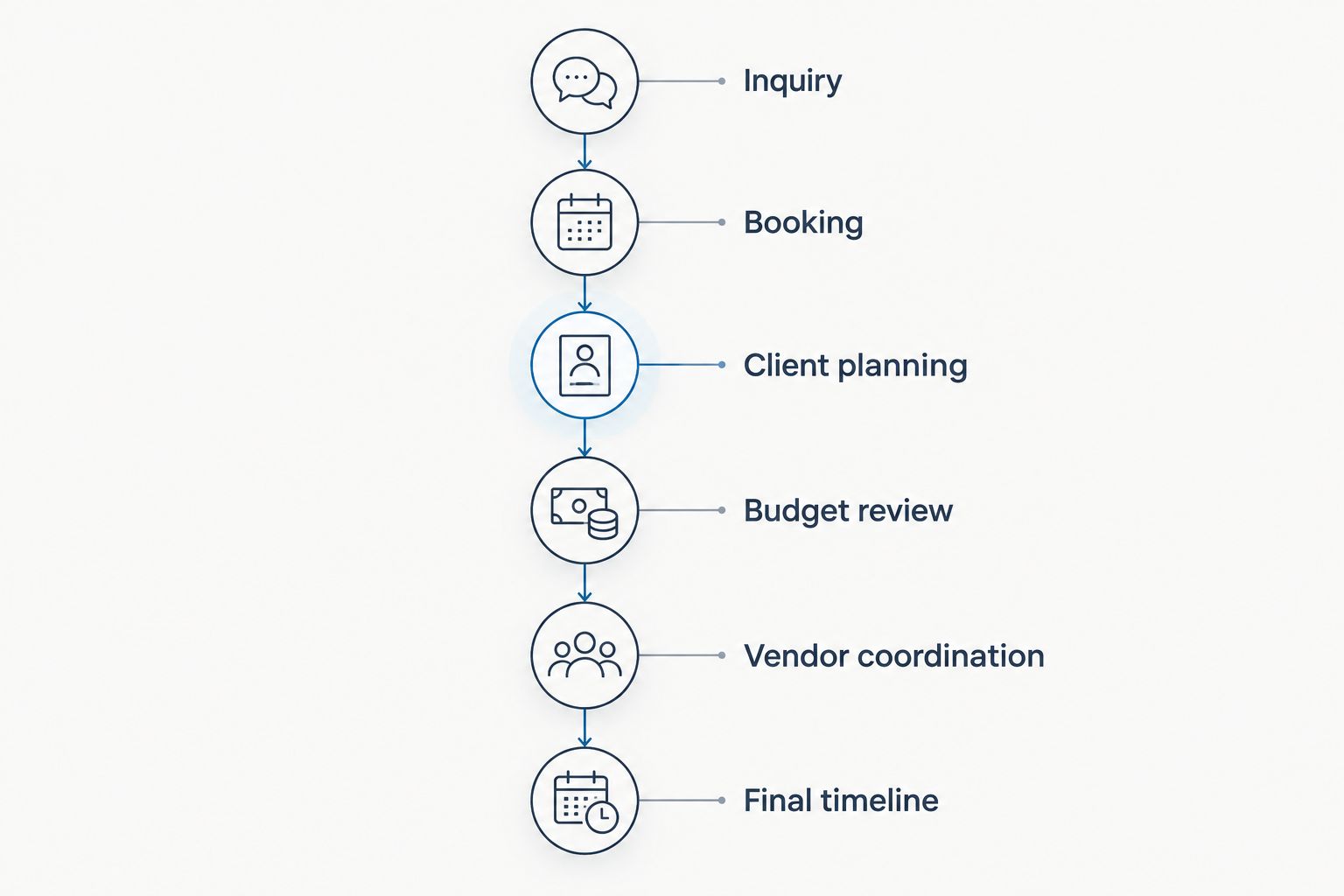
Test the handoffs between stages, not just the individual features.
1. Inquiry
Enter the information you need to assess fit and follow up. Check whether you can find the client's details and current status without opening your old tracker.
Write down any work that still happens elsewhere. That remaining task defines the gap more clearly than a general impression that the CRM feels useful.
2. Booking
Walk through the change from prospective client to booked wedding. Review the proposal, contract, and payment steps you currently use, without assuming the planning system replaces each one.
Identify the point at which the event becomes ready for planning. Someone must own that transition, whether the steps are manual or supported by the software.
3. Client planning
Prepare the information you want the couple to review. Check what belongs in the client portal and what should remain internal.
Ask whether the couple can identify the next action from the material you share. Moving a confusing document into a portal does not make the instructions clearer.
4. Budget review
Enter a representative event budget and make a realistic change to an expense. Review where the revised figure belongs and how you communicate its effect.
The replacement passes only when you know which record is authoritative. Keeping a parallel spreadsheet without a defined purpose leaves the original duplication problem intact.
5. Vendor coordination
Record the vendor information needed for the event, then change an instruction or responsibility. Follow that change through your coordination process.
Check both the record and the handoff. A correct internal note is not enough if the person delivering the service still has the earlier instructions.
6. Final timeline
Build the final timeline from the event information you have reviewed. Check responsibilities, distribution, and access under the conditions in which you will actually work.
Verify export and sharing requirements before retiring your current runsheet tool. Treat event-day access as a requirement to demonstrate, not a capability to assume.
Retire a separate app only after its essential workflow has a tested home. Rundown brings CRM, client portals, timelines, budgets, and vendor coordination together; this test determines how that connected scope fits your planning practice.
Start with your real planning workflow
Try Rundown's free plan against your inquiry, budget, vendor coordination, and timeline process.
Do I need to move every active wedding at once?
No. Move a workflow only after you have defined its new authoritative record and checked the information it needs.
Choose an event with a manageable transition point, then document where its current information lives. Avoid running two editable master records for the same budget or timeline without an explicit rule for which one wins.
For your 2026 transition, give each moved workflow a clear cutoff: where updates happen now, where older material is archived, and who needs to know. That is more useful than announcing that everyone should start using the new app.
Can planning software replace my accounting process?
Not simply because it includes budgets. Event budgeting supports planning decisions; business accounting serves a different purpose.
Keep your existing accounting process until you have verified every required replacement function with the people responsible for your books. Apply the same discipline to payment collection and tax records, rather than treating a budget screen as evidence that those jobs are covered.
FAQ
Can wedding planner software replace multiple separate apps?
Yes, wedding planner software can replace separate apps for core planning workflows when it includes the functions you need. CRM, client portals, timelines, budgets, and vendor coordination are the main areas to test; specialist business tools need separate evaluation.
What's the best approach for an independent planner using several apps?
The best approach is to map each app to the specific job it performs before choosing what to consolidate. Test the full workflow and retire a tool only when its essential work has a verified replacement.
Can I stop using spreadsheets for wedding budgets?
Yes, if the planning software's budget functionality supports the categories, figures, and review process you need. Confirm which record becomes authoritative before you stop maintaining the spreadsheet.
Does a client portal replace all my client emails?
No, a client portal does not automatically replace every client email. Define which planning information belongs in the portal and which conversations still need direct communication.
Will wedding timeline software replace my appointment calendar?
Not automatically: an event timeline and an appointment calendar have different jobs. Test both workflows before assuming that timeline functionality covers calendar management.
Is Rundown a fit for replacing separate planning tools?
Rundown fits professional wedding planners who want CRM, client portals, timelines, budgets, and vendor coordination in one system. Test your proposal, accounting, sharing, and event-day requirements separately before retiring other tools.
Should I cancel my old apps as soon as I sign up?
No, keep each old app until its essential workflow has a tested replacement and its records have a defined destination. Canceling first creates a transition problem rather than solving duplication.
One last thing
Count editable master records, not just subscriptions. You can cancel an app and still have duplicate budgets, conflicting vendor instructions, and an outdated runsheet sitting in shared files.
Before your next 2026 wedding handoff, ask a simple question: if this detail changes, exactly where do I update it? The answer should identify a specific record and a specific owner, not a collection of places someone needs to remember.
That is the practical goal of consolidation. Keep specialist tools where they have a distinct job, and stop maintaining competing versions of the same planning information.
Related guides

