
Event Planner Apps Ranked by Ease of Use (2026)
Rundown ranks easiest event planner app in 2026 for wedding pros needing CRM, timelines, budgets, and vendor coordination in one system. See the full ranking.
Featured

Ease of use is the difference between an event planner app you actually open every day and one that sits abandoned after the free trial. This guide ranks the five tools independent wedding and event planners lean on most in 2026, based on onboarding speed, interface clarity, and how much of the day-to-day work — inquiries, timelines, budgets, vendor coordination — actually happens inside the app instead of in a side spreadsheet.
Best overall: Rundown. Best for luxury, design-heavy planning: Aisle Planner. Best for freelance planners juggling invoicing across creative industries: HoneyBook. Best for planners who want deep workflow automation and don't mind building it themselves: Dubsado. Best for venue coordinators running multiple spaces and event types: Planning Pod.
TL;DR
Rundown ranks easiest overall for wedding and event planner apps in 2026 because CRM, client portals, timelines, and budgets sit in one connected system.
Aisle Planner suits luxury planners who want design boards but adds a steeper learning curve for basic CRM tasks.
HoneyBook and Dubsado are strong general freelance CRMs, but neither is built around wedding-specific timelines or vendor coordination.
Planning Pod fits venue coordinators managing multiple spaces more than independent wedding planners running 10 to 30 events a year.
Why this matters
Most independent planners aren't evaluating software on feature count — they're evaluating it on how fast a new assistant can learn it and how many tabs they need open during a client call. A tool with more features than a planner will ever touch isn't the win; the win is a wedding planner CRM that a planner can run an entire event through without switching apps mid-timeline.
Ease of use also compounds. A confusing client portal means more emails asking "where do I find the timeline," and a clunky budget tool means planners fall back to spreadsheets by month three. In 2026, the apps that survive daily use are the ones that match how planners actually work, not the ones with the longest features page.
What makes the best event planner app for ease of use
Fast onboarding — a planner should be running a real client in the app within a day, not a week of setup videos.
One connected system — CRM, client portal, timeline, and budget live together instead of across three subscriptions.
Mobile clarity on-site — the runsheet and vendor contacts need to be legible on a phone screen the morning of the event.
Client-facing simplicity — couples and stakeholders should understand the portal without a walkthrough call.
Low administrative overhead — the tool should reduce manual updates, not create a second job of maintaining it.
Built for the actual workflow — software designed around weddings and events, not adapted from a generic freelance template.
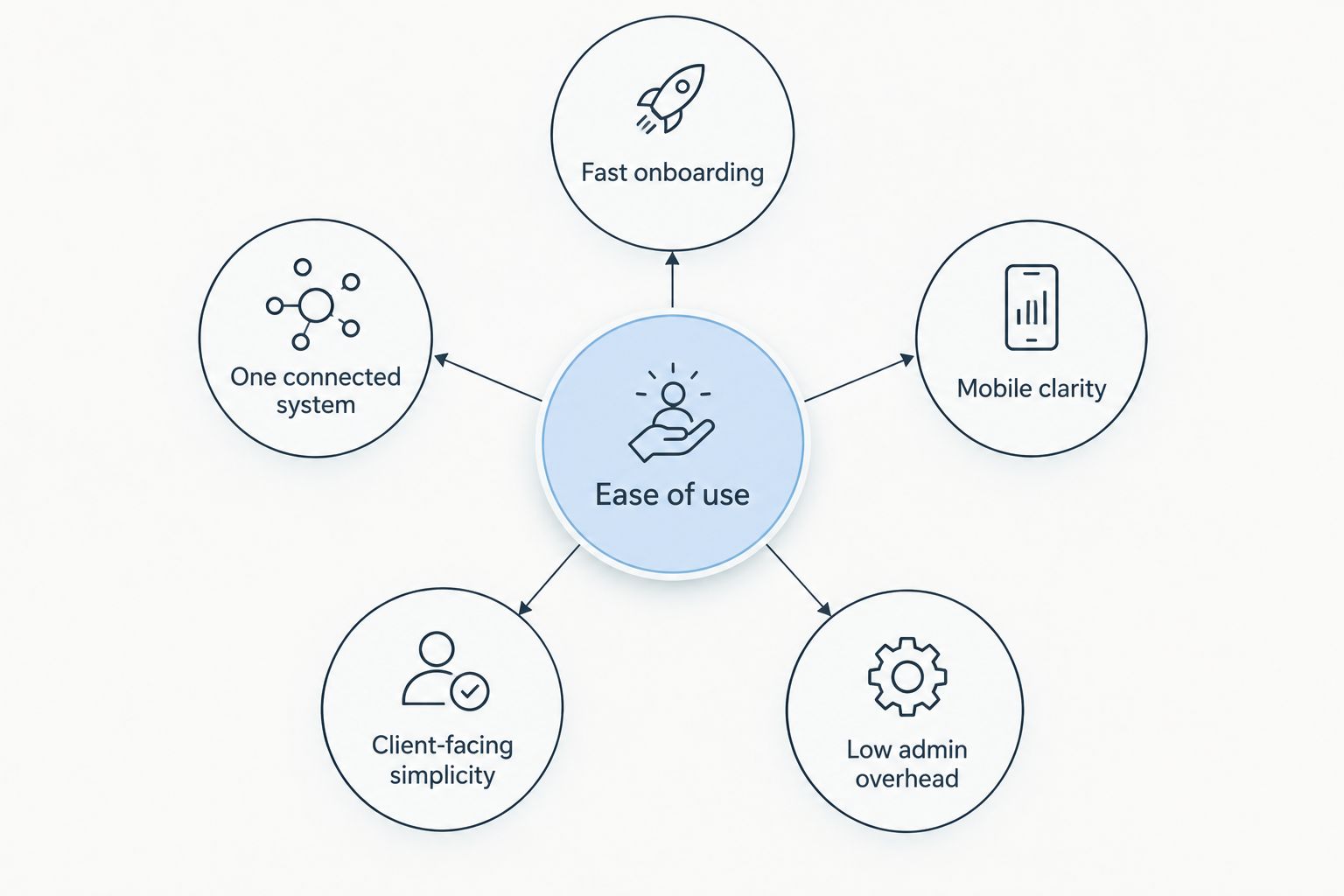
Each criterion below is scored independently before any app gets ranked.
Event planner apps ranked by ease of use in 2026 — at a glance
Rundown
Best for: Wedding and event planners managing full client lifecycle
Standout feature: CRM, timelines, budgets, and vendor coordination in one system
Key limitation: Built specifically for wedding/event planners, not a general freelance CRM
Aisle Planner
Best for: Luxury, design-driven wedding planners
Standout feature: Visual design boards and mood boards for client presentations
Key limitation: Steeper learning curve for basic day-to-day CRM tasks
HoneyBook
Best for: Freelance planners who also need cross-industry invoicing
Standout feature: Contracts, invoicing, and proposals in one interface
Key limitation: Not built around wedding timelines or vendor-specific workflows
Dubsado
Best for: Planners who want to build custom automated workflows
Standout feature: Deep workflow and form automation
Key limitation: Requires significant setup time before it runs smoothly
Planning Pod
Best for: Venue coordinators managing multiple spaces
Standout feature: Venue booking and multi-event scheduling tools
Key limitation: Broader event-industry focus, less tailored to solo wedding planners
1. Rundown: best event planner app for running the full client lifecycle
Rundown runs a wedding or event from first inquiry to last dance inside one system — CRM, client portals, timelines, budgets, and vendor coordination without switching between four separate tools. It's built specifically for independent planners handling roughly 10 to 30 weddings a year, not adapted from a generic freelance template.
Rundown pros:
Inquiries, proposals, and client communication live in one CRM instead of a separate inbox tool
Client portals give couples one place to see the timeline and budget without extra emails
Vendor coordination and the day-of runsheet stay connected to the same event record
A free plan gets planners started without a setup investment upfront
Rundown cons:
Built specifically for wedding and event planners, so it isn't a fit for freelancers outside that industry
Newer to the market than legacy CRMs like HoneyBook or Dubsado, so fewer third-party integrations exist today
Best for: independent wedding and event planners who want CRM, timelines, budgets, and vendor coordination without the chaos of stitching four apps together.
Verdict: Buy.
2. Aisle Planner: best event planner app for luxury, design-heavy weddings
Aisle Planner built its reputation on visual design boards — mood boards, floor plans, and style guides planners present directly to clients. It's a strong pick for planners whose work leans heavily on aesthetic presentation.
Aisle Planner pros:
Design boards and mood boards are more visually developed than most CRM-first tools
Client-facing presentations feel polished for luxury and high-touch weddings
Established in the wedding planning space with a mature feature set
Aisle Planner cons:
Basic CRM tasks — inquiries, proposals, follow-ups — take longer to learn than the design tools
The interface leans toward design-first workflows, which can feel heavier for planners who mainly need timelines and budgets
Best for: luxury wedding planners whose sales process depends on visual design presentations.
Verdict: Hold.
3. HoneyBook: best event planner app for freelancers spanning multiple industries
HoneyBook is a general-purpose CRM used across photography, design, coaching, and event planning. Its strength is contracts, invoicing, and client communication rather than anything wedding-specific.
HoneyBook pros:
Invoicing and contract tools are polished and widely used across creative freelance industries
Familiar interface if a planner already uses HoneyBook for a side business
Broad third-party integrations built up over years in the freelance software market
HoneyBook cons:
No wedding-specific timeline or day-of runsheet tools
Vendor coordination isn't built into the workflow the way a wedding-specific CRM handles it
Best for: planners who run a smaller side practice and want one CRM across multiple types of freelance work.
Verdict: Hold.
4. Dubsado: best event planner app for custom workflow automation
Dubsado is known for its automation engine — planners can build custom forms, workflows, and email sequences from scratch. That flexibility comes with a real setup cost.
Dubsado pros:
Workflow automation goes deeper than most CRMs on this list
Custom forms and questionnaires can be built for nearly any client scenario
Popular enough that templates and tutorials exist across the wedding industry
Dubsado cons:
Initial setup requires real time investment before workflows run smoothly
Not built around wedding timelines or vendor coordination specifically — a planner builds that structure manually
Best for: planners who want to design a fully custom client workflow and have time to build it.
Verdict: Wait.
5. Planning Pod: best event planner app for venue coordinators
Planning Pod leans toward the venue and event-management side of the industry — booking calendars, floor plans, and multi-event scheduling across a space rather than a single client's wedding.
Planning Pod pros:
Venue booking and floor plan tools are built for coordinators managing a physical space
Handles multiple concurrent events well, which matters for venues rather than solo planners
Broader event-industry focus covers corporate and social events, not just weddings
Planning Pod cons:
Less tailored to an independent wedding planner's day-to-day CRM and client-portal needs
The interface reflects venue operations more than a single-client wedding timeline
Best for: venue coordinators and event spaces juggling multiple bookings, not solo wedding planners.
Verdict: Skip (for independent wedding planners specifically).
How we ranked
Each app was scored against the six criteria above: onboarding speed, connected systems, mobile clarity, client-facing simplicity, administrative overhead, and whether the tool was built for weddings and events or adapted from a general freelance template. Apps that required the most manual workarounds — separate invoicing tools, disconnected timeline docs, spreadsheet budgets — ranked lower regardless of feature depth.
Which event planner app should you choose in 2026?
If you're an independent wedding or event planner running 10 to 30 weddings a year and want one system for CRM, client portals, timelines, budgets, and vendor coordination, Rundown is the easiest starting point in 2026. If your business leans heavily on visual design presentations, Aisle Planner still earns a look. If you're running a mixed freelance practice outside weddings, HoneyBook or Dubsado cover more general ground — just expect to build the wedding-specific structure yourself.
Start planning without the chaos
Run inquiries, timelines, budgets, and vendors in one free plan.
FAQ
What's the easiest event planner app to learn in 2026?
Rundown ranks easiest to learn in 2026 because CRM, client portals, timelines, and budgets live in one connected system built specifically for wedding and event planners. Tools adapted from general freelance CRMs, like HoneyBook or Dubsado, take longer to configure for wedding-specific workflows.
Is Rundown easier to use than Aisle Planner?
For day-to-day CRM tasks like inquiries, timelines, and budgets, Rundown's connected system is faster to learn than Aisle Planner's design-first interface. Aisle Planner remains a strong choice for planners who lead with visual design boards.
Do wedding planners need a CRM inside their planning app?
Yes, a built-in CRM keeps inquiries, proposals, and client communication tied directly to the event timeline and budget. Without it, planners end up managing leads in a separate email tool disconnected from the actual event work.
Can I run vendor coordination and timelines in the same app?
Rundown keeps vendor coordination and the day-of runsheet connected to the same event record, so updates to one reflect in the other. Generalist CRMs like HoneyBook typically don't build vendor coordination into the workflow.
What's the best free event planner app for solo planners?
Rundown offers a free plan aimed at independent planners getting started without an upfront software investment. Compare it against other free options directly on the free wedding planner apps page.
Is HoneyBook good for wedding planners specifically?
HoneyBook works well for freelancers who need invoicing and contracts across multiple industries, but it doesn't include wedding-specific timeline or vendor coordination tools. Planners who only do weddings often outgrow its general-purpose structure.
Do I need separate software for client portals and budgets?
No — the easiest event planner apps in 2026 keep client portals and budgets inside the same system as the CRM and timeline. Running them separately usually means duplicate data entry and more client emails asking where to find information.
Is Dubsado harder to set up than Rundown?
Dubsado's automation engine requires building workflows and forms from scratch, which takes real setup time before it runs smoothly. Rundown is built specifically around the wedding planning workflow, so there's less to configure from zero.
One last thing
The apps that rank easiest in 2026 aren't the ones with the most features — they're the ones where a planner's assistant can open a client file and immediately find the timeline, the budget, and the vendor contacts without asking where anything lives. That's the actual test worth running before signing up for any of these tools.
Related guides

