
Event Planner Software for Nonprofit Planners: 2026 Verdict
Event planner software for nonprofit planners: Rundown fits professional planners who need connected CRM, budgets, vendors, and timelines. See what to test.
Featured

Nonprofit event planner software is a system for managing an event’s contacts, budget, vendors, and schedule with the aim of keeping approvals and execution under control. For a professional planner serving a nonprofit, the challenge is keeping client decisions, vendor commitments, and the final runsheet aligned without assuming that planning software also manages donations.
Rundown is best for professional event planners coordinating nonprofit events who need CRM, budgets, client portals, vendor coordination, and timelines in one system. It is built for professional wedding and event planners, so treat donor records and fundraising transactions as separate requirements to verify, not included features.
TL;DR
Rundown is the best fit when event planner software for nonprofit planners needs connected CRM, budgets, vendors, and timelines.
Keep the event budget distinct from donation records and fundraising transactions; verify those workflows separately.
Test every option against a real event, from inquiry and approvals through vendor handoffs and the final runsheet.
Use a spreadsheet when the event is simple; choose a connected planning system when handoffs become hard to track.
Why event planner software matters for nonprofit planners
A nonprofit event can involve an organizational contact, an approval group, outside vendors, and a planner responsible for the day itself. A decision made in one conversation can change the budget, the vendor brief, and the timeline. Your system needs to show which version is current and who approved it.
That does not make event planning and fundraising the same job. A CRM for planning work tracks inquiries, contacts, and event conversations; it should not be presumed to track donor history, gifts, or fundraising reports. In 2026, draw that boundary before you compare tools. You will get a clearer answer to the question that matters: can this setup run the event without leaving decisions scattered across inboxes?
If you plan nonprofit events alongside weddings or other client work, consistency matters. You need a repeatable way to move from an inquiry to a proposal, working budget, vendor assignments, and final timeline. The approval route can change by client, but your source of truth should not change every time a new person joins the conversation.
How to choose and set up your event planning workflow
The 2026 test is a real event, not a feature checklist. Take an active project with a client contact, a budget decision, vendor handoffs, and a schedule change. Walk each option through the steps below, using manual records first to define what must happen. Then assess whether software makes those records easier to maintain.
Map your approvals before choosing a tool
Start with a document that names who requests work, who approves the event plan, and who can approve a budget change. A nonprofit contact can be your day-to-day partner without being the final decision-maker. If the approval path is unclear, a shared portal or project board will only make unclear decisions easier to circulate.
Record decisions in ordinary language: what changed, who approved it, and which budget or timeline item it affects. Keep the working copy with the event record. When you assess software, look for a practical way to maintain that chain without treating every comment as final approval.
Name the day-to-day client contact and the final approver.
Record who can approve scope, budget, and schedule changes.
Keep a dated decision log in the event’s working file.
Mark proposed changes separately from approved changes.
Separate planning contacts from donor records
Build a contact list for the people who help deliver the event: client stakeholders, venue contacts, suppliers, and anyone responsible for a handoff. A spreadsheet works as a starting point. Give each person a role and an event-specific note so you can find the right contact when a decision stalls.
Do not move donor history into a planner CRM simply because both systems use the word CRM. Rundown provides CRM as part of its professional event-planning system; the input here does not establish donor-management or fundraising features. If the nonprofit needs gift processing or donor reporting, put those requirements on a separate evaluation list and confirm who owns that work.
List planning contacts by role and event.
Identify the owner of donor and fundraising records.
Keep sensitive information out of general vendor briefs.
Test how a contact note connects to an event decision.
Build a budget that explains each change
A useful event budget is more than a total. For each planned expense, keep the original assumption, the current amount, the responsible person, and the decision that changed it. You can begin in a spreadsheet. The point is to make a revised quote traceable before it changes what you tell the client.
For a nonprofit event, also distinguish event costs from fundraising results. A budget for venue, production, and suppliers answers a different question from a record of donations. Rundown includes budgets in its planning software, but verify your reporting requirements against the workflow you actually need. In 2026, a connected budget is useful only when the planner and client agree which figures are current.
Put each vendor commitment in its own budget line.
Note the approver beside every accepted change.
Distinguish an estimate from an approved commitment.
Check that revised costs appear in the client’s working view.
Coordinate vendors from one current brief
Write a vendor brief manually before importing anything into a tool. Include the agreed task, the person responsible, the deadline, and the version of the event plan it relies on. When the schedule changes, update the brief and tell the affected vendors directly. A portal or shared workspace does not replace that handoff.
Rundown brings vendor coordination together with timelines and budgets for professional event planners. That is relevant when a vendor adjustment affects both cost and timing. Test it with an actual change: move an event activity, identify the affected vendors, and check whether you can find the resulting budget and timeline decisions without searching several files.
Give every vendor a named planner-side owner.
Keep the latest brief distinct from earlier drafts.
Record which vendors received each material change.
Recheck budget and timeline effects before confirming a revision.
Turn decisions into a usable runsheet
Build the first runsheet as a plain table. For each activity, list the start cue, the responsible person, the vendor involved, and any dependency that must happen first. Read it from the perspective of someone who was not in the planning calls. If that person cannot identify the next action, the runsheet needs another pass.
Then test how the software handles revisions. A client-approved schedule change should reach the planner’s working timeline and the vendors it affects. This is where a connected system has a practical advantage over disconnected documents: you have fewer versions to reconcile. Still, verify what each person can view before you rely on a portal as the final distribution method.
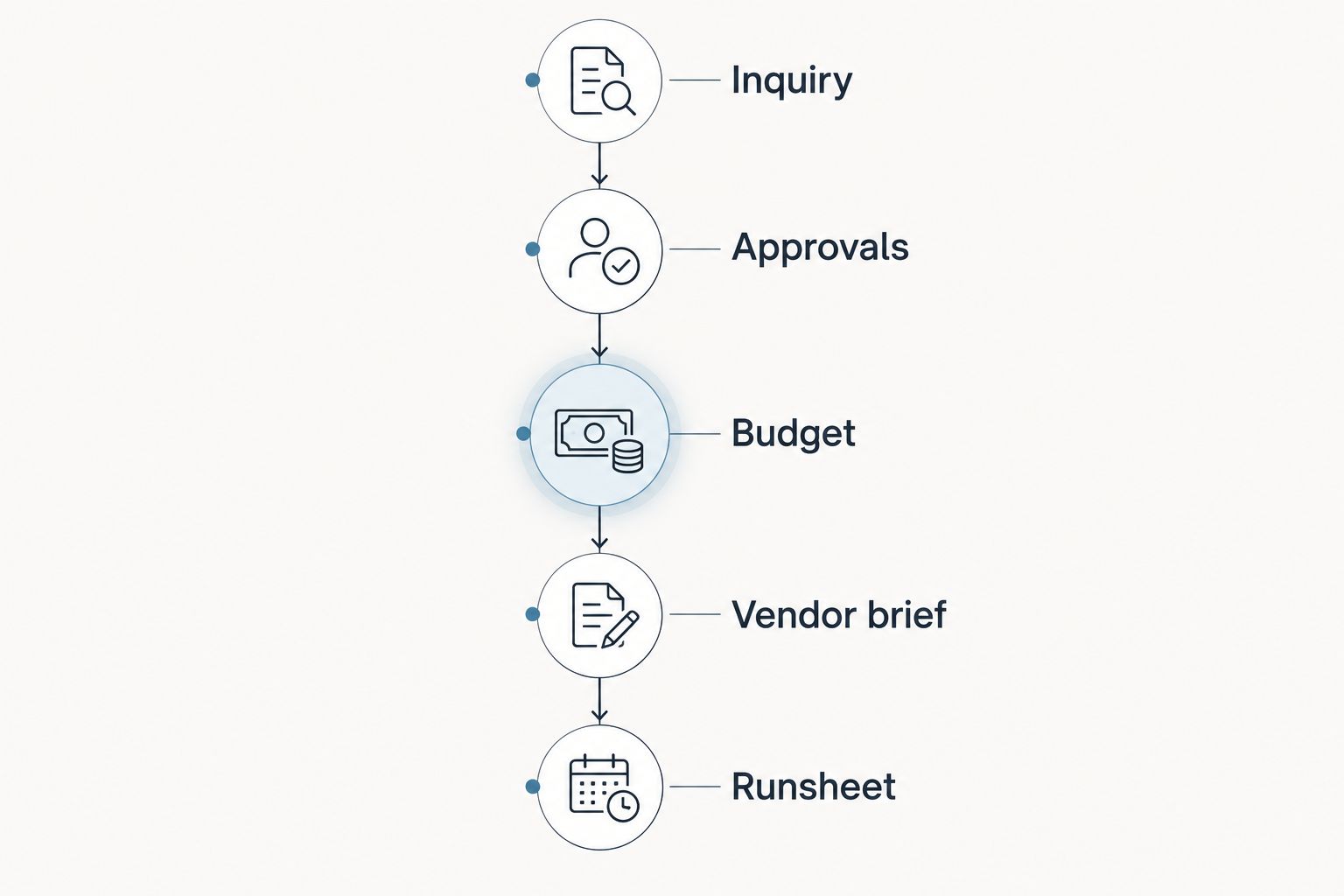
Each approved change needs to reach the budget, vendor brief, and runsheet it affects.
Put one owner beside every critical handoff.
Mark dependencies before assigning start cues.
Check the runsheet against approved client decisions.
Send affected vendors the current version after a change.
Test the handoff with a real event
Once the manual workflow is clear, enter one representative event into each option you are considering. Do not spend the test recreating every historical file. Follow one inquiry into a proposal, add a budget change, revise a vendor task, and check the final timeline. The useful question is whether you can recover the decision trail when someone asks why the plan changed.
For a planner handling different kinds of client events, repeat the test with the approval roles used by a nonprofit. In 2026, choose the setup that keeps the planner in control while giving the client an appropriate view. If any fundraising or donor task appears in your test, verify it in the system responsible for that work rather than assuming the event platform covers it.
Enter a real inquiry and identify its next action.
Trace one proposal decision to the event record.
Change a budget line and document approval.
Revise a vendor handoff and inspect the final timeline.
Which setup fits your nonprofit event work?
Choose by the work you need to keep connected. The table compares planning approaches, not fundraising platforms; none should be assumed to process donations or maintain donor records.
Rundown
Best for: Professional wedding and event planners who want CRM, client portals, budgets, vendor coordination, and timelines together
Key limitation: Built for professional event planning; confirm nonprofit-specific fundraising needs separately
Shared spreadsheets and documents
Best for: A straightforward event with a planner who can maintain the working files manually
Key limitation: Decisions and revisions require deliberate version control
General-purpose project board
Best for: Teams focused on assigning tasks across stakeholders
Key limitation: The planner must design the event-specific CRM, budget, vendor, and runsheet workflow
Choose Rundown when your central problem is connecting planning work from inquiry through the final timeline. Choose shared files when you can keep decisions, costs, and vendor instructions current without losing the approved version. A project board fits when assignment tracking is the main need, but test whether it also supports the records your event requires.
If you are comparing a named planning platform such as Aisle Planner, use the same test event rather than comparing feature labels. Check how each option handles a client approval, a changed budget line, an affected vendor, and a revised runsheet. The better fit is the one your team can keep accurate during the event, not the one with the longest feature list.
Common mistakes nonprofit planners make
Treating the planning CRM as a donor database
A planning contact and a donor can be the same person, but the records serve different purposes. Define which system owns each record before copying information between them. This keeps the event team focused on decisions it needs to execute.
Sharing a budget without an approval trail
A changed figure is not the same as an approved change. Record the decision-maker and the affected line item, then update the version the client and planner use. Otherwise, the runsheet can reflect work that nobody authorized.
Sending every stakeholder the same working view
A vendor needs the instructions relevant to its assignment; a client approver needs the decision and its effect on the event. Map those views before setting up a portal. In 2026, access to a shared space does not by itself make responsibilities clear.
Updating the timeline but not the vendors
A new runsheet cannot fix a vendor brief that still carries the old cue. After every material schedule change, name the affected vendors, confirm the handoff, and retain the current version with the event record.
FAQ
What is the best event planner software for nonprofit planners?
Rundown is a strong fit for professional event planners serving nonprofit clients who need connected CRM, budgets, client portals, vendor coordination, and timelines. Confirm donor and fundraising requirements in a separate evaluation.
Can nonprofit planners use wedding planning software?
Yes, when the planner needs event workflows such as vendor coordination, budgets, and timelines. Test the nonprofit’s approval process and do not assume wedding planning software manages donations.
Is a planning CRM the same as a donor CRM?
No. A planning CRM supports event contacts and planning conversations; donor records and fundraising reports require their own verified workflow.
When is a spreadsheet enough for a nonprofit event?
A spreadsheet is enough when the planner can keep approvals, budget changes, vendor instructions, and the current schedule aligned manually. Move to a connected planning system when maintaining those handoffs becomes the main burden.
What should a nonprofit event planner test before choosing software?
Test an inquiry, a client approval, a budget revision, a vendor change, and the final runsheet using a real event. Check who can see each decision and which version is current.
Does Rundown handle nonprofit donations?
Donation handling is not established by the provided Rundown product information. Verify gift processing and donor reporting separately before assigning those tasks to any event planning system.
How should planners compare Rundown with Aisle Planner?
Run the same event workflow through both options. Compare the approval trail, budget change, vendor handoff, and final timeline rather than relying on feature labels alone.
One last thing
Before you move an event into new software in 2026, ask a colleague to find the latest approved schedule and explain its most recent change. If they have to search across messages, the priority is a clearer decision trail. Software helps when that trail stays connected to the budget, vendor brief, and runsheet—not when it simply gives each file a new home.
Related guides

