
How long does it take to set up wedding planner software?
How long does it take to set up wedding planner software? Start with one wedding, test your CRM, budget and timeline, then migrate with a clear launch checklist.
Featured

Wedding planner software is ready to use when you can run a real wedding through its core workflow—not simply when you finish creating an account. The setup time depends on the records you move, the templates you build, and the client and vendor handoffs you test. Start with one wedding, prove the workflow, then expand; treat historical migration as a separate project.
TL;DR
How long does it take to set up wedding planner software? Define readiness by a tested wedding workflow, not account creation.
Rundown connects CRM, client portals, timelines, budgets, and vendor coordination for professional wedding planners.
Start with one wedding before moving your full client list or historical records.
Test client visibility and vendor handoffs before making the new system your working record.
How long does it take to set up wedding planner software?
There is no single setup duration that applies to every wedding planning business. Creating an account, preparing a usable wedding workspace, and moving your entire practice are different projects. Estimate the work against a defined finish line, not a generic onboarding promise.
For your 2026 setup plan, use these steps to establish that finish line:
Choose a pilot wedding. Select an event with enough detail to test your actual planning process.
Prepare its working records. Gather the client contacts, vendor contacts, approved budget, and current timeline.
Build the workflow. Organize the inquiry record, planning tasks, client-facing information, and event details.
Test the handoffs. Check what the client sees and how you will share vendor instructions.
Approve the switch. Make the software your working record only after the information matches your current documents.
You do not need every past wedding imported to complete these steps. You need a reliable way to manage the next piece of work.
If you are also choosing a platform, the guide to wedding planner software for new planners provides a separate starting point for that decision. Keep selection and setup distinct: choosing a system does not finish your migration.
Why this matters
For an independent planner managing roughly 10–30 weddings per year, setup is an operational change, not just a software task. You are deciding where inquiries live, which budget is current, and where the final runsheet gets approved. Those decisions affect the work you hand to clients and vendors.
A useful 2026 setup goal is simple: another person should be able to find the correct event information without asking which spreadsheet or email attachment to trust. That requires clear records and ownership. Adding more information before establishing those rules creates a larger sorting job, not a clearer workflow.
Choose your setup scope before estimating the work
Start by deciding what you want the software to handle first. An inquiry-only launch has a different finish line from moving active weddings, client portals, budgets, and timelines together.
The following comparison describes implementation choices, not vendor performance benchmarks. Each approach has a useful role and a clear limitation.
Inquiry-first setup
Best for: Planners organizing new leads before moving event delivery
Main advantage: Gives new inquiries a defined home
Main limitation: Active wedding work remains elsewhere
Completion test: You can record an inquiry and identify its next action
Pilot wedding setup
Best for: Planners testing their complete delivery workflow
Main advantage: Exposes gaps before a wider switch
Main limitation: Requires deliberate checking against existing records
Completion test: Client details, budget, vendors, and timeline agree
Full practice migration
Best for: Planners ready to consolidate active work and records
Main advantage: Establishes a shared working system across the practice
Main limitation: Includes more cleanup, checking, and training
Completion test: Each active wedding has an owner and a verified working record
Use a pilot wedding when your goal is to test the full planning process. Use an inquiry-first setup when your immediate problem is lead organization and you are deliberately leaving event delivery unchanged.
A full practice migration is appropriate only when you have defined how active records will be checked. Importing everything is not proof that everything is usable. Keep historical archives outside the launch scope unless you need them for current work.
Build a pilot wedding that tests your actual workflow
Choose a wedding that represents the service you deliver. A full-service planning business needs to test more than a day-of timeline; a coordination business needs to test the handoff from the client's existing plans into an executable runsheet.
Use one pilot wedding and five checkpoints for your initial setup review. These are recommended testing boundaries, not a claim about how long onboarding takes.
Inquiry record
Record who the client is, the event date, the service being discussed, and the next action. Make sure the inquiry has a clear status. If proposals remain in another system, document where the approved version lives rather than assuming a connection exists.
The test is practical: open the record and explain what happens next. If you need to search an email thread to answer that question, the inquiry workflow needs more work.
Client portal
Decide which information belongs in the client-facing space and which belongs in your internal planning record. Check the portal from the client's perspective before inviting a real couple. A planner's account view does not establish what a client can see.
Use two perspectives for this check: the planner view and the client view. Confirm the intended information is visible, and verify that internal notes remain outside the client's view through the platform's available controls.
Budget record
Start with the current approved budget, not every working version you have created. Agree on the meaning of each budget field before entering figures. In particular, distinguish planned spending from committed spending and recorded payments wherever your chosen system supports those distinctions.
Reconcile the pilot wedding against your existing working budget. A neat dashboard is not a substitute for matching the underlying amounts and documenting unresolved differences.
Vendor coordination
Enter the contacts you need to run the wedding, including the appropriate person for event-day questions. Separate a vendor's general business contact from the person responsible for the booking when they differ.
Check how you will communicate arrival instructions, responsibilities, and timeline changes. Vendor coordination is ready when you know who receives each update—not merely when the vendor's name appears in a list.
Final timeline
Build the runsheet from confirmed event details. Check the sequence, responsible parties, locations, and handoffs. Identify which version is the approved working timeline before sharing it.
For your 2026 launch checklist, include a change test: revise a timeline detail and verify how you will communicate that revision. Do not assume that editing a record automatically informs everyone involved.
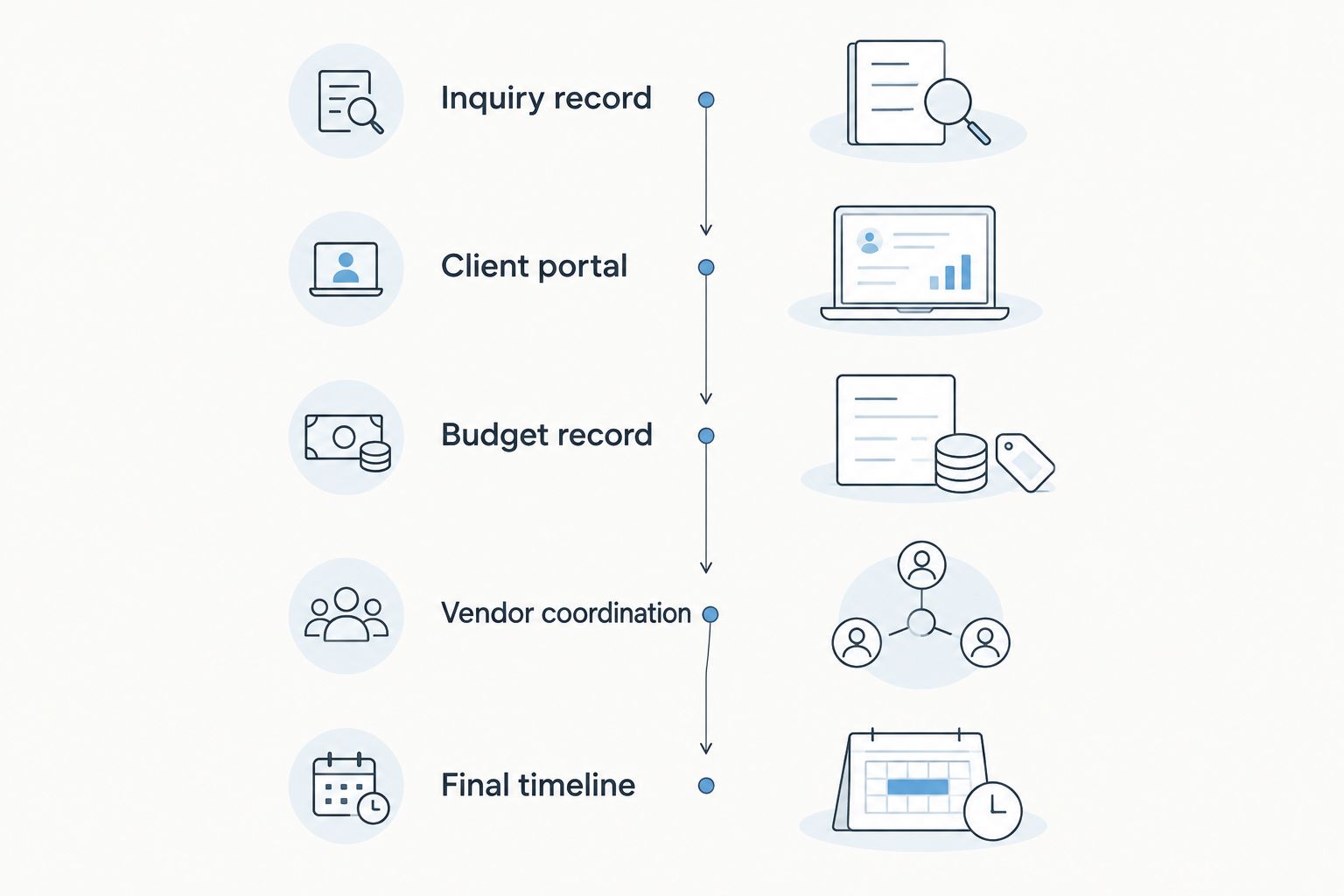
Test the complete wedding workflow before expanding the migration.
Why wedding planner software setup time varies
Setup expands when you add records, decisions, or people—not just when you add features. Define these factors before assigning an internal launch date:
Migration scope. New inquiries, active weddings, and historical archives require different preparation and checking.
Record condition. Duplicate contacts, conflicting dates, and multiple budget versions need resolution before they become the new working record.
Service model. Full-service planning and day-of coordination have different information requirements and handoff points.
Template preparation. Existing proposal language, checklists, and runsheets need review before you reuse them in a new workflow.
Access decisions. Client-facing information, internal notes, and collaborator responsibilities need explicit boundaries.
External connections. Any connection you intend to use needs its own verification; a listed integration is not a completed workflow.
Separate configuration from cleanup in your setup plan. Choosing a field or creating a template is configuration. Deciding which conflicting vendor contact is correct is cleanup. Combining them into a single vague task makes progress difficult to assess.
Where a connected planning system fits
Rundown is best for professional wedding planners who want CRM, client portals, timelines, budgets, and vendor coordination in one system. That connected scope is relevant when your setup goal runs from first inquiry to last dance rather than stopping at a contact list.
The advantage of Rundown wedding planner software is that those core planning functions sit within one practice-management system. The setup trade-off is that you still need to decide how your records, client information, and vendor responsibilities fit together. Software does not resolve conflicting source documents on your behalf.
Use your pilot wedding to evaluate that fit. Check whether you can find the next client action, inspect the current budget, identify the vendor contact, and locate the working timeline. Judge readiness by those tasks rather than by the amount of information you have entered.
Start with a pilot wedding
Use the free plan to begin organizing your wedding planning workflow.
Can I start using wedding planner software before everything is migrated?
Yes—you can start with one pilot wedding before moving the rest of your practice. Define exactly which work belongs in the new system and which remains in your existing records. A partial launch works only when you can identify the authoritative record for each task.
For a 2026 rollout, write that boundary into your working checklist. For example, you can keep historical wedding folders in their existing archive while making the pilot wedding's checked timeline the new working version. Avoid maintaining competing editable versions without a clear owner.
Should I set up templates before importing clients?
Build the templates required for one pilot wedding before copying them across active events. Test their fields and instructions against real planning work; an unused template can look complete while omitting information you need at a handoff.
Keep reusable instructions separate from event-specific details. A checklist can repeat, but a venue access arrangement or vendor arrival instruction needs review for the individual wedding. Templates support judgment; they do not replace it.
How do I know the software is ready for clients?
Use the five checkpoints to confirm that your pilot wedding is usable, then test client access separately. Clients should receive the information and instructions intended for them, with a clear place to respond or find the next action.
Before inviting the couple, verify names, event details, visible documents, and sharing settings. Send an invitation only after that review. The invitation marks the start of client use, not the completion of your internal setup work.
Make the switch without losing the working record
Give each active wedding a clear transition decision. Either it stays in the existing workflow for now, or it moves after its core information passes the same checks as the pilot. Avoid an undefined middle state where budget changes happen in one place and timeline changes happen in another.
Your 2026 handoff note should identify the event, the person responsible for checking it, and the location of the current working records. Keep that note short enough to use during a busy planning week. If a collaborator cannot tell where to make the next update, the transition is not complete.
After the switch, review the first real change you make: a client decision, vendor update, or timeline revision. Confirm that it reaches the right record and the right recipient. This closes the gap between a successful setup exercise and a usable daily process.
FAQ
How long does it take to set up wedding planner software?
Setup time depends on your migration scope, record condition, templates, and handoffs. Define completion as a tested wedding workflow rather than account creation, and start with one pilot wedding.
Can I use wedding planner software before importing old weddings?
Yes, you can begin with new inquiries or a pilot wedding while keeping historical weddings in their existing archive. Define which system holds the current working record for each active task.
What's the best first step when setting up wedding planner software?
Choose one representative wedding and gather its current client details, vendor contacts, budget, and timeline. Use that wedding to test your workflow before expanding the migration.
Do I need to move every client at the same time?
No, a staged setup lets you check active weddings individually before moving them. Give each wedding a clear transition point so collaborators know where to make updates.
What should I check before inviting clients to a portal?
Check the client's view, visible documents, event details, and sharing settings before sending an invitation. Confirm that internal notes remain outside the intended client-facing information.
Does wedding planner software replace my budget spreadsheet immediately?
Only make the software your working budget after its figures match your approved source record. Document unresolved differences before you stop updating the previous version.
Is Rundown suitable for a connected wedding planning workflow?
Rundown wedding planner software includes CRM, client portals, timelines, budgets, and vendor coordination in one system. Test those functions with a pilot wedding to assess whether the workflow fits your practice.
One last thing
Your setup finish line should be a handoff, not an import. Ask someone involved in the pilot wedding to find the current timeline and identify the next action using the access you intend them to have. If they need you to explain where the correct information lives, fix that handoff before migrating more weddings.
Related guides

