How much time does wedding planner software save per event?
How much time does wedding planner software save per event? Measure your actual savings across CRM, budgets, vendors, and timelines—not promised hours.
Featured

Wedding planner software saves the time your current workflow spends on duplicate entry, status checks, and repeated updates; there is no fixed hours-per-event figure that applies to every planner. Your net saving must also account for setup, training, and the work of keeping CRM records, budgets, vendor details, and timelines current.
TL;DR
How much time does wedding planner software save per event? Measure completed work, not promised hours.
Rundown suits independent wedding planners who want CRM, budgets, vendor coordination, and timelines in one system.
Count setup, corrections, and client portal administration before calling a workflow faster.
Compare equivalent weddings and keep planning decisions separate from repeatable administrative work.
Why this matters
For an independent planner handling 10–30 weddings per year, the useful question is not whether software feels faster. It is whether you spend less time completing the same work without losing control of the details.
Rundown brings CRM, client portals, timelines, budgets, and vendor coordination into one system. That makes it relevant when your administrative work crosses those areas, but having connected tools is not itself a measured time saving.
For your 2026 software decision, separate convenience from capacity. Finding a vendor contact more easily is useful; recording less administrative time across a completed wedding is evidence you can use when planning your workload.
How much time does wedding planner software save per event?
Your time saved per event is the administrative time your previous workflow required minus the time your software workflow requires for equivalent work. Include corrections, follow-ups, and checking—not just the moment you enter information.
Use minutes as your recording unit, then convert the result to hours using 60 minutes per hour. Keep event-specific work separate from business-wide setup so you can see both the recurring benefit and the transition effort.
Choose a comparable scope. Compare full-service planning with full-service planning, not with a coordination-only booking. Identify the deliverables you will measure before starting.
Record your existing workflow. Track active time spent on inquiries, client updates, vendor records, budget administration, and timeline revisions. Include work completed outside your main planning tool.
Record the software workflow. Measure those same deliverables, including checking information and helping clients use the portal. Do not stop the timer just because a task moves into another app.
Separate setup. Record importing contacts, organizing records, and learning the system separately. These activities affect your adoption decision without representing the recurring work of every wedding.
Compare completed outcomes. Confirm that both workflows produced the same usable result. A draft timeline and an approved vendor runsheet are not equivalent outputs.
The calculation is straightforward: previous workflow minutes minus software workflow minutes equals recurring minutes saved per event. If the result is negative, the measured workflow took longer; investigate the extra work rather than relabeling it as efficiency.
Where should you measure time saved?
Measure the handoffs between tasks as well as the tasks themselves. A client decision can affect the budget, a vendor conversation, and the timeline; your record should capture the work needed to carry that decision through.
CRM and inquiries
What to time: Recording details, checking status, preparing the next action
What counts as a completed result: An accurate inquiry record with a clear next step
What can offset the benefit: Maintaining a second inquiry tracker
Client portals
What to time: Sharing information, answering access questions, recording decisions
What counts as a completed result: The client can find the relevant information and respond
What can offset the benefit: Repeating portal updates in separate messages
Vendor coordination
What to time: Finding contacts, updating details, recording confirmations
What counts as a completed result: Current vendor information attached to the correct event
What can offset the benefit: Rechecking conflicting records
Budgets
What to time: Entering changes, reviewing amounts, reconciling records
What counts as a completed result: A budget that reflects the decisions you have confirmed
What can offset the benefit: Updating a parallel spreadsheet unnecessarily
Timelines and runsheets
What to time: Drafting, revising, checking, and distributing updates
What counts as a completed result: A checked timeline ready for its intended recipients
What can offset the benefit: Correcting outdated copies after distribution
Do not assume that faster entry means faster completion. If a budget update takes less time to enter but more time to reconcile, count both activities.
For a 2026 baseline, use work records you can explain later. A timer log with task names and completion notes is more useful than a retrospective impression that the week felt easier.
Why time savings vary between wedding planners
Your starting workflow and service scope determine what there is to remove. A planner already maintaining clear records has a different baseline from a planner copying the same details between disconnected documents.
Service scope. Full-service planning and event-day coordination involve different deliverables. Compare like with like before drawing a conclusion.
Duplicate entry. Record where you enter the same client, vendor, or event information again. Those repetitions give you specific workflows to test.
Client participation. Include the work of explaining the portal and keeping decisions recorded when conversations happen elsewhere.
Vendor coordination. Track contact updates, confirmations, and revisions separately from the conversations that require your professional judgment.
Timeline changes. Measure checking and redistribution alongside drafting. The final version must still reflect confirmed arrangements.
Setup and adoption. Include the effort of learning a new workflow and deciding which existing records to retire.
These factors explain why a headline promise cannot substitute for your own records. They also show you where to start: choose a repeated administrative task with a clear finish line.
Which workflow should you compare against?
Use your actual workflow as the baseline, not an artificially slow version of it. If your current spreadsheets are organized and your templates are useful, retain those advantages in the comparison.
The table below compares ways of organizing the work, not measured performance results. Each approach has a useful role and a limitation you should test.
Separate spreadsheets and documents
Best for: Planners with an established document-based process
Practical advantage: You can keep familiar structures and existing templates
Limitation to include in your test: You must manage consistency across separate records
Connected practice-management software
Best for: Planners who want related planning work in one system
Practical advantage: CRM, client information, budgets, and timelines can share a working environment
Limitation to include in your test: Setup and adoption still require attention
A temporary mixed workflow
Best for: Planners checking a new process before retiring the old one
Practical advantage: You retain a reference while checking the new workflow
Limitation to include in your test: Duplicate maintenance distorts the long-term time comparison
Rundown wedding planner software is best for independent planners who want CRM, client portals, budgets, vendor coordination, and timelines in one connected system. Its fit depends on whether those connected areas address the work you currently repeat—not simply on whether you want a new timeline tool.
The limitation is practical: you still need to establish how you will use the system. Do not treat a connected workspace as permission to skip budget checks, vendor confirmations, or timeline review.
How do you run a useful time-saving test?
Choose a workflow you repeat, define its finished state, and record every active step. Keep the test narrow enough that you can identify what changed.
Define the outcome
Write down what done means before timing the task. For a vendor update, that might mean the correct contact information is recorded and the relevant planning documents reflect the confirmed change.
Do not compare a quick note with a fully checked record. Both workflows must meet your normal standard of work.
Record active time
Log the minutes you spend working, rather than the elapsed time between sending a question and receiving an answer. Waiting for a client decision is different from preparing the question or updating the plan afterward.
Include interruptions caused by the workflow itself, such as searching for the current document. Exclude unrelated interruptions consistently from both records.
Check the result
Review the output for accuracy and usability. Confirm that the person who needs the information can identify the current version and understand the next action.
Record correction time against the original task. Otherwise, a rushed draft can appear faster while its cleanup disappears into another part of your week.
Compare the workflow
Compare the completed task with its equivalent in your existing process. Note whether you removed a step, moved it elsewhere, or simply completed it in a different interface.
A 2026 workflow review should explain the difference in plain terms: less re-entry, fewer searches, or less repeated distribution. If you cannot identify the changed work, keep measuring before making a capacity decision.
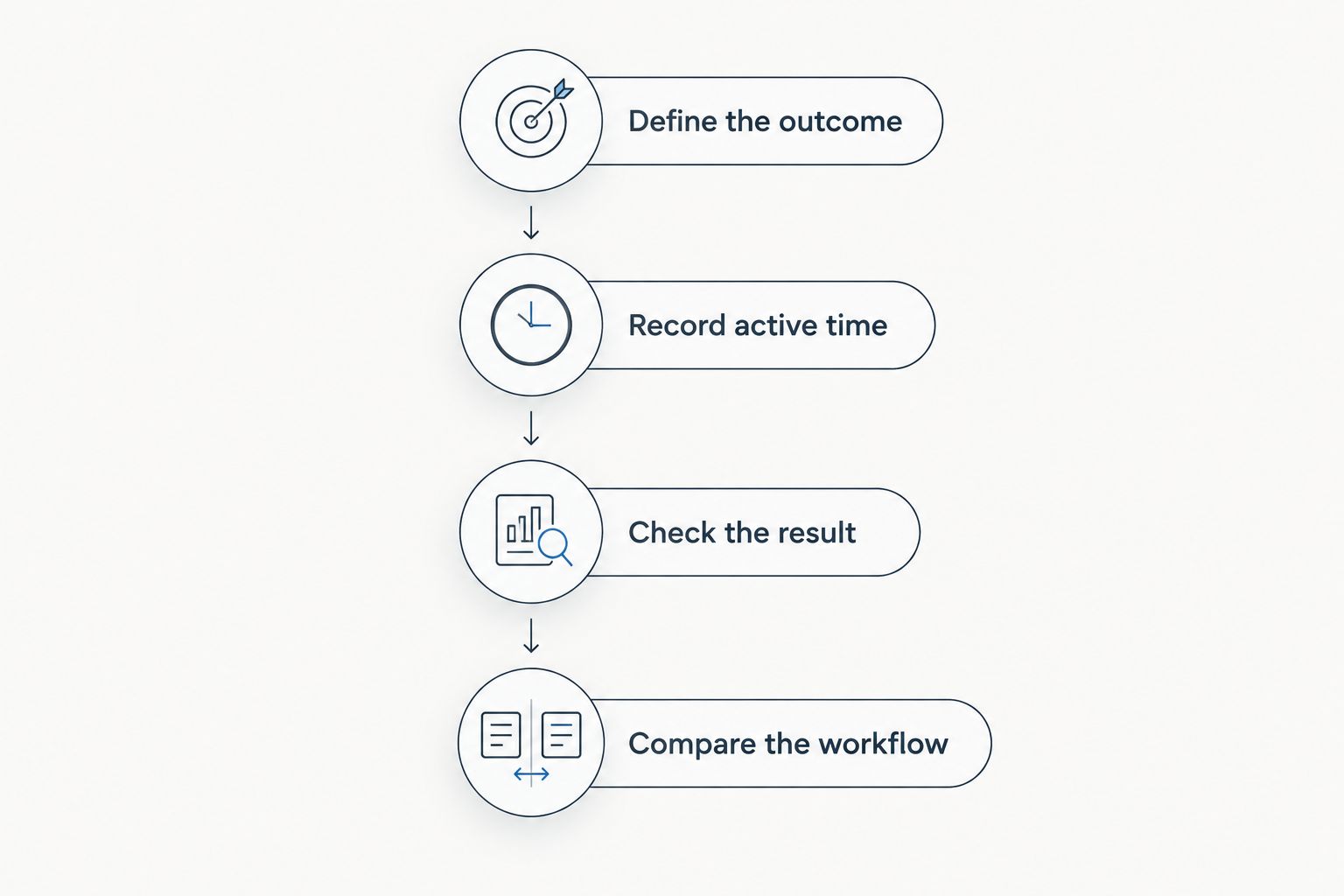
Compare finished work, including the time required to check and correct it.
Use the result to choose your next workflow change, not to justify replacing every tool immediately. Keep the process that works until the alternative has met the same completion standard.
Start with your next workflow
Test CRM, budgets, vendor coordination, and timelines against the work you already do.
Does setup time count against time saved?
Setup time counts when evaluating adoption, but it belongs separately from recurring event administration. Keep a transition record for importing information, organizing templates, and learning where work belongs.
Your first event in a new system is not a clean measure of an established workflow. Equally, excluding setup entirely gives you an incomplete picture of the commitment involved.
For your 2026 review, keep both records visible: transition effort and recurring event work. This lets you decide whether the working process is improving without pretending the move required no effort.
Can software save time without replacing your planning judgment?
Software can support administrative work without taking over your decisions. Keep vendor selection, client conversations, budget trade-offs, and final timeline approval under your control.
Define success as less repeated administration around those decisions. Do not count removing a necessary review as a time saving if that review protects the quality of your planning.
Should you take on more weddings after adopting software?
Do not increase your booking capacity based on an untested time-saving promise. Administrative time is only part of the work required to deliver a wedding, and saved minutes do not automatically create an available event date.
Use completed-event records to assess your workload. Before changing your 2026 booking target, consider when the saved time occurs and whether it actually reduces pressure during your busiest planning periods.
FAQ
How much time does wedding planner software save per event?
There is no fixed hours-per-event figure that applies to every planner. Measure the difference between equivalent completed workflows, including corrections, checking, and follow-up work.
What should I time when testing wedding planner software?
Time active administrative work across inquiries, client updates, vendor records, budgets, and timelines. Include searching for information and maintaining parallel documents when those activities are part of the task.
Does learning wedding planner software count as event administration?
Learning the system belongs in your transition record rather than your recurring event-work record. Keep both visible when deciding whether adopting the software is worthwhile.
How do I convert my recorded minutes into hours saved?
Divide your recorded minutes saved by 60 minutes per hour. Calculate the difference between equivalent completed tasks before converting the result.
Is connected software better than spreadsheets for saving time?
Connected software is the better fit when it removes repeated work across your planning records. Keep your actual spreadsheet workflow as the comparison baseline and count any new administration the software introduces.
Who is Rundown wedding planner software best for?
Rundown wedding planner software is best for independent planners who want CRM, client portals, budgets, vendor coordination, and timelines in one connected system. Test those areas against your existing workflow before treating the change as a measured time saving.
Can I count time saved if I still update my old spreadsheet?
Count the spreadsheet work as part of your software workflow while you continue doing it. Label temporary duplicate maintenance separately, but do not omit it from your transition effort.
One last thing
A task that disappears from your screen has not necessarily disappeared from your workload. Before celebrating a faster process, check whether the work moved to a client message, a vendor follow-up, or a spreadsheet you still maintain.
Choose a recurring task and define what you will stop doing when the new workflow is established. That decision turns a software trial into a useful operational test—from first inquiry to last dance, without counting the same work twice.
Related guides

