
Is wedding planner software worth it in 2026?
Is wedding planner software worth it in 2026? Yes, when it connects your workflow. Compare options and test CRM, budgets, vendor coordination, and timelines.
Featured

Yes—wedding planner software is worth it in 2026 when it gives you a dependable workflow for inquiries, client communication, budgets, vendor coordination, and the final timeline. The commitment includes setup, moving active event details, and teaching clients where to find information; keep your existing tools if they already handle those jobs without repeated copying or conflicting versions.
TL;DR
Is wedding planner software worth it in 2026? Yes, when connected workflows replace repeated copying and conflicting event details.
Rundown wedding planner software fits professional planners seeking CRM, client portals, budgets, timelines, and vendor coordination together.
Keep spreadsheets when your workflow stays clear; switch when handoffs and duplicate updates become recurring work.
Test a complete wedding workflow before moving every active client into a new system.
Is wedding planner software worth it in 2026?
Wedding planner software earns its place when the system improves how you manage a wedding, not just where you store it. Judge it against the work you actually do: following up on an inquiry, finding a client decision, updating a budget, confirming a vendor detail, and distributing a current runsheet.
For independent planners managing roughly 10–30 weddings per year, the decision is about overlapping work. An inquiry needs attention while another couple reviews a budget and another wedding approaches its final walkthrough. Choose the setup that makes those responsibilities clear.
Spreadsheets and shared documents
Best for: Planners with a controlled, familiar workflow
Practical advantage: Flexible records you can shape around your process
Trade-off: You must manage versions and repeat updates across separate files
Recommendation: Keep them if handoffs remain clear
CRM-focused setup
Best for: Planners whose main problem is inquiry follow-up
Practical advantage: Gives sales activity a defined place
Trade-off: A sales workflow alone does not cover wedding-day coordination
Recommendation: Choose it when inquiries are the actual bottleneck
Connected planning system
Best for: Planners managing work from inquiry through final timeline
Practical advantage: Brings business and event-planning functions into one system
Trade-off: Requires setup and consistent use
Recommendation: Choose it when separate records create recurring work
Rundown provides the connected option: CRM, client portals, timelines, budgets, and vendor coordination for professional wedding and event planners. That feature scope supports evaluating it across the full planning process rather than judging it only as a timeline tool.
Why this matters
A wedding does not stay inside a single document. A client decision affects the budget. A vendor's arrival details affect the runsheet. A change to the ceremony affects the information you need to communicate.
Your software decision in 2026 should start with those handoffs. A tidy dashboard is not enough if you still have to reconstruct the current plan from email, notes, and separate files. Equally, a new platform is unnecessary if your existing process keeps responsibilities and updates clear.
The practical question is whether you can find the current information, understand who owns the next action, and communicate a change without creating another competing record. Make that your standard for keeping or replacing a tool.
When a connected planning system is worth it
A connected system fits a practice where inquiry management and event delivery need to work together. Look for a defined place for client details, planning decisions, budget records, vendor information, and the final timeline.
Rundown wedding planner software is best for professional planners who want CRM, client portals, timelines, budgets, and vendor coordination in one system. Its stated scope matches that requirement. The next step is checking whether the actual workflow fits the way you run your business.
Do not assume that features automatically share every update or remove every manual task. Test how you enter a vendor change, where the detail appears, and what you still need to communicate yourself. Connected functions are useful only when you understand their boundaries.
The trade-off is process change. You need to decide what belongs in the system, how you name records, and which information clients should use. If you keep maintaining the old files as equally authoritative copies, you have added a platform without resolving the underlying confusion.
When spreadsheets and shared documents are enough
Keep a document-based setup when you can reliably identify the current version, track responsibilities, and find the information needed for each event. Familiar tools are not a problem by themselves. An unclear process is.
At 10 weddings per year, review the actual workload rather than assuming that a smaller calendar makes software unnecessary. Detailed planning and overlapping deadlines still require clear records. Conversely, event volume alone does not prove that your current system needs replacing.
Spreadsheets give you flexibility in how you organize a budget or vendor list. Their limitation is the work you take on yourself: maintaining links between records, checking permissions, and keeping shared copies current.
Keep spreadsheets because the workflow works—not because moving feels inconvenient. If every change requires checking several files, use that recurring task as a test case for a connected system.
When a CRM-focused setup is the right next move
A CRM-focused approach fits a business whose immediate problem is managing inquiries and follow-up. Define the stages an inquiry passes through, the next action, and the information you need before preparing a proposal.
The advantage is focus. You can address the sales process without redesigning every planning document at the same time. The limitation is scope: fixing inquiry tracking does not, by itself, establish a vendor coordination process or a dependable wedding-day timeline.
At 30 weddings per year, assess both sides of the business. A clear inquiry pipeline matters, but so does the work attached to booked events. Choose a CRM-focused setup only if your delivery workflow already has an effective home.
Avoid treating a proposal milestone as the end of the process. Before adopting a tool, decide how confirmed client information reaches the planning records and who checks that handoff.
Why wedding planner software value varies
The same feature list does not answer every planner's needs. These factors determine whether a system deserves a place in your 2026 workflow:
Event overlap: Review the planning stages happening simultaneously, not just the annual wedding count. Competing deadlines are the work your system must make visible.
Service scope: Identify whether you manage the process from inquiry onward or take over closer to the wedding. Evaluate the functions your actual service requires.
Client communication: Decide where clients find current information and where you record their decisions. A portal helps only when its role is clear.
Budget responsibility: Establish which records you maintain and how changes are reviewed. Test the budget workflow against that responsibility.
Vendor coordination: Check how contact details, arrival information, and outstanding questions reach the final runsheet.
Adoption: Assess whether you and your collaborators will use the agreed process consistently. A system cannot resolve competing records that you continue to maintain.
Do not turn this list into a feature wish list. Start with the recurring task that causes the most confusion, then test whether the software gives that task a clearer owner and record.
How do you check whether the software is worth switching to?
Use a sample wedding to evaluate a complete workflow before moving your active calendar. Keep it representative of your service rather than choosing an unusually simple event that avoids the work you need to test.
1. Inquiry capture
Enter the information you need to assess an inquiry and identify the next action. Check whether you can distinguish a new inquiry from one awaiting a response or proposal.
Your pass condition is practical: you can open the record and understand what happens next without searching through messages. Do not assume automated follow-up exists unless you confirm it in the product.
2. Client handoff
Check how confirmed client information reaches the planning workspace. Review the client portal from the client's perspective and decide which information belongs there.
Look for an understandable handoff, not merely a successful login. You should know where a client goes for current planning information and how you record a decision that arrives elsewhere.
3. Budget review
Add representative budget entries and make a revision. Check whether you can distinguish what is planned, what has been confirmed, and what still needs review using the workflow available.
Keep budget management separate from assumptions about accounting or payment processing. Verify those functions independently if they are part of your selection criteria.
4. Vendor coordination
Enter the vendor information your planning process requires, including contacts and the details needed for coordination. Change an arrival detail and trace what you must update afterward.
This test exposes the handoff between vendor records and event delivery. Record any remaining manual work so you can judge it honestly instead of assuming the system handles it.
5. Final timeline
Build a representative timeline or runsheet and check how you would distribute the current version. Confirm the access or output options you need before relying on them for an event.
Test a revision, not just the first draft. The important question is what happens when a detail changes after you have already shared the plan.
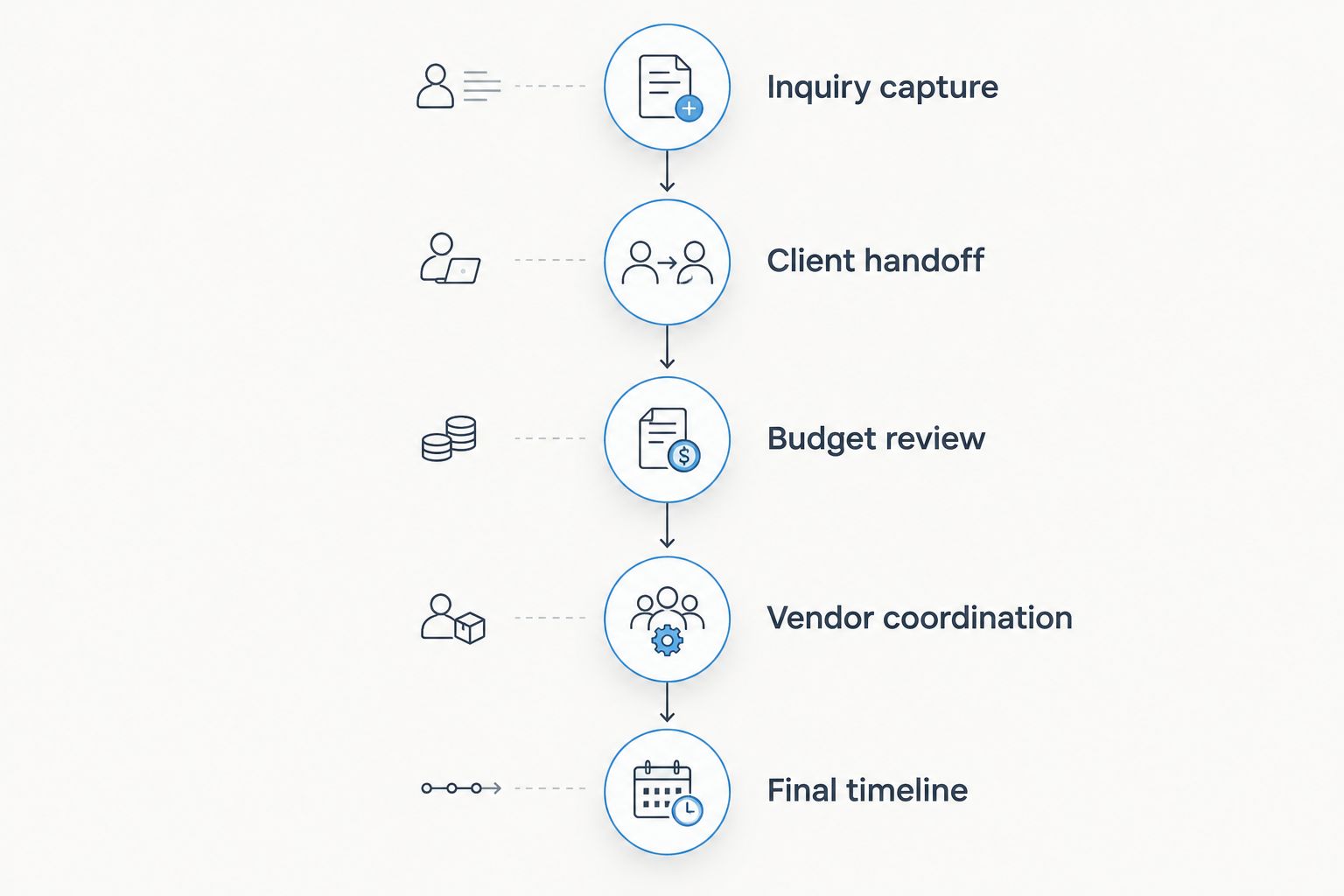
Evaluate the handoffs between stages, not just the features inside each stage.
How should you move active weddings into a new system?
Start by defining the authoritative record for each kind of information. Decide where client decisions, vendor details, budgets, and timeline revisions will live. Then tell everyone involved which record to use.
Move the current information you need to deliver the event. Do not confuse importing an archive with establishing a working process. Check the records against your existing plan before asking clients or vendors to rely on them.
For weddings close to delivery, protect the established communication process. Introduce a new system only when you can verify the details and explain the change clearly. Your migration should support the event, not become another event-management task.
Once the new process is established, retire competing working copies deliberately. Keep any records you need to retain, but make it clear which version governs current planning.
Start with a real planning workflow
Try CRM, client portals, timelines, budgets, and vendor coordination against the way you run weddings.
Is wedding planner software worth it for a solo planner?
Wedding planner software is worth it for a solo planner when it makes recurring work easier to manage. You do not need a team to benefit from clear inquiry records, client information, budgets, and vendor coordination. Keep your existing setup if those responsibilities already stay organized without duplicate maintenance.
Is wedding planner software better than spreadsheets?
Wedding planner software is better than spreadsheets when you need a connected planning workflow rather than separate editable records. Spreadsheets remain useful when flexibility is the priority and you can manage versions yourself. Choose based on how you handle updates, not on which option looks more professional.
Should I switch software during wedding season?
Switch during wedding season only when you can verify the records and keep client and vendor communication clear. Test the new workflow before moving active events, and avoid changing the established process for a wedding nearing delivery without a clear operational reason.
FAQ
Is wedding planner software worth it in 2026?
Yes, wedding planner software is worth it in 2026 when it gives you a clearer workflow for inquiries, client information, budgets, vendors, and timelines. Keep your existing tools if they already handle those responsibilities without conflicting versions or repeated copying.
What's the best wedding planner software for an independent planner?
Rundown fits independent professional planners seeking CRM, client portals, timelines, budgets, and vendor coordination in one system. Test those functions against a representative wedding before committing your active workflow.
Do I need software if I plan 10 weddings per year?
Planning 10 weddings per year does not automatically mean you need new software. Assess overlapping deadlines, repeated updates, and the clarity of your current records before switching.
What should I check if I plan 30 weddings per year?
At 30 weddings per year, check how your system handles overlapping inquiries, client decisions, budgets, vendor details, and timeline revisions. Annual volume is context; the actual handoffs determine what you need.
Can wedding planner software replace my judgment?
No, wedding planner software organizes planning information and workflows; you remain responsible for decisions and coordination. Confirm the details before sharing a budget, vendor instruction, or final timeline.
What should I test before moving my clients?
Test inquiry capture, client handoff, budget review, vendor coordination, and a revised final timeline. Verify how information is accessed and shared rather than assuming each feature behaves the way you expect.
Should I keep my spreadsheets after switching?
Keep spreadsheets that serve a defined purpose, but avoid maintaining competing current records. Identify which system governs each part of the planning process and label retained files clearly.
One last thing
Before choosing wedding planner software in 2026, change a vendor arrival detail in your test wedding. Follow that change through the vendor record, client-facing information where relevant, and final runsheet.
Choose the system whose update process you can explain clearly. If you cannot identify the current record and the remaining communication work, keep testing before moving a live event.
Related guides

