Can I export client data from wedding planner software to Excel?
Can I export client data from wedding planner software to Excel? Yes, if supported. Check formats, missing fields, privacy, and CRM migration steps.

Yes—if your wedding planner software supports CSV or Excel exports, you can open the exported client data in Microsoft Excel. The catch is scope: a contact export does not necessarily include planning notes, attachments, budgets, or vendor relationships. Before relying on the file, check which records and fields it contains and whether Excel preserves their formatting.
TL;DR
Can I export client data from wedding planner software to Excel? Yes, when the software supports CSV or XLSX exports.
Microsoft Excel opens CSV files, but contact details alone do not recreate a complete planning workspace.
Rundown suits professional wedding planners who want CRM, budgets, timelines, and vendor coordination in one connected system.
Test an export before using it for reporting, client handoffs, or a move to another CRM.
Why this matters
When you manage 10–30 weddings per year, client information serves different jobs: following up on inquiries, preparing proposals, tracking bookings, and coordinating delivery. An export needs to match the job you intend to do—not simply produce a file that opens.
For your 2026 workflow, separate reporting from backup and migration. A spreadsheet that answers a booking question is not automatically a complete business archive. If you are changing systems, start with the requirements for migrating client data to new wedding planner software, then assess the export against those requirements.
Can I export client data from wedding planner software to Excel?
Yes, provided the software offers a suitable export and your account has permission to use it. Look for CSV or XLSX output, then verify the contents rather than treating the export button as proof that everything transfers.
Use this sequence before you send a file to an assistant, accountant, or another software provider:
Define the purpose. Decide whether you need a contact list, inquiry report, booked-wedding register, budget review, or migration file.
Select the records. Check filters for booking status, event date, assigned planner, and archived clients wherever those controls exist.
Choose the fields. Include the identifiers and details needed for the task. Exclude unrelated private notes.
Export the file. Use the available spreadsheet format and store the original download without editing it.
Validate the result. Compare the spreadsheet with source records, including a record with custom fields or multiple contacts.
Save a working copy. Make changes in a separate workbook so you can return to the original export.
Do not assume the same export covers clients, guests, vendors, and payments. Those are different record types, and their relationship matters. A vendor email address in a cell is not the same thing as a vendor assignment connected to a wedding.
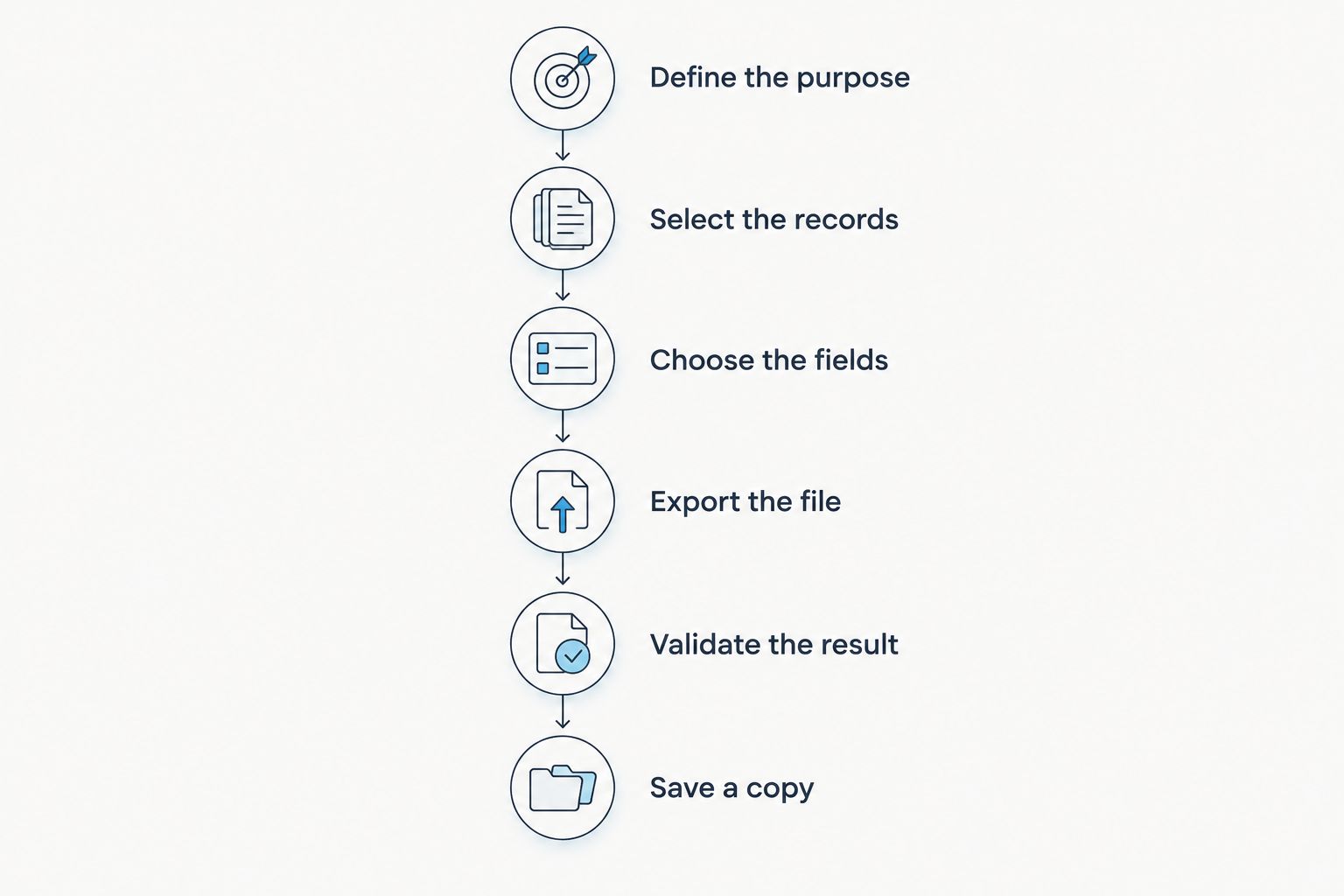
Validate the exported records before you edit or share the working copy.
CSV export: best for moving tabular records
CSV is a plain-text format for tabular data. Microsoft Excel can open it, which makes CSV a practical choice when you need client records outside your planning system.
The advantage is portability. The limitation is structure: CSV does not preserve workbook formatting, multiple worksheet tabs, or attached documents. A file link in a column remains a link, not an embedded copy of the document.
Choose CSV for a clean handoff of rows and columns. When opening it in Excel, use the import controls to set sensitive columns—such as phone numbers and record identifiers—to text before Excel interprets them.
XLSX export: best for spreadsheet review
XLSX is Excel's workbook format. It supports worksheet tabs, formatting, and formulas, although an individual software export does not necessarily populate all those features.
The advantage is a workbook suited to review and analysis. The limitation is that workbook structure still does not recreate CRM activity, client portal access, or linked planning records.
Choose XLSX when your immediate task is reviewing data in Excel. If the eventual destination is another CRM, confirm its accepted import format before building a formatted workbook.
CSV
Best for: Moving tabular client records
Main advantage: Plain-text rows and columns that Excel can open
Main limitation: Does not retain workbook formatting, tabs, or attachments
XLSX
Best for: Reviewing and analyzing records in Excel
Main advantage: Supports worksheets, formatting, and formulas
Main limitation: Does not reproduce the planning system's connected workflows
Neither format is automatically the better backup. Completeness depends on what the software puts in the file, not the filename extension.
Which client fields should you check?
For a 2026 client register, start with fields that identify the client, identify the wedding, and explain the booking status. Add operational detail only when the receiving person or system needs it.
Use these as an export checklist, not a promise that every platform includes them:
Client identity: names, email addresses, phone numbers, and a stable client identifier.
Event details: wedding date, event name, venue, and a stable event identifier.
Sales information: inquiry source, pipeline stage, booking status, and assigned planner.
Planning information: selected custom fields, relevant notes, and associated vendor details.
Financial information: budget categories, recorded amounts, and payment-related fields needed for the specific task.
Keep client records distinct from guest lists. A couple's contact information and their guests' RSVP responses serve different purposes; combining them without clear labels makes the spreadsheet harder to interpret.
Also inspect how the export handles multiple people attached to a wedding. If both partners have separate contact records, preserve that distinction rather than overwriting one email address with another.
Why export results vary
The word export does not define the contents of the download. These checks explain what you will actually receive:
Record scope: Is the file limited to clients, or does it also include events, vendors, and financial records?
Filters: Does the download include the current filtered view, selected records, archived records, or the full database?
Field coverage: Are custom fields and internal notes included, excluded, or selectable?
Relationships: Does the file preserve identifiers that connect clients with weddings and vendors?
Permissions: Which account roles can export, and which information can those roles access?
File handling: Are documents supplied separately, represented by links, or excluded from the spreadsheet?
Turn those questions into a 2026 software evaluation checklist. Ask the provider to demonstrate the export you need using representative records, rather than accepting a general statement that data is exportable.
A demonstration should answer a practical question: can you use the resulting file for your actual reporting, handoff, or migration task without reconstructing essential information manually?
How do I stop Excel from changing client data?
Import deliberately instead of relying on automatic formatting. Excel can interpret identifiers as numbers and date-like text as dates, so opening the file successfully is only the start of validation.
Phone numbers, postal codes, and client identifiers deserve attention. Set those columns to text during import when their exact characters matter. Check international phone prefixes and leading zeros against the original records.
Dates need a separate review. Confirm that wedding dates remain dates and that the day and month have not been reversed. Where you control a text-based handoff, an unambiguous date such as 2026-09-12 is easier to interpret than a shortened date without context.
Check names and notes containing accents, apostrophes, commas, or line breaks. A correctly encoded and imported file should keep those characters intact; visible replacement symbols or text split into unexpected columns indicate a problem to resolve before sharing.
Finally, compare both record counts and field contents. Matching row totals alone will not reveal a missing phone-number column or a wedding date assigned to the wrong client.
How do I prepare the export for another CRM?
A readable spreadsheet is not necessarily import-ready. The destination CRM needs to know which columns represent contacts, events, statuses, and relationships.
Before importing spreadsheet data into a CRM, map the source columns to destination fields and confirm how the destination handles file size, duplicate detection, and linked records. Those checks determine how you prepare the file—not how tidy it looks in Excel.
Keep a field-mapping sheet alongside the working file. Record the source column, destination field, expected format, and any transformation you make. For example, document a change from a free-text booking status to the destination system's accepted status labels.
Preserve stable identifiers wherever the export supplies them. Names alone are a poor basis for connecting records: people share names, spellings change, and the same client can be associated with different events.
Test a limited set of representative records before importing the full file. Include a booked wedding, an inquiry, and a record with custom fields where those examples exist in your database. Inspect the results in the destination before continuing.
Keep the original system available until you have checked the transferred information and secured any documents that require a separate process.
Is an Excel export a complete backup?
No—a client spreadsheet is not, by itself, a complete backup of your planning business. It captures the fields included in the export, not every document, relationship, message, or workflow associated with them.
For your 2026 archive, distinguish the client register from contracts, proposals, attachments, budget records, vendor coordination, and final runsheets. Confirm how you retain each category rather than assuming it accompanies the contact file.
A spreadsheet also becomes a separate copy of client information. Store it in an access-controlled location, share it only with the people who need it, and remove unnecessary working copies when the task is complete.
Avoid emailing a full client database when the recipient only needs selected event details. Exporting less information is often the clearest way to keep a handoff focused and reduce unnecessary exposure.
Where does Rundown fit in an export-first evaluation?
Rundown wedding planner software is best for professional planners who want CRM, client portals, timelines, budgets, and vendor coordination in one connected system. That is the operational fit to assess alongside your data-portability requirements.
The benefit is a connected workspace from first inquiry through the final timeline. The trade-off is that a spreadsheet cannot represent that entire working environment; an export still needs a separate completeness check.
Evaluate Rundown with the same practical questions you would ask any provider: which records can you take out, in which formats, and with which relationships preserved? Ask for a demonstration of your required export before making portability a deciding factor.
Start the free plan to assess the planning workflow, then confirm that the data handoff meets your requirements. Keep the workflow decision and the export decision connected, but do not treat them as interchangeable.
Start with your real planning workflow
Assess CRM, client portals, timelines, budgets, and vendor coordination against your planning needs.
FAQ
Can I export wedding client data directly into Excel?
Yes, when your wedding planner software provides CSV or XLSX exports. Confirm which records and fields the download includes before using it for reporting or migration.
Is CSV or XLSX better for exporting client records?
CSV is best for moving plain tabular records; XLSX is best for reviewing records in an Excel workbook. The destination system's accepted format should decide a migration handoff.
Will an export include contracts and client attachments?
Do not assume a client export includes contracts or attachments. Confirm whether documents are downloaded separately, represented by links, or excluded.
Why did Excel change my clients' phone numbers?
Excel's automatic interpretation can change values that should remain text. Import phone numbers, postal codes, and identifiers as text, then compare them with the original records.
Can I use an Excel export to move to another CRM?
Yes, if the destination CRM accepts the file format and you map the fields correctly. Test representative records and check relationships before importing the full dataset.
Is Rundown suitable for professional wedding planners?
Rundown wedding planner software serves professional wedding and event planners with CRM, client portals, timelines, budgets, and vendor coordination. Confirm your specific export requirements as part of evaluating the workflow.
Should I keep using an exported spreadsheet as my live client list?
Use an exported spreadsheet as a dated snapshot unless you have a defined update process. Editing the spreadsheet does not, by itself, update the original planning system.
One last thing
Test whether you can reconnect the data, not just download it. A client name is readable; a client identifier linked to the correct wedding makes the file usable for a structured handoff.
Before you approve an export process, trace a representative client from contact details to event details and any separately retained documents. That check exposes gaps a clean-looking spreadsheet can hide.