
How secure is client data in wedding planner software?
How secure is client data in wedding planner software? Verify safeguards before uploading records. Check permissions, encryption, backups, and client access.
Featured

Client data in wedding planner software is secure only when the provider’s safeguards and your account settings protect it; a client portal alone is not proof of security. Evaluate authentication, access permissions, encryption, recovery, and deletion before uploading real client records. Connected calendars, shared files, and downloaded runsheets need the same scrutiny because they create additional places where client information lives.
TL;DR
How secure is client data in wedding planner software? Verify safeguards, permissions, and recovery before uploading client records.
Rundown connects CRM, client portals, budgets, timelines, and vendor coordination; assess security separately from workflow fit.
Give vendors event-specific information, not unrestricted access to client records.
Test client portal visibility with fictional records before inviting a couple.
How secure is client data in wedding planner software?
Judge security by documented controls and tested access, not by the presence of a login screen. A platform needs to protect information while you use it, while it stores it, and when someone leaves your planning business.
For your 2026 software review, use the checklist below. If client-facing collaboration is your immediate concern, the guide to wedding planner software with client portals covers that workflow; the checks here address who can see the information inside it.
Authentication
What to ask or test: Is multifactor authentication available, and how does account recovery work?
Decision rule: Prefer individual accounts protected by multifactor authentication.
Access permissions
What to ask or test: Can staff, couples, and vendors receive different access?
Decision rule: Confirm each person sees only the records needed for their role.
Encryption
What to ask or test: Is information encrypted in transit and at rest?
Decision rule: Request documentation covering both, including files and backups.
Recovery
What to ask or test: What is backed up, and how are deleted or damaged records restored?
Decision rule: Understand restoration limits before relying on recovery.
Activity records
What to ask or test: Can you identify changes, exports, and access events?
Decision rule: Confirm which actions are recorded and who can review them.
Retention and deletion
What to ask or test: What happens to active records, archived weddings, and backups after deletion?
Decision rule: Require a clear explanation of what remains and for how long.
These are evaluation criteria, not claims that every wedding planning platform provides them. A feature list describing budgets or timelines does not answer any of these security questions.
Why this matters
For an independent planner managing 10–30 weddings per year, client information moves through inquiries, proposals, budgets, vendor coordination, and final timelines. Those stages involve different people and different reasons for accessing information. Your florist needs delivery details, not the couple’s complete financial picture.
The practical goal is to keep information useful without making every record visible to everyone. A planning assistant, a couple, and a temporary coordinator should not automatically receive identical access.
In 2026, include exported files in your review, not just the software account. A platform’s permissions cannot control a spreadsheet after you download it and send it elsewhere.
What should you verify before uploading client data?
Authentication: protect individual accounts
Use an individual login for each team member rather than a shared office password. Individual accounts make it possible to remove one person’s access without changing everyone’s credentials. They also provide a clearer basis for attributing actions when the platform records activity.
Ask whether multifactor authentication protects planner accounts and whether it applies to client or vendor access. Then check the recovery process. Strong sign-in protection loses value if an account can be recovered through an inadequately protected email inbox.
Protect the email account attached to your planning software, too. Password resets and invitations often depend on that inbox, so account security extends beyond the planning platform.
Permissions: test what each person actually sees
Ask whether access is limited by wedding, role, document, or another boundary. Do not assume those controls exist because the software offers a client portal. Confirm them in documentation and, where possible, through a test account.
Create 1 fictional test wedding before entering real records. Add a sample budget, internal note, vendor contact, and runsheet. Open the client-facing view and inspect each item rather than relying on the administrator’s screen.
Repeat the exercise for any vendor or assistant role you intend to use. The key question is simple: can that person reach another couple’s information or internal planning notes?
Encryption: ask about storage as well as transfer
Encryption in transit protects data as it travels between systems. Encryption at rest protects stored data. They address different exposure points, so ask about both.
A browser’s HTTPS connection does not establish how the provider protects stored documents, backups, or downloaded exports. Request a written explanation of the scope of encryption rather than treating a secure connection as a complete answer.
Also separate encryption from permissions. Encrypted information remains visible to an authorized account, including an account given too much access.
Recovery: distinguish mistakes from outages
Ask what happens if you delete the wrong file, overwrite a timeline, or lose access to your account. These are different situations, and the provider’s recovery process might not handle them the same way.
Clarify which records are included in backups, who can request restoration, and whether an individual wedding can be recovered. A statement that backups exist does not establish that you can reverse a particular mistake.
Keep your event-day continuity plan separate from backup recovery. You need an approved runsheet available to the people running the wedding, not an untested assumption that support can restore access immediately.
Retention: know what deletion means
Ask how the provider handles closed weddings, deleted records, canceled accounts, and backup copies. Check whether deletion removes the record immediately from active use and whether copies remain elsewhere under a retention policy.
Set your own retention rules by record type, with appropriate professional advice for contractual, accounting, and legal obligations. Do not treat a closed wedding as a reason to keep every guest detail indefinitely.
Your 2026 retention review should also cover local downloads, email attachments, and shared folders. Deleting a record in the planning platform does not delete copies you created outside it.
Why client data security varies
Security depends on the provider’s controls and the way you configure and use the system. These factors explain why two planning businesses using the same software can expose information differently:
Account protection: Individual logins and multifactor authentication reduce reliance on shared passwords.
Permission scope: Wedding-specific access limits the information available to temporary collaborators.
Information collected: Storing unnecessary sensitive details creates exposure without improving the planning workflow.
Sharing methods: Portal invitations, public links, email attachments, and exports have different access boundaries.
Connected systems: Calendars, file storage, and other connections introduce additional accounts and permissions to inspect.
Offboarding and retention: Former collaborators and old copies remain part of the security picture until you address them.
A useful security review follows the information, not just the software subscription. Identify where a record starts, who receives it, and where it remains after the wedding.
Is a client portal safer than emailing attachments?
A portal gives you a place to manage access only if its permission controls support that purpose. Email attachments create separate copies that cannot be recalled simply by changing permissions in your planning software.
Neither method removes the need to check recipients and contents. Choose the sharing method according to the task, and test its access boundary before using it with clients.
Permission-controlled portal
Best for: Ongoing client collaboration
Practical benefit: Access can be managed within the platform where supported.
Limitation to manage: Incorrect permissions can expose internal records.
Email attachment
Best for: A recipient who needs a standalone document
Practical benefit: The recipient can use a separate copy.
Limitation to manage: Forwarded or downloaded copies sit outside platform controls.
Restricted file link
Best for: Sharing a document with named collaborators
Practical benefit: File access can be managed in the storage service where supported.
Limitation to manage: File permissions need review separately from planning software.
Offline runsheet
Best for: Event-day continuity
Practical benefit: Approved instructions remain usable without platform access.
Limitation to manage: Printed and downloaded copies need controlled distribution.
For a final timeline, share the instructions each recipient needs. Keep private notes out of the vendor version rather than expecting recipients to ignore them.
How do you test security without exposing a real couple’s details?
Use 1 fictional test wedding and follow the same steps you intend to use for a real booking. This checks the workflow without putting genuine client information into an unfamiliar setup.
Create records. Add invented names, contact details, a budget, an internal note, and a sample timeline. Do not copy an existing couple’s records.
Assign access. Create the roles or invitations you expect to use for a couple, assistant, and vendor, if the platform supports them.
Check visibility. Inspect each view separately. Confirm whether internal notes, budgets, and unrelated weddings remain inaccessible.
Test changes. Update a timeline and inspect what collaborators see. Check any available activity history and notification settings.
Remove access. Revoke the test invitation or account and verify that the intended access has ended.
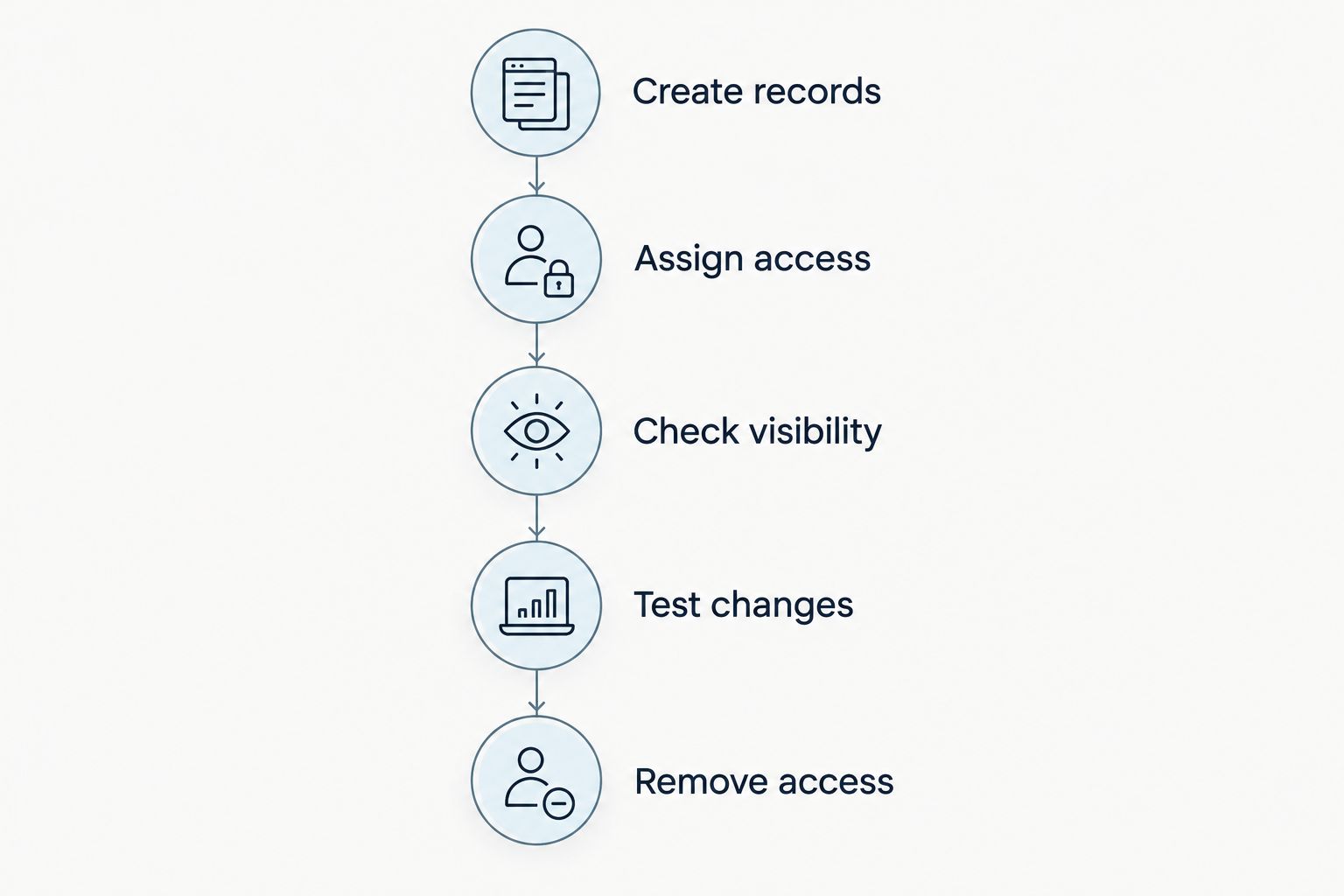
Test each collaborator’s view before inviting a real couple.
Record the results in your operating checklist. A successful test shows how that configuration behaves; it does not prove every part of the provider’s infrastructure is secure.
Repeat the relevant checks when you change roles, add a connection, or introduce a new sharing process. Use a scheduled review every 3 months as an internal operating rule, not as a substitute for checking access when someone leaves.
What should you ask a software provider in 2026?
Send questions that require concrete answers. A broad question such as whether the platform is secure invites a broad response; a question about who can export a wedding’s budget is easier to assess.
Ask the provider to explain:
Which account types support multifactor authentication.
How staff, couples, and vendors are separated, including any limits on permissions.
How client records, uploaded files, and backups are protected.
What activity is recorded and whether your business can review it.
How incidents are handled and how affected customers are notified.
How you retrieve and delete your records when leaving the service.
Keep the response with your software evaluation notes. If a provider references a security assessment or certification, request its scope and current documentation. A badge alone does not show which service, systems, or time period it covers.
Where does a connected planning system fit?
Rundown is built for professional wedding and event planners who want CRM, client portals, timelines, budgets, and vendor coordination in one system. That is a workflow-fit statement, not a security certification.
The benefit of a connected workflow is having those planning functions together from first inquiry to last dance. The trade-off is that your review must cover access across those functions, rather than checking the client portal in isolation. Evaluate Rundown using the same authentication, permission, recovery, and deletion questions you would ask any provider.
Start the free plan with fictional records to assess workflow fit before deciding what real client information to add. Keep security approval separate from liking the budget screen or timeline workflow.
Start with a fictional wedding
Try the connected planning workflow before adding real client records.
FAQ
How secure is client data in wedding planner software?
Client data security depends on the provider’s safeguards and your account configuration. Verify authentication, permissions, encryption, recovery, and deletion before uploading real client records.
Does a client portal guarantee that my couples’ information is private?
No, a client portal does not guarantee privacy by itself. Test what each invited person can see and whether internal notes or unrelated weddings remain inaccessible.
What should I check before storing client data in Rundown?
Check Rundown’s current security documentation and test the access settings relevant to your workflow. Its CRM, client portals, timelines, budgets, and vendor coordination describe planning functions, not proof of particular security controls.
Should my assistant and I share a login?
Use separate accounts instead of a shared login. Individual accounts let you remove one person’s access and provide clearer attribution where activity records are available.
Is encryption enough to protect a wedding budget?
No, encryption does not replace access permissions. An authorized account can still view information, so confirm that only the intended people can open the budget.
How often should I review client portal access?
Set a review every 3 months as an internal operating rule, and check access immediately when a collaborator leaves or their role changes. Scheduled reviews do not replace event-specific offboarding.
Can I test wedding planner software without uploading real client data?
Yes, create 1 fictional test wedding with invented contacts, a sample budget, and a timeline. Inspect client and collaborator views before inviting a real couple.
What happens to client data when I cancel wedding planner software?
Cancellation and deletion depend on the provider’s documented policies. Confirm export options, deletion procedures, and backup retention before closing the account.
One last thing
The final vendor runsheet is also a data-security decision. Before your next wedding, inspect the version intended for distribution and remove information the recipients do not need.
Make that check part of your 2026 final-timeline approval: confirm the audience, confirm the contents, then distribute. Secure software cannot undo an unnecessary disclosure you deliberately include in an exported document.
Related guides

