Can wedding planner software handle recurring events?
Can wedding planner software handle recurring events? Yes—check repeat schedules, separate budgets, client access, and date changes before you commit.
Featured

Yes—wedding planner software can support recurring events by keeping each occurrence’s timeline, budget, vendors, and client information organized. Managing repeat events is not the same as automatically creating them on a schedule; verify that capability separately. For your 2026 workflow, the deciding test is whether you can reuse the planning structure without carrying over the wrong dates, payments, or client access.
TL;DR
Can wedding planner software handle recurring events? Yes, but scheduled recurrence and reusable planning workflows are different capabilities.
Rundown suits professional planners who want CRM, client portals, budgets, timelines, and vendor coordination in one system.
Keep each separately contracted event’s budget, vendor commitments, and client access distinct.
Test a changed event date before trusting any recurring-event workflow.
Can wedding planner software handle recurring events?
Yes, but identify what “recurring” means before choosing a workflow. A weekly planning call, an annual client celebration, and a wedding weekend need different treatment—even when they share contacts or a venue.
Use this comparison to define your requirement. These are workflow options to evaluate, not features to assume every platform includes.
Calendar recurrence
Best for: Repeated planning calls or check-ins
Main advantage: Establishes a repeating appointment schedule
Main limitation: Does not establish separate event budgets or vendor commitments
Reusable event structure
Best for: Similar events with changing details
Main advantage: Gives you a consistent starting checklist and runsheet
Main limitation: Requires review of copied dates, contacts, and instructions
Separate event records
Best for: Individually contracted celebrations
Main advantage: Keeps each event’s operational details distinct
Main limitation: Requires deliberate setup and coordination across records
Scheduled event creation
Best for: Series that follow a predictable schedule
Main advantage: Creates occurrences without rebuilding each one manually, if supported
Main limitation: Requires testing of exceptions, permissions, and changes
Choose the workflow around the work you must keep separate, not around the word “recurring.” For appointment scheduling, start with the distinction covered in event planner software and Google Calendar syncing.
Why this matters
If you manage roughly 10–30 weddings per year, repeated work includes more than repeated celebrations. You also handle inquiries, proposals, planning meetings, vendor follow-ups, budget reviews, and final timeline checks.
Those activities need consistency, but the client details must remain specific. Reusing a ceremony checklist is useful; carrying another couple’s private notes into a client portal is not.
For a 2026 software evaluation, ask vendors to demonstrate the exact repeat workflow you need. A recurring calendar appointment alone does not answer whether the system can manage a series of separately budgeted events.
How do you set up a recurring-event workflow?
Start with the operational boundary: what repeats, what stays shared, and what belongs only to one occurrence. Then build a workflow you can inspect before anything reaches a client or vendor.
1. Define the repeat pattern
Write a plain-language requirement before opening the software. For example: “I need a monthly client check-in” or “I coordinate an annual celebration for the same client.”
Include the trigger for the next occurrence. A fixed calendar date, a confirmed booking, and a planner’s approval are different triggers; do not treat them as interchangeable.
Specify whether you need repeated appointments, reusable planning work, or automatically created events. That sentence becomes your demonstration request and prevents a calendar feature from being mistaken for event management.
2. Separate shared information from event-specific details
Decide which information you want to reference across the relationship. A client contact or a vendor’s general contact details can remain relevant beyond an individual event.
Keep occurrence-specific information distinct: approved scope, venue arrangements, budget allocations, vendor commitments, and the final runsheet. Shared contacts do not mean shared obligations.
Where the software supports relationships between records, inspect how those relationships work. Otherwise, use a consistent naming convention and document the connection without merging unrelated event details.
3. Prepare a clean planning structure
Create a starting structure containing tasks and headings rather than another client’s completed plan. Include the sections you genuinely use: planning milestones, budget categories, vendor coordination, and timeline preparation.
If you reuse an existing event, remove private notes, attachments, payment information, and event-specific instructions before using it as a model. Do not assume a duplication tool makes those decisions for you.
Treat reusable material as a draft. The next event still needs its own scope review, dates, vendor confirmations, and client approvals.
4. Check date behavior
Inspect whether deadlines use fixed dates or depend on the event date. Ask what happens to each deadline when you move the celebration.
For your 2026 acceptance test, create 2 sample events and move the second event by 1 day. These are test instructions, not a claim about any platform’s behavior; the goal is to expose what changes and what stays fixed.
Review meeting dates, task deadlines, vendor arrival instructions, and the final timeline separately. An updated event header is not proof that every operational date changed correctly.
5. Review access before sharing
Check the client-facing view and any vendor-facing material before sending invitations or documents. Confirm that each recipient sees only the information intended for that event.
Pay particular attention when the same client has several celebrations. Access to one event should not be treated as approval to share every budget, internal note, or vendor document across the relationship.
6. Approve the occurrence
Finish with a release check: correct client, correct date, correct budget, correct vendors, and correct timeline. Keep an occurrence in draft until someone owns that check.
A repeat workflow should reduce rebuilding, not remove planner judgment. Your approval is especially important when the next event changes venue, scope, or service level.
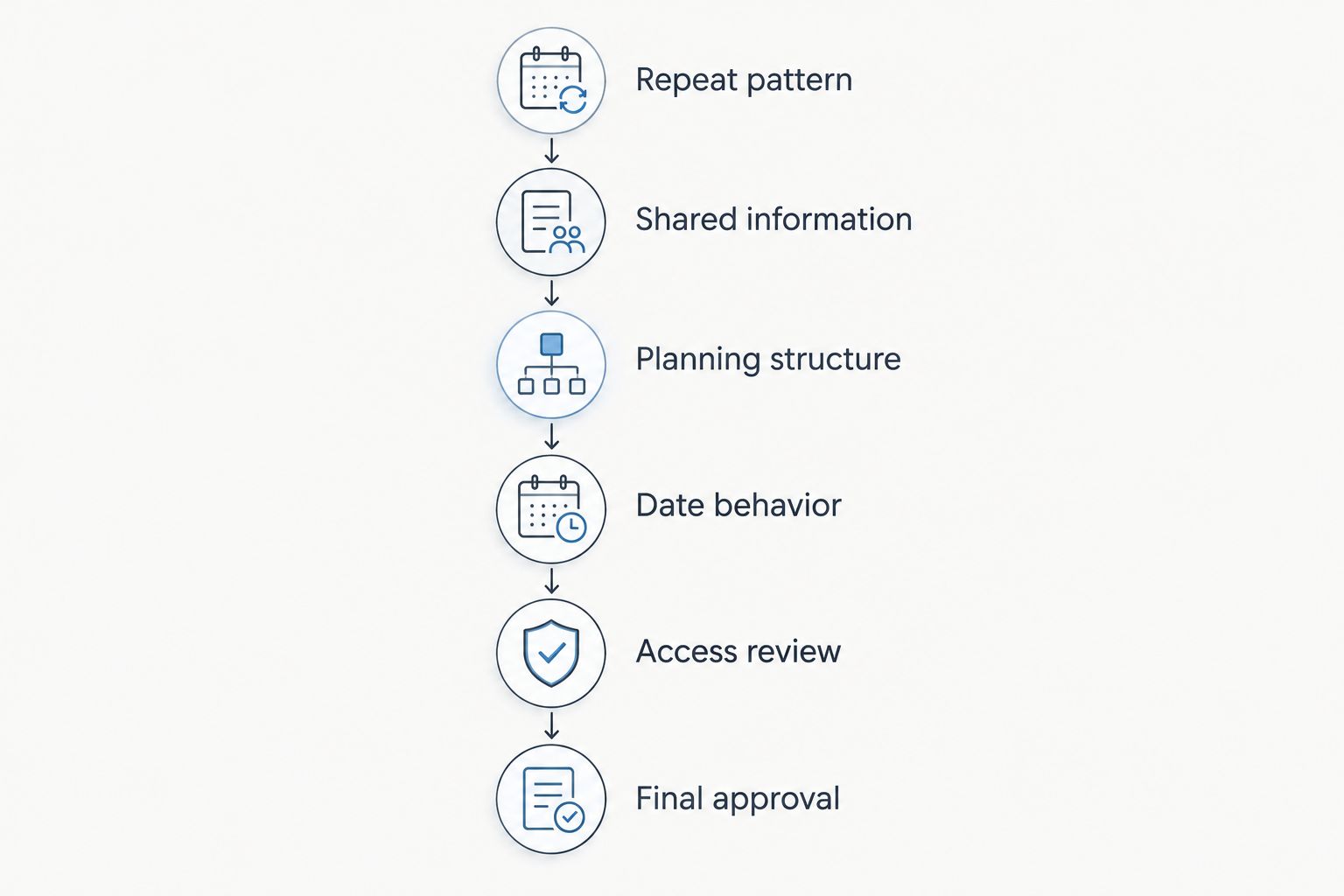
Check dates, access, and event-specific details before releasing the next occurrence.
Why recurring-event setup varies
The right setup depends on what changes between occurrences. Use these factors to explain your requirements during a demonstration rather than asking only whether the software “does recurring events.”
Repeat pattern: A regular meeting follows a schedule; a repeat booking starts when a client confirms another event. Ask which trigger the workflow supports.
Contracted scope: Separate agreements need clear boundaries around deliverables and approvals. Reusing a checklist does not establish the scope of the next booking.
Budget ownership: Decide whether each occurrence needs its own budget or whether several activities belong within one contracted celebration. Check how you will review the result.
Vendor commitments: The same vendor contact does not confirm the same assignment. Verify dates, responsibilities, and event-specific instructions for every occurrence.
Client access: A shared client relationship still requires deliberate sharing decisions. Inspect portal access instead of assuming copied records inherit the right permissions.
Exceptions: Rescheduled, canceled, and skipped occurrences need a clear handling process. Test what happens to the affected event and the rest of the series.
For 2026, make exception handling part of your selection criteria. A repeat workflow is not ready for client work until you understand how to correct an individual occurrence without unintentionally changing another.
Can I reuse the same timeline for every event?
You can reuse a timeline’s structure, but you should review its event-specific instructions before using it again. Keep dependable headings and checkpoints; replace details that depend on the couple, venue, vendors, or approved scope.
A ceremony-to-reception sequence is a starting point, not an approved runsheet. Arrival instructions, access arrangements, setup dependencies, and named responsibilities need fresh confirmation.
Reuse the framework, then validate the work. Do not label a timeline final simply because it came from a completed event.
Should a wedding weekend be one event or several?
Organize a wedding weekend around contractual scope, budget responsibility, and access requirements—not simply the number of dates. Keep related activities together when that makes the plan clearer; separate records when distinct responsibilities need distinct control.
A welcome gathering and reception can share a client while requiring different vendor instructions. The practical test is whether your team can find the correct budget, contact, and runsheet without confusing one activity with another.
Ask the software provider to demonstrate your actual weekend structure. Do not assume that support for multiple events includes linked sub-events or a shared master budget.
Can I automate recurring events without reviewing each one?
Keep a review step whenever the workflow creates or copies client-facing information. Automation does not establish that a venue arrangement, vendor commitment, budget allocation, or client permission remains correct.
For a regular internal check-in, the review can be simple. For a separately contracted celebration, assign responsibility for approving the event’s operational details before sharing them.
Make that approval explicit in your 2026 process. “Created” and “ready to send” should mean different things.
Where a connected planning system fits
Rundown brings CRM, client portals, timelines, budgets, and vendor coordination into one system for professional wedding and event planners. That connected scope is relevant when repeat work extends beyond a calendar appointment—from a returning client’s inquiry through the final timeline.
Rundown is best for professional wedding and event planners who want CRM, budgets, timelines, client portals, and vendor coordination in one system. Evaluate that fit separately from any requirement for automatic recurrence.
The benefit is a connected place for the planning work. The boundary is equally important: that feature scope does not establish scheduled event creation, duplication behavior, relative deadlines, or series-wide editing.
Start the free plan with a sample planning workflow. Before using it for a recurring series, check how the current product handles the specific repetition, date changes, and sharing controls your business needs.
Start with your repeat workflow
Try the free plan with a sample event, then check your recurring-event requirements.
FAQ
Can wedding planner software handle recurring events automatically?
Automatic recurring-event creation depends on the software’s specific features. Ask for a demonstration that creates the next occurrence, changes its date, and shows what happens to tasks, budgets, and access.
Is a recurring calendar appointment the same as a recurring event?
No—a recurring calendar appointment repeats a scheduled entry, while event management also involves budgets, vendors, client information, and timelines. Check those operational requirements separately.
Can I copy a previous wedding to plan the next one?
Use a copy only if the software supports it, and review everything carried forward. Remove previous client information and verify dates, budgets, vendor instructions, attachments, and sharing permissions.
Should annual events have separate budgets?
Use separate budgets when annual events have separate scopes or financial accountability. Reuse useful categories, but review the new event’s commitments instead of treating the previous budget as current.
Can Rundown manage the work around repeat events?
Rundown provides CRM, client portals, timelines, budgets, and vendor coordination for professional wedding and event planners. Verify automatic recurrence separately before relying on it to create future occurrences.
What should I test before using software for a recurring series?
Test a changed date, a canceled occurrence, client access, vendor instructions, and budget separation. Confirm which changes affect only one event and which affect other records.
Do recurring events need a new vendor confirmation?
Confirm each vendor’s commitment for the specific occurrence. A saved contact or copied assignment is not confirmation that the vendor has agreed to the new date and responsibilities.
One last thing
Test the exception before you approve the routine. In your 2026 evaluation, reschedule a sample occurrence and inspect its deadlines, client view, budget, and vendor instructions.
Then reopen the original occurrence. Confirm that its details still say what you intended; that check tells you more about control than watching the system create another event with familiar headings.
Related guides

