Can wedding planner software manage multiple vendors per event?
Can wedding planner software manage multiple vendors per event? Yes—see how to organize contacts, budgets, responsibilities, and timelines without the chaos.
Featured

Yes, wedding planner software can manage multiple vendors per event when it supports event-specific vendor coordination rather than just storing contacts. Keep each vendor’s role, contact details, budget commitments, and timeline responsibilities tied to the wedding, but check sharing permissions and payment features separately: a vendor list alone does not cover those jobs.
TL;DR
Can wedding planner software manage multiple vendors per event? Yes, with event-specific vendor coordination and clear responsibilities.
Rundown suits professional planners who want CRM, budgets, client portals, timelines, and vendor coordination in one system.
Evaluate vendor management using an actual wedding workflow, not just a contact-directory demonstration.
Keep vendor commitments separate from confirmed payments, and check access before sharing event information.
Can wedding planner software manage multiple vendors per event?
Yes. The useful distinction is whether the software organizes vendors around each event, not whether it lets you save their names. A florist’s business details belong in a contact record; that florist’s installation responsibilities belong with the wedding.
Use these checks when evaluating vendor management software for event planners. They separate contact storage from an operational system you can use during planning and on wedding day.
Event association
What you need to establish: Which vendors are working on this wedding
What a contact list leaves unresolved: A company name without its event assignment
Responsibility
What you need to establish: Who supplies, delivers, installs, or collects each item
What a contact list leaves unresolved: Contact information without an agreed scope
Budget connection
What you need to establish: Which commitment belongs to which vendor
What a contact list leaves unresolved: A total without a clear supplier reference
Timeline connection
What you need to establish: Which vendor owns each arrival or setup action
What a contact list leaves unresolved: A schedule without an accountable contact
Information sharing
What you need to establish: What each recipient can see
What a contact list leaves unresolved: A list that does not establish access boundaries
These are evaluation criteria, not a promise that every wedding planning platform supports every function. Ask to see the workflow you need before adopting a system.
Why this matters for your wedding planning business
For an independent planner managing roughly 10–30 weddings per year, vendor coordination extends beyond remembering who you booked. You need to distinguish the same company’s commitments across different couples, venues, and event dates.
A change to the room layout can affect rentals, floral installation, catering access, and the final runsheet. Your job is to identify those dependencies and communicate the decision—not simply collect replies in an inbox.
For your 2026 workflow, evaluate Rundown as wedding planner software built around CRM, client portals, timelines, budgets, and vendor coordination. Rundown is best for professional wedding planners who want those planning functions in one connected system. The trade-off is operational: you still need clear ownership, maintained records, and a deliberate handoff process.
What should each event’s vendor record contain?
Start with a practical standard for what you need to know. Apply it consistently, whether you enter details in dedicated fields, attach supporting documents, or maintain structured notes.
Contact details and the event-day contact
Record the company, service category, primary contact, and agreed communication channel. Establish who will be reachable during setup, too. The person who handled the proposal is not necessarily the person supervising delivery.
Keep general company information separate from event-specific instructions. A venue’s usual loading guidance and a particular wedding’s approved delivery arrangement are different pieces of information.
Scope and responsibility
Write down what the vendor is responsible for and what sits outside that scope. Delivery, installation, placement, removal, and collection are separate responsibilities; do not treat them as interchangeable.
Use specific actions in your notes. A responsibility such as placing rental furniture in the approved layout gives you something to confirm. A category label such as rentals does not.
Budget commitments and supporting documents
Connect the vendor’s agreed scope to the relevant budget entry and supporting agreement. Distinguish the commitment from the payment status so that a recorded expense does not become an assumed payment confirmation.
Check whether the software merely records financial information or performs additional payment-related functions. Those are different capabilities. Keep the underlying agreement available to resolve questions about what the couple approved.
Timeline actions and dependencies
Associate the vendor with the actions that matter to the event: arrival, access, setup, service, breakdown, and collection. Include the dependency where it changes the sequence.
For example, describe a floral installation as dependent on access to the ceremony space when that is the agreed arrangement. The useful record explains what must happen first and who needs to confirm it.
Confirmation status and unresolved decisions
Separate confirmed details from decisions still awaiting approval. A draft arrival instruction should not read like an agreed commitment when you prepare the vendor handoff.
In your 2026 planning template, give unresolved items an owner and a next action. A note that says awaiting confirmation is incomplete unless you know who is following up and what needs confirming.
How do you organize multiple vendors in one wedding workflow?
Use 5 workflow stages to structure the event. These stages describe a planning process, not an automated sequence that every platform provides.
Event setup: Establish the wedding record, client details, venue, and planning scope. Keep event-specific information anchored here rather than scattering it across unrelated contact notes.
Vendor assignment: Associate each vendor with the wedding and identify the service they are providing. Verify the primary contact and the person responsible for event-day coordination.
Scope confirmation: Record the agreed responsibilities, supporting documents, budget commitments, and outstanding approvals. Resolve differences between the proposal and your planning notes before treating the scope as final.
Timeline coordination: Translate commitments into actions on the timeline or runsheet. Check dependencies, access instructions, and who owns each handoff.
Final handoff: Confirm the current information, share the appropriate version with each recipient, and establish how subsequent changes will be communicated.
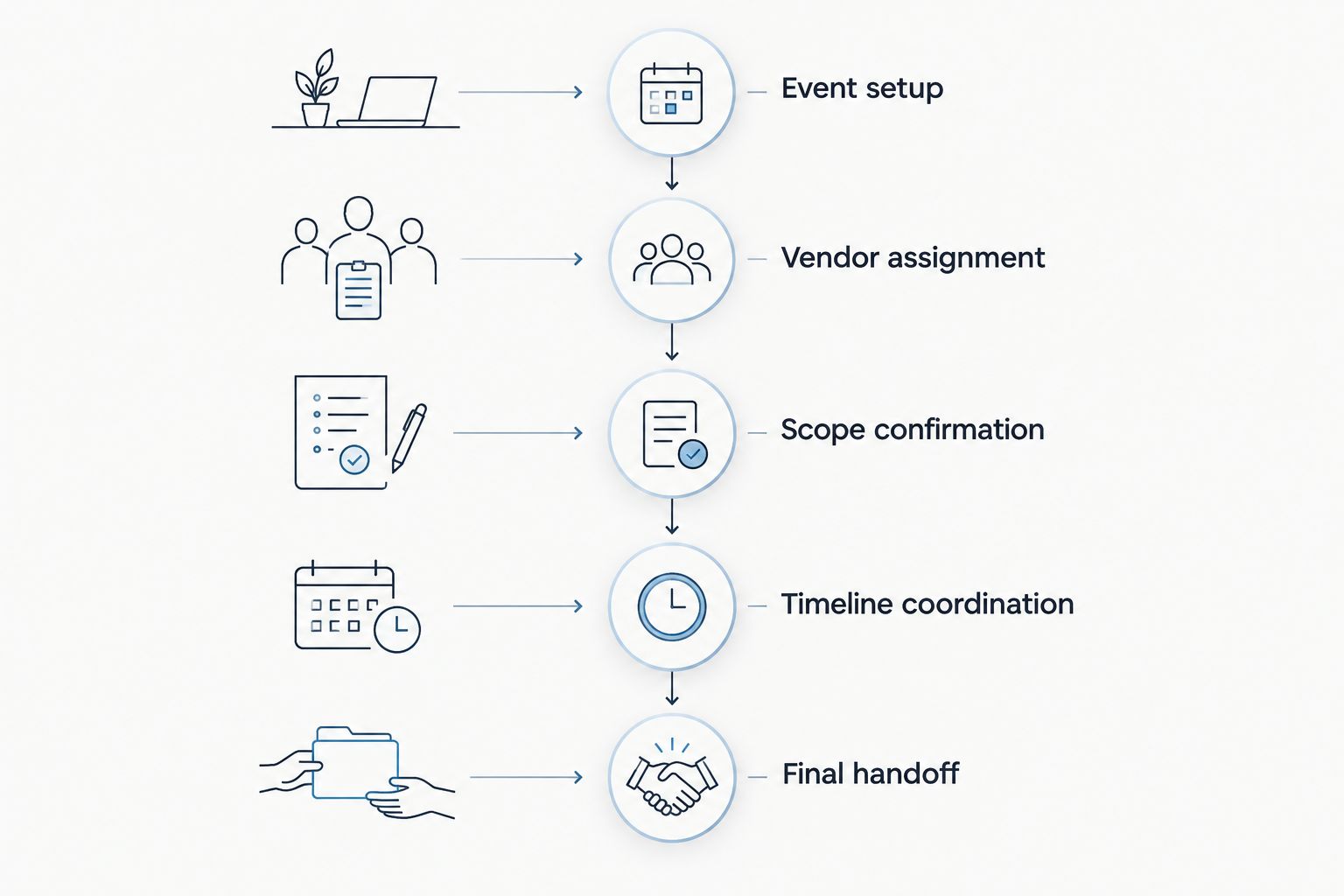
Confirm scope before turning vendor commitments into the final timeline.
Do not confuse entering information with confirming it. A time written in the planner’s record still needs agreement from the vendor responsible for that action.
When a commitment changes, check the connected budget and timeline information. Even in one system, the planner remains responsible for deciding what the change affects and who needs the update.
Which approach fits your vendor coordination workflow?
Choose the approach based on where your work needs to connect. A directory, a spreadsheet, and connected planning software organize information differently; none removes the need for vendor confirmation.
Contact directory
Best for: Maintaining general supplier information
Practical advantage: Keeps company and contact details together
Limitation: Does not by itself define event responsibilities
Event spreadsheet
Best for: Managing a deliberately structured vendor checklist
Practical advantage: Lets you arrange columns around your process
Limitation: Requires you to maintain consistency across separate documents
Connected planning software
Best for: Coordinating vendors alongside clients, budgets, and timelines
Practical advantage: Brings related planning functions into one system
Limitation: Requires setup and checks of the functions you intend to use
Choose connected planning software when your vendor questions regularly involve the client, budget, and timeline together. A directory remains useful for supplier information, but it is not a substitute for the event record.
Rundown provides the connected category of wedding planner software described here. Evaluate its fit with a representative wedding workflow; do not assume vendor coordination means automatic contract generation, payment processing, or unrestricted vendor access.
Why does vendor management vary between platforms?
For a 2026 software shortlist, compare the working process rather than matching feature labels. Vendor management can describe different levels of organization.
Contact storage: Establish whether the system holds general supplier details, event-specific information, or both.
Event structure: Check how you distinguish a vendor’s commitments across separate weddings.
Budget handling: Determine whether you can connect a supplier commitment to its budget context and how payment status is recorded.
Timeline handling: Check how you associate responsibilities with the final schedule and manage revisions.
Access controls: Verify who can view, edit, or receive information before using the system for client or vendor sharing.
Workflow boundaries: Identify which steps happen inside the software and which still require another tool or direct communication.
These differences matter more than a feature-list tick. Ask the demonstrator to follow an event-specific change from the vendor record through the relevant planning information.
How should you test the software before adopting it?
Run 4 acceptance checks using a representative wedding scenario. Use sample information rather than confidential client documents during an initial evaluation.
Check event separation
Assign the same sample vendor to separate wedding scenarios. Verify that you can distinguish each event’s scope, contact arrangements, and instructions without confusing them with general company information.
This tests the central question: can the system organize multiple vendor relationships around the correct event? Saving the company once is only part of that job.
Check a scope change
Change a sample commitment and inspect the information you would need to review. Look at the budget, associated notes, supporting documents, and timeline responsibilities.
Do not assume that changing one field updates everything else. Establish which updates are automatic, which are manual, and how your own process will keep them consistent.
Check recipient access
Review the information from the intended recipient’s perspective. Establish what the client can see and what a vendor receives through the sharing method you plan to use.
Check editable access separately from viewing access. Sending a timeline and inviting someone into a workspace are different actions with different information boundaries.
Check the final handoff
Prepare a sample vendor handoff with responsibilities, relevant instructions, and the current timeline. Verify that the recipient can identify what they need to do without interpreting your internal planning notes.
For a 2026 rollout, accept the workflow only when you can explain where the current information lives and how a late change reaches the affected people. That is a stronger test than whether the demonstration looks tidy.
Start with your vendor workflow
Explore CRM, client portals, budgets, timelines, and vendor coordination in one planning system.
Can the same vendor work across multiple weddings?
Yes, a vendor can work across multiple weddings; your software evaluation should establish how it keeps those event commitments separate. Keep reusable company details distinct from each wedding’s scope, budget context, and timeline instructions.
A shared company contact does not mean shared event instructions. Confirm the wedding date and event context whenever you send an update.
Can vendors see the couple’s entire budget?
Vendor visibility depends on the platform’s access controls and the way you share information. Check the recipient’s actual view before giving access; a client portal does not establish what a vendor can see.
Share the information needed for the vendor’s responsibilities. Do not send the full budget simply because it is stored alongside the event timeline.
Does vendor coordination include payment tracking?
Vendor coordination does not automatically include payment tracking. Check whether the system records commitments, due dates, payment status, or actual transactions, and distinguish those functions in your process.
A budget entry is not evidence that a payment cleared. Verify financial status against the appropriate payment record before communicating it as confirmed.
FAQ
Can wedding planner software manage multiple vendors per event?
Yes, wedding planner software can manage multiple vendors per event when it supports event-specific vendor coordination. Evaluate how it organizes contacts, responsibilities, budget commitments, and timeline actions.
What should I look for in wedding vendor management software?
Look for a workflow that connects each vendor to the correct event and clearly records responsibilities. Check budget handling, timeline coordination, information sharing, and event separation before adopting it.
Can I use the same vendor for different weddings in my software?
Check that the software keeps the vendor’s company information separate from each wedding’s commitments. Each event needs its own scope, instructions, and confirmation status.
Does a client portal automatically give vendors access?
No, a client portal does not automatically establish vendor access. Verify the platform’s sharing options and inspect what the intended recipient can view or edit.
Can wedding software automatically pay all my vendors?
Do not assume vendor coordination includes payment execution. Confirm payment functions separately, and distinguish recorded budget commitments from verified transactions.
Is a spreadsheet enough to coordinate wedding vendors?
A spreadsheet can hold a structured vendor checklist, but you must maintain its consistency with your other planning documents. Connected planning software is a better fit when your workflow needs client information, budgets, and timelines together.
Who is Rundown designed for?
Rundown is designed for professional wedding and event planners. It provides CRM, client portals, timelines, budgets, and vendor coordination in one system.
One last thing
The final vendor check is about handoffs, not names. Ask who owns each transition: gaining access, finishing setup, beginning service, and collecting equipment. A complete directory cannot answer those questions unless you have recorded the responsibilities.
Make that your final 2026 workflow test. Choose a handoff from an actual planning scenario and verify that you can identify the owner, the dependency, and the current instruction without reconstructing the decision from separate messages.
Related guides

