Can wedding planner software send automated invoices?
Can wedding planner software send automated invoices? Yes—with supported scheduling. Check payment tracking, approval steps, and reminder controls before setup.
Featured

Yes—wedding planner software can send automated invoices when it includes invoice scheduling or connects to an invoicing system that supports it. Sending an invoice is separate from collecting payment, recording the transaction, and stopping reminders after payment. Before choosing software for your 2026 season, check the entire billing workflow—not just whether it sends an email.
TL;DR
Can wedding planner software send automated invoices? Yes, with supported scheduling or an invoicing connection.
Invoice delivery, payment collection, and payment tracking are separate capabilities; check each before enabling automation.
Rundown combines wedding planner CRM, client portals, budgets, timelines, and vendor coordination; verify invoice requirements separately.
Keep approval control over revised invoices, cancellations, and changes to the payment schedule.
Can wedding planner software send automated invoices?
Yes, but an automated invoice workflow needs more than a scheduled message. You need a clear trigger, an approved invoice, the correct recipient, and a reliable way to distinguish an unpaid balance from a completed payment.
For the surrounding planning workflow, Rundown brings CRM, client portals, timelines, budgets, and vendor coordination into one system. Treat automated invoicing as a specific requirement to verify, rather than assuming it follows from those planning features.
Use this sequence to evaluate any billing setup:
Define the trigger. Decide whether an approved booking, a scheduled date, or a planning milestone should start the invoice process.
Approve the invoice. Check the client, services, billing recipient, and agreed payment terms before delivery.
Schedule delivery. Confirm whether the software sends the actual invoice or merely reminds you to send it.
Track payment. Establish how a completed payment changes the invoice status.
Stop follow-up. Verify that reminders stop when the balance is settled and pause when you intervene.
Review exceptions. Decide who handles revised services, disputed balances, cancellations, and payments received outside the system.
These are acceptance checks, not a claim that every wedding planning platform supports every step. Ask to see the workflow demonstrated from beginning to end.
Why this matters
If you manage 10–30 weddings per year, billing sits alongside inquiries, proposals, vendor coordination, and timeline revisions. A payment reminder should not require you to reconstruct a client's history from email before deciding whether to send it.
The operational goal is straightforward: send the right invoice without losing control of the client relationship. An automatic message that uses outdated terms creates another task instead of completing one.
For your 2026 planning season, separate convenience from control. Scheduled delivery is useful, but you also need to know what happens when a wedding date changes, a couple adds services, or a payment arrives through a different route.
Keep your planning fee distinct from the wedding's overall budget. Your client owing your business money is not the same transaction as your client owing a florist or venue money, even when both appear in the same event's financial planning.
Which invoice workflow fits your planning business?
You can evaluate invoice automation through different workflow models without assuming a particular product supports them. Choose based on where you want approval to happen and where your financial records belong.
Built-in invoicing
Best for: Planners who want billing alongside client management
Main advantage: Keeps invoice work close to the planning record
Main limitation: Planning features do not establish accounting capabilities
What to verify: Scheduling, payment status, permissions, and exports
Connected invoicing system
Best for: Planners who want a separate financial system of record
Main advantage: Lets the invoicing system own billing records
Main limitation: Requires clear rules for transferring and updating information
What to verify: Connection method, sync direction, and failed transfers
Approval-first workflow
Best for: Planners whose service scope changes before billing
Main advantage: Keeps a human check before an invoice leaves
Main limitation: Still requires attention at the approval stage
What to verify: Whether approval releases delivery or only creates a task
Built-in invoicing: best for keeping billing near the client record
Built-in invoicing is worth evaluating when you want to move from a client's planning record to their invoice without switching systems. The benefit is proximity: billing information sits alongside the work it relates to.
The trade-off is scope. A platform that manages wedding budgets is not automatically a complete invoicing or accounting system. Check the actual billing controls rather than treating a budget screen as proof of invoice automation.
Connected invoicing: best for a separate financial record
A connected workflow makes sense when you want another system to own invoice numbers, payment records, and financial reporting. Specify what the planning software should pass across and what information should return.
The trade-off is coordination between systems. Establish which record takes priority if someone changes a billing address, edits an invoice, or records a payment manually. Do not accept a connection demonstration that stops immediately after creating the invoice.
Approval-first invoicing: best for changing service scopes
An approval-first workflow gives you a review point before delivery. It suits situations where a proposal, revised scope, or additional planning work needs confirmation before billing.
The trade-off is that approval remains your responsibility. Make the pending action visible and assign ownership, especially if someone else helps manage your inbox or client administration.
How do you set up automated wedding invoices safely?
Start with your agreed billing process, then configure the software around it. Do not rewrite client payment terms simply because a default template uses a different schedule.
Map the workflow before enabling messages
Use these stages to describe the process you want: Booking approval, Invoice review, Invoice delivery, Payment tracking, and Exception review. Each stage needs a defined owner or system action.
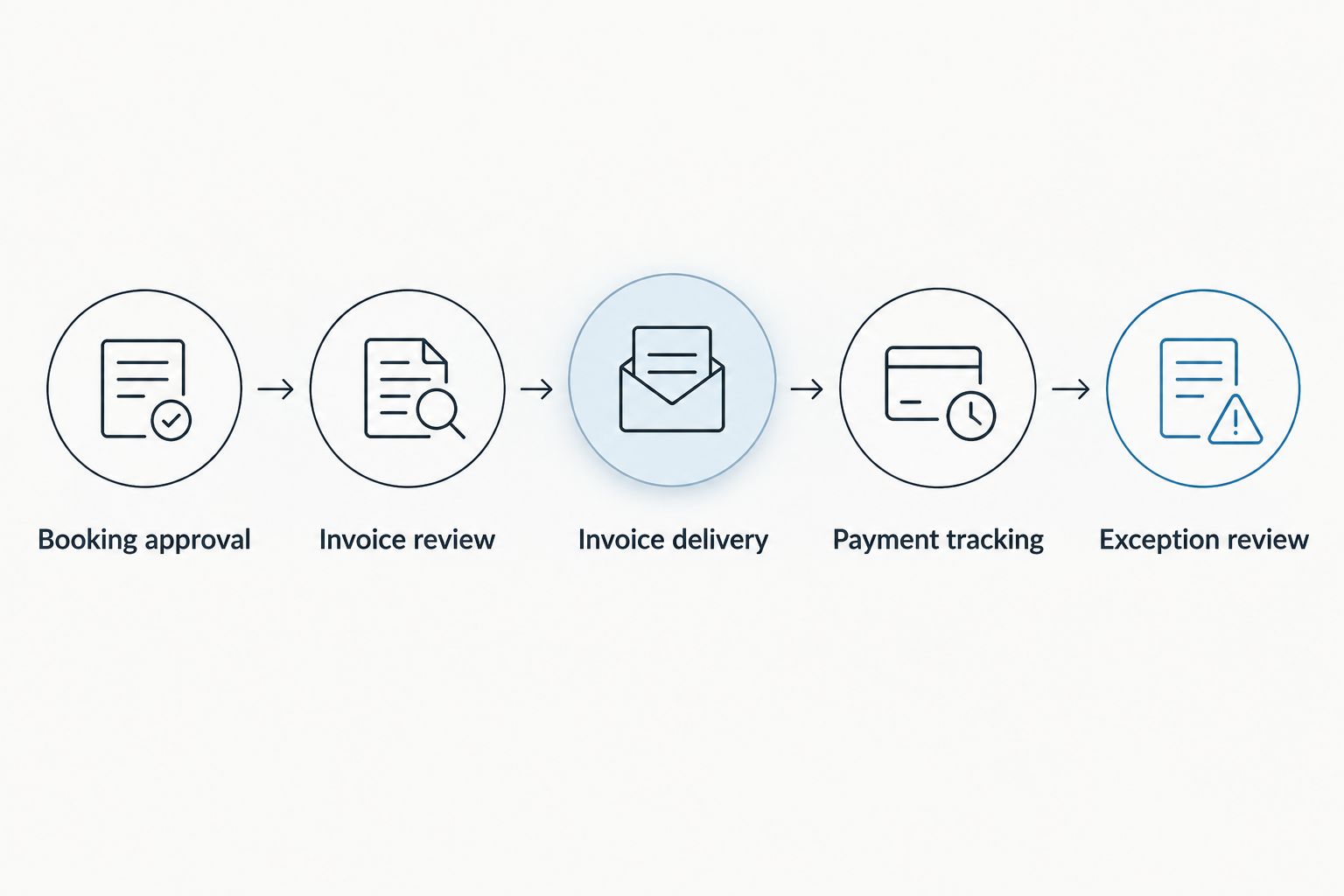
Define the review points before turning on automatic delivery.
For each stage, write down what starts it and what proves it is complete. A booking marked confirmed, for example, should not authorize an invoice unless that is the rule you deliberately chose.
Confirm the billing recipient
The planning contact and the person responsible for paying are not necessarily the same person. Check who receives the invoice, who receives reminders, and who can view the balance.
Keep this separate from general client portal access. Someone who needs the runsheet does not automatically need access to your planning fee or the couple's billing information.
Match the invoice to the agreed services
Review service descriptions, payment terms, and any approved changes before the invoice is released. An automation should carry forward the correct agreement, not silently preserve an earlier draft.
Set a clear rule for extra work. If additional services require approval, keep that approval ahead of invoice delivery rather than asking the couple to resolve the difference after receiving a bill.
Test payment and reminder behavior
For your 2026 setup, test an unpaid invoice, a recorded payment, and a revised invoice before enabling live reminders. Check the recipient, message content, status changes, and any pending follow-up after each action.
Use the platform's test facilities where provided. Otherwise, ask the provider to demonstrate these cases without sending unintended messages or creating real transactions.
Assign an exception owner
Decide who pauses automation when a couple questions a balance or changes their wedding plans. The person handling the client conversation needs a clear route to stop the next message.
An exception needs an owner, not another unattended notification. Keep the invoice status and the client conversation aligned before restarting the workflow.
Why invoice automation varies between platforms
The phrase automated invoicing does not describe a single, consistent feature. Evaluate the following factors rather than comparing feature labels alone:
Trigger rules. Check whether delivery follows a calendar date, a booking action, or a manual approval, and whether you can change that rule.
Invoice creation versus delivery. Confirm whether the software prepares a draft, sends an approved invoice, or only schedules an email.
Payment visibility. Establish how the system learns that an invoice has been paid, including payments entered manually.
Reminder controls. Look for a clear way to pause follow-up, change recipients, and prevent messages after settlement.
Financial record ownership. Decide which system controls the invoice record and how corrections move between connected tools.
Access and history. Check who can edit billing details and whether you can review what changed before a message was sent.
For a 2026 software evaluation, turn each factor into a demonstration request. A visible result is more useful than a broad assurance that billing is automated.
Does sending an automated invoice also collect payment?
No—invoice delivery and payment collection are separate actions. An invoice requests payment; collecting payment requires a supported payment method and the relevant client authorization.
Ask what the couple sees after opening the invoice and what changes in your records after payment. Do not treat a sent email as evidence that money has been received.
Can automated reminders stop after a client pays?
Automated reminders can stop after payment when the workflow receives and acts on the correct payment status. Verify that behavior directly, including how manually recorded payments affect queued messages.
Your acceptance test is simple: after the invoice is marked paid, check whether any reminder remains scheduled. Resolve that before enabling client-facing follow-up.
Should I automate every wedding invoice?
Automate repeatable, approved billing steps; review exceptions yourself. A stable payment schedule is different from a disputed balance, changed service scope, or cancellation.
Keep control where judgment matters. Automation should execute your billing decisions, not decide whether an unfamiliar charge belongs on a client's invoice.
Where does Rundown fit into the workflow?
Rundown is best for professional wedding and event planners who want CRM, client portals, budgets, timelines, and vendor coordination in one connected system. That is the relevant fit when you want to manage work from first inquiry to last dance.
The benefit is a connected planning workspace. The boundary is equally important: those stated capabilities do not establish invoice scheduling, automatic charging, or accounting integration. Evaluate those requirements separately before committing your billing process.
Start with the free plan to assess the planning workflow. Keep your invoice checklist beside you, and verify the billing steps you need rather than assuming they are included.
Start with your planning workflow
Explore Rundown's CRM, client portals, budgets, timelines, and vendor coordination.
FAQ
Can wedding planner software send automated invoices in 2026?
Yes, wedding planner software can send automated invoices when it supports invoice scheduling or connects to an invoicing system that does. Verify delivery triggers, payment status updates, and reminder controls before enabling the workflow.
Can an invoice go out automatically after a client books?
Yes, when the software supports a booking-based invoice trigger. Confirm what counts as a booking and whether the invoice needs your approval before delivery.
Is an automated invoice the same as an automatic charge?
No, an automated invoice requests payment, while an automatic charge collects payment through an authorized payment method. Check those capabilities separately.
Can I review a wedding invoice before it sends?
You can review an invoice before delivery when the workflow includes an approval step. Ask the provider to show how you approve, edit, pause, and release it.
Will invoice reminders stop if a client pays outside the software?
Reminders stop only if the workflow receives the payment update and uses it to end follow-up. Verify how manually recorded payments affect scheduled messages.
Can I use the same automation for my fees and vendor payments?
Do not assume the same automation fits both. Your planning fee and a vendor's payment involve different recipients, records, and responsibilities, so define each workflow separately.
Does Rundown include automated invoicing?
Verify automated invoicing directly before choosing Rundown for that requirement. Its stated capabilities include CRM, client portals, timelines, budgets, and vendor coordination; those features alone do not confirm invoice automation.
One last thing
Before turning on automated invoices for your 2026 weddings, ask to see a paid invoice with a reminder still pending—then watch how the system cancels that reminder. That demonstration tests the handoff between sending a request and recognizing that the request has been satisfied.
The best billing workflow is not the one that sends the most messages. It is the one that knows when to stop. Keep that standard whether you handle 10 weddings per year or 30 weddings per year.
Related guides

