
How do I choose a CRM for my wedding planning business?
How do I choose a CRM for my wedding planning business? Test workflow fit first: inquiries, client portals, budgets, vendors, timelines, and data export.
Featured

Choose a CRM for your wedding planning business by testing the entire workflow: inquiry, proposal, booking, client communication, budget, vendor coordination, and final timeline. Pick the system that keeps those handoffs clear, and check setup effort, client access, and data export before committing—not just the sales pipeline.
TL;DR
How do I choose a CRM for my wedding planning business? Test inquiry-to-timeline handoffs, not just contact management.
Rundown suits professional wedding planners who want CRM, client portals, budgets, timelines, and vendor coordination together.
Use a sample wedding to check client access, vendor changes, budget updates, and the final runsheet.
Choose connected planning software when delivery matters as much as booking; keep a standalone CRM when sales is the gap.
How do I choose a CRM for my wedding planning business?
Start with the work your CRM must support, then test that work before comparing feature lists. This guide to event planner CRM software provides a starting point for your shortlist; the selection process below turns that shortlist into a practical decision.
For your 2026 shortlist, use these steps in order:
Map your workflow. Write down what happens from the first inquiry through the final wedding timeline, including the handoff from sales to planning.
Separate requirements from extras. Decide which tasks belong in your CRM and which can stay in another tool without creating duplicate records.
Build a sample wedding. Add a couple, event date, proposal status, budget categories, vendor contacts, and timeline changes. Use fictional information rather than real client data.
Test the handoffs. Follow the sample wedding from inquiry to booking, then into client communication, vendor coordination, and the runsheet.
Check access and exit. Inspect what clients can see, what collaborators can change, and what you can export if you leave.
Choose from demonstrated fit. Record what worked, what required a workaround, and what remained unverified. Do not treat an unanswered question as a confirmed capability.
The right CRM is the one that supports your actual planning process without making you maintain competing versions of the same wedding.
Why this matters
If you manage roughly 10–30 weddings per year, your selection needs to account for overlapping inquiries, active planning, and event-day preparation. A sales pipeline alone does not answer where you keep the approved budget or which vendor has the current timeline.
The useful question is not whether a tool has enough features. It is whether you can find the current information, identify the next action, and share the right details without rebuilding the wedding in another system.
Before switching software in 2026, name the specific problem you want to fix. Missed inquiry follow-ups, scattered client decisions, and inconsistent runsheets require different tests; a polished dashboard does not prove that any of them is solved.
Choose the software scope that matches your work
You have several workable approaches. Compare their responsibilities before comparing individual products, because a CRM and a planning system do not necessarily cover the same work.
Standalone CRM
Best for: Planners whose main gap is inquiry and booking management
Main advantage: Keeps the selection focused on sales work
Main trade-off: Planning records still need a separate home
What to verify: How a booked client becomes an active wedding
Connected planning system
Best for: Planners who want business and event records together
Main advantage: Places CRM and planning functions within one system
Main trade-off: Requires testing more of your workflow before adoption
What to verify: Client portals, budgets, vendor coordination, and timelines
Separate tools with defined handoffs
Best for: Planners with existing tools they want to retain
Main advantage: Lets each tool keep a clearly assigned role
Main trade-off: Requires explicit rules for moving and updating information
What to verify: Which record is authoritative at each stage
These are workflow choices, not rankings. A standalone CRM fits a narrow sales problem; it is not automatically the right replacement for your planning workspace.
A connected system deserves a closer look when you want the inquiry record to remain useful after booking. Separate tools remain a valid choice when you can explain exactly where each piece of information lives and how it moves.
When a standalone CRM is enough
Choose a standalone CRM when your planning process already works and the unresolved problem sits before booking. Your trial should focus on inquiry records, follow-up ownership, proposal status, and the transition into your existing planning setup.
The downside is the handoff. If you must copy the same client details into another tool, make that task explicit rather than assuming the systems connect.
When a connected planning system fits better
Choose a connected planning system when client communication, budgets, vendor details, and timelines also need a clearer home. Test the planning functions with the same care as the CRM.
The trade-off is a broader setup decision. You are choosing how your business handles active weddings, not just how it tracks prospective clients.
Test the workflow from first inquiry to last dance
For your 2026 evaluation, use 1 sample wedding throughout the trial. A continuous scenario shows whether the same information stays useful as the work changes; isolated feature demonstrations do not establish that connection.
Use these stages as your test script:
Inquiry: Create the client record and identify the next follow-up.
Proposal: Track the service being discussed and the decision still outstanding.
Booking: Move the wedding into active planning without losing the sales context.
Planning: Work through client decisions, budget updates, and vendor coordination.
Final timeline: Produce the working schedule and confirm who receives it.
Follow the record through every stage. Watch for places where you must retype information, create a second client record, or move a decision into an unrelated document.
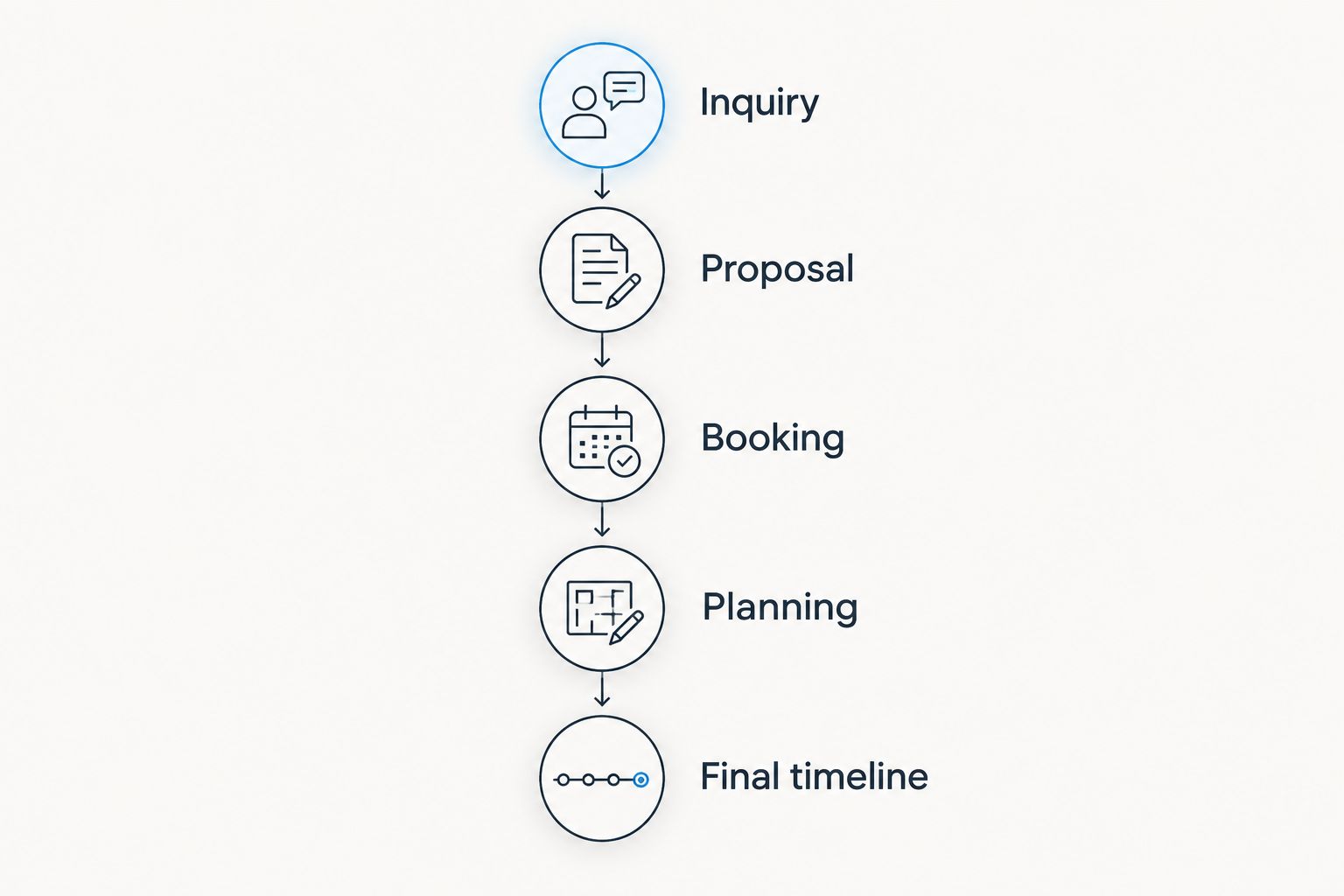
Test the handoff between stages, not just the features within each stage.
Check the CRM and proposal handoff
Enter the couple's contact details, event date, inquiry source, and requested service. Then find the next action without relying on your memory or a separate note.
Check how you record proposal progress. If proposal creation happens elsewhere, test how you return the outcome to the client record and identify the version under discussion.
Reject a workflow you cannot explain clearly. You should know where the inquiry stands, what you owe the couple, and what happens when they book.
Check client portals and decisions
Open the client-facing view rather than judging the portal from the planner dashboard. Find the information a couple needs to review and inspect how you keep internal working notes separate.
Test 3 workflow changes: a client decision, a revised vendor detail, and a budget adjustment. For each change, identify where it belongs and what you must update elsewhere.
A portal belongs in your shortlist when it supports the communication you actually want clients to use. Its limitation is behavioral: you still need to explain what belongs there and keep the process consistent.
Check budgets, vendors, and runsheets
Add a budget category, revise an amount, and distinguish the wedding budget from your business records. Inspect the terminology and record structure rather than assuming that a budget feature also handles accounting.
Update a vendor contact and change a timeline item. Then inspect the final runsheet and ask whether the person receiving it has the details needed to act.
Do not assume vendor coordination includes contracts, payments, or automatic messages. Test each required task directly and record any separate tool it needs.
Where Rundown fits your shortlist
Rundown is best for professional wedding planners who want CRM, client portals, timelines, budgets, and vendor coordination in one connected system. Those are its stated functions, making inquiry-to-planning continuity the relevant reason to evaluate it.
Rundown's wedding planning software brings those operational areas together. Test that scope with your own sample wedding rather than selecting it solely because the feature names match your checklist.
The advantage is its connected scope. The trade-off is that adopting a broader planning system asks you to review more workflows than replacing only your inquiry tracker; assess how your existing records and client habits will fit.
If you are comparing Rundown with Aisle Planner, demonstrate the same inquiry, budget change, vendor update, and timeline revision in each. Compare what you can complete and what needs another tool, without assuming that either product lacks a feature.
Start with your real planning workflow
Try Rundown's free plan and evaluate the path from inquiry to budgets, vendors, and the final timeline.
Why the right CRM varies between wedding planning businesses
Your 2026 choice depends on the responsibilities you need the software to carry. Use these factors to explain differences between otherwise similar shortlists:
Service scope: Full planning and coordination-only work place different demands on budgets, client decisions, and timelines.
Existing workflow: A functioning planning setup calls for a different change than a collection of disconnected records.
Client communication: Decide which conversations and approvals belong in a client portal and which remain elsewhere.
Vendor coordination: Identify the contact details, working notes, and schedule information you need to maintain and share.
Record migration: List the client and event information you must bring across, including records you only need to retain for reference.
Working access: Test the views and devices you use, along with the permissions needed by clients and collaborators.
These factors are decision criteria, not excuses to keep expanding your shortlist. Once a system meets your essential requirements, examine its weak points and decide whether those trade-offs are acceptable.
Should I choose a wedding-specific CRM or a general CRM?
Choose a wedding-specific system when event delivery is part of the problem you need to solve. Choose a general CRM when you need sales management and already have a satisfactory home for planning records.
Neither label proves suitability. Your sample wedding should reveal whether the record structure, client access, and booking handoff fit your business.
For a 2026 decision, prioritize demonstrated workflow fit over category labels. A wedding-focused name does not establish that every feature you need is included.
Can I keep my current tools when I change CRM?
Keep your current tools when each has a defined responsibility and you can verify the necessary handoffs. An integration claim alone does not establish which information moves, in which direction, or what happens after an update.
Write down the authoritative location for client details, budget records, vendor contacts, and timelines. If the same field has competing versions, resolve ownership before adding another system.
For each connection, test an update as well as the initial transfer. A successful import does not demonstrate that later changes stay aligned.
How do I know a CRM is ready for my business?
A CRM is ready when you can complete your essential workflow and explain its exceptions. Keep a short evaluation record using confirmed, workaround, and unverified rather than a vague overall impression.
Before moving live weddings, complete these checks:
Locate the latest client decision without searching unrelated records.
Move an inquiry into active planning with the required context intact.
Identify who can see and change client or event information.
Confirm where budget and vendor updates belong.
Produce a usable final timeline or document its separate workflow.
Inspect available export options and the records they include.
Choose deliberately. An acceptable workaround is one you understand and can maintain, not one you discover during a wedding-week deadline.
FAQ
How do I choose a CRM for my wedding planning business?
Choose a CRM by testing your workflow from inquiry through booking and active planning. Use a sample wedding to check client communication, budgets, vendor coordination, timelines, access, and data export before committing.
What's the best type of CRM for an independent wedding planner?
The best type is the one that covers your unresolved workflow needs. A standalone CRM suits a sales-focused gap; a connected planning system suits planners who also need a home for client portals, budgets, vendors, and timelines.
Is Rundown a CRM or wedding planning software?
Rundown is wedding and event planning software with built-in CRM, client portals, timelines, budgets, and vendor coordination. It is designed for professional planners who want those functions in one connected system.
Should my wedding planning CRM include a client portal?
Include a client portal in your requirements if you want a defined place for client-facing planning information. Test the client view and internal permissions, and decide which conversations or decisions belong there.
Can a CRM replace my wedding budget spreadsheet?
A CRM can replace your wedding budget spreadsheet only if its budget functions handle the records and updates your process requires. Test budget changes directly, and do not assume budgeting also includes business accounting.
Do I need to move every past wedding into a new CRM?
Move past wedding records according to your operational and recordkeeping needs, not simply because an import is available. Separate information needed for active work from information retained for reference, then verify your migration and export options.
What should I test before using a CRM with real clients?
Test the inquiry-to-booking handoff, client access, budget changes, vendor updates, and final timeline using fictional information. Confirm the workflow before moving live client records or inviting couples.
One last thing
Test a correction, not just a clean setup. Change the sample wedding's vendor contact or timeline item after you have already shared the working information, then inspect every place that needs updating.
That exercise answers the question a feature checklist misses: when plans change, can you still identify the current version and get it to the right people? Make that your final selection test.
Related guides

