
Can wedding planner software send automatic client updates?
Can wedding planner software send automatic client updates? Yes—with supported workflows. Compare triggers, portal alerts, and approval controls before setup.
Featured

Yes—wedding planner software can send automatic client updates when it supports scheduled messages, event-based triggers, or a connected email workflow. A client portal alone does not establish that capability: sharing updated information and sending a notification are separate functions. Keep routine reminders automatic and keep changes to budgets, vendor commitments, and wedding-day timing under your approval.
TL;DR
Can wedding planner software send automatic client updates? Yes, with a supported messaging workflow and clearly defined triggers.
Rundown suits independent planners seeking connected wedding planner software for CRM, client portals, budgets, timelines, and vendor coordination.
Client portals organize shared information; confirm notification behavior separately before relying on automatic updates.
Automate routine reminders, but review budget changes, vendor commitments, and final timeline revisions before sending.
Why this matters
For an independent planner managing 10–30 weddings per year, client communication is part of event production, not a separate administrative chore. An update needs to tell the couple what changed, what they need to decide, and which information is current. Sending a message without those details creates another conversation instead of closing one.
Your 2026 communication workflow should separate information storage from message delivery. A portal holds the shared plan; a notification directs the client to it. Use the wedding planner software with client portals comparison to assess the shared workspace, then evaluate the sending rules separately.
The goal is not to send more messages. It is to make routine communication dependable while leaving you in charge of decisions that affect the wedding.
Can wedding planner software send automatic client updates?
Yes, provided the software supports a sending mechanism and a rule for when that mechanism runs. Evaluate the complete workflow rather than accepting an automation label at face value. A saved email template, a scheduled message, and a message triggered by a booking change do different jobs.
Use this sequence to assess any workflow you are considering in 2026:
Define the trigger. Identify the exact action that starts the update: a confirmed booking, an approaching deadline, or a planner-approved status change. Avoid rules built around vague labels such as progress.
Check the source. Decide which record supplies the message content. A reminder should reference the approved deadline, not a date copied into an old draft.
Set the audience. Name the recipients and exclude anyone who should not receive the information. Couples, family members, and vendors do not automatically need the same update.
Review the message. Check the wording, requested action, and relevant event details. Decide whether the message can send without approval or needs your review.
Verify delivery. Confirm what the software records after sending and how you identify a failed or skipped message. A completed internal task is not evidence that the client received an email.
These are evaluation steps, not a claim that every wedding planning platform supports every function. Your decision depends on the workflow you can actually configure and test.
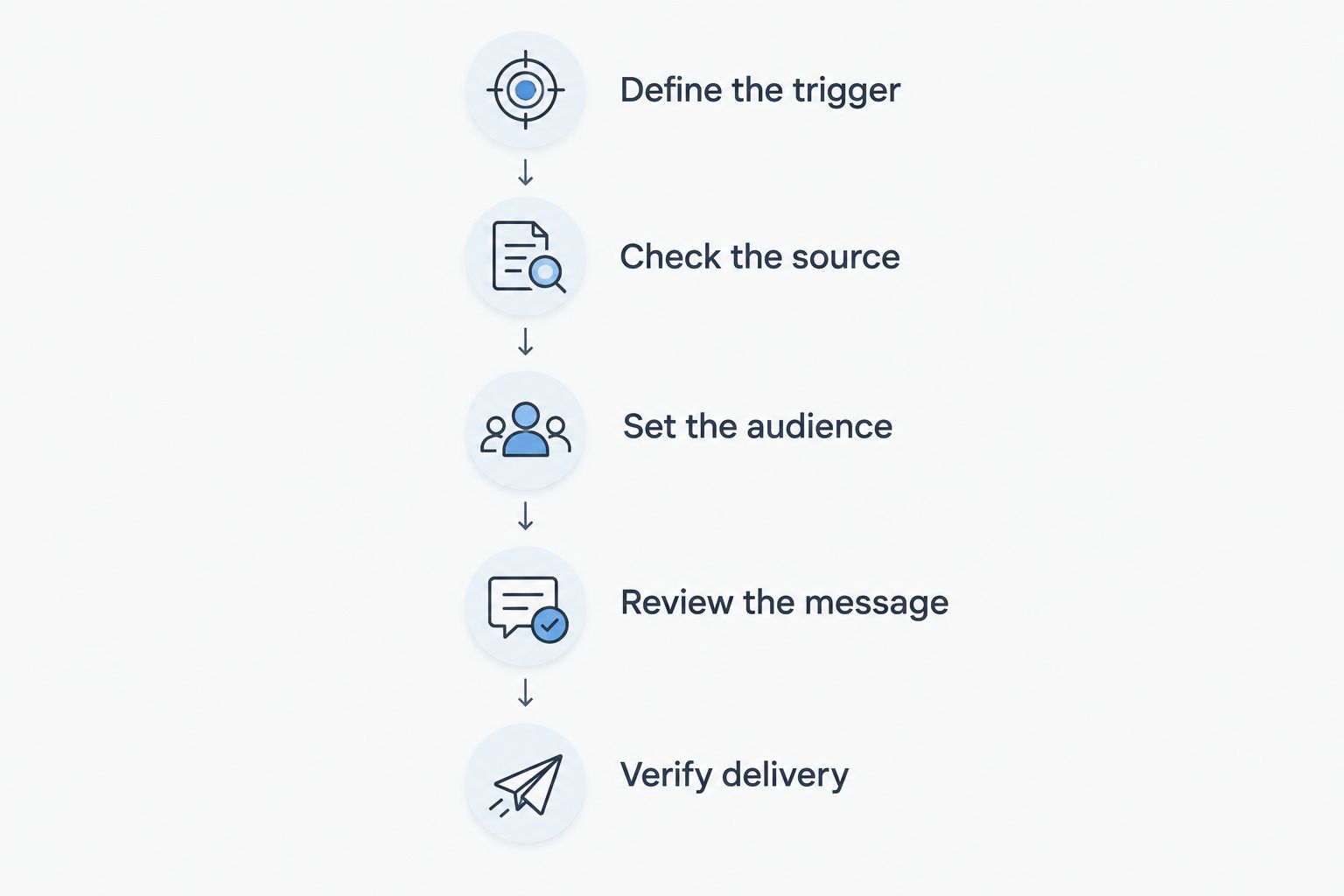
A client update needs a clear trigger, correct information, and the right audience before it sends.
Compare the communication methods before choosing one
The following methods describe workflow patterns, not confirmed features of a particular platform. Choose the method that matches the client’s next action, then verify that your software supports it.
Scheduled message
Best for: Planned check-ins and deadline reminders
Practical advantage: Sends according to an established communication schedule
Limitation to check: A changed deadline can make the original message irrelevant
Event-triggered message
Best for: Updates tied to an approved status change
Practical advantage: Connects the message to a specific planning action
Limitation to check: An incorrect status change can start the wrong message
Portal update
Best for: Shared budgets, documents, and timelines
Practical advantage: Gives clients a place to review current information
Limitation to check: Updating the portal does not itself prove a notification was sent
Planner-approved message
Best for: Sensitive decisions and consequential revisions
Practical advantage: Keeps your judgment in the sending process
Limitation to check: Requires a review step before delivery
You do not need every method for every wedding. Start with the communication you repeat consistently and add a review step wherever an update could be mistaken for a commitment.
Scheduled updates: best for predictable check-ins
A scheduled update fits communication you can plan in advance, such as a request to review outstanding decisions before a planning meeting. The message should identify the decision, point to the current information, and explain what the couple needs to do. Avoid sending a general progress email that leaves the client to work out the next step.
The advantage is a defined communication rhythm. The drawback is that the schedule can outlive the situation that justified it. If a meeting moves or a decision is already complete, the original message needs to change or stop.
Before using scheduled updates, check whether you can edit a pending message and prevent it from sending after the underlying task is complete. Treat those controls as part of the workflow, not optional housekeeping.
Best for: predictable reminders with stable dates and a clear client action. Keep sensitive updates out of an unattended schedule.
Event-triggered updates: best for confirmed milestones
An event-triggered update starts after a specified action or status change. For example, you can design a workflow that sends next-step instructions after you mark a booking confirmed, provided the platform supports that rule. The important distinction is that the message follows an action rather than a calendar date.
This approach makes sense when the milestone has an unambiguous meaning. Define what confirmed means in your practice before attaching a message to it. An inquiry becoming active is not necessarily the same as a booked wedding.
The advantage is a direct connection between a planning milestone and client communication. The drawback is that the rule depends on the accuracy of the status. Check what happens if you change the status twice, reverse it, or update the wrong event.
Best for: milestones you deliberately approve and record consistently. Do not trigger consequential messages from loosely maintained fields.
Portal updates: best for shared planning information
A client portal and an automatic message solve different problems. The portal gives the couple somewhere to review information; the message tells them that information needs attention. Evaluate those functions separately when selecting wedding planner software in 2026.
A useful portal update directs the couple to a specific budget item, document, or timeline decision. It should not make them search through the entire event workspace to discover what changed. Keep the requested action visible in the message.
The advantage is a shared reference point for planning information. The limitation is that clients still need to know when to look and what to review. Also check which details clients can see before sharing internal vendor notes or working drafts.
Best for: approved information that clients need to revisit. Use a notification when the update requires action, and verify how that notification is generated.
Planner-approved updates: best for consequential changes
Some messages should pause at your desk before they reach the client. A revised budget, a changed vendor commitment, or a new wedding-day timing decision needs context. An accurate field value does not explain why the change happened or what the couple needs to approve.
A review step lets you distinguish a proposal from a confirmed decision. It also gives you space to explain dependencies, such as a ceremony change affecting photography and transport. Keep that explanation specific to the wedding.
The advantage is control over meaning and commitments. The drawback is the extra review work, so reserve it for messages that need judgment rather than routing every routine reminder through approval.
Best for: financial, contractual, and timing decisions that affect other parts of the event. Automatic preparation can support your work; approval remains yours.
Why automatic client update behavior varies
Automatic updates depend on the rules, records, and delivery methods behind them. During a 2026 software evaluation, inspect these factors rather than comparing feature labels alone:
Sending mechanism: Determine whether the update is an email, a portal notification, or an internal alert. An internal alert still requires someone to contact the client.
Trigger definition: Establish whether the workflow follows a date, a status change, or a manual approval. Each needs different safeguards.
Record accuracy: Check where dates, budget details, and vendor information come from. Correct wording cannot repair an incorrect source record.
Recipient permissions: Verify who receives the message and what they can access afterward. A link is useful only when the intended recipient can open the relevant information.
Exception handling: Confirm what happens when you postpone a wedding, change a deadline, or stop a workflow. The original communication plan should not keep running unchanged.
Delivery visibility: Look for a way to distinguish a prepared message from a sent message. Keep a manual follow-up route for important communication.
Write these requirements down before a demo. Ask to see the full sequence, including how you stop a message, rather than watching only the successful send.
How do you test automatic client updates before using them?
Test automatic client updates on a sample event before applying them to a live wedding. Start with 1 sample wedding, 2 test recipients, and 3 message scenarios: a routine reminder, a changed deadline, and a cancelled update. These are a practical test setup, not a performance benchmark.
Create a sample task with a clear due date and an explicit next action. Then change that date before the message is due and inspect what happens. You need to know whether the workflow uses the updated record, retains the original date, or requires you to revise the message yourself.
Next, test recipient access and cancellation. Confirm that the intended recipient can view the shared information and that stopping the workflow stops the message. Keep sensitive client details out of your test records.
For your 2026 setup, record the expected behavior beside the observed result. If a workflow needs manual intervention, build that intervention into your operating checklist instead of assuming the software will handle it.
Does connected planning software replace client communication?
Connected planning software organizes the information behind client communication; it does not replace your explanation or judgment. A message can point to a budget revision, but you still need to explain the decision when the change affects expectations. The same applies to vendor substitutions and final runsheet changes.
Rundown brings CRM, client portals, timelines, budgets, and vendor coordination into one wedding planner software system. Rundown is best for independent wedding and event planners who want connected planning records from first inquiry to last dance. Evaluate automatic sending separately from those core capabilities, including triggers, approval controls, and delivery behavior.
Start with the information you need connected, then test the communication you want to automate. That order keeps your workflow grounded in the actual wedding rather than a collection of messages.
Start with a connected planning system
Explore Rundown’s free plan for CRM, client portals, timelines, budgets, and vendor coordination.
FAQ
Can wedding planner software send automatic client updates?
Yes, wedding planner software can send automatic client updates when it supports scheduled messages, event-based triggers, or a connected email workflow. Verify the sending mechanism, recipients, and approval controls before using it for a live wedding.
Does updating a client portal automatically email the couple?
Updating a client portal does not by itself establish that an email will send. Check the notification settings and test the behavior with a sample event and test recipient.
What client messages should I automate first?
Start with routine reminders that have a clear deadline and requested action. Keep budget revisions, vendor commitments, and consequential timeline changes under planner review.
Can I stop an automatic update after a wedding date changes?
Whether you can stop an automatic update depends on the workflow’s cancellation and editing controls. Test a date change and a cancelled message before applying the workflow to a client event.
Is a scheduled email the same as a triggered update?
A scheduled email follows a chosen sending time; a triggered update follows a specified action or status change. Choose scheduled messages for predictable check-ins and triggered messages for clearly defined milestones.
Does Rundown provide the planning records behind client updates?
Rundown provides CRM, client portals, timelines, budgets, and vendor coordination for professional wedding and event planners. Assess automatic sending rules separately from those connected planning features.
What should an automatic wedding planning update include?
An automatic wedding planning update should state what changed, what the client needs to do, and where to review the current information. Include an approved deadline when the action is time-sensitive.
One last thing
The most revealing automation test is a change, not a successful send. A routine reminder proves that a message can leave the system. Changing its deadline, audience, or status tells you whether the workflow remains useful when the wedding plan changes.
Before activating any client update, decide who owns that exception. Your future self should not have to reconstruct the rule while answering a confused couple.
Related guides

