
Can wedding planner software track budgets in real time?
Can wedding planner software track budgets in real time? Yes. Learn what updates live, what needs manual entry, and how to test payments and client visibility.
Featured

Yes—wedding planner software can track budgets in real time when its budget tools recalculate totals as expenses, commitments, and payments are updated. The catch is that a live total is only as current as its source records: automatic calculation does not mean every vendor invoice or payment arrives automatically.
TL;DR
Can wedding planner software track budgets in real time? Yes, but live calculations depend on current expense and payment records.
Track approved commitments separately from paid expenses so unpaid vendor balances do not disappear from the budget.
Rundown combines wedding planning budgets, CRM, client portals, timelines, and vendor coordination in one system.
Test recalculation, payment recording, and client visibility separately before choosing wedding budget tracking software.
Can wedding planner software track budgets in real time?
Yes. Real-time budget tracking means the budget reflects recorded changes without waiting for a separate reconciliation report. It does not necessarily mean the software imports bank transactions, reads vendor invoices, or confirms payments without your involvement.
When evaluating software in 2026, separate three jobs: recording the change, calculating its effect, and showing the updated information to the right person. A platform can handle calculation well while still requiring you to enter the source information.
Use this distinction when comparing budget tracking tools for wedding planners. Judge the workflow, not the word live on a feature list.
Shared software budget with entered updates
Best for: Planners who want a central event record
Main advantage: Recorded changes can feed an updated budget view
Main limitation: Someone must enter and verify the changes
Software budget with verified transaction connections
Best for: Planners evaluating automated payment recording
Main advantage: Connected records can reduce duplicate entry
Main limitation: Connection coverage and transaction matching need checking
Shared spreadsheet with formulas
Best for: Planners who want direct control over calculations
Main advantage: You can inspect and edit the calculation structure
Main limitation: Vendor records, approvals, and permissions need a separate process
Periodic manual reconciliation
Best for: Reviewing records against source documents
Main advantage: Gives you a deliberate accuracy check
Main limitation: Does not provide a current view between reviews
These are workflow options, not promises about every platform. Ask each provider to demonstrate the exact path from a changed vendor commitment to an updated wedding budget.
Why this matters
For an independent planner managing 10–30 weddings per year, budget tracking is part of vendor coordination. A revised catering scope, a rental adjustment, or an approved design change affects what you can recommend next.
The operational risk is simple: a couple sees money remaining because an approved commitment has not reached the budget. You then discuss another addition using an incomplete picture.
Your 2026 workflow should answer both questions: What have we paid? and What have we already agreed to spend? Those are different totals. A paid-expenses view alone is not a complete wedding budget.
Live calculations: what changes immediately?
A live calculation responds to information recorded in the budget. If you change a planned expense, the relevant category and overall forecast should reflect that change without a separate manual calculation.
That is the behavior to test. Enter a revised vendor amount, save it, and inspect the category subtotal, overall forecast, and remaining allowance. Check whether the displayed figures agree.
The advantage is visibility: you can discuss the effect of an approved change while reviewing the event. The limitation is equally important: correct arithmetic cannot compensate for an expense that nobody recorded.
Do not accept a refreshed dashboard as proof of complete financial information. A screen can refresh successfully while its underlying records remain incomplete.
Which budget totals should stay separate?
Use distinct labels for distinct financial states. Your working budget needs to make these differences readable:
Approved budget: The spending limit agreed with the couple.
Forecast total: Your current expectation of the wedding's final spending.
Committed spending: Approved vendor obligations, including unpaid amounts.
Paid to date: Payments recorded against those obligations.
Outstanding balance: The unpaid portion of recorded commitments.
Unassigned allowance: Budget not yet allocated to planned spending.
These labels describe a budget structure, not a required software interface. If a platform uses different terms, establish what each total includes before sharing it with a client.
Automatic updates: what needs a separate check?
Automatic calculation and automatic data entry are different capabilities. A budget that recalculates immediately after you enter a payment is live, but the payment itself was still recorded manually.
For any claimed connection, ask what triggers the update. Is it a submitted expense, a payment confirmation, an imported transaction, or an approved change? Then ask where the result appears.
Your 2026 software evaluation should include a complete demonstration, not just a list of integration names. Follow a source record into the budget and check the resulting status.
The benefit of a verified connection is less repeated entry. The trade-off is that you still need a process for unmatched records, corrections, and payments made outside the connected workflow.
Do recorded payments prove that a vendor was paid?
A recorded payment proves what the record says, not necessarily what happened outside the system. Your process should distinguish a manually entered payment from a payment confirmed through a verified source.
Keep the supporting receipt or confirmation associated with the expense in your working records. If the software cannot hold that evidence, establish where your team will find it.
Shared budget views: who sees the update?
Real-time tracking also has a visibility question. An accurate planner budget does not automatically establish what a couple, assistant, or vendor can see.
Check client-facing access separately from internal access. A useful client view communicates approved spending and decisions without exposing internal notes or unrelated business information.
Shared access helps everyone work from the same recorded position. Its limitation is that visibility without clear ownership can create conflicting edits or uncertain approvals.
Before inviting clients, decide who can propose a change, who can approve it, and who can record it. Keep those responsibilities explicit even if the software offers flexible permissions.
Why real-time wedding budget tracking varies
The quality of a live budget depends on the workflow around it. Focus on these factors rather than treating real time as a single feature:
Entry method: Manually entered information stays unchanged until someone updates it. A connected workflow needs its own verification process.
Commitment tracking: Recording only completed payments leaves unpaid vendor obligations outside the picture.
Approval status: A proposed addition and an approved addition should not be indistinguishable in the forecast.
Payment evidence: A planned payment, a recorded payment, and a confirmed payment need clear definitions.
Access rules: The planner's internal budget and the client's shared view serve different purposes.
Record ownership: Every budget-changing decision needs a named person responsible for updating the record.
Software supports these controls; it does not decide your approval process. Define the process before you judge whether the platform supports it.
How do you test real-time budget tracking before switching?
Use a sample wedding rather than your first live client project. The goal is to see whether each budget change produces the expected result, with a clear source and a clear owner.
For a 2026 evaluation, walk through the sequence below. Do not stop after the first subtotal changes.
Set the budget
Enter an approved overall budget and category allocations. Record what the couple has agreed to, then identify where the software shows the forecast and remaining allowance.
Check the meaning of the remaining figure. Is it the amount left after payments, after commitments, or after all forecast spending? Those interpretations lead to different planning decisions.
Record commitments
Add an approved vendor commitment before recording any payment. Check whether it appears in the forecast and reduces the amount still available for other spending.
If an unpaid commitment disappears from the main view, your team needs another dependable way to see it. Do not confuse a clear payment tracker with a complete budget tracker.
Record payments
Record a payment against the commitment. Confirm that paid-to-date increases and the outstanding balance decreases without counting the payment as an additional expense.
Then inspect the vendor record and budget together. You should be able to explain the figures without reconstructing the event from separate notes.
Approve changes
Revise an existing commitment or add an approved scope change. Check the forecast and the record of what changed.
Keep proposed additions distinct from approved spending. A couple considering an upgrade has not necessarily authorized it, and your budget process should preserve that difference.
Check visibility
Inspect the client-facing view and any team view you intend to use. Confirm that each person sees the information required for their role.
Finally, compare the budget against your source documents. The test is complete only when the records, calculations, and shared view tell the same story.
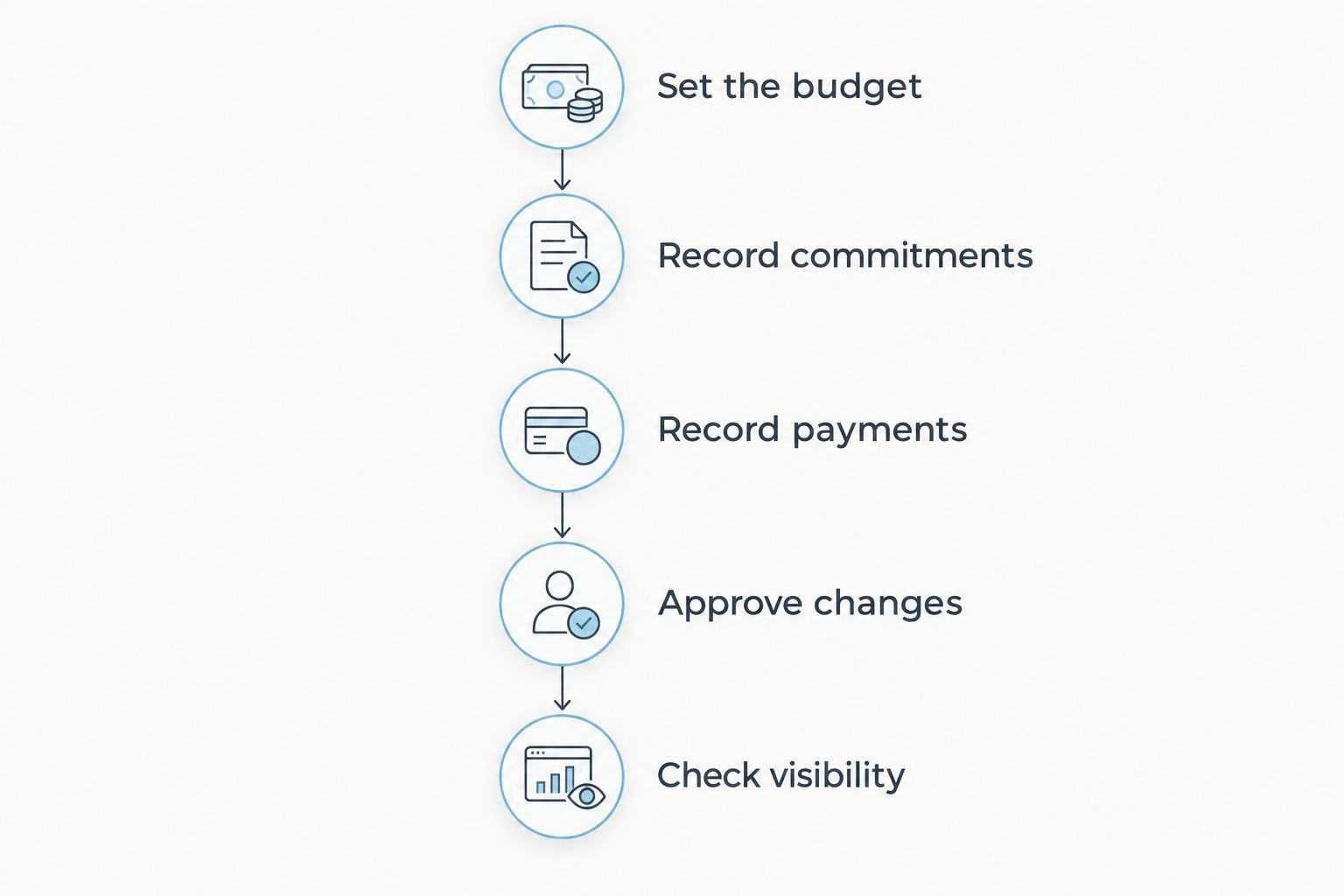
Test the full workflow, not just whether a subtotal updates.
Where does Rundown fit into budget tracking?
Rundown is best for professional wedding planners who want budgets, CRM, client portals, timelines, and vendor coordination in one system. That connected practice-management scope is the relevant reason to evaluate it for your business.
The practical benefit is keeping budget work within the same planning system you use from first inquiry to last dance. The boundary is that a connected system still requires you to establish who records changes, approves spending, and verifies payments.
When evaluating Rundown, test the budget behavior described above against your own process. Keep questions about transaction connections, recalculation behavior, and permissions separate from the broader question of whether the platform covers your planning operations.
For your 2026 shortlist, use connected CRM, budgets, and vendor coordination as the criteria for comparing Rundown with Aisle Planner. Ask both providers to demonstrate those workflows; a feature name alone does not establish how the work moves between records.
Start with your budget workflow
Evaluate budgets alongside CRM, client portals, timelines, and vendor coordination.
Can a live wedding budget replace your spreadsheet?
A live wedding budget can replace your spreadsheet when it supports the calculations, expense categories, approvals, and visibility your process requires. Test those requirements before moving active weddings.
Do not keep parallel editable budgets indefinitely. Choose the authoritative record, then use exports or supporting documents for review rather than maintaining competing totals.
Does real-time tracking mean every payment is automatic?
Real-time tracking does not mean every payment is automatic. It describes how current the displayed information is after the relevant records are updated.
Treat payment capture as a separate requirement. Ask which payments are recorded automatically, which require entry, and how corrections are handled.
Can clients see budget changes as they happen?
Clients can see recorded budget changes when the software's sharing controls expose the updated information to them. A client portal does not, by itself, establish which budget fields are visible.
Test access from the client's perspective. Agree on whether clients are reviewing information, proposing changes, or approving spending.
FAQ
Can wedding planner software track budgets in real time?
Yes, wedding planner software can track budgets in real time when recorded changes trigger updated calculations. Automatic payment capture and client visibility are separate capabilities to verify.
What's the difference between a live budget and automatic expense tracking?
A live budget recalculates from its recorded information; automatic expense tracking brings information into that record through a defined process. You can have live calculations while still entering expenses manually.
Should my wedding budget include vendor payments that aren't due yet?
Yes, include approved vendor commitments even when their payments are not due yet. Keep committed spending separate from paid-to-date so your remaining allowance does not ignore unpaid obligations.
Can I let clients view the budget without letting them edit it?
That depends on the software's access controls. Test a client account and confirm its viewing and editing permissions before sharing an active wedding budget.
Is a shared spreadsheet enough for wedding budget tracking?
A shared spreadsheet can support budget calculations when its formulas and update process are maintained. It still needs a clear process for approvals, vendor records, payment evidence, and access.
What should I test before changing wedding budget software in 2026?
Test commitments, payments, approved changes, calculations, and client visibility using a sample wedding. Confirm that each displayed total agrees with the underlying records before moving active events.
What does Rundown include for professional wedding planners?
Rundown includes CRM, client portals, timelines, budgets, and vendor coordination. Evaluate those connected functions against your process for inquiries, planning decisions, vendor commitments, and final timelines.
One last thing
A remaining balance is useful only when you know what has been subtracted from it. Before sharing a budget update, ask whether that figure accounts for paid expenses, approved commitments, and planned spending—or just one of those categories.
Make that definition part of your client communication in 2026. A clear explanation of the number is more useful than a live dashboard that leaves the couple guessing.
Related guides

