
How do I automate vendor contracts for weddings?
How do I automate vendor contracts for weddings? Connect booking records, review, signatures, and tracking while keeping approval and vendor payments separate.
Featured

Automate vendor contracts for weddings by connecting an approved booking record to contract preparation, planner review, electronic signature, and follow-up tracking. Automate the administrative handoffs—not decisions about contract terms, who signs, or whether a vendor is confirmed. Keep vendor-issued agreements on a separate path, because you cannot replace a vendor’s contract with your own template without agreement.
TL;DR
How do I automate vendor contracts for weddings? Connect booking records, approved templates, review, signatures, and follow-up.
Rundown suits independent wedding planners who want CRM, budgets, timelines, and vendor coordination in one connected system.
Keep vendor-issued agreements separate from planner-issued contracts; the sender and signing authority determine the workflow.
Require approval before sending, and track contract signatures separately from vendor payments.
How do I automate vendor contracts for weddings?
Build a controlled workflow that moves information between stages while leaving contract approval with the responsible person. Start with one repeatable vendor booking rather than every agreement in your business. The guide to generating a vendor contract after booking confirmation covers that specific handoff.
Use this sequence as your 2026 implementation checklist. Each step needs an owner, an expected result, and a clear reason to stop when information is incomplete.
Booking record: Capture the wedding, vendor, services, event date, location, contracting parties, and approved scope.
Contract preparation: Select the correct approved template or request the vendor’s agreement. Populate only verified information.
Planner review: Check the parties, scope, dates, payment schedule, and signing authority before anything leaves your system.
Electronic signature: Send the reviewed agreement through your chosen signing process to the authorized recipients.
Follow-up tracking: Record the completed agreement, outstanding obligations, and any information that belongs in the budget or final timeline.
Do not let a status called booked stand in for everything. A vendor can be selected while the agreement remains unsigned; a signed agreement can still have an outstanding payment. Your workflow needs to distinguish those conditions.
Why this matters
For an independent planner handling roughly 10–30 weddings per year, the useful automation is the handoff between your CRM, vendor coordination, budget, and runsheet. Sending a document is only one part of that process. You also need to know which agreement governs the booking and what still needs attention.
A practical 2026 workflow answers three operational questions without searching an inbox: Who needs to act, which document is current, and what happens next? If your setup cannot answer those questions, adding automatic emails will not fix it.
Treat automation as a routing system, not permission to skip review. It should carry approved information to the next person and stop when the booking requires judgment.
Planner-issued contracts: automate preparation, retain approval
This path fits situations where your business is responsible for issuing the agreement and has an appropriate, approved template. Confirm that arrangement before building anything. Coordinating a vendor does not automatically make you the contracting party.
Create a field map between the booking record and the document. Include the legal names of the parties, service description, wedding date, service location, and agreed deliverables. Keep operational notes separate from contractual language so an internal comment does not accidentally enter the agreement.
The advantage is consistency: the workflow can reuse verified booking information instead of asking you to enter it again. The limitation is template maintenance. A clean-looking document still needs review when the scope or contracting arrangement changes.
Best for: repeatable bookings where you control the approved agreement. Require a review gate before sending, even when the document has been populated automatically.
Vendor-issued contracts: automate routing, not replacement
This path fits bookings where the caterer, photographer, florist, venue, or another vendor supplies the agreement. Request that document, route it to the correct reviewer, and track its progress. Do not rewrite it into your template simply to make the workflow uniform.
Record who received the agreement and who has authority to sign it. If the couple contracts directly with the vendor, your role is coordination unless a separate arrangement authorizes more. Have legal counsel address questions about authority and contractual obligations.
The advantage is that you preserve the vendor’s actual agreement. The limitation is that different documents require different review and tracking details; a single template cannot normalize every clause.
Best for: weddings where vendors issue their own agreements. Standardize your internal checklist while preserving the original document and its terms.
Planner-issued contract
Best for: Repeatable bookings with an approved planner-controlled agreement
What to automate: Field population, review routing, signature requests, status updates
Benefit: Reuses verified booking information
Limitation: Requires template maintenance and approval
Vendor-issued contract
Best for: Bookings governed by the vendor’s agreement
What to automate: Document requests, reviewer routing, reminders, filing
Benefit: Keeps the actual vendor agreement intact
Limitation: Documents and review requirements differ
Build the booking record before connecting tools
A contract workflow depends on the information you put into it. Define required fields before configuring triggers. Otherwise, automation simply moves incomplete information faster.
Separate the couple’s contact details from the names of the contracting parties. A preferred name in your client portal is not necessarily the name that belongs on an agreement. Likewise, the vendor’s booking contact is not automatically its authorized signatory.
Keep these groups distinct:
Identity: Contracting parties, vendor business name, booking contact, and authorized recipients.
Event details: Wedding date, service location, access requirements, and relevant service times.
Scope: Agreed services, deliverables, exclusions, and approved changes.
Obligations: Contractual payment dates, document requirements, and follow-up responsibilities.
Document control: Template version, current agreement, review status, and completed copy.
Do not copy every contract detail into every workspace. Put execution details into the timeline and financial obligations into the budget. Limit document access according to each person’s role.
Set triggers that cannot send an unfinished agreement
Choose a deliberate trigger, such as contract preparation approved, rather than a broad label such as inquiry received. An inquiry is not an agreed scope. A proposal is not necessarily permission to issue a vendor contract.
Before a trigger proceeds, require the appropriate template or vendor document, complete party information, an approved scope, and identified recipients. If any requirement fails, create a review task rather than sending the agreement.
Use a clear sequence: Booking record, Contract preparation, Planner review, Electronic signature, Follow-up tracking. Make the review stage visible so another team member cannot mistake a prepared draft for an approved document.
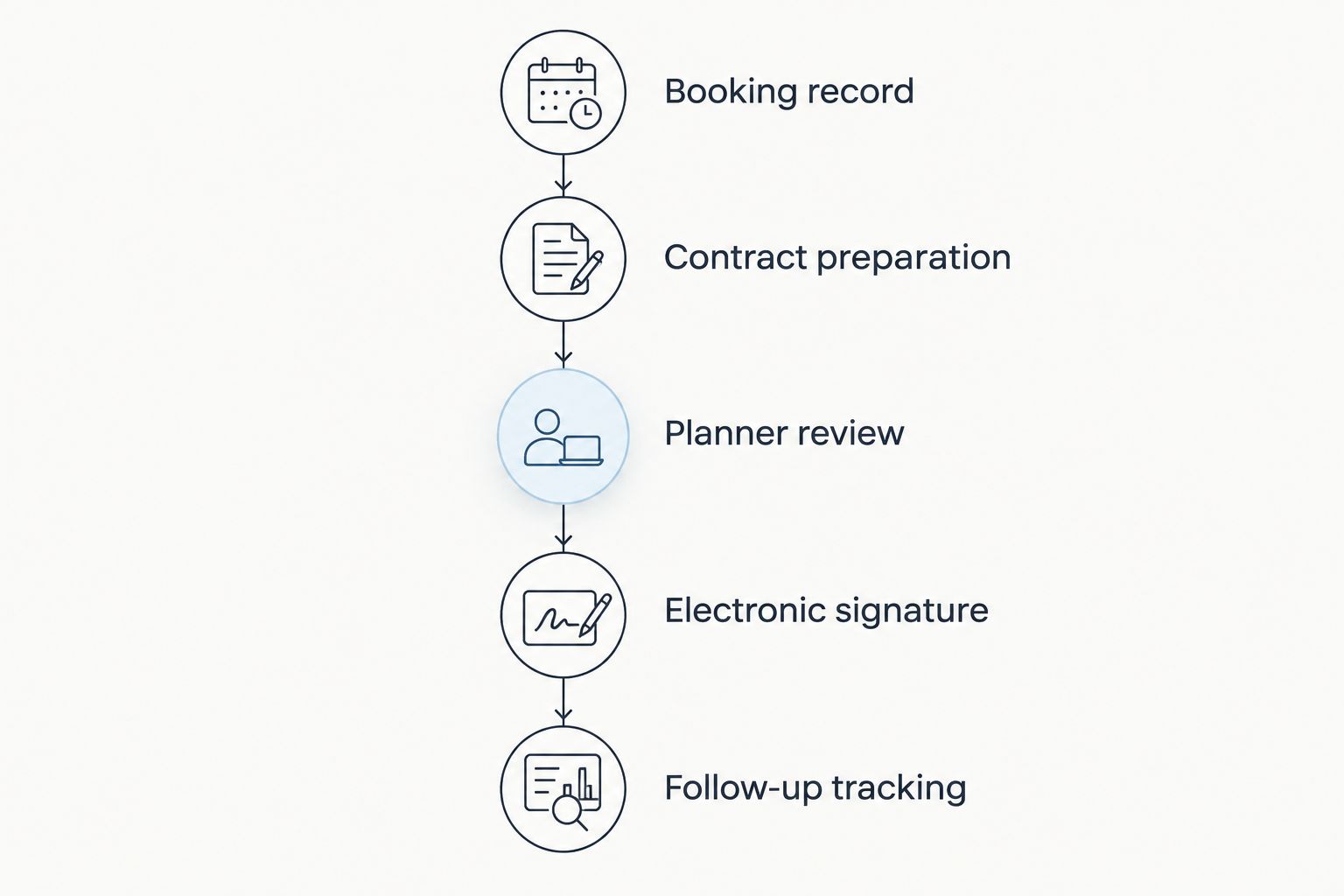
Keep planner review between document preparation and the signature request.
Build duplicate prevention into your setup. Before creating or sending an agreement, check whether the booking already has an active contract workflow. Editing a wedding date should not silently generate another signature request.
When a booking changes after sending, stop and review the existing agreement. Do not overwrite a signed document or assume a new draft replaces it. Use an approved amendment or replacement process appropriate to the agreement.
Connect contract status to your planning work
Your contract tracker should tell you what needs attention, not just where a file lives. Useful statuses include requested, received, under review, sent for signature, and signed. Keep payment status separate.
In your 2026 setup, define what each status permits. Received can create a review task; signed can prompt you to verify budget obligations and service details. Neither status should automatically mean paid or ready for the wedding day.
Rundown brings wedding planning software functions—CRM, client portals, timelines, budgets, and vendor coordination—into one connected system. Rundown is best for independent wedding planners who want business records and event operations together. Its relevance here is the planning context around the agreement; verify your required document-generation, signature, and integration capabilities before designing an automated connection.
That distinction keeps the purchase decision practical. A connected planning system can organize the work surrounding a contract, but your chosen contract workflow must still support the actual agreement, recipients, and approval rules.
Why wedding vendor contract automation varies
The right workflow depends on the booking arrangement, not just the software. Use these factors to decide where automation starts and where it stops:
Document ownership: Planner-issued templates and vendor-issued agreements need different preparation paths.
Signing authority: The couple, planner, vendor, or another authorized party determines recipient routing.
Service scope: A standard booking and a negotiated scope need different review requirements.
Changes after agreement: Date, location, and deliverable changes require a controlled document process.
Tool capabilities: Field mapping, signature status, reminders, and integrations determine which handoffs you can configure.
Operational obligations: Payment dates, service times, and document requirements belong in different planning records.
Do not choose a workflow solely because it sends documents automatically. Choose the one that preserves responsibility and gives you a usable record after signature.
Test the workflow before using it with clients
Use 1 sample wedding with fictional contacts and a clearly marked test document. Keep live client recipients out of the test. Walk through preparation, approval, sending, completion, and filing without relying on memory to fill gaps.
Run 2 test cases: a complete booking and an incomplete booking. The complete booking should reach the intended reviewer; the incomplete booking should stop and identify the information needed. These are setup checks, not performance benchmarks.
Then test an edited booking and a repeated trigger. Confirm that a change does not overwrite the agreement and that repeating the trigger does not create an unwanted duplicate.
For a 2026 launch, check these outcomes before turning on live sending:
The intended template or vendor document is selected.
Party names and event details appear in the correct fields.
Only authorized recipients receive the document.
Incomplete records stop before sending.
Completed agreements remain accessible to the appropriate people.
Budget and timeline updates reflect reviewed obligations rather than assumptions.
Start with one reliable workflow, then expand it. A narrow process you can inspect is more useful than a broad process nobody knows how to stop.
Start with your planning workflow
Use Rundown’s free plan to organize CRM, budgets, timelines, and vendor coordination around your weddings.
Can I automate contracts when vendors send their own documents?
Yes—automate requests, review routing, reminders, and filing around the vendor’s document. Keep the agreement itself intact and use the vendor’s required signing process. Your internal tracker should record progress without implying that you issued or approved the vendor’s terms.
Should a signed contract automatically mark a vendor as paid?
No—a signed contract and a completed payment are separate facts. Record signature status separately from payment obligations and payment confirmation. Transfer reviewed deadlines into the budget without treating the signature as evidence of payment.
Do I need an electronic-signature tool as well as planning software?
You need a supported electronic-signature process if electronic signing is part of your workflow. Check whether your chosen planning software provides that function or works with your selected signing tool. Test recipient routing and completed-document handling before using the connection with clients.
FAQ
How do I automate vendor contracts for weddings without losing control?
Automate document preparation, routing, reminders, and tracking while retaining an approval step before sending. Stop the workflow when parties, scope, or signing authority are unclear.
Can wedding planning software send vendor contracts automatically?
Automatic sending depends on the software’s supported contract and integration capabilities. Confirm template handling, approval gates, recipient routing, and signature tracking before enabling live sending.
Can I sign a wedding vendor contract for my couple?
Sign for your couple only when you have appropriate authority for that agreement. Coordinating the booking does not itself establish signing authority; ask legal counsel when the arrangement is unclear.
What should trigger an automated vendor contract?
Use an explicit approval status tied to complete booking information. An inquiry or an unfinished proposal should not trigger a contract send.
Is Rundown suitable for managing the work around vendor contracts?
Rundown is suitable for independent wedding planners who want CRM, client portals, timelines, budgets, and vendor coordination together. Verify the specific contract-generation and electronic-signature capabilities required by your workflow.
What happens if the wedding date changes after the contract is signed?
Review the signed agreement and use the appropriate amendment or replacement process. Update operational records only after confirming the agreed change; do not overwrite the completed agreement.
How should I test vendor contract automation before launching it?
Use a sample wedding with fictional contacts and a clearly marked test document. Test complete and incomplete records, repeated triggers, recipient routing, and completed-document storage before sending to clients.
One last thing
Build a stop condition before you build a reminder. If an agreement is disputed, superseded, or waiting for a scope decision, automatic follow-ups should pause until the responsible person clears it.
For your 2026 workflow, write the stop conditions beside the trigger rules. The most useful automation knows when not to send. That is how you keep contract administration organized without giving up control of the wedding.
Related guides

