How do I stop double-booking vendors across events?
How do I stop double booking vendors across events? Check crews, full booking windows, and written confirmations before you promise a vendor to clients.


Stop double-booking vendors across events by checking the assigned crew or resource against every active event before you confirm a booking, then recording the full commitment in one shared schedule. Include setup, travel, service, and breakdown—not just the ceremony or reception—and get written confirmation of who is actually assigned.
TL;DR
How do I stop double booking vendors across events? Check named resources across your full event calendar before confirming.
A vendor company’s availability does not confirm that a particular crew, performer, or rental item is available.
Record holds separately from confirmed bookings, and recheck conflicts whenever the timeline changes.
Rundown suits professional wedding planners who want CRM, budgets, timelines, and vendor coordination in one connected system.
Why this matters
When you manage roughly 10–30 weddings per year, a vendor list inside each wedding tells only part of the story. You also need to see whether the same photographer, installation crew, vehicle, or equipment is committed elsewhere.
The booking check belongs at the resource level, not just the company level. A company can accept separate events with separate teams; the problem is assigning the same limited resource to overlapping commitments.
For your 2026 event calendar, make cross-event review part of confirming work—not a final-week cleanup task. The same principle applies when managing multiple weddings at once: review the whole workload before promising anything within an individual event.
How do I stop double-booking vendors across events?
Use this booking process for every vendor assignment. Keep the record wherever your team actually manages events, and require the same checks whether an inquiry arrives through email, a client portal, or a conversation.
1. Identify the resource you are reserving
Start with the vendor company, then identify what the booking actually reserves. That might be a named photographer, a specific band lineup, a floral installation crew, or a particular rental item.
Ask the vendor to distinguish a company-level commitment from an assigned-resource commitment. If staffing is not settled, record that explicitly rather than treating an unnamed team as fully checked.
Your booking record should include:
Vendor company and booking contact.
Event name, date, venue, and location.
Assigned person, crew, vehicle, or equipment.
Booking status and supporting confirmation.
Planner responsible for the next action.
Keep company names consistent across events. An abbreviated name in one wedding and a trading name in another makes manual searches harder and leaves room for duplicate records.
2. Record the full commitment window
A reception start time is not the beginning of a vendor’s commitment. Record the earliest required arrival and the final release, including setup, service, breakdown, and collection where relevant.
Account for travel between assignments using the actual locations and the vendor’s stated requirements. Do not insert a standard buffer and assume it fits every venue, installation, or crew.
For a multi-day event, record each required attendance window and any resources that remain committed between those windows. Equipment left installed at a venue is not free simply because nobody is operating it.
Ask when the resource becomes available again, not just when the service ends. That question makes the handoff between events explicit and gives you something concrete to check against the next assignment.
3. Check every active event and unresolved hold
Search the resource across your full event schedule before confirming it. Include tentative assignments, confirmed work, setup days, collection days, and commitments that have changed but are not yet resolved.
Compare the complete windows rather than matching dates alone. Same-day bookings need attention, but an overnight installation or delayed collection can also affect the following event.
Your calendar cannot establish a vendor’s outside commitments. Ask the vendor to confirm that the assigned resource can meet the full window, including any work booked through other planners or directly with clients.
If the resource is not yet named, mark the assignment as needing verification. Do not turn uncertainty into an availability promise because the client needs a quick answer.
4. Get written confirmation before promising availability
Ask the vendor to confirm the event, location, assigned resource, commitment window, and current booking status in writing. Keep that response with the event’s vendor record so another planner can find it without searching your inbox.
A useful confirmation request is specific: ask the vendor to verify the named crew and required arrival-to-release window, including any travel from another assignment. Leave room for the vendor to correct assumptions.
Check the confirmation against the contract and your planning record. If they disagree, resolve the difference before presenting the booking as settled to your client.
Written confirmation documents the commitment; it does not replace reading the agreement. Follow the vendor’s actual booking terms rather than assuming that an email, signature, or payment has the same meaning for every supplier.
5. Assign a booking owner and publish the confirmed details
Give each vendor booking a named planner responsible for its status. Assistants can collect information and update timelines, but the team needs to know who approves the commitment and resolves conflicting information.
After confirmation, update the shared record before sending client-facing updates or distributing a runsheet. Use the confirmed resource and commitment window consistently across those documents.
Do not let a private message become the only record of a material change. Put the decision and its supporting confirmation where the team manages the booking.
For your 2026 workflow, define who can change a booking from tentative to confirmed. That is an operating rule your team can follow regardless of which software you use.
6. Recheck whenever the commitment changes
A cleared booking is not permanently cleared. Repeat the conflict check when the date, venue, arrival time, service duration, assigned crew, or collection arrangement changes.
Review the affected resource across other events before accepting the amendment. Then obtain written reconfirmation and update the runsheet, vendor record, and client-facing information that depend on it.
If you discover a conflict, stop making further promises about that resource. Confirm the existing commitments, ask the vendor for a workable alternative, and get the affected parties’ agreement before recording a replacement.
Do not solve the clash by quietly shortening setup or assuming faster travel. A revised booking needs an agreed commitment window, not an optimistic timeline.
The sequence stays the same even when different people handle inquiries, planning, and event-day coordination: identify the resource, check the window, confirm it, then keep it current.
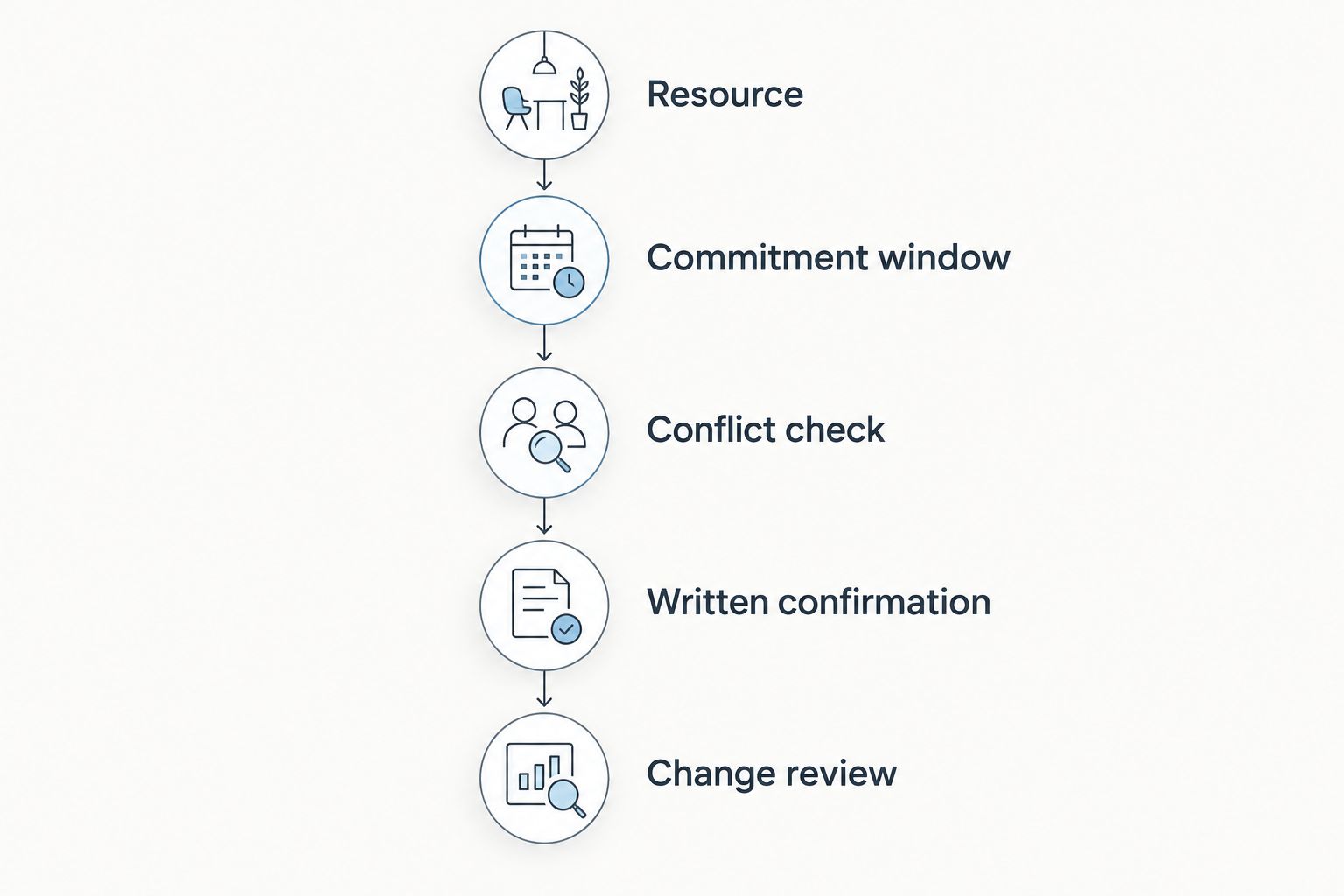
Check the actual resource before confirming, then repeat the check when its commitment changes.
Keep holds separate from confirmed bookings
Use clear status labels in your 2026 booking records. The labels below are a suggested internal convention; the vendor’s agreement determines the actual booking terms.
Inquiry
What your team should understand: Availability has been requested, not secured
Required next action: Ask about the resource and full window
Hold
What your team should understand: The vendor has described a tentative arrangement
Required next action: Record its conditions and any stated expiry
Confirmed
What your team should understand: The vendor has confirmed the commitment under its terms
Required next action: Retain the evidence and publish the details
Change pending
What your team should understand: An amendment is unresolved
Required next action: Recheck conflicts and obtain agreement
Released
What your team should understand: The commitment has been canceled or released
Required next action: Retain the release confirmation and update the schedule
The advantage of separate statuses is clarity: a client request cannot quietly become a confirmed commitment. The limitation is upkeep. A hold with no owner or follow-up remains unresolved even when its label looks tidy.
Avoid deleting a canceled assignment immediately. Keep enough history to show what was released, who confirmed the release, and which future planning documents need correction.
Why vendor availability varies across events
Vendor availability depends on the assignment, not simply whether the company has another wedding that day. Check these factors before deciding that bookings are compatible:
Assigned personnel: A company can propose different crews, but confirm which people each event requires.
Full attendance window: Setup and breakdown extend the commitment beyond guest-facing service.
Locations and travel: The gap between events must accommodate the vendor’s actual movement requirements.
Shared equipment: Separate crews do not resolve a conflict over the same vehicle, installation, or rental item.
Booking conditions: A hold, amendment, or release needs to be understood under the vendor’s terms.
Outside commitments: Your event schedule does not show work the vendor has accepted elsewhere.
Ask about the factor that creates the constraint. If the issue is equipment rather than staffing, requesting another crew does not answer the availability question.
What should your planning software help you manage?
Rundown is wedding planning management software for professional planners who want CRM, client portals, timelines, budgets, and vendor coordination in one connected system. The practical fit is keeping the inquiry-to-event workflow connected rather than treating vendor coordination as a separate business task.
Rundown brings those functions together, but a connected record is not proof of vendor availability. You still need to verify the assigned resource, the vendor’s outside commitments, and the agreed booking window.
Before adopting any system for your 2026 season, work through a representative booking. Check whether you can record the resource clearly, find its commitments across events, retain confirmation, and identify who owns the next action. Verify any automatic conflict-detection behavior directly before depending on it.
Start with Rundown if that connected workflow matches how you want to run your planning business. Evaluate the booking process itself, not just how neatly an individual wedding appears on screen.
Start with a connected planning workflow
Keep CRM, budgets, timelines, and vendor coordination together from inquiry through the final timeline.
Can the same vendor work separate weddings on the same day?
The same vendor company can take separate weddings when the assigned resources and complete commitment windows are compatible. Confirm the actual staffing and equipment arrangements rather than rejecting or accepting the booking based only on the company name.
If a particular performer or lead professional is part of the client’s agreement, check that person specifically. A substitute team is not the same commitment unless the relevant parties accept the change.
Does a shared calendar prevent vendor double-booking?
A shared calendar supports conflict checks, but it does not establish availability by itself. It needs accurate resources, full commitment windows, current statuses, and confirmation from the vendor.
For your 2026 calendar review, look beyond whether an event appears. Check whether the entry tells another planner exactly what is committed and what still needs verification.
What should I do when a vendor changes the assigned crew?
Treat a crew change as a booking amendment and repeat the resource check. Confirm the replacement crew, required equipment, arrival-to-release window, and any effect on the client’s agreement before updating the runsheet.
Keep the original assignment and the accepted change in the booking history. That preserves the reason behind the current plan without leaving competing instructions in circulation.
FAQ
How do I stop double booking vendors across events?
Check the assigned resource against all active events before confirming, then retain written confirmation of the full commitment window. Repeat the check whenever the crew, location, timing, or equipment changes.
What information should I track for each vendor booking?
Track the company, assigned resource, event, location, complete commitment window, booking status, and responsible planner. Keep the vendor’s written confirmation with that record.
Should I block setup and breakdown time on the vendor schedule?
Include setup and breakdown in the vendor’s commitment window whenever the assignment requires them. Confirm travel and collection requirements with the vendor rather than assuming service hours describe the whole booking.
Does a vendor hold mean my wedding is confirmed?
A hold does not by itself establish a confirmed booking. Record the vendor’s stated conditions and follow the actual agreement before telling your client the commitment is settled.
Can a vendor company handle overlapping weddings?
A vendor company can handle overlapping weddings when it assigns compatible personnel and equipment to each commitment. Confirm the resources for your event rather than relying on company-level availability.
Can software automatically stop every vendor booking conflict?
Do not assume software stops every vendor booking conflict. Verify its actual behavior and obtain vendor confirmation for commitments outside your own planning records.
What should I do if I find a vendor booking conflict?
Pause new promises about the affected resource and verify the existing commitments with the vendor. Agree on a workable replacement or amendment before updating the client and distributing revised instructions.
One last thing
Check the point when a vendor’s resource becomes available again. A rental item awaiting collection, a crew completing breakdown, or a vehicle moving between venues can remain committed after the reception ends.
Add a release check to your booking review: ask what must happen before that resource can serve the next event. It is a more useful question than asking whether the vendor is simply free that day.