How do I track vendor deposits in event planner software?
How do I track vendor deposits in event planner software? Record each installment, verify receipt, and keep budgets, deadlines, and payers aligned.
Featured

Track vendor deposits in event planner software by recording each contractual installment against the correct wedding and vendor, assigning its due date and payer, and updating its status only when you have payment evidence. Keep the deposit separate from the remaining balance, and distinguish a payment the client says they sent from a payment the vendor confirms receiving.
TL;DR
How do I track vendor deposits in event planner software? Connect each installment to its vendor, budget, payer, and evidence.
A sent payment is not a confirmed receipt; keep those statuses separate.
Rundown suits professional wedding planners seeking CRM, budgets, client portals, and vendor coordination in one connected system.
Keep vendor deposits separate from your planning fees and the vendor’s remaining balance.
Why this matters
A deposit tracker should answer a practical question: Does this vendor still need money, confirmation, or a follow-up? A checkbox labeled paid cannot tell you which action comes next.
For an independent planner managing 10–30 weddings per year, the same vendor can appear across different events with different clients, contracts, and deadlines. Keep each payment attached to its wedding, not just to the vendor’s general contact record. The broader guide to tracking vendor payments covers the surrounding workflow; this page focuses on deposits and their handoffs.
For your 2026 workflow, make the payment record useful to the person who must act next. That means recording responsibility and evidence alongside the amount and deadline.
How do I track vendor deposits in event planner software?
Use the signed agreement to create the payment schedule, then maintain a separate record for each installment. Follow this sequence whether your software offers dedicated payment fields or you maintain the details in its event records.
1. Start with the signed vendor agreement
Read the payment terms before entering a deadline. Record the vendor’s business name, the wedding, the contracted service, the deposit requirement, and the payment instructions exactly as agreed.
Do not calculate a deposit from an old proposal when the signed agreement contains different terms. Keep the agreement accessible from the event record, using an attachment or document reference your system supports. If the wording is unclear, ask the vendor to clarify before you tell the client what to pay.
2. Create one record per installment
Give each deposit or later installment its own entry. A single vendor-level paid checkbox cannot represent an initial deposit, an additional installment, and a final balance without losing detail.
Use a consistent naming pattern: wedding, vendor, installment. Keep 1 record per installment, even when the same client pays the same vendor again. This makes a later balance review possible without overwriting the deposit history.
3. Assign the payer and follow-up owner
Record who must send the money: the couple, another authorized payer, or your business when that arrangement is explicitly agreed. Separately identify who follows up on the payment.
Assign 1 follow-up owner per payment. That person checks the deadline, requests evidence, and confirms receipt; the role does not automatically authorize them to move money. If a family member is paying, confirm the appropriate communication route with your client rather than assuming access to their financial information.
4. Enter the contractual due date
Use the actual calendar date when the agreement provides one. When a deadline depends on another event, such as signing, record that condition and resolve the date once the triggering event happens.
Keep your internal follow-up date separate from the contractual due date. A reminder is your working deadline, not a change to the vendor’s terms. For a wedding taking place in 2026, include the full year wherever a shortened date could be confused with another event.
5. Connect the deposit to the wedding budget
Treat the deposit as a payment toward the vendor commitment when the agreement defines it that way. Do not add it as a second expense on top of the same contracted service.
Keep the total commitment, confirmed payments, pending payments, and remaining obligation distinguishable. Your wedding budget-tracking workflow should preserve those distinctions. A client needs to understand both what has been committed and what still requires payment.
6. Update the status from evidence
Change the payment status when something verifiable happens, not when somebody expects it to happen. A client’s transfer confirmation supports a sent status; the vendor’s acknowledgment supports a received status.
Record the evidence date and a useful reference. Avoid placing full bank-account details or payment-card information in general planning notes. Keep the tracker focused on coordination rather than collecting sensitive payment credentials.
7. Close the loop with the vendor
Ask the vendor to confirm that the payment has been applied to the correct wedding and installment. Record that confirmation and check what remains due under the agreement.
If the vendor reports a discrepancy, leave the entry unresolved and document the next action. Do not mark a deposit received simply to clear the task list. A clean dashboard is not a substitute for an accurate payment record.
What should each vendor deposit record contain?
Build a reusable record structure before entering your next wedding. Use dedicated fields where available; otherwise, use a consistent note template that keeps the same information together.
Wedding and vendor
What to record: Event identity, vendor business, service
What it prevents: Applying a payment to the wrong event
Agreement reference
What to record: Signed document and relevant payment terms
What it prevents: Working from an outdated proposal
Installment
What to record: Deposit or other contractual payment
What it prevents: Confusing the deposit with the final balance
Amount and currency
What to record: The contractual payment requirement
What it prevents: Treating an unlabeled figure as complete
Due date
What to record: Actual deadline and any triggering condition
What it prevents: Mistaking a reminder for a contractual date
Payer and owner
What to record: Who sends payment and who follows up
What it prevents: Assuming someone else is handling it
Status and evidence
What to record: Current state, supporting reference, date
What it prevents: Marking an unconfirmed payment complete
Next action
What to record: Named person and specific follow-up
What it prevents: Leaving a disputed payment without ownership
For your 2026 event template, test the record by asking someone to identify the next action without opening the entire message history. If they cannot, improve the fields or the note format before duplicating it across weddings.
Which payment statuses should I use?
Choose statuses that describe evidence, not optimism. The following is a suggested tracking model, not a claim about any software’s preset labels.
Scheduled
Use it when: An agreed installment has a future deadline
Next action: Confirm payer and follow-up responsibility
Awaiting payment
Use it when: The payer still needs to send the installment
Next action: Request action against the agreed deadline
Sent, unconfirmed
Use it when: The payer provides evidence of sending
Next action: Request vendor acknowledgment
Received
Use it when: The vendor confirms the payment was received and applied
Next action: Review the remaining payment schedule
Overdue
Use it when: The deadline has passed without confirmed resolution
Next action: Establish what happened and assign follow-up
Disputed
Use it when: The amount, destination, receipt, or application is contested
Next action: Document the issue and obtain clarification
Keep the contractual deadline visible even when a payment becomes disputed. A dispute explains why the record needs attention; it does not rewrite the agreement.
Also distinguish payment receipt from booking confirmation. Record whether the vendor has confirmed the booking instead of assuming that a transfer alone settles every contractual requirement.
How should the deposit workflow connect?
Keep the working sequence visible: Agreement, Installment, Payer, Payment evidence, Vendor confirmation. Each stage answers a different question, from what is owed to whether the vendor has acknowledged it.
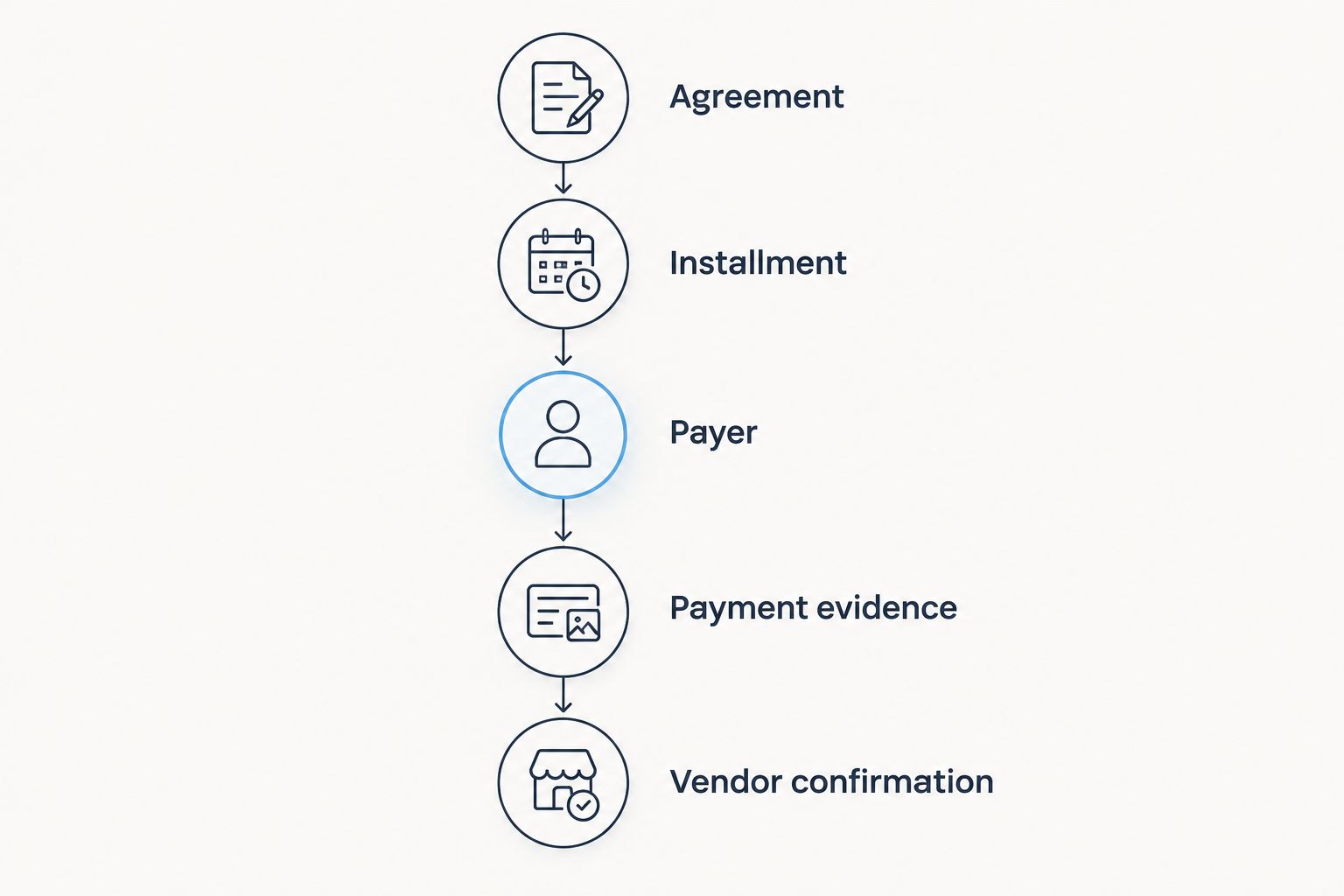
Payment evidence and vendor confirmation are separate checkpoints.
Use that sequence during client updates. Instead of reporting that a deposit is handled, state whether it is scheduled, sent, or confirmed received, then name the next action. The client gets an operational update rather than an ambiguous reassurance.
Why vendor deposit tracking varies
The record structure stays consistent, but the underlying agreement determines what you enter. Build your 2026 process around these factors rather than imposing the same payment schedule on every vendor:
Contract wording. Copy the vendor’s terminology and conditions; do not rename a retainer or booking fee as a refundable deposit.
Payment schedule. Track every contractual installment separately, including deadlines triggered by signing or another agreed event.
Payer responsibility. Identify the authorized payer and keep that role separate from your follow-up responsibility.
Payment method. Preserve the relevant transaction reference and obtain receipt confirmation rather than assuming that sending equals receipt.
Scope changes. Record approved changes and their effect on the outstanding obligation without deleting the original payment history.
Currency. Label the currency explicitly and keep unlike currencies distinct when reviewing event obligations.
These factors belong in the record because they change the next action. A new deadline, payer, or contractual amount needs an explicit update, not a correction buried in an email thread.
Should I mark a vendor deposit paid when the client sends it?
Mark the deposit sent, not received, when the client provides evidence of sending. Keep the payment open for confirmation until the vendor acknowledges receipt and application to the correct event.
This distinction also improves client communication. You can confirm that the client completed their action without claiming that the vendor has completed theirs. If either party reports a mismatch, preserve both references and assign the follow-up.
How do I keep deposits from being counted twice in the budget?
Record the deposit as a payment against the relevant vendor obligation, not as an additional version of that obligation. Keep committed spending separate from payment progress.
During a budget review, reconcile the agreement, any approved changes, confirmed payments, and remaining obligation. Check that a later vendor invoice has not created a duplicate expense for a service already recorded. Your planning fee belongs in its own record, separate from money owed to vendors.
What should I do when a vendor deposit changes or is refunded?
Preserve the original transaction and add the adjustment with its supporting agreement. Do not overwrite the deposit history to make the current balance look correct.
Record what changed, who authorized it, the applicable date, and the resulting obligation. For a refund, distinguish requested, approved, and received rather than treating a request as money returned. Use the vendor’s written terms and acknowledgment; do not promise a client a refund based on the tracker alone.
Where Rundown fits in the workflow
Rundown is best for professional wedding planners who want CRM, budgets, client portals, timelines, and vendor coordination in one connected practice-management system. The relevant benefit is keeping the client and event context together from first inquiry to last dance.
Rundown brings those planning functions into one system, but your deposit process still needs clear ownership and evidence rules. Software does not turn a client’s message into vendor confirmation or resolve unclear contract terms.
For your 2026 evaluation, start with the free plan and walk through an existing vendor agreement. Check how you will represent installments, preserve evidence, identify the payer, and distinguish sent from received. Choose a workflow you can maintain during a busy wedding week, not just one that looks tidy during setup.
Start with your deposit workflow
Try Rundown’s free plan and assess how budgets and vendor coordination fit your process.
FAQ
How do I track vendor deposits in event planner software?
Create a separate record for each contractual installment and connect it to the wedding, vendor, budget, payer, deadline, and payment evidence. Keep sent and received statuses separate until the vendor confirms receipt.
What’s the best way to track deposits across multiple weddings?
Attach each installment to its specific wedding and vendor, then use a consistent record structure across events. Assign a follow-up owner so a shared vendor contact does not blur responsibility between weddings.
Can Rundown help me organize vendor deposits?
Rundown includes budgets and vendor coordination alongside CRM, client portals, and timelines. Use the free plan to assess how your installment records, evidence references, and follow-up process fit the system.
Should the couple or the planner pay vendor deposits?
The payer should be the party authorized under the client and vendor arrangements. Record that responsibility explicitly; tracking a payment does not itself authorize the planner to send it.
Does a vendor deposit count toward the final balance?
A vendor deposit counts toward the remaining obligation when the agreement defines it that way. Use the signed terms rather than assuming every booking fee, retainer, or deposit receives identical treatment.
Can payment reminders prove that a vendor received a deposit?
No, a reminder proves neither payment nor receipt. Use transaction evidence to record sending and vendor acknowledgment to record confirmed receipt.
What should I check before sharing a deposit update with a client?
Check the installment, due date, payer, current evidence, and next action. Share only the relevant payment information through an appropriately controlled communication channel.
One last thing
Before you close a deposit task, read the vendor’s acknowledgment closely. Confirmation that money arrived is useful; confirmation that it was applied to the correct wedding and installment is the detail your record needs.
Make that your final checkpoint. It keeps an apparently finished task from hiding an unresolved payment allocation.
Related guides

