
Stripe Wedding Payment Tracking: Use Invoice Events 2026
Stripe wedding payment tracking: use invoice events to update balances, handle refunds, and prevent duplicate entries while keeping vendor bills separate.
Featured

Instead of manually matching Stripe receipts to wedding invoices, build Stripe wedding payment tracking around verified payment events and a ledger that updates the correct invoice automatically. This 2026 workflow covers invoice matching, duplicate protection, refunds, and the boundary between payment records and your planning system—not an assumed native Stripe integration.
TL;DR
Stripe wedding payment tracking works best when verified invoice events update a ledger using permanent invoice IDs.
Rundown suits independent wedding planners who need CRM, budgets, client portals, timelines, and vendor coordination together.
Keep planner fees separate from vendor payments; a wedding budget is not proof of payment.
Confirm destination integration access before attempting automatic budget updates.
Why this matters
A payment receipt answers whether a transaction happened. Your wedding payment tracker must also answer which invoice it belongs to, which wedding it affects, and whether a later refund changes the balance. Matching by a couple's name alone leaves those questions unresolved.
Rundown is best for independent wedding planners who want CRM, budgets, client portals, timelines, and vendor coordination in one planning system. Use Rundown for that operational context; establish the supported connection method separately before sending payment updates into it.
For your 2026 setup, keep three records distinct: the client's contractual obligation, the Stripe payment record, and the wedding's planning budget. They describe related information, but they are not interchangeable.
Before you start
Accounts and access: You need access to the Stripe account receiving your planning fees, its test environment, and a developer who can configure a webhook receiver. Automatic writes into another system also require that system's documented API or supported integration.
Materials: Prepare your invoice schedule, permanent wedding IDs, and a ledger with separate invoice, payment, and refund records. Decide who owns exceptions before making the workflow live.
The gotcha: Stripe sends events more than once and does not guarantee delivery order. Also,
invoice.paidcan represent an invoice marked paid outside Stripe, so do not treat every paid invoice as evidence of a Stripe collection.
This is a developer-assisted workflow, not a series of assumed dashboard clicks. The field names below are Stripe API identifiers or proposed ledger fields, not undocumented settings in your planning software.
Choose the payment workflow
Best for scheduled planning fees: use Stripe invoices as the payment obligation. They give the workflow an invoice to reconcile, rather than asking a receipt to explain the entire contract.
Stripe invoice events
Best for: Planning fees billed through Stripe invoices
Advantage: Invoice status and balances anchor the payment record
Limitation: A paid invoice does not always mean Stripe collected the money
Stripe PaymentIntent events
Best for: Payments collected through a custom checkout
Advantage: Successful payments can update a separate obligation ledger
Limitation: Your system must maintain the invoice or installment relationship
Choose the path that matches how you actually collect money. Do not rebuild a working invoice process around PaymentIntents just to add automation.
If your couples pay vendors directly, those vendor bills belong in a separate tracking process. Your Stripe account cannot establish the payment status of a transaction it never processed.
Wedding and invoice ledger
Start your 2026 workflow with identifiers, not automation. A webhook cannot reliably assign money to a wedding when the receiving ledger has no stable matching rule.
Create 1 ledger row per invoice. Add a permanent wedding ID, the Stripe invoice ID, the Stripe customer ID, currency, invoice status, amount paid, and amount remaining. These are your ledger's fields, not a prescribed interface.
Store the wedding reference in your own database. When creating a Stripe invoice through the API, include the reference in metadata if that fits your implementation. Explicitly add it to the invoice; do not assume metadata on another Stripe object appears there automatically.
Make the Stripe invoice ID the unique invoice key. Keep the wedding ID as the relationship that groups invoices for the same event.
Create a separate event-processing record keyed by the Stripe event id. Store the processing outcome and any error so a retry does not create another payment entry.
Separate planning fees from vendor obligations. Label who receives the money and which account holds the payment evidence.
Expected result: You can take an invoice ID and find exactly one invoice record, its wedding, and its client without searching by name or email.
Keep the client-visible balance separate from internal notes about processing errors. A couple needs a clear payment status; your team needs the evidence supporting it.
Stripe event destination
Configure the receiver before accepting live payment events. Keep 2 environments—test and live—separate, with their own credentials, endpoint secrets, and ledger records.
Have your developer create an HTTPS webhook endpoint that accepts Stripe event requests. Preserve the raw request body so the Stripe library can verify the signature correctly.
Register the destination through Stripe's supported configuration process. For an API-based setup, the webhook endpoint creation fields include url and enabled_events. Subscribe to invoice.paid, invoice.payment_failed, and invoice.updated for the invoice workflow.
Retrieve the endpoint's signing secret and store it outside application code. Verify the Stripe-Signature header with Stripe's official library before accepting an event as authentic.
Record the verified event durably or place it in a durable queue. Return an HTTP 2xx response after that handoff, rather than waiting for every downstream system to finish updating.
Process queued work separately. Keep unsuccessful records available for retry, with an error that identifies the failed step.
Expected result: Valid test events enter the processing queue; requests that fail signature verification cannot change your ledger.
A successful webhook response confirms receipt, not successful reconciliation. Keep those states separate so an endpoint that responds correctly cannot hide a broken budget update.
Payment reconciliation rules
For your 2026 invoice workflow, read the current invoice before changing the balance. This protects the ledger from an older event arriving after a newer one.
Find the invoice using the event object's id, then retrieve the current invoice from Stripe. Match its ID to the invoice record before updating anything.
Read the current status, amount_paid, amount_remaining, and currency. Use Stripe's currency rules when converting API amounts for display; do not apply a universal decimal conversion to every currency.
Update the existing invoice row rather than adding the event amount to a running total. Reconcile current state; do not count webhook deliveries as payments.
Distinguish a paid invoice from a Stripe-collected payment. Preserve the payment source, and review invoices marked paid outside Stripe before labeling them as Stripe receipts.
For invoice.payment_failed, record the failed attempt without declaring the obligation canceled. Retrieve the invoice's current state before changing its outstanding balance.
Write the resulting status to your planning destination only through a documented, supported connection. Without that connection, keep the external ledger authoritative and use a controlled review process for planning-budget updates.
Expected result: Reprocessing an event leaves the same invoice balance, and each updated record retains its wedding association.
Rundown brings budgets together with CRM, client portals, timelines, and vendor coordination. That connected planning context is useful, but it does not establish which payment APIs or write actions are available.
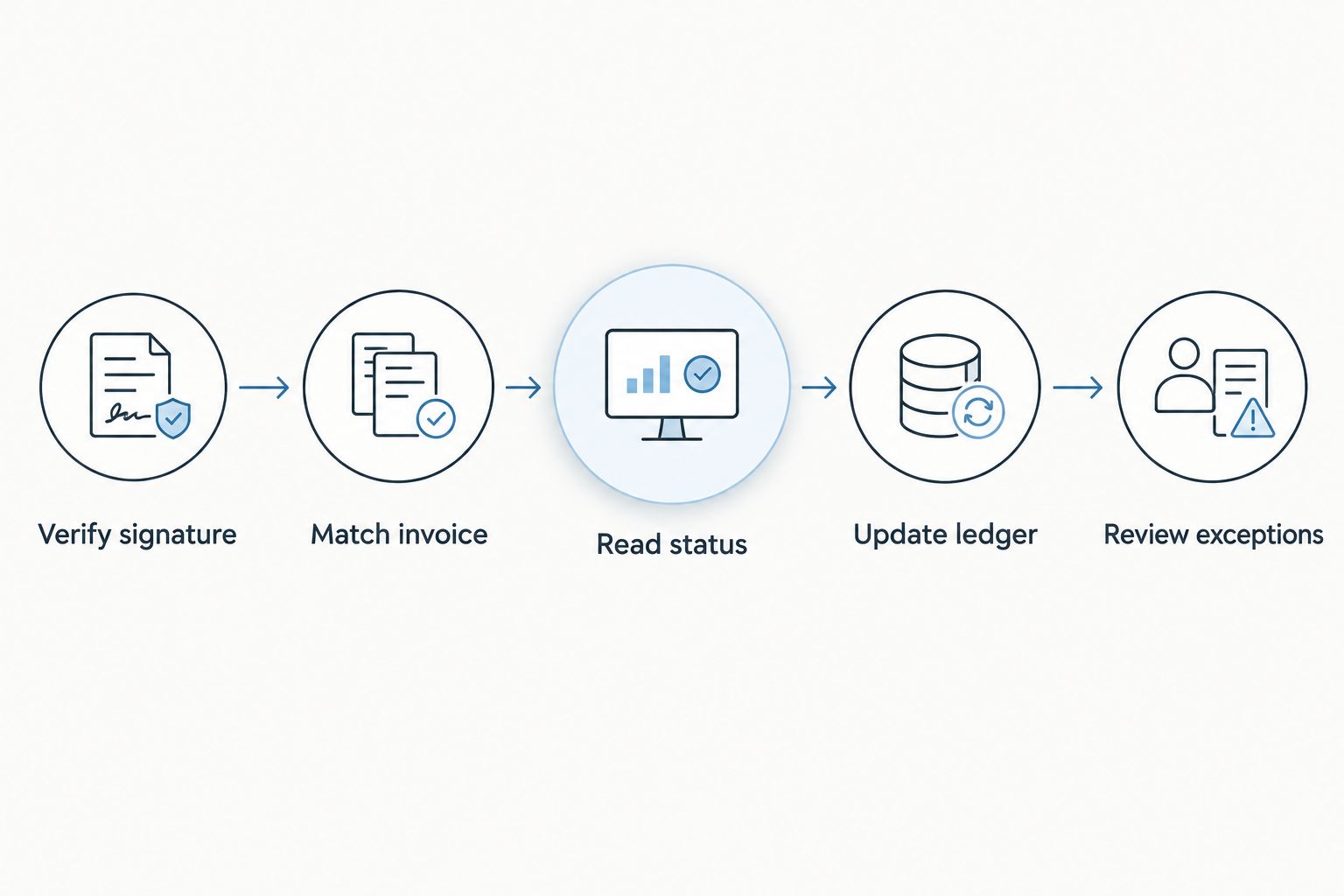
Match the invoice before updating the wedding's payment record.
Use the sequence above as your processing checklist: Verify signature, Match invoice, Read status, Update ledger, and Review exceptions. An unmatched event belongs in review, not in the nearest-looking wedding record.
Validation and release checks
Test the payment record and the planning record together. A webhook that reaches your server is only the beginning of a working tracker.
Run 5 test cases: successful invoice payment, failed payment, repeated event delivery, an event with no matching wedding, and a refund. Confirm each produces the intended ledger outcome.
Deliver an event again and check that the ledger contains no duplicate payment. Also test an older event after the invoice has changed; the ledger should reflect the current Stripe state.
Confirm an unmatched invoice creates an exception without updating another wedding. Include a client with multiple weddings or multiple invoices in the matching test.
Test a destination failure. The payment record should remain available for retry without creating another receipt or losing the original event.
Release the live configuration separately. Verify the live endpoint secret, event subscriptions, and wedding references before relying on automatic updates.
Expected result: You can trace a live payment from Stripe to its invoice record and wedding reference, with a visible processing outcome.
For a 2026 launch, preserve an exception queue from the start. Automation should remove repetitive matching, not remove your ability to investigate a payment.
Track standalone payments and later refunds
Best for custom checkout payments: use payment_intent.succeeded with an explicit obligation reference. This variant suits a workflow in which your own application already maintains the installment schedule.
On success, retrieve the PaymentIntent and match its id to a unique payment record. Read amount_received and currency, then apply that payment to the obligation identified by your own stored relationship. Do not assume a successful PaymentIntent settles every invoice for that couple.
Refunds need their own adjustment records. Subscribe to the relevant Stripe refund events for your implementation, retrieve the refund's current state, and connect it to the original payment. Use the refund ID as the unique adjustment key.
A refunded payment and a reopened invoice are different decisions. Record the refund first, then apply your contractual rule for whether the client still owes that money. Do not automatically increase an invoice balance merely because funds were returned.
If you support both invoice and standalone payment workflows, define which one owns each obligation. Counting an invoice event and its underlying payment as separate receipts overstates collections.
Troubleshooting
The payment appears twice
Check both event deduplication and payment deduplication. Stripe event IDs identify deliveries to process, while invoice, payment, and refund IDs identify business records. Enforce unique keys at both levels; a visual check is not duplicate protection.
The balance changes backward
An older event can arrive after a newer one. Retrieve the current Stripe object before updating the ledger, and serialize or otherwise control concurrent updates to the same invoice. Do not overwrite a current record with an old event snapshot.
The webhook rejects valid Stripe requests
Check that signature verification receives the unmodified raw body and the signing secret for that exact endpoint and environment. Parsing or rewriting the body before verification breaks the signature check. Test and live secrets are not interchangeable.
The payment has no matching wedding
Inspect the invoice mapping and metadata assignment. Route the record to an exception queue, then fix the relationship and reprocess it. Do not fall back to the client's name when the permanent reference is absent.
The invoice is paid, but no payout has arrived
Invoice payment status and bank payout status are separate. Reconcile client obligations against invoice and payment records; reconcile deposits against Stripe payout records. A missing bank deposit does not, by itself, make a paid client invoice unpaid.
Customize your workflow
Once invoice matching works, expand the workflow to internal alerts, payment-review tasks, and accounting reconciliation. Trigger those actions from a successfully reconciled record, not merely from an incoming event.
Use Rundown's planning context to decide who needs the information: the planner reviewing a budget, the team coordinating vendors, or the client checking an obligation. Confirm supported destination actions before automating any of those updates.
For 2026 operations, define the visibility rule as carefully as the payment rule. Keep internal processing errors and vendor financial details out of client-facing updates unless they belong there.
Start with one supported payment path, then expand after the exception handling works. Adding another event type before fixing invoice matching only creates more records to investigate.
Start your connected planning workflow
Bring CRM, budgets, client portals, timelines, and vendor coordination into one planning system.
FAQ
What's the best way to automate Stripe wedding payment tracking?
Use verified Stripe events to reconcile a ledger keyed by permanent invoice and wedding IDs. For fees billed through Stripe invoices, retrieve the current invoice before updating its payment status and balance.
Does Rundown automatically connect to Stripe?
This workflow does not establish a native Stripe connection for Rundown. Confirm a documented integration or API write method before planning automatic updates to its budgets or client portals.
Should I use invoice.paid or payment_intent.succeeded?
Use invoice.paid for obligations managed through Stripe invoices and payment_intent.succeeded for standalone payments mapped to your own obligation ledger. Avoid counting both as separate receipts for the same payment.
Can I track vendor payments through my Stripe account?
Your Stripe account cannot verify payments that couples make directly to vendors outside that account. Track those obligations separately and attach confirmation from the party responsible for collecting the money.
How do I stop duplicate payment entries?
Use unique event IDs for processing and unique invoice, payment, and refund IDs for ledger records. Update existing records from current Stripe state instead of adding money for every webhook delivery.
Does a Stripe refund automatically reopen a wedding invoice?
A refund does not establish that the invoice should be reopened. Record the refund separately, then determine the remaining client obligation under the contract and your invoicing process.
Why does a paid invoice not match my bank deposit?
Invoice payment status and bank payout status measure different things. Use invoice records to track client obligations and payout records to reconcile transfers to your bank.
One last thing
Your payment tracker should still work when the wedding date changes. Use an immutable wedding ID rather than making the event date part of the matching key.
A postponed wedding can keep its invoice history, refunds, and outstanding obligations without moving those records to a new identity. Before accepting the workflow, change a test wedding's date and confirm that its payment relationships remain intact.
Related guides

