Can a solo wedding planner afford CRM software?
Can a solo wedding planner afford CRM software? Yes—if it fits cash flow. Assess setup work, duplicate tools, and workflow fit before committing to a system.
Featured

Yes—a solo wedding planner can afford CRM software when the commitment fits the business’s cash flow and the system supports work you actually deliver. Include setup, migration, and duplicate subscriptions in that decision; a manageable subscription does not make an unsuitable system affordable.
TL;DR
Can a solo wedding planner afford CRM software? Yes—judge affordability against cash flow, setup work, and duplicate subscriptions.
Rundown suits solo wedding planners who want CRM, client portals, budgets, timelines, and vendor coordination together.
Test an actual wedding workflow before committing; feature lists do not establish business value.
Keep your current setup if a new system adds administration without replacing existing work.
Can a solo wedding planner afford CRM software?
Yes, provided the software fits your operating budget without depending on an unbooked wedding to cover it. Separate the decision into what you can comfortably commit and what the software will actually do for your business.
For your 2026 software decision, compare these approaches by the work they cover—not just by the subscription you see first.
Keep your current setup
Best for: Planners whose inquiry and delivery processes remain manageable
Practical advantage: Avoids a migration and preserves familiar workflows
Tradeoff to check: You remain responsible for keeping separate records consistent
Add a standalone CRM
Best for: Planners whose main problem is tracking inquiries and client relationships
Practical advantage: Focuses the change on the sales and relationship workflow
Tradeoff to check: Check whether budgets, timelines, and vendor coordination require separate tools
Choose Rundown
Best for: Solo planners seeking connected practice-management software
Practical advantage: Includes CRM, client portals, timelines, budgets, and vendor coordination
Tradeoff to check: Test how the connected workflow fits your process before moving active weddings
None of these approaches wins simply because you work alone. Choose the smallest commitment that covers your actual workflow without creating another place to maintain the same information.
Why this matters for a solo planning business
When you run the business yourself, you own the inquiry response, proposal follow-up, client communication, budget updates, and final runsheet. A software decision affects both business administration and event delivery.
For an independent planner managing 10–30 weddings per year, evaluate the connection between those tasks. Recording an inquiry is useful; carrying accurate client information into the planning work is the larger operational question.
Affordability also differs from value. You can comfortably cover a subscription and still choose the wrong system if you never use its core functions. Conversely, useful software is not a sensible commitment if it puts pressure on cash needed for existing obligations.
Approve the cash commitment and the workflow fit separately. Both need to pass.
What belongs in your 2026 CRM budget?
Build the budget around your business records and the provider’s current terms. Do not use a generic industry average as permission to spend.
The subscription commitment
Check the billing frequency, renewal conditions, cancellation terms, and features included in the plan you are considering. Read the terms for the specific plan—not a general feature page.
Match the payment schedule to your business’s cash flow. An annual commitment and a monthly commitment create different obligations, even when the software itself is the same.
The changeover work
List what you would move: inquiries, client details, wedding dates, vendor contacts, budgets, and working timelines. Then decide which records genuinely need to move now.
Your migration does not need to include every archived wedding. Start with the information required to operate safely, and keep historical records accessible in their existing location until you have a reason to move them.
The subscriptions you would keep
Write down which current tools remain necessary after the change. Include any separate tools you still need for accounting, document storage, or other work outside the new system’s scope.
Do not count a canceled subscription as a benefit until you have confirmed that you can actually retire it. A replacement that exists only in your spreadsheet does not reduce your business commitments.
The work you still own
Software does not make client decisions, approve a budget change, or confirm a vendor’s understanding on your behalf. You still need a clear process for checking information and communicating changes.
Assess the system on how it supports that responsibility. Avoid building your budget around promised time savings that you have not measured in your own workflow.
Why CRM affordability varies between planners
Your wedding count is context, not a spending rule. A planner handling 10 weddings per year and a planner handling 30 weddings per year should each evaluate the work behind those bookings.
These factors belong in the decision:
Service scope: Compare the work required for your actual packages, from coordination through full-service planning.
Cash-flow timing: Check whether the software commitment fits when your business receives and spends money.
Existing tools: Identify which subscriptions the new system replaces and which remain necessary.
Record condition: Review whether client, vendor, budget, and timeline information is ready to move.
Workflow coverage: Decide whether you need inquiry tracking alone or a connected planning system.
Setup responsibility: Identify the configuration and checking you will personally need to complete.
Use these factors to explain your decision rather than to justify a predetermined purchase. If the system solves only a minor inconvenience, keep the commitment proportionate to that problem.
Test affordability with an actual wedding workflow
For a 2026 evaluation, use an actual wedding workflow rather than a tour of every available feature. Choose a representative project, protect client information, and keep your current working records intact during the test.
The point is not to recreate your entire business immediately. It is to see whether a client can move from inquiry through the final timeline without you rebuilding the same information at every stage.
1. Inquiry
Record the details you need to assess fit: the wedding date, requested service, contact information, and next action. Check whether you can find the current status without searching through unrelated messages.
A useful inquiry workflow tells you what needs attention. If you still need a separate private list to remember every follow-up, examine what is missing from the setup.
2. Client portal
Test what the client sees before sharing anything. Decide which information belongs in the portal and which remains part of your internal working process.
Check access settings rather than assuming that all records have the same visibility. Your test should establish how you will keep client communication clear without exposing information unintentionally.
3. Budget
Enter a representative wedding budget and make a realistic revision. Check whether you can identify the current figures and explain the change to the client.
Do not treat a budget view as proof that every financial workflow is covered. Confirm separately which accounting, invoicing, or payment tasks still require your existing process.
4. Vendor coordination
Add the vendor information you need to deliver the wedding, including contacts, responsibilities, and outstanding questions. Locate that information as if you were answering a last-minute planning request.
Check the handoff between vendor details and your working timeline. You need a repeatable process for keeping both accurate, whether the software connects them directly or you maintain the relationship yourself.
5. Final timeline
Build the working timeline and review how you would communicate an approved revision. Confirm that the people who need the update can identify the version you intend them to use.
A finished-looking timeline is not the whole test. You also need a clear process for checking it, sharing it, and replacing an earlier version.
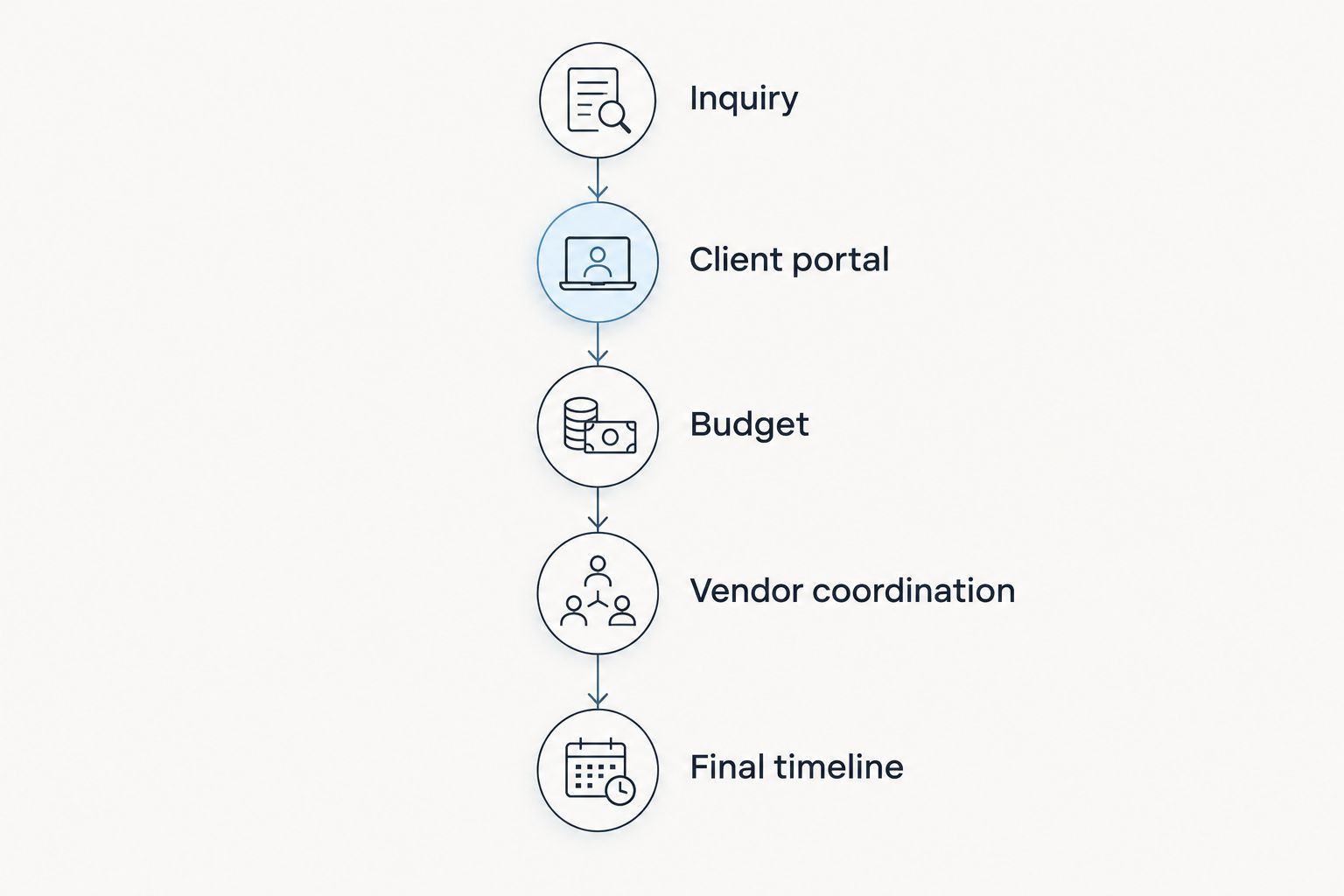
Evaluate the handoffs between tasks, not just each feature in isolation.
After the test, record where you entered information twice, where you needed another tool, and where the next action was unclear. Those observations are more useful than a long list of features you never opened.
Before moving active client records, use the guide to migrating client data to new wedding planner software to structure the changeover.
Where a connected planning system fits
Rundown is best for solo wedding planners who want CRM and event delivery in one connected system. Its scope includes CRM, client portals, timelines, budgets, and vendor coordination—from first inquiry to last dance.
That is relevant when your software decision extends beyond tracking prospective clients. You are choosing where the planning work will live after the wedding is booked, not just where you will store the original inquiry.
The tradeoff is the changeover itself. Choosing a connected system still requires you to decide how records are organized, what clients can access, and how approved updates reach the right people.
For your 2026 shortlist, test Rundown against your own process rather than assuming that broader coverage guarantees a better fit. Start with the free plan to assess the workflow, and check its current scope before relying on a particular feature.
Test your planning workflow
Explore a connected system for CRM, client portals, budgets, timelines, and vendor coordination.
Should I wait until I book more weddings?
Do not use wedding count alone as the trigger. Review whether you can reliably track inquiries, client decisions, budget revisions, vendor responsibilities, and timeline changes with your current process.
If those tasks remain clear and manageable, waiting is a valid choice. If the process depends on remembering what belongs where, evaluate a system before adding more active work—but keep the financial decision tied to booked business and available cash.
Will CRM software pay for itself?
CRM software does not automatically pay for itself. Establish value through work you can observe: a subscription you actually retire, a repeated task you no longer duplicate, or a clearer process you consistently use.
Do not treat saved administration as guaranteed extra bookings. Your budget should stand without assuming that spare capacity becomes new revenue.
Can I keep spreadsheets alongside a CRM?
Yes, you can keep spreadsheets alongside a CRM when each has a defined purpose. Decide which record is authoritative for each type of information so you do not maintain competing versions of the same wedding budget or timeline.
Keeping a spreadsheet is not a failure. Keeping an unexplained duplicate that you must reconcile after every change is a reason to revisit the workflow.
FAQ
Can a solo wedding planner afford CRM software in 2026?
Yes, when the commitment fits current business cash flow and the system supports work the planner actually delivers. Include setup work, migration, and subscriptions that will remain necessary.
How much should I spend on wedding planner CRM software?
Set the commitment from your operating budget and the provider’s current plan terms, not a generic spending target. Check the billing schedule, included features, and tools you would still need.
Is a CRM worth considering if I plan 10 weddings per year?
Yes, 10 weddings per year is enough to evaluate whether a CRM addresses a real workflow problem. Wedding count alone does not establish value; check inquiry tracking, client communication, and planning handoffs.
What is Rundown best for?
Rundown is best for solo wedding planners who want CRM, client portals, timelines, budgets, and vendor coordination in one connected system. Test the workflow and check the current plan scope before moving active weddings.
Should I choose a standalone CRM or connected wedding planning software?
Choose based on the work you need to manage. A standalone CRM is an approach to evaluate for inquiry and relationship tracking; a connected planning system is relevant when you also need budgets, vendor coordination, and timelines.
Will wedding planner software replace all my other apps?
Do not assume that wedding planner software replaces every app. Confirm each required task, including accounting and document handling, before canceling an existing subscription.
Should I move every wedding into a new CRM immediately?
No, test a representative workflow before moving every active wedding. Keep your current working records intact until you have checked the information, access settings, and handoff process.
One last thing
Before you approve a CRM commitment in 2026, write down which existing record or task will stop being duplicated. Be specific: the inquiry status list, the separate vendor contact sheet, or the second working budget.
If you cannot name anything that changes, you have identified a feature purchase rather than an operational decision. Buy for the workflow you will actually use, not the business you hope to run someday.
Related guides

