How do I get clients to sign contracts electronically?
How do I get clients to sign contracts electronically? Send a final agreement, collect signatures, and save signing evidence with a clear wedding booking process.
Featured

To get clients to sign contracts electronically, prepare the final agreement, add signature fields for every required signer, and send it through an electronic-signature service that records the signing process. Give clients clear instructions, retain the completed agreement and signing record, and track payment separately: a signed contract does not prove that the booking payment has been received.
TL;DR
How do I get clients to sign contracts electronically? Send a prepared agreement, collect required signatures, and retain signing evidence.
Rundown suits professional wedding planners who want CRM, client portals, budgets, timelines, and vendor coordination together.
Electronic signatures do not replace clear contract terms, signer identification, or payment tracking.
Choose an electronic-signature workflow you can test from the client's phone through your booking record.
Why this matters
For an independent planner managing 10–30 weddings per year, contract signing is a handoff between selling your services and delivering them. Your inquiry record, agreed scope, signed agreement, and booking status need to tell the same story. Otherwise, you are checking email attachments before you can confidently begin planning.
Your 2026 booking checklist should distinguish an agreement sent for review from an agreement completed by every required party. A client opening the document is not the same as signing it, and a signature is not the same as payment.
If you are considering a dedicated signing service, the DocuSign contract-signing workflow guide is a relevant next read. Evaluate the full handoff, not just whether a client can draw a signature on a screen.
How do I get clients to sign contracts electronically?
Send one final agreement with clearly assigned signature fields, then keep both the signed document and the evidence of signing. Use this sequence whether your signing tool stands alone or sits inside your planning software.
1. Finalize the agreement before requesting signatures
Start with a contract reviewed for your business and the jurisdiction where you operate. Confirm the client names, event date, service scope, payment terms, cancellation provisions, and responsibilities before uploading it. Electronic signing does not repair unclear terms.
Match the agreement to the proposal the client accepted. If the couple chose partial planning rather than full-service planning, the contract should reflect that choice—not the package left in your template.
Give the file a clear name that identifies the event and agreement version. Avoid sending several attachments and asking the client to work out which one to sign.
2. Confirm who needs to sign
Identify the contracting parties before assigning fields. A couple, a parent paying for services, and the person coordinating logistics are not automatically the same legal party. Your agreement should make those roles clear.
Use a separate recipient entry for each required signer rather than assuming a shared email address identifies everyone. If your business must countersign, include that step in the signing order.
When the signer acts for a company or organization, confirm the appropriate signing authority. Do not treat someone being your main contact as proof that they can enter the agreement.
3. Prepare the signing fields
Place signature, printed-name, and date fields where the agreement requires them. Add initials only where your agreement calls for them. Assign each field to the correct recipient so clients are not asked to complete someone else's section.
Preview the document before sending it. Check that fields do not cover contract language, that the entire agreement is readable, and that no required section is left blank.
For your 2026 template review, also inspect reusable fields for old client names or event details. A reusable template is a starting point, not a finished agreement.
4. Send a clear request
Explain what the agreement covers, who needs to sign, and what happens afterward. Keep the email practical: identify the wedding, direct clients to review the document, and explain how to raise questions before signing.
State a signing deadline only when you have actually established one. Do not imply that a date is reserved indefinitely or that signing alone completes the booking if your contract requires another condition.
Give clients a way to request corrections. Asking them to sign now and fix the scope later creates an avoidable mismatch between the agreement and the work.
5. Track completion, not just delivery
Check whether every required party has finished. A sent email, an opened document, and a completed agreement are different states. Use the signing service's status information rather than relying on a reply saying the client has signed.
If you send reminders, direct them to the outstanding signer. Stop reminders when the agreement is complete, and resolve questions before sending another request.
When terms change, withdraw or void the outstanding request using the service's available controls. Prepare the revised agreement rather than leaving competing versions open for signature.
6. Save the agreement and update the booking record
Download the completed agreement and any available completion certificate or audit record. Keep them with the relevant client record in a location your business controls. Confirm that clients receive or can retrieve their completed copy.
Update your CRM only after checking the conditions that define a confirmed booking for your business. Record contract completion and payment status separately, then begin the appropriate onboarding tasks.
The operational sequence is straightforward: Finalize agreement, Confirm signers, Prepare fields, Send request, Save records. Keep these checkpoints visible even when software automates part of the process.
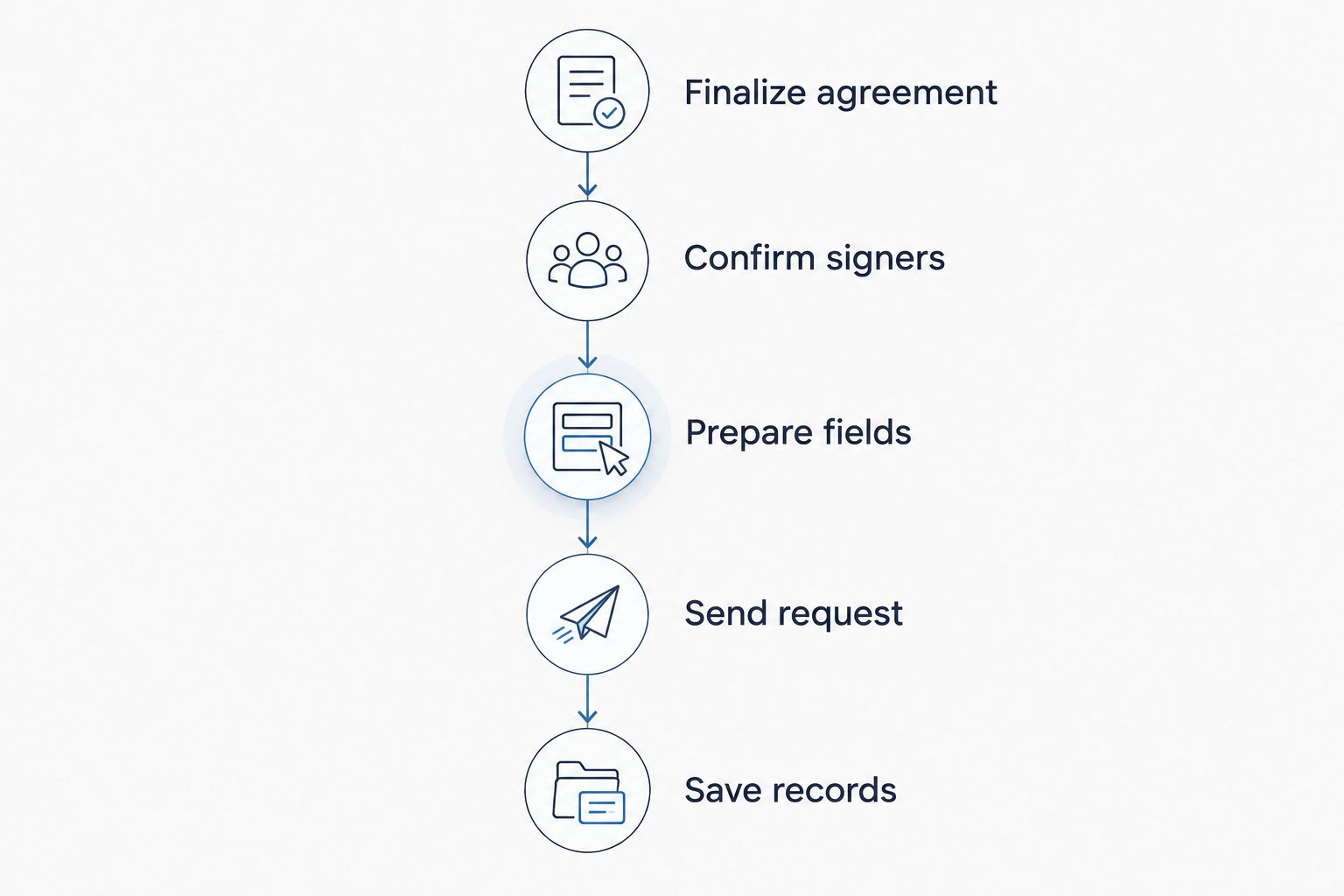
Keep the completed agreement and signing evidence with the client record.
Which electronic-signature workflow should you use?
Choose the workflow that preserves a clear agreement, a usable client experience, and retrievable signing evidence. For your 2026 software review, test these requirements with a sample document before committing real client contracts.
The options below describe workflow categories, not promises about any particular provider. Features differ, so confirm each requirement in the service you are evaluating.
Dedicated electronic-signature service
Best for: Planners keeping an existing CRM
Practical advantage: Separates contract execution from planning operations
Limitation to address: Completion status and documents need a reliable handoff to the client record
Signing inside practice-management software
Best for: Planners seeking a connected booking process
Practical advantage: Keeps signing close to other client work when supported
Limitation to address: Verify signing evidence, exports, permissions, and supported agreement types
Client-returned signed PDF
Best for: An exception handled with an established review process
Practical advantage: Lets you receive a completed file without adopting a full booking workflow
Limitation to address: A returned file alone does not establish the signing history or identify the signer
Dedicated electronic-signature service
Best for: planners who want to keep their current CRM and add a separate signing process. Assess recipient controls, document status, evidence records, and completed-file exports. Then decide who transfers the result into your planning system.
The drawback is the handoff. If the signing service says complete but your CRM still says proposal sent, your booking record is unreliable. A manual update is workable when it has a named owner and a consistent checklist.
Signing inside practice-management software
Best for: planners who want contract completion close to client onboarding. Check that the platform actually supports the signing workflow you need; a client portal or document upload feature does not establish electronic-signature functionality.
The attraction is fewer separate places to check. The trade-off is dependence on the platform's signing controls and export options, so test those rather than assuming an all-in-one label covers every requirement.
Client-returned signed PDF
Best for: an agreed exception, not your default booking process. A client can return a signed file, but you still need a process for confirming the final version, required parties, and completed copy.
Do not equate an image of a signature with a complete evidentiary record. If you use this route, have your attorney advise on the agreement and recordkeeping process rather than treating the file format as proof of enforceability.
Why electronic contract signing varies
The signing request should match the agreement and the people involved. Your 2026 process needs room for these differences without turning every booking into a custom administrative project.
Required parties: An agreement involving several signers needs recipient assignments and a clear completion check.
Signing authority: An organizational client requires attention to who is authorized to enter the agreement.
Client access: Test whether recipients can review, sign, and retrieve the document on the devices they use.
Agreement revisions: Changes to scope or terms require version control and a fresh review of the signing request.
Evidence requirements: Identity checks, consent records, and signing history depend on the service and applicable legal requirements.
Booking conditions: Contract execution and payment need distinct tracking when both are required to confirm the event.
Standardize the checkpoints, not the assumptions. A familiar client email address does not remove the need to identify the signer, and a familiar template does not remove the need to check the terms.
Are electronic signatures legally valid for wedding contracts?
Electronic signatures generally have legal recognition in US commerce under the federal E-SIGN Act and applicable state electronic-transactions law. A contract cannot be denied legal effect solely because it uses an electronic signature, but that does not make every electronically signed document enforceable.
The agreement still needs to satisfy applicable contract requirements. Consent to the electronic process, evidence of intent, identification of the signer, and a retainable record are relevant considerations. Certain transactions have exceptions or additional requirements.
Have a qualified attorney review your wedding-planning agreement and electronic-signing process. Software supplies a method of execution; it does not decide whether your cancellation clause or service terms are enforceable.
Can clients sign wedding contracts on their phones?
Clients can sign on their phones when the chosen signing service supports a usable mobile process. Test your actual agreement on a phone: long pages, misplaced fields, and hard-to-read attachments can make an otherwise functional process difficult.
Check the whole journey, including opening the request, reviewing terms, completing required fields, and retrieving the finished agreement. A successful planner preview is not a successful client test. Use a test recipient account rather than only the sender dashboard.
When should I mark the wedding as booked?
Mark the wedding as booked when the conditions in your agreement and booking policy have been met. If those conditions include completed signatures and payment, verify both before moving the inquiry into your active planning workflow.
Keep a record of the evidence behind the status change. Your client portal invitation, kickoff tasks, budget setup, and vendor coordination should follow the confirmed booking—not an assumption based on an email notification.
Keep contract completion connected to planning
Rundown is best for professional wedding planners who want CRM, client portals, budgets, timelines, and vendor coordination together. Rundown provides that connected practice-management system, from inquiry through the final timeline.
That operational fit is separate from choosing a signing method. Before adopting Rundown for your contract handoff, confirm how your chosen electronic-signature process connects to the client record; do not assume that CRM or portal functionality includes a particular signing integration.
Start with a sample booking and trace the information you need after signature: agreed scope, client details, payment status, and onboarding tasks. The useful outcome is a clear handoff into planning, without the chaos of searching several inboxes for the final agreement.
Start with a sample booking
Try Rundown's free plan for CRM, client portals, budgets, timelines, and vendor coordination.
FAQ
What's the best way to get wedding clients to sign electronically?
Use an electronic-signature service that supports your required signers and retains evidence of the signing process. Prepare the final agreement, assign fields, and keep the completed document with the client record.
Do both members of the couple need to sign?
Both members need to sign if your agreement identifies both as required contracting parties. Confirm the parties with your attorney rather than assuming the main email contact represents everyone.
Can a client type their name instead of drawing a signature?
A typed name can serve as an electronic signature when it is adopted with intent to sign and the process meets applicable requirements. The evidence of intent and agreement matters, not simply the appearance of the signature.
Is a signed contract the same as a confirmed wedding booking?
A signed contract is not automatically a confirmed booking. Check the conditions in your agreement, including any required payment, before updating the booking status.
What should I do if the client wants changes after I send the contract?
Resolve the requested changes before collecting signatures on the final agreement. Withdraw or void the outstanding request using the service's controls, then send the revised version to all required parties.
What documents should I save after electronic signing?
Save the fully executed agreement and any available completion certificate or audit record. Retain them with the client record and confirm that the client can retrieve a completed copy.
Does Rundown's client portal automatically mean it supports electronic signatures?
Rundown's stated client-portal functionality does not establish electronic-signature support. Confirm the current signing capabilities and handoff requirements before selecting your contract workflow.
One last thing
For your 2026 booking process, test the exception—not just the happy path. Send a sample agreement, discover a scope error, and check that you can withdraw the request, issue a corrected version, and distinguish it from the original.
The final signed version must be unmistakable. That is the document you need when planning responsibilities, payment questions, or cancellation terms come back into the conversation.
Related guides

