How do I know if I need a CRM as a wedding planner?
How do I know if I need a CRM as a wedding planner? Missed follow-ups are a clear sign. Check inquiry tracking, proposals, and your booking-to-planning handoff.
Featured

You need a CRM as a wedding planner when you cannot reliably see each inquiry’s status, the next follow-up, and the commitments you have made to each couple. Missed replies, scattered proposal notes, and repeated searches through email are reasons to change your system—not reasons to wait until you book more weddings. If your current process keeps those details accurate and easy to find, keep it until a specific gap appears.
TL;DR
How do I know if I need a CRM as a wedding planner? Look for missed follow-ups and unclear inquiry status.
Rundown suits professional wedding planners who want CRM, client portals, budgets, timelines, and vendor coordination together.
Keep your current system if every inquiry has an accurate status, an owner, and a next action.
Test inquiry tracking and the booking handoff before moving your client records.
How do I know if I need a CRM as a wedding planner?
You need a CRM when your current system stops giving you a dependable next action for each prospective client. You do not need to reach a particular annual booking count first. A solo planner can lose track of inquiries; a busy planner can maintain a disciplined tracking process.
Use this check against your actual workflow:
Find every open inquiry. Can you produce a current list without searching your inbox and messages separately?
Identify the booking stage. Can you distinguish an unanswered inquiry from a consultation completed or a proposal awaiting a decision?
Find the next action. Can you see what needs to happen, who owns it, and when it is due?
Recover the conversation. Can you find the couple’s priorities and your previous commitments before replying?
Check the booking handoff. Can you move into planning without rebuilding the same client details elsewhere?
If a check fails, write down the exact problem. That becomes your software requirement. For the next step, use the guide to choosing a CRM for your wedding planning business, rather than shopping from a feature list alone.
Why this matters
An inquiry is not just a name and a wedding date. It carries a service request, availability question, conversation history, and next step. When those details live in separate places, you have to reconstruct the relationship each time you respond.
For an independent planner managing roughly 10–30 weddings per year, sales work overlaps with planning work. You are answering prospective couples while coordinating vendors and updating timelines for booked clients. Your inquiry process needs to remain clear during that overlap.
The right 2026 CRM decision starts with that operational problem. Buying software because your business feels busy is too vague; buying it because proposal follow-ups have no dependable home gives you something concrete to evaluate.
Your follow-ups depend on remembering
A warning sign is a follow-up process that exists mostly in your head. You remember that someone requested a proposal, but you cannot immediately find the next action or the date you intended to contact them.
A dependable follow-up needs a visible action and a due date. A note saying interested does not tell you what to do. Send consultation recap does.
Before choosing software, make your follow-up rules explicit. Decide what happens after an inquiry arrives, after a consultation, and after a proposal goes out. Then test whether the CRM supports those steps in a way you will actually maintain.
Do not assume every CRM sends messages automatically. Verify any automation you need, including how you review the message, stop it, or change the timing.
You cannot tell where an inquiry stands
An inbox shows messages, not necessarily the state of your sales process. A couple who has received a proposal needs a different response from a couple who has only asked whether you are available.
Use clear stages that match your work: New inquiry, Consultation, Proposal, and Decision. Those are suggested workflow labels, not required software features. Add detail only when it changes your next action.
If you already maintain accurate stages in a spreadsheet, you have part of the problem solved. The next question is whether that spreadsheet also keeps follow-ups and conversation context easy to retrieve. Do not replace a working process just to get a different interface.
You rebuild client information after booking
Another sign appears after the couple says yes. You copy their names, event date, priorities, and planning notes into a new folder or tool, then check that nothing was lost.
That is a handoff problem. A CRM can organize the inquiry, but a sales-only system does not necessarily carry the work into budgets, vendor coordination, client portals, or the final timeline.
For your 2026 software shortlist, separate two requirements: managing the relationship before booking and managing the event afterward. Test both if your goal is one connected system from first inquiry to last dance.
Your current tools work—but only with extra checking
Manual tools are not automatically a bad choice. A spreadsheet, calendar, and inbox can support a clear process when you consistently maintain them.
The warning sign is the checking required to trust them. You compare the spreadsheet with your inbox, inspect the calendar for reminders, and reopen notes to confirm the last conversation. Each location contains part of the answer.
Ask whether those checks serve a real purpose or compensate for disconnected records. If the same client detail needs updating in several places, map those locations before changing software. Otherwise, you risk moving the same confusion into a new tool.
Which type of system fits your actual problem?
Choose the smallest system that covers the work you need to manage. These are workflow categories, not claims that every product in a category includes the same features.
Spreadsheet, calendar, and inbox
Best for: Planners whose manual process remains accurate
Main advantage: You control the structure and keep familiar tools
Main limitation: You maintain status, reminders, and context across separate places
Standalone CRM
Best for: Planners whose main gap is inquiry and relationship tracking
Main advantage: It gives sales activity a dedicated home
Main limitation: Event delivery can still require a separate system and handoff
Connected planning system with CRM
Best for: Planners who need inquiry tracking alongside event operations
Main advantage: It brings sales and planning into the same working environment
Main limitation: You still need setup rules, accurate records, and consistent use
Keep manual tools when they work; choose a CRM when relationship tracking breaks; evaluate a connected system when the booking handoff also breaks. More features are useful only when they support work you need to do.
Why your CRM needs vary
The number of weddings you manage provides context, not a universal buying threshold. Your 2026 requirements depend on the work around those weddings:
Inquiry tracking: You need a clear distinction between new inquiries, active conversations, proposals, and closed decisions.
Follow-up ownership: You need to know whether you or someone else is responsible for the next reply.
Client context: You need the couple’s priorities and your commitments available when you communicate.
Booking handoff: You need to decide whether client information should continue into planning or move to another system.
Event operations: Budgets, vendor coordination, client portals, and timelines expand the requirement beyond sales tracking.
Working habits: A system is useful only if you can keep it current during your normal planning week.
Turn each relevant factor into a test. For example, show me every proposal awaiting a decision is more useful than asking whether a product has a dashboard.
Test the workflow before moving your records
For a 2026 trial, use 1 sample inquiry and 1 sample booked wedding. These are test records, not a recommendation to move real client data before checking access and privacy settings.
Capture the inquiry
Enter the details you need to decide what happens next: contact information, event date, service requested, and relevant notes. Keep the record focused; collecting information you never use adds maintenance.
Check whether you can find that inquiry again without remembering where you entered it. The test is retrieval, not simply whether a form accepts the information.
Set the next action
Give the inquiry a status and a concrete next step. Set an owner and due date wherever the system supports them, and verify the result rather than assuming a reminder exists.
Look at your working view as if you were returning after a wedding weekend. Does it tell you what needs attention, or do you still have to open every record?
Record the decision
Move the sample inquiry through your proposed stages. Add consultation notes and record the outcome of the proposal conversation.
Test unsuccessful outcomes too. You need to distinguish a couple who declined, a date you could not accommodate, and an inquiry that remains open. Do not leave every conversation in the same active list.
Check the handoff
Treat the sample inquiry as booked. Inspect which details remain available and which planning records you have to create yourself.
If you want connected planning software, examine budgets, vendor coordination, client access, and timelines here. Do not assume those areas share information automatically; confirm the actual workflow.
Review the record
Return to the sample wedding and explain its status using only what you can see in the system. You should be able to identify the next action and find the context behind it.
The practical test is whether you trust the record without reconstructing the conversation elsewhere.
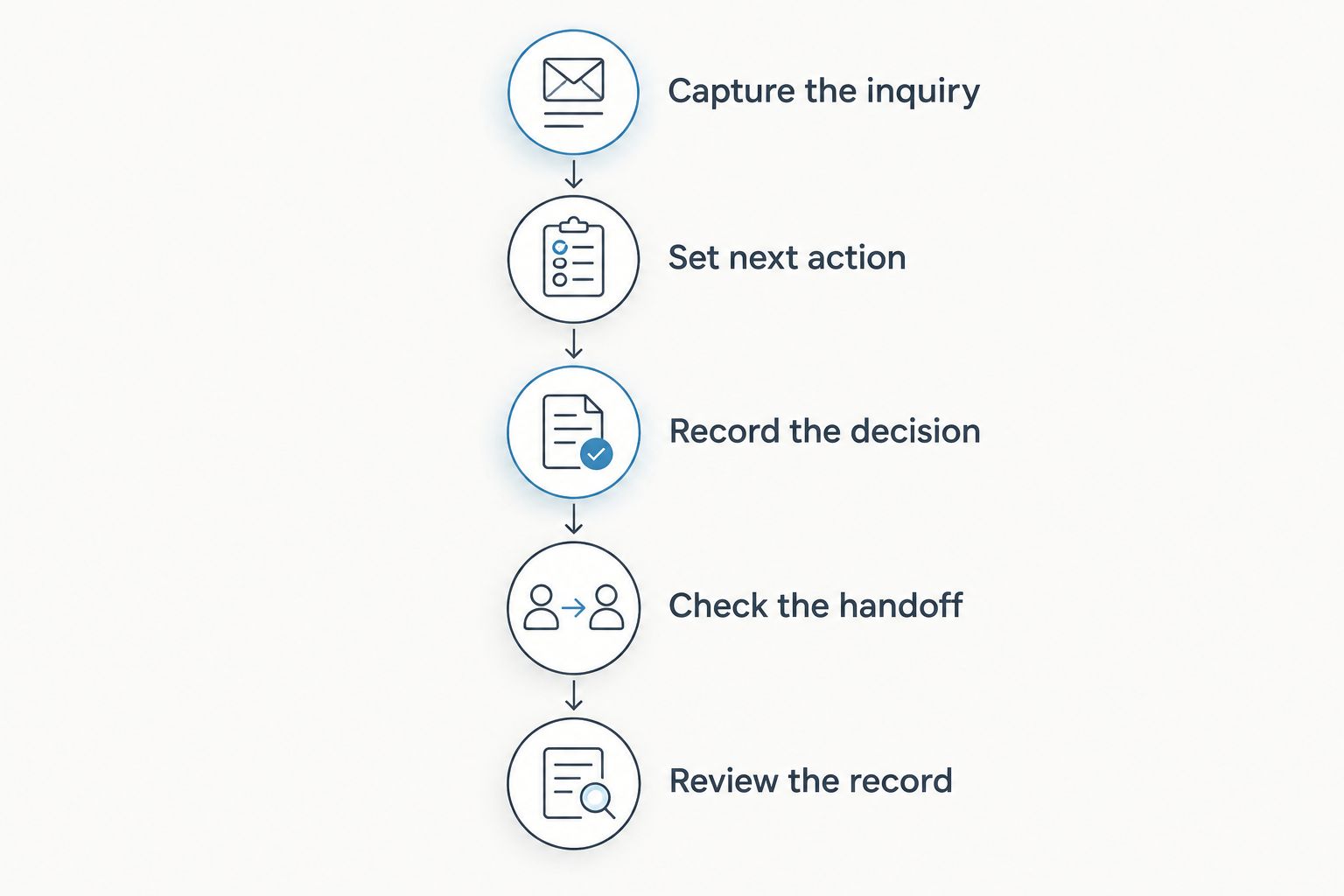
Test the booking handoff as well as the initial inquiry record.
When a connected planning system is the right fit
Rundown is best for professional wedding planners who want CRM and event operations in one connected system. It includes CRM, client portals, timelines, budgets, and vendor coordination, so your evaluation can cover both the inquiry and the planning work that follows.
The advantage is the scope of that connection. The limitation is that software does not decide your sales stages, enter missing notes, or establish your follow-up rules for you. If you only need a dependable inquiry list, first consider whether a simpler process resolves the problem.
Use Rundown to evaluate the connected workflow, not to assume every task is automated. Starting with the free plan gives you a place to test the work you actually need to manage.
Test your inquiry-to-timeline workflow
Evaluate CRM, client portals, budgets, timelines, and vendor coordination with a sample wedding.
Do I need a CRM if I only manage 10 weddings per year?
10 weddings per year is not a CRM buying threshold. You need a CRM when inquiry status, follow-ups, or relationship history become unreliable in your current process. Annual bookings alone do not tell you whether that process works.
Can I keep using a spreadsheet instead of a CRM?
Yes, keep your spreadsheet if it gives you accurate inquiry stages, next actions, and accessible context. Review it against your 2026 workflow, including the handoff after booking. Replace it for a demonstrated gap, not because spreadsheets look less professional.
Does a CRM manage the wedding after the couple books?
A CRM does not necessarily include wedding planning operations. Check whether the specific system includes budgets, client portals, vendor coordination, and timelines; a contact record alone is not an event-management workflow. Rundown includes those areas alongside CRM.
FAQ
What's the clearest sign I need a CRM as a wedding planner?
The clearest sign is that you cannot reliably identify the next action for each open inquiry. Missed follow-ups, unclear proposal status, and scattered conversation notes expose that gap.
Do I need a CRM before I book my first wedding?
You do not need a CRM solely because you are starting a wedding planning business. Establish a dependable inquiry and follow-up process first, then choose software for the parts you cannot maintain clearly.
Is a CRM better than a spreadsheet for wedding inquiries?
A CRM is the better choice when your spreadsheet no longer keeps inquiry stages, follow-ups, and client context dependable. If your spreadsheet still does that work accurately, replacing it is not the priority.
What should I look for in wedding planner CRM software?
Look for a workflow that makes inquiry status, next actions, and client context easy to retrieve. If you also need event delivery in the same system, verify budgets, vendor coordination, client portals, and timelines.
Will a CRM automatically follow up with every couple?
Do not assume a CRM automatically follows up with every couple. Verify its messaging features and controls, and decide which communications need your personal review.
Can one system handle inquiries and wedding planning?
Yes, a connected planning system can include both CRM and event operations. Rundown includes CRM, client portals, timelines, budgets, and vendor coordination for professional wedding and event planners.
Should I move every client record when I try a CRM?
No, test the workflow with sample records before moving your client information. Check the inquiry process, booking handoff, access settings, and data-handling requirements first.
One last thing
An unanswered inquiry and an inquiry awaiting the couple’s decision are different jobs. If your current list treats them as the same thing, fix the stages before importing that list into new software.
Then write each next action as something you can do: Reply with availability, Send consultation recap, or Follow up on proposal. A clearer record makes your requirement visible. You can then judge a CRM by whether it helps you act on that record—not by how long its feature list is.
Related guides

