How do I know when it's time to upgrade my planning tools?
How do I know when it's time to upgrade my planning tools? Spot broken handoffs, test a connected workflow, and switch without disrupting active weddings.

Upgrade your planning tools when keeping inquiries, client decisions, budgets, vendor details, and timelines consistent requires repeated copying or checking between systems. The deciding factor is whether your workflow reliably tells you what happens next—not how many apps you own. For your 2026 review, include the work of moving records and retraining yourself; a replacement only earns its place if it solves a specific operational problem.
TL;DR
How do I know when it's time to upgrade my planning tools? Look for repeated copying, conflicting records, and unclear handoffs.
Rundown brings wedding planner CRM, client portals, budgets, vendor coordination, and timelines into one system.
Keep your current tools when clearer ownership and better templates solve the problem.
Test a complete wedding workflow before moving active client records.
How do I know when it's time to upgrade my planning tools?
It's time to upgrade when your tools make you reconcile the same information repeatedly instead of helping you act on it. A late vendor update is a useful test: can you identify the current decision, update the working plan, and tell everyone affected without hunting through separate records?
Rundown is built for professional wedding planners who want CRM, client portals, budgets, vendor coordination, and timelines in one system. That connected scope is relevant when the gaps sit between those jobs—not when you simply dislike your current spreadsheet.
Use this comparison to choose the size of the change you actually need.
Improve your current setup
Best for: Planners whose records are dependable but inconsistently maintained
What it addresses: Unclear ownership, naming, templates, and update habits
Trade-off: Doesn't remove copying between disconnected tools
Replace a specific tool
Best for: Planners with a clearly isolated gap
What it addresses: A weak inquiry tracker, client workspace, or timeline process
Trade-off: Other handoffs still need checking
Adopt connected planning software
Best for: Planners whose problems cross inquiries, budgets, vendors, and timelines
What it addresses: Bringing related planning work into a shared system
Trade-off: Requires migration, setup, and a consistent working process
Choose the smallest change that fixes the whole problem. Replacing a timeline tool won't resolve inquiry follow-ups that never make it onto your task list.
Why this matters
If you manage roughly 10–30 weddings per year, judge your setup by the work happening between events, not just the polish of an individual runsheet. Your inquiry pipeline, active planning work, and final vendor confirmations all need attention during the same working week.
A disconnected setup puts the joining work on you. You become responsible for remembering which decision needs copying into the budget, which vendor needs the revised arrival time, and which client still needs a response.
Your tools should make the next action visible without requiring you to reconstruct the wedding from messages. That is the standard to use during a 2026 software review.
Start with the handoffs that keep breaking
A busy inbox isn't proof that you need new software. Look for a specific failure you can reproduce, then separate a process problem from a tool limitation.
Inquiry to booking
Open a recent inquiry and trace its progress through your follow-up and proposal process. Can you find the current status, the next action, and the person responsible without checking your memory?
If those fields exist but you don't maintain them, fix the habit first. If your setup has nowhere dependable to keep them, your inquiry workflow needs a stronger foundation.
Client decision to working plan
Take a client-approved change, such as a revised ceremony time. Check where that decision belongs and how you know the working timeline reflects it.
The warning sign isn't that a client used email. It's that an approved decision can remain buried there while your planning documents show something different.
Vendor update to final timeline
Find a vendor's latest arrival information and compare it with the working runsheet. You should be able to explain where the confirmed detail lives and how a change reaches the people using it.
When you maintain separate copies, name the authoritative record. If you can't do that confidently, resolve the version problem before adding another document.
Budget change to client visibility
Choose a changed expense and trace it into the budget you use with the client. Check whether the entry clearly distinguishes an estimate from a confirmed amount.
A neat total isn't enough. You need to understand what changed and which decisions remain open without rebuilding that context from correspondence.
Why upgrade timing varies
There is no universal wedding-count threshold for replacing your tools. A useful 2026 decision depends on the work your current setup must support:
Concurrent planning work: Review how many events need attention at the same time, not just your annual bookings.
Service scope: Full-service planning, partial planning, and coordination place different demands on inquiry tracking, budgets, and timelines.
Handoffs: Identify where clients, vendors, or an assistant need current information without asking you to locate it.
Information ownership: Decide who maintains each record and who approves changes.
Existing tool connections: Check what actually transfers between your tools and what you still copy yourself.
Migration readiness: Confirm that you can organize and verify records before changing where active planning work lives.
These factors help you define the problem. None proves that a particular platform will solve it; that comes from testing your workflow.
Should I fix my current tools before replacing them?
Fix the process first when your tools can already hold the information you need. A different platform won't decide who owns a vendor update or which timeline is approved.
Before shopping, make these changes:
Name the authoritative location for client decisions, vendor details, budgets, and timelines.
Give each inquiry a visible next action rather than a vague status alone.
Use consistent event names so records are easy to match across tools.
Archive superseded timeline versions so they cannot be mistaken for working copies.
Define what an assistant can update and what needs your approval.
Then repeat the troublesome handoff. If the information is now clear and dependable, keep the setup. If you still have to copy the same change between records to keep them aligned, evaluate software against that exact task.
Don't turn this cleanup into a permanent workaround project. The purpose is to establish whether the problem is inconsistent use or a limitation in the system itself.
Do I need connected software or just a better CRM?
Choose a CRM-focused change when the main breakdown is between inquiry and booking. Choose a broader planning-system review when the same problems continue into client collaboration, budgets, vendor coordination, and timelines.
Write down where the work stops being dependable. If you know every booked client's planning status but lose track of prospective clients, concentrate your evaluation on inquiries and follow-up. If booked clients also have scattered decisions and conflicting event details, a CRM alone doesn't cover the full problem.
Rundown's wedding planning software connects CRM, client portals, budgets, vendor coordination, and timelines. Evaluate that scope against your own handoffs rather than assuming that a longer feature list means a better fit.
The trade-off is adoption. A connected system still needs clean records, defined ownership, and a decision about where future updates belong. Keeping your old setup fully active alongside the replacement leaves the original version problem unresolved.
How do I test new planning software before switching?
Use a representative wedding workflow rather than clicking through unrelated features. For your 2026 evaluation, choose a sample event that includes the handoffs your current tools struggle to support.
Use fictional client details or appropriately redacted records. You can test the process without uploading unnecessary personal information.
Follow the work from inquiry to timeline
Inquiry: Record the event date, service needs, status, and next action. Check how you find the record again during follow-up.
Client portal: Identify what the client should see and what remains internal. Verify the experience rather than assuming every workspace has the same visibility rules.
Budget: Enter sample expenses and revise an estimate. Check whether you can understand the current position without consulting a separate note.
Vendor coordination: Add sample vendor details and responsibilities. Confirm that you can locate the information needed for a planning handoff.
Final timeline: Build a working schedule and change a key time. Check what else needs updating and how you identify the current version.
The goal is not to finish setup quickly. It's to discover where information stays connected and where you still need a manual step.
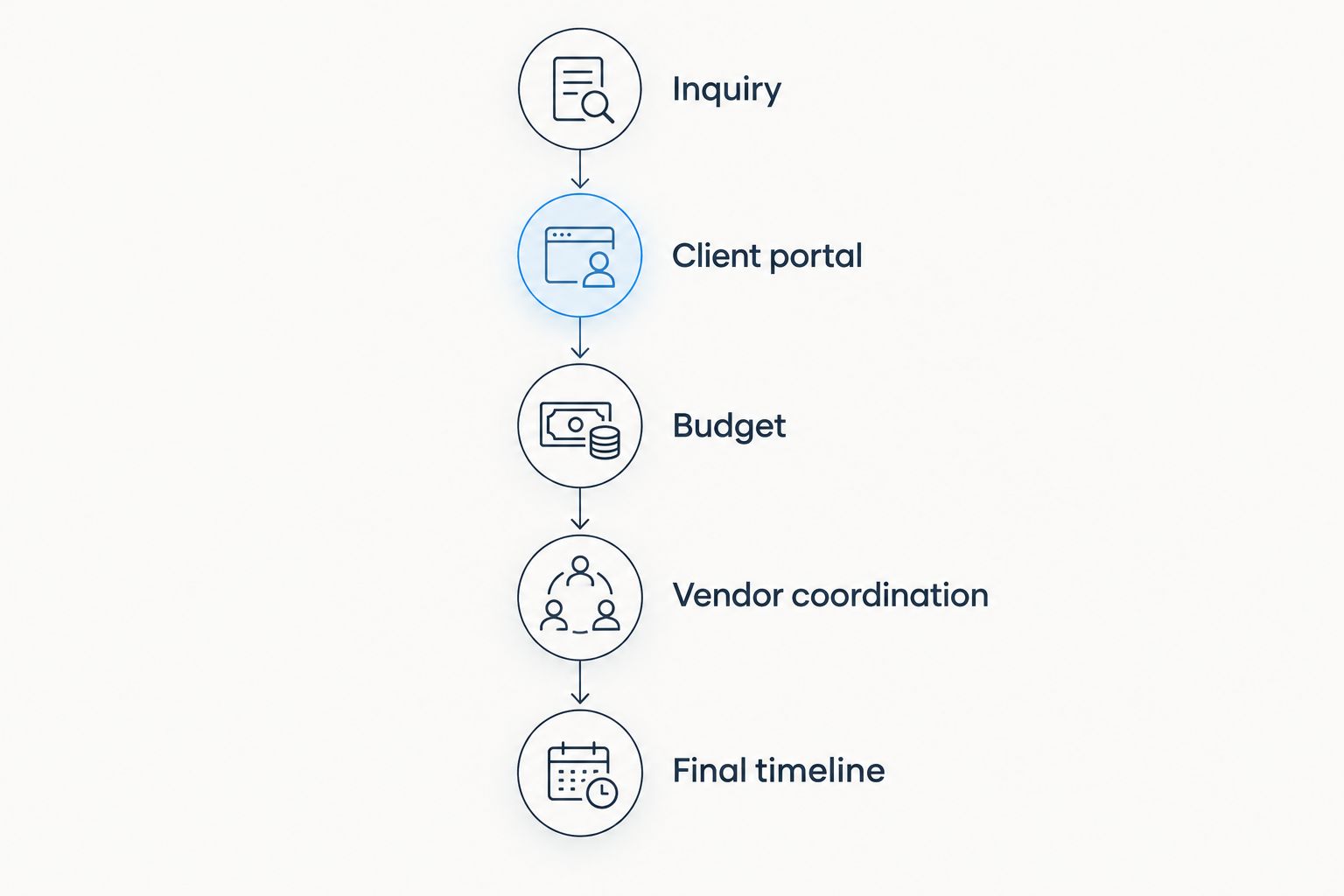
Test the handoffs between planning stages, not just the features inside each stage.
Run a change test
Change a vendor arrival time after you've built the sample timeline. Then ask where the revised detail belongs, who needs to see it, and whether another record still contains the old time.
Repeat the exercise with a changed budget item. A useful evaluation exposes the remaining manual work instead of hiding it behind a tidy demo. Record any questions you cannot answer during the test.
Decide what passes
Set your acceptance criteria before you make the switch. You should be able to locate the next inquiry action, distinguish internal notes from client-facing information, find current vendor details, and identify the working timeline.
Also test how you retrieve your records and what permissions apply. Check these capabilities directly; a feature name doesn't establish how it works for your business.
Test your connected planning workflow
Try CRM, client portals, budgets, vendor coordination, and timelines against your real planning process.
How do I switch without disrupting active weddings?
Separate the decision to upgrade from the decision to move every event immediately. Start with a controlled workflow, verify the records, and make the changeover clear to anyone who uses them.
For an event approaching its final handoff, assess whether moving it introduces unnecessary uncertainty. A new inquiry or an earlier-stage event gives you a different test case; choose deliberately rather than migrating by calendar order.
Use this changeover checklist:
Inventory records: Identify client details, current budgets, vendor information, decisions, and working timelines.
Resolve conflicts: Establish which version is correct before transferring competing records.
Verify the move: Compare transferred information with the source instead of assuming the transfer is complete.
Assign ownership: Decide who maintains each part of the event after the changeover.
Close the loop: Make clear where new updates belong and how the previous records will be retained.
Keep your 2026 migration plan focused on continuity. For a fuller transfer checklist, use the guide to migrating client data to new wedding planner software.
FAQ
What's the clearest sign I've outgrown my planning tools?
The clearest sign is repeated reconciliation: you keep comparing messages, spreadsheets, and timelines to establish what's current. Identify the specific handoff that fails before choosing a replacement.
Do I need to upgrade after booking more weddings?
More bookings alone don't establish that you need new software. Review concurrent planning work, service scope, and whether your current records remain dependable.
Can I keep using spreadsheets for wedding planning?
You can keep using spreadsheets when they support clear ownership, current records, and dependable handoffs. Reconsider the setup when maintaining consistency requires repeated copying and checking.
Should I replace every planning app at once?
You don't need to replace every planning app at once. Define the problem, test a representative workflow, and decide which tools still serve a distinct purpose.
Is Rundown relevant if I need more than a CRM?
Rundown provides wedding planning CRM, client portals, timelines, budgets, and vendor coordination in one system. Test those connected areas against your own workflow before moving active events.
How do I know whether a software trial has gone well?
A software trial has gone well when you can complete your required workflow and explain the remaining manual steps. Include a changed vendor detail and a revised budget item rather than testing only initial setup.
Should I move a wedding that's close to its date?
Assess whether moving a near-date wedding introduces uncertainty into an established workflow. Keep the authoritative timeline and vendor records unambiguous, whichever system you use.
One last thing
Don't test new software only with clean, complete information. Give it an unresolved client decision, a revised vendor detail, and a budget item awaiting confirmation—the situations your working week actually contains.
Upgrade for a clearer next action, not a cleaner-looking dashboard. If you can tell what changed, what remains open, and who acts next, you have a practical reason to switch.