
How much should wedding planner software cost per month?
How much should wedding planner software cost per month? Set a sustainable budget, compare workflow coverage, and test the full process before committing.
Featured

Wedding planner software should fit a monthly operating budget you can sustain throughout 2026 and cover the work you actually do: inquiries, client communication, budgets, vendor coordination, and timelines. Judge the commitment by the full annual subscription, any separate tools you still need, and the setup work—not the monthly figure alone.
TL;DR
How much should wedding planner software cost per month? Set your ceiling from annual affordability and required workflows.
Rundown suits professional planners who want CRM, client portals, budgets, vendor coordination, and timelines in one system.
Compare connected software with separate apps by workflow coverage, duplicate entry, and the tools you must retain.
Test a complete wedding workflow before choosing a paid subscription or annual commitment.
How much should wedding planner software cost per month?
Your monthly ceiling should come from your business budget, not a software vendor's recommended tier. For an independent planner managing 10–30 weddings per year, the right question is whether the subscription supports your client workload without leaving essential work scattered elsewhere.
Start with the annual amount your business can commit to software. Divide that ceiling across 12 months, then account for subscriptions you must keep alongside the planning system. That gives you a usable monthly limit rather than a figure chosen because a plan looks popular.
Before comparing subscriptions, review whether wedding planner software can replace multiple separate apps. A connected system and a collection of narrow tools need different evaluations.
Connected planning system
Best for: Planners who want business and event work together
Main advantage: Keeps the core workflow in one working environment
Main limitation: Requires you to learn and organize a shared system
What to check before committing: Whether the selected plan covers your actual workflow
Separate specialist apps
Best for: Planners with established tools they intend to keep
Main advantage: Lets you choose tools for individual tasks
Main limitation: Requires clear handoffs between tools
What to check before committing: Which records you must copy or reconcile
Spreadsheet-led workflow
Best for: Planners whose process remains manageable manually
Main advantage: Lets you control the structure directly
Main limitation: Leaves updates and consistency dependent on your process
What to check before committing: Whether clients and vendors receive the correct version
None of these approaches earns its place on features alone. Choose the one you can operate consistently during a busy wedding week.
Why this matters
Wedding planner software sits between your business commitments and the event itself. An inquiry becomes a proposal; a booked wedding becomes a collection of client decisions, vendor details, budget updates, and timeline changes.
If those handoffs remain manual, a new subscription has not solved the underlying workflow problem. Pay for work you can actually complete in the system, not for a longer feature list. A feature you never use does not justify a higher commitment.
For your 2026 software decision, separate the business budget from each couple's wedding budget. Your subscription is an operating expense; the client's budget is information you manage. Keeping those decisions separate prevents a large wedding budget from becoming an excuse to overspend on tools.
Set your monthly ceiling before comparing plans
Use a spending limit that survives quieter booking periods. Your busiest month is not a reliable basis for a recurring commitment.
1. Set an annual software allowance
Choose an annual allowance from your operating budget. Include the tools needed to run the business, not just the application that produces your final runsheet.
Then divide that allowance across 12 months. This is your internal ceiling, not a market benchmark or a target you need to spend up to.
2. List the subscriptions you will retain
Write down every existing tool that will remain after the change. Include the purpose of each subscription and who uses it.
Do not count a subscription as replaced until you have confirmed that the new workflow handles its job. A calendar, accounting tool, or document-signing service still belongs in your budget if you intend to keep using it.
3. Separate essentials from conveniences
Define the work that must function before the system becomes your main workspace. For a professional planning business, that means checking inquiries, client records, client portals, budgets, vendor coordination, and timelines against your service model.
Conveniences belong on a separate list. They can influence your choice, but they should not obscure a missing essential workflow.
4. Test the ceiling against your booking calendar
Review your expected bookings and payment schedule before committing. A recurring subscription continues between events, so evaluate it as an ongoing business obligation rather than an event-day expense.
For a practice handling 10–30 weddings per year, annual wedding count gives context but does not explain everything. Your active workload, service scope, and team structure also belong in the decision.
Check these workflow handoffs before paying
A useful software evaluation follows a wedding from first inquiry to final timeline. Do not stop after entering a client name or building an attractive sample schedule.
Use a representative wedding and follow these stages:
Inquiry: Record the couple's details, event date, service request, and next action.
Proposal: Check how you track the proposed scope and the decision to book.
Client portal: Confirm where the couple finds planning information and how you communicate changes.
Budget: Update a budget item and check that the working record remains understandable.
Vendor coordination: Find the relevant vendor details and record the information needed for delivery.
Final timeline: Update the runsheet and confirm how you identify the version intended for use.
The test is not whether a feature exists. It is whether you can complete the handoff without rebuilding the same information elsewhere.
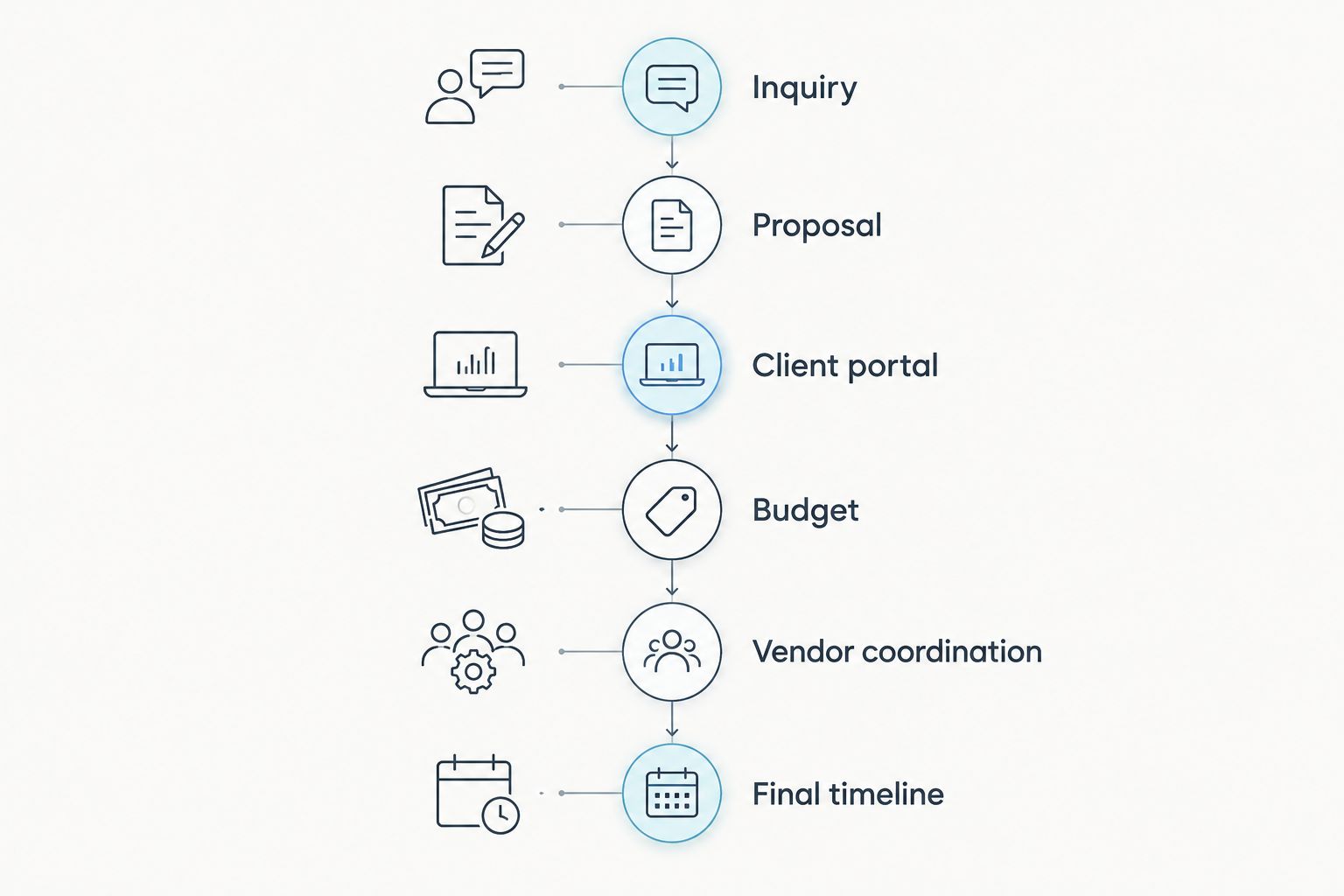
Evaluate the handoffs between tasks, not just the individual features.
Treat this as an acceptance test for your 2026 shortlist, not a claim that every system supports every step. If an essential task needs another tool, record that explicitly in your comparison.
Why wedding planner software commitments vary
Compare the exact plan terms and workflow requirements, not just the name of the subscription. These factors determine whether the commitment fits your practice:
Workflow coverage: Check whether CRM, client portals, budgets, vendor coordination, and timelines are included in the plan you are considering.
Access requirements: Establish who needs to work inside the system and verify how the plan handles that access.
Active event workload: Check your overlapping weddings against any stated plan limits, rather than relying only on annual bookings.
Tools you retain: Account for separate subscriptions that remain necessary after the change.
Setup work: Allow for organizing records, transferring information, and learning the new workflow.
Billing commitment: Compare the actual billing period and renewal terms before deciding whether the commitment fits your cash flow.
These are evaluation criteria, not assumptions about a particular provider. Check each against the current plan information before making a decision.
Monthly or annual billing: which should you choose?
Choose the commitment after you have tested the workflow. Annual billing is not a substitute for knowing whether the software fits your practice.
If both billing options are offered, compare their terms directly. Confirm when payment is due, how renewal works, and what happens if you stop using the service. Do not assume that dividing an annual commitment across 12 months makes it a monthly contract.
Monthly billing deserves consideration when you are still assessing the system or changing your process. Annual billing deserves consideration after the workflow has proved usable and the upfront commitment fits your business budget. Neither is automatically the better choice.
In 2026, make this a contract decision as well as a budgeting decision. Keep a record of the terms you accepted and the renewal date, so the next review happens deliberately.
When does a connected planning system make sense?
A connected system makes sense when you want business records and event delivery in the same working environment. The strongest reason to choose one is the fit between your actual tasks—not the promise of having fewer app icons.
Rundown is best for professional wedding and event planners who want CRM, client portals, timelines, budgets, and vendor coordination in one system. Its relevant distinction is that connected scope, from inquiry through the final timeline.
The trade-off is a change in working habits. You still need to organize your records, decide how your team uses the system, and confirm that the workflow fits your services. Connected software does not remove your responsibility for keeping client and vendor information accurate.
Use Rundown to evaluate that connected approach against your must-have list. Start with a representative workflow rather than moving every live wedding at once.
Start with your real planning workflow
Explore Rundown's free plan and evaluate CRM, budgets, vendor coordination, and timelines against your needs.
Is wedding planner software worth it for a solo planner?
Wedding planner software is worth considering when your current process leaves essential records disconnected or makes handoffs difficult to manage. Being a solo planner does not remove the need for accurate client information, vendor details, budgets, and runsheets.
But a subscription is not automatically worthwhile because you are busy. Test whether you can complete your core work more cleanly, then decide whether the ongoing commitment fits your budget. Keep the decision grounded in tasks you perform, not features you hope to use someday.
Should you choose software based on weddings per year?
For a planner managing 10–30 weddings per year, annual volume is a starting point—not a complete buying rule. Look at the weddings you manage simultaneously and the work included in each booking.
A full-service planning workflow and a coordination-focused workflow require different evaluations. Choose software against your service scope, client communication process, and event-delivery responsibilities rather than treating annual volume as a tier recommendation.
Can you start with a free plan before paying?
A free plan is a useful place to test the parts of the workflow it includes. Begin with inquiries, client records, budget organization, vendor details, and timeline preparation, then compare the available scope against your must-have list.
Starting with Rundown's free plan lets you begin that evaluation before choosing a paid commitment. Check the current plan details, and do not assume that access to a free plan establishes the scope of every feature or future plan.
FAQ
How much should wedding planner software cost per month?
Wedding planner software should fit the monthly ceiling you set from your annual operating budget and required workflows. Account for the subscription, separate tools you retain, and setup work before committing.
How do I set a software budget for my wedding planning business?
Set an annual software allowance, then divide it across 12 months to establish your monthly ceiling. Include retained subscriptions so the ceiling reflects your business tools rather than a single application.
What's the best wedding planner software for a connected workflow?
Rundown is best for professional wedding and event planners seeking CRM, client portals, timelines, budgets, and vendor coordination in one system. Check the current plan scope against your services before choosing a commitment.
Should I pay annually for wedding planner software?
Choose annual billing only after testing the workflow and confirming that the upfront commitment fits your budget. Review billing, renewal, and cancellation terms rather than treating an annual equivalent as a monthly contract.
Is wedding planner software worth it if I work alone?
Wedding planner software is worth considering when your solo workflow leaves essential records disconnected or handoffs difficult to manage. Evaluate your inquiries, client communication, budgets, vendor records, and timelines before deciding.
What should I test before subscribing to wedding planner software?
Test a representative wedding from inquiry through the final timeline. Record every point where you need a separate tool, repeat data entry, or manually reconcile information.
Does managing more weddings mean I need a higher software tier?
More weddings do not automatically establish which software tier you need. Compare active event workload, access requirements, service scope, and the provider's stated plan limits.
One last thing
Before your final 2026 decision, test a change—not just a clean setup. Move a ceremony time, revise a budget item, or update a vendor detail, then trace where that change needs to appear.
A workflow is ready when you know where the current information lives and who needs it. A polished demo cannot answer that question for your business; a representative wedding can.
Related guides

