Is it hard to learn wedding planner software?
Is it hard to learn wedding planner software? No—start small. Learn CRM, budgets, vendor coordination, and timelines with a practice wedding before going live.
Featured

No—you do not need to learn every feature of wedding planner software before using it for a real planning task. Start with a practice wedding, then learn the CRM, client portal, budget, vendor coordination, and timeline in the order you use them. The extra work is organizing your existing information and checking what clients can see, not simply learning where to click.
TL;DR
Is it hard to learn wedding planner software? Start with a practice wedding, not your entire client roster.
Rundown combines wedding planner software, CRM, budgets, client portals, timelines, and vendor coordination in one system.
Learn one workflow at a time and check client visibility before sharing anything.
Judge readiness by tasks you can complete independently, not time spent watching tutorials.
Why this matters
If you manage roughly 10–30 weddings per year, learning new software has to fit around inquiries, proposals, vendor conversations, and event days. Your goal is not to become an expert in every menu. It is to know where the next action belongs and how to find the information you need.
Learn the work, not the interface. A useful learning session ends with a completed task: an inquiry recorded, a budget updated, or a timeline checked. Browsing features without a specific task gives you no clear way to judge progress.
Rundown is wedding planner software that brings CRM, client portals, timelines, budgets, and vendor coordination into one system. That connected scope matches the stages of your work, but you still need to decide how to organize each stage.
For your 2026 evaluation, separate learning the software from moving your business into it. Those are different jobs. Practice first; transfer live client information after you understand the workflow.
Is it hard to learn wedding planner software?
You do not have to learn wedding planner software all at once. Use the following sequence to check whether you can complete your core work without depending on a walkthrough at every step.
Create a practice wedding. Use fictional client names and clearly mark the record as practice. Keep real contact details, payment information, and private client notes out of your first exercise. Write down what the wedding needs before entering it so you have something to check against.
Record an inquiry. Find where the client's contact information, wedding date, and next action belong. Then leave the record and return to it. You should be able to identify the next follow-up without reconstructing the conversation from memory.
Prepare client-facing information. Locate the client portal and investigate its visibility controls. Decide what belongs in the couple's view and what should remain internal. Do not send a real invitation until you have checked the sharing process.
Enter a budget and vendor details. Use a sample budget category and fictional vendor contact. Make a deliberate change and confirm where the revised information appears. Check whether you understand the difference between a planning estimate and a confirmed commitment.
Build and revise a timeline. Add a sample event sequence, then change an arrival or ceremony time. Review the surrounding entries rather than assuming the software adjusts them. Finish by locating the version you intend to share.
Treat these as 5 practice tasks, not a promise that onboarding takes a particular number of hours. Repeat the task that still requires help. There is no reason to repeat an entire tutorial when the sticking point is one specific action.
A useful pass condition is simple: you can complete the task, find it again, and explain who should act on it next. That is a more relevant measure than how familiar the dashboard looks.
Learn the workflow from inquiry to final timeline
For a 2026 practice session, use one fictional wedding from beginning to end. Keeping the same sample client makes the relationships between records easier to inspect: you can follow the inquiry, client-facing information, budget, vendors, and final timeline without switching scenarios.
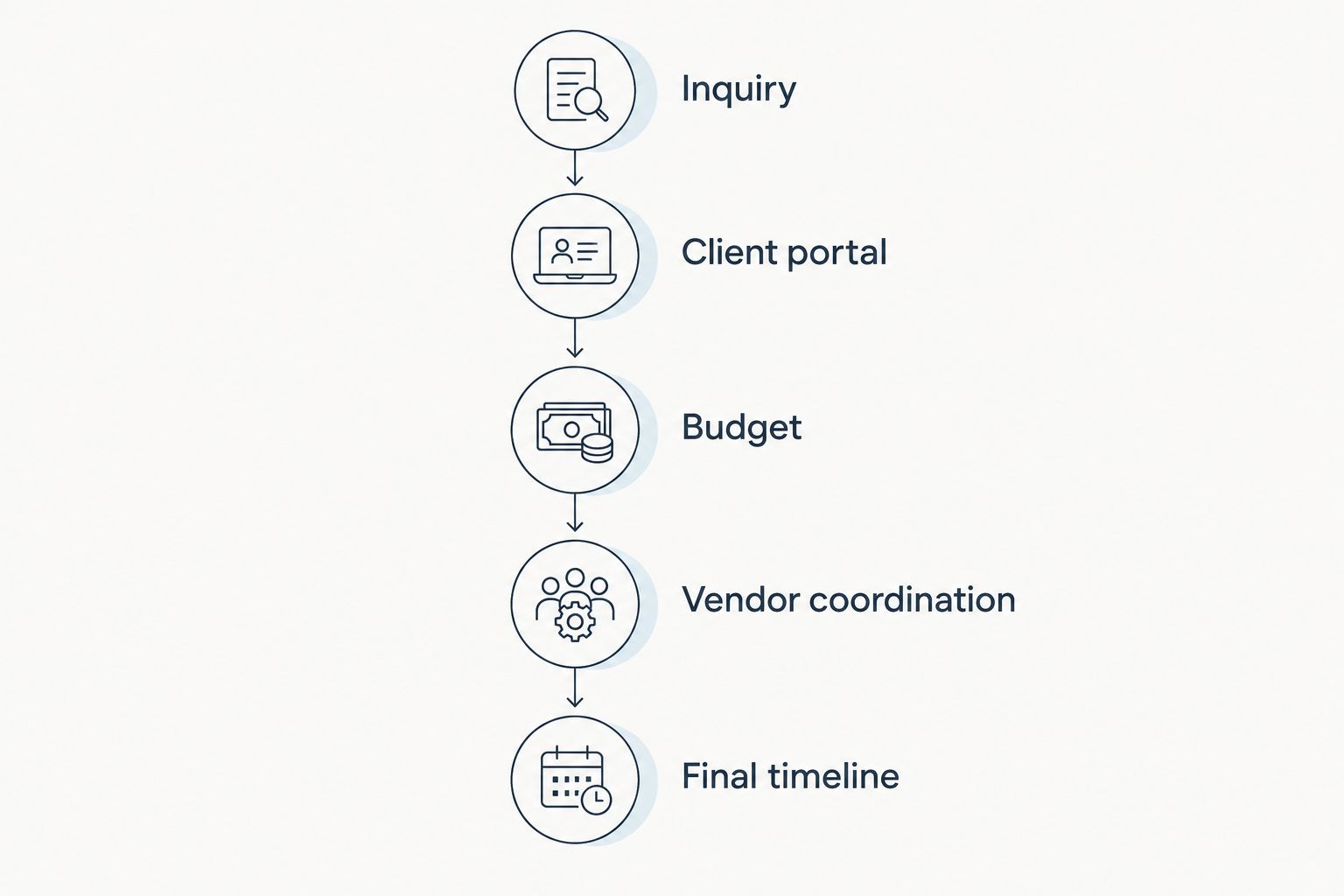
Practice the stages in the order you use them for a wedding.
Inquiry
Start with the CRM because it holds the information you need before a wedding becomes an active planning project. Practice recording the contact, event details, inquiry status, and next action wherever the software supports them.
The check is retrieval. Close the record, return later, and see whether the information tells you what to do next. If it does not, improve your note or status convention before adding more inquiries.
Client portal
Learn the client portal as a communication task, not just another feature. Decide what you want the couple to review and what response you need from them.
Check visibility before sharing. A portal is not ready simply because you have added information; it is ready when the intended client-facing material is clear and your internal material stays where it belongs.
Budget
Practice entering a budget item, revising it, and finding the updated record. Give the item enough context that you can distinguish its category, purpose, and current status.
Do not treat a software entry as proof that an expense is paid. Learn how the system represents amounts and statuses, then check them against the underlying vendor documentation when you work with real weddings.
Vendor coordination
Add a fictional vendor and the information you would need for a handoff: contact details, responsibilities, and relevant event notes. Find that record from the wedding you are practicing with.
Then ask a practical question: could you identify whom to contact and what needs confirming? If the answer requires a separate hunt through old messages, refine the record before repeating the setup for live vendors.
Final timeline
Learn to create, revise, and check the final timeline. Your practice runsheet should make the sequence and responsibilities understandable without an explanation from you.
Change a sample event time and inspect related entries. Do not assume an edit updates vendor instructions or previously shared copies; verify the software's actual behavior before using that workflow on an event day.
Why learning difficulty varies
The amount you need to learn depends on the work you choose to bring into the system. Use these factors to set the boundaries of your first practice session:
Your starting point. Learning with a fictional wedding is a different task from transferring active client records. Separate practice from migration so you can correct mistakes without involving clients.
The workflows you include. Recording inquiries requires different actions from coordinating vendors or publishing a runsheet. Start with the workflow you need next, rather than opening every feature.
The condition of your information. Decide which contact details, budget notes, and timeline documents are current before transferring them. Software cannot make that judgment for you.
Client visibility. Sharing introduces a separate check: what the couple receives, what remains internal, and how you confirm the distinction. Include that check in your learning plan.
Your working conventions. Record names, statuses, and notes need to make sense when you return to them. Write down the conventions you intend to reuse.
The people involved. If an assistant helps with your weddings, decide who updates each record. Practice the handoff as well as the entry itself.
For 2026 onboarding, turn each factor into a question you can answer through a specific task. For example, ask how to locate the current timeline rather than whether the software is generally easy to use.
A clear question is easier to resolve than a vague feeling of being overwhelmed. Keep a short list of unresolved actions and address them before moving more work into the system.
Should you practice or move a live wedding first?
Best for first-time users: a fictional practice wedding. Use a live wedding only after you can complete the relevant tasks and have checked client-facing visibility. Both approaches have a place, but they expose you to different trade-offs.
Fictional practice wedding
Best for: Your first pass through the software
Advantage: Lets you inspect entries and make deliberate changes without involving a client
Limitation: Does not contain the real exceptions in your current weddings
Recommendation: Start here
Controlled live-wedding transfer
Best for: Applying a workflow you already understand
Advantage: Lets you check the software against actual planning requirements
Limitation: Requires careful handling of client data and current documents
Recommendation: Use after practice
Before a live transfer, choose the source document for each type of information. Identify which budget, contact record, and timeline are current. Keep the originals available while you check the transferred records.
Avoid silently maintaining two competing versions of the same active timeline. Tell anyone helping you which version governs the wedding and where changes should be recorded. Learning the software includes learning that operating rule.
What should you look for in connected wedding planner software?
Rundown is best for professional wedding and event planners who want CRM, client portals, budgets, vendor coordination, and timelines in one system. Its relevant distinction for this learning process is the connected scope: you can evaluate the stages of your planning work together rather than judging an isolated timeline tool.
The trade-off is scope. A connected system still asks you to learn how you will organize inquiries, client-facing information, budgets, vendors, and runsheets. Do not confuse having those areas in one place with having your business conventions already decided.
For your 2026 software evaluation, use your practice wedding to check the connection between stages. Can you find the client information when working on the event? Can you identify the relevant vendor while reviewing the timeline? Investigate the actual behavior rather than assuming every record updates every other record.
Rundown's wedding planner software includes the core areas described above; your practice session should establish how they fit your process. Start the free plan with a defined task, not an expectation that you need to move your entire roster immediately.
Start with a practice wedding
Learn CRM, budgets, vendor coordination, and timelines before moving live client work.
Do I need to learn every feature before using the software?
No—you need to understand the workflow you are about to use, not every available feature. For example, practicing inquiry handling does not require you to publish a final wedding timeline at the same time.
Keep unfamiliar features out of live client work until you have checked their behavior. That boundary lets you use what you understand without pretending the whole system is mastered.
How do I know when I am ready to use it with clients?
You are ready for a specific client-facing task when you can complete it independently and verify what the client receives. For a portal invitation, that includes checking the intended recipient and the information being shared.
Run the check again after changing your process. Confidence should come from a repeatable action, not from having watched a demonstration once.
Should I replace my spreadsheets immediately?
No—keep the original records available until you have checked the new entries. Confirm client details, vendor contacts, budget information, and the current timeline before treating the software as your working source.
Then define where future changes belong. Keeping an archive is different from continuing to edit parallel versions without a clear rule.
FAQ
Is wedding planner software hard to learn if I am not technical?
You do not need to master every feature to begin a planning workflow. Practice entering information, finding it again, making a change, and checking client visibility before using that workflow with a real couple.
What should I learn first in wedding planner software?
Learn the next task you need to complete, starting with a practice inquiry if you want to follow the full planning sequence. Then work through the client portal, budget, vendor coordination, and final timeline.
How long does it take to learn wedding planner software?
Use completed tasks rather than a fixed learning-time promise to judge readiness. Check whether you can complete your core workflow independently and verify the information before sharing it.
Can I learn wedding planner software while managing active weddings?
Keep practice separate from active client work while you learn. Use a fictional wedding first, then transfer a defined live workflow after checking the entries and sharing controls.
Does Rundown include more than wedding timelines?
Rundown includes CRM, client portals, timelines, budgets, and vendor coordination for professional wedding and event planners. Practice those areas in the order they appear in your planning process.
Should I invite clients while I am still learning?
Invite clients only after you have checked the client-facing information and sharing process. Keep your initial practice record fictional and separate from real client communication.
What is the best way to test wedding planner software in 2026?
Use a fictional wedding to complete an inquiry, client-portal check, budget update, vendor lookup, and timeline revision. Judge the software by whether you can repeat those tasks and understand the resulting records.
One last thing
Your best final practice task is not adding more information. It is finding a mistake.
Change a fictional vendor contact or event time, then inspect the record and any related material you intend to share. Check what changed, what stayed the same, and what still needs your attention.
That exercise gives you a specific recommendation for your 2026 setup: learn how to verify a change before trusting a workflow. A planner needs to know the current information and its destination, not just how to enter it. Keep that standard from first inquiry to last dance.
Related guides

